This OP got it working.
https://forum.arduino.cc/t/touch-not-working-with-esp32s3-ili9341/1231572
looking at the post I cannot see any mention of which graphics library is being used
I have the ESP32S3/IL19341 combination working with the Adafruit_ILI9341 library OK - the problem appears to be with using TFT_eSPI library on the ESP32S3
I saw this.

Do you see any CLK or DATA pulses on the ESP Pins?
made some progress
test File>Examples>TFT_eSPI>320 * 240>TFT_Print_Test working on a ESP32-S3-DevKitC-1 using ESP32 core 2.0.14
TFT_Print_Test.ino
//  ESP32-S3-DevKitC-1 TFT_eSPI library  example TFT_Print_Test

// File>Examples>TFT_eSPI>320 * 240>TFT_Print_Test

// NOTE - PROBLEMS
// using  ESP32 core 2.3.0 and 2.0.17  goes into a reboot loop
// using ESP32 core 2.0.14 works OK

// SETUP
// in C:\Users\bb\Documents\Arduino\libraries\TFT_eSPI\User_Setup_Select.h
// uncomment line
//   #include <User_Setups/Setup70b_ESP32_S3_ILI9341.h>    // Setup file for ESP32 S3 with SPI ILI9341

// in C:\Users\bb\Documents\Arduino\libraries\TFT_eSPI\User_Setups/Setup70b_ESP32_S3_ILI9341.h
/*  define the GPIO pins, e.g.
#define TFT_CS   SS     // 10
#define TFT_MOSI MOSI   // 11
#define TFT_SCLK SCK    // 12
#define TFT_MISO MISO   // 13

#define TFT_DC   9
#define TFT_RST  4
*/
// 5Volt power to display VCC if J1 is open
// LED to 3.3V

/*
 Test the tft.print() viz. the libraries embedded write() function

 This sketch used font 2, 4, 7

 Make sure all the required fonts are loaded by editing the
 User_Setup.h file in the TFT_eSPI library folder.

  #########################################################################
  ###### DON'T FORGET TO UPDATE THE User_Setup.h FILE IN THE LIBRARY ######
  #########################################################################
 */

#include <SPI.h>

#include <TFT_eSPI.h> // Hardware-specific library

TFT_eSPI tft = TFT_eSPI();       // Invoke custom library

#define TFT_GREY 0x5AEB // New colour

void setup(void) {
  //uint16_t ID = tft.readID();
  Serial.begin(115200);
  delay(2000);
  Serial.println("\n\nESP32S3 TFT_eSPI library  example TFT_Print_Test");
  //Serial.println(ID);
  Serial.printf("TFT_MOSI %d\n", TFT_MOSI);
  Serial.printf("TFT_MISO %d\n", TFT_MISO);
  Serial.printf("TFT_SCLK %d\n", TFT_SCLK);
  Serial.printf("TFT_CS %d\n", TFT_CS);
 Serial.printf("TFT_DC %d\n", TFT_DC);
 Serial.printf("TFT_RST %d\n", TFT_RST);

  tft.init();
  tft.setRotation(2);
}

void loop() {

  // Fill screen with random colour so we can see the effect of printing with and without
  // a background colour defined
  tft.fillScreen(random(0xFFFF));

  // Set "cursor" at top left corner of display (0,0) and select font 2
  // (cursor will move to next line automatically during printing with 'tft.println'
  //  or stay on the line is there is room for the text with tft.print)
  tft.setCursor(0, 0, 2);
  // Set the font colour to be white with a black background, set text size multiplier to 1
  tft.setTextColor(TFT_WHITE,TFT_BLACK);  tft.setTextSize(1);
  // We can now plot text on screen using the "print" class
  tft.println("Hello World!");

  // Set the font colour to be yellow with no background, set to font 7
  tft.setTextColor(TFT_YELLOW); tft.setTextFont(7);
  tft.println(1234.56);

  // Set the font colour to be red with black background, set to font 4
  tft.setTextColor(TFT_RED,TFT_BLACK);    tft.setTextFont(4);
  tft.println((long)3735928559, HEX); // Should print DEADBEEF

  // Set the font colour to be green with black background, set to font 4
  tft.setTextColor(TFT_GREEN,TFT_BLACK);
  tft.setTextFont(4);
  tft.println("Groop");
  tft.println("I implore thee,");

  // Change to font 2
  tft.setTextFont(2);
  tft.println(F("my foonting turlingdromes.")); // Can store strings in FLASH to save RAM
  tft.println("And hooptiously drangle me");
  tft.println("with crinkly bindlewurdles,");
  // This next line is deliberately made too long for the display width to test
  // automatic text wrapping onto the next line
  tft.println("Or I will rend thee in the gobberwarts with my blurglecruncheon, see if I don't!");

  // Test some print formatting functions
  float fnumber = 123.45;
   // Set the font colour to be blue with no background, set to font 4
  tft.setTextColor(TFT_BLUE);    tft.setTextFont(4);
  tft.print("Float = "); tft.println(fnumber);           // Print floating point number
  tft.print("Binary = "); tft.println((int)fnumber, BIN); // Print as integer value in binary
  tft.print("Hexadecimal = "); tft.println((int)fnumber, HEX); // Print as integer number in Hexadecimal
  delay(10000);
}
serial monitor prints
ESP32S3 TFT_eSPI library  example TFT_Print_Test
TFT_MOSI 11
TFT_MISO 13
TFT_SCLK 12
TFT_CS 10
TFT_DC 9
TFT_RST 4
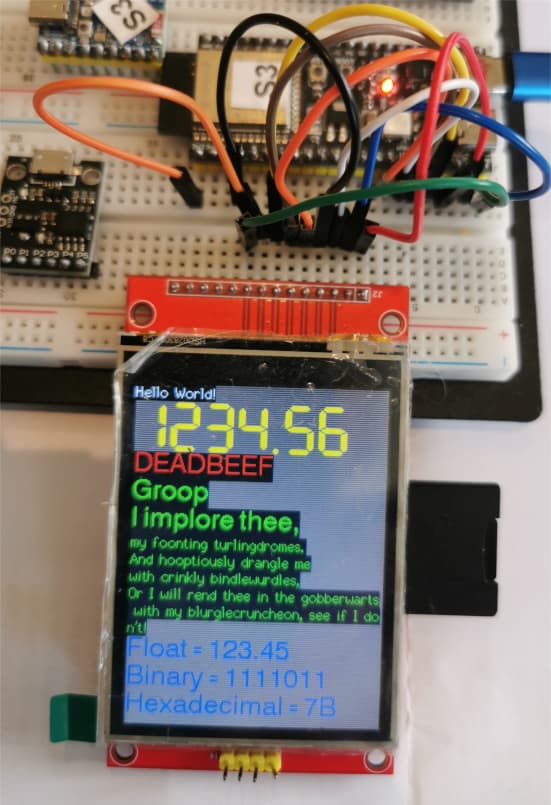
Much more than progress , its working proof that ESP32S3 will work with TFT eSPI.
Sadly the OP left 2 days ago.
the problem with it only working with ESP32 core 2.0.14 is a real pain!
True words spoken!
there was mention of using a ESP32C3
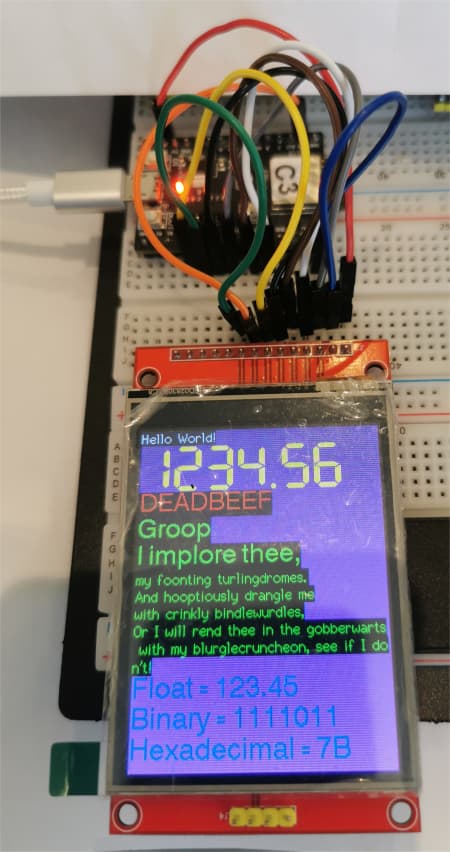
this test used a ESP32-C3-MINI-1 running TFT_eSPI on a IL19341
//  ESP32-C3-MINI-1 TFT_eSPI library  example TFT_Print_Test

// File>Examples>TFT_eSPI>320 * 240>TFT_Print_Test

// NOTE - PROBLEMS
// using  ESP32 core 2.3.0 and 2.0.17  goes into a reboot loop
// using ESP32 core 2.0.14 works OK

// SETUP
// in C:\Users\bb\Documents\Arduino\libraries\TFT_eSPI\User_Setup_Select.h
// uncomment line
//   #include <User_Setups/User_Setups/Setup70c_ESP32_C3_ILI9341.h>    // Setup file for ESP32 C3 with SPI ILI9341

// in C:\Users\bb\Documents\Arduino\libraries\TFT_eSPI\User_Setups/User_Setups/Setup70c_ESP32_C3_ILI9341.h.h
/*  define the GPIO pins, e.g.
#define TFT_CS   7
#define TFT_MOSI 6
#define TFT_MISO 5
#define TFT_SCLK 4

#define TFT_DC    8
#define TFT_RST   9
*/
// 5Volt power to display VCC if J1 is open
// LED to 3.3V

/*
 Test the tft.print() viz. the libraries embedded write() function

 This sketch used font 2, 4, 7

 Make sure all the required fonts are loaded by editing the
 User_Setup.h file in the TFT_eSPI library folder.

  #########################################################################
  ###### DON'T FORGET TO UPDATE THE User_Setup.h FILE IN THE LIBRARY ######
  #########################################################################
 */

#include <SPI.h>

#include <TFT_eSPI.h> // Hardware-specific library

TFT_eSPI tft = TFT_eSPI();       // Invoke custom library

#define TFT_GREY 0x5AEB // New colour

void setup(void) {
  //uint16_t ID = tft.readID();
  Serial.begin(115200);
  delay(2000);
  Serial.println("\n\nESP32C3 TFT_eSPI library  example TFT_Print_Test");
  //Serial.println(ID);
  Serial.printf("TFT_MOSI %d\n", TFT_MOSI);
  Serial.printf("TFT_MISO %d\n", TFT_MISO);
  Serial.printf("TFT_SCLK %d\n", TFT_SCLK);
  Serial.printf("TFT_CS %d\n", TFT_CS);
 Serial.printf("TFT_DC %d\n", TFT_DC);
 Serial.printf("TFT_RST %d\n", TFT_RST);

  tft.init();
  tft.setRotation(2);
}

void loop() {

  // Fill screen with random colour so we can see the effect of printing with and without
  // a background colour defined
  tft.fillScreen(random(0xFFFF));

  // Set "cursor" at top left corner of display (0,0) and select font 2
  // (cursor will move to next line automatically during printing with 'tft.println'
  //  or stay on the line is there is room for the text with tft.print)
  tft.setCursor(0, 0, 2);
  // Set the font colour to be white with a black background, set text size multiplier to 1
  tft.setTextColor(TFT_WHITE,TFT_BLACK);  tft.setTextSize(1);
  // We can now plot text on screen using the "print" class
  tft.println("Hello World!");

  // Set the font colour to be yellow with no background, set to font 7
  tft.setTextColor(TFT_YELLOW); tft.setTextFont(7);
  tft.println(1234.56);

  // Set the font colour to be red with black background, set to font 4
  tft.setTextColor(TFT_RED,TFT_BLACK);    tft.setTextFont(4);
  tft.println((long)3735928559, HEX); // Should print DEADBEEF

  // Set the font colour to be green with black background, set to font 4
  tft.setTextColor(TFT_GREEN,TFT_BLACK);
  tft.setTextFont(4);
  tft.println("Groop");
  tft.println("I implore thee,");

  // Change to font 2
  tft.setTextFont(2);
  tft.println(F("my foonting turlingdromes.")); // Can store strings in FLASH to save RAM
  tft.println("And hooptiously drangle me");
  tft.println("with crinkly bindlewurdles,");
  // This next line is deliberately made too long for the display width to test
  // automatic text wrapping onto the next line
  tft.println("Or I will rend thee in the gobberwarts with my blurglecruncheon, see if I don't!");

  // Test some print formatting functions
  float fnumber = 123.45;
   // Set the font colour to be blue with no background, set to font 4
  tft.setTextColor(TFT_BLUE);    tft.setTextFont(4);
  tft.print("Float = "); tft.println(fnumber);           // Print floating point number
  tft.print("Binary = "); tft.println((int)fnumber, BIN); // Print as integer value in binary
  tft.print("Hexadecimal = "); tft.println((int)fnumber, HEX); // Print as integer number in Hexadecimal
  delay(10000);
}
serial monitor displays
ESP32C3 TFT_eSPI library  example TFT_Print_Test
TFT_MOSI 6
TFT_MISO 5
TFT_SCLK 4
TFT_CS 7
TFT_DC 8
TFT_RST 9
similar problems to ESP32S3 in that ESP32 core 2.0.14 works OK but ESP32 core 3.2.0 goes into a reset loop
Dude, you are a 100% professional in this area. Your tip solved the problem! I hope you make decent money on this if you haven't started yet. There is no such information even on YouTube!
And the TFT_eFEX companion library, for displaying images on the TFT, does not compile on the newer ESP32 cores.
some more tests
been unable to get touch tests to work on ESP32S3 or ESP32C3 using
File>Examples>TFT_eSPI>Test and diagonistices>Test_touch_Controller
serial monitor outputs
Starting...
x: 0     y: 0     z: 0
x: 0     y: 0     z: 0
x: 0     y: 0     z: 0
x: 0     y: 0     z: 0
x: 0     y: 0     z: 0
x: 0     y: 0     z: 0
using ESP32 core 2.0.14
my notes indicate I had touch working with an ESP32
positive news: I have the TFT display onboard SD card reader working with both the ESP32S3 and ESP32C3


