Hello everyone! I decided to buy esp32 s3 (the chip says "esp3-s3-wroom-1"), but I can't display an image on the ILI9341 display. The messages appear in the serial monitor after compilation, but there is nothing on the screen. I tried different ways of connecting the pins, but this did not help. Relatively recently, the board went into periodic reboot, and the mouse cursor froze because of this, giving the error "exit status 1". This problem was solved by holding down the boot and reset buttons. Who has encountered a similar problem?
Could be a problem with your code.
(Hint)
Or maybe the particular 'ESP32 S3' you are using.
From what I can see, random rewiring is a good candidate. Too bad you didn't read the pinned post 'How to get the most from the forum'. BTW, we are not mind readers or have the power of remote seeing. HINT
Here is an example sketch:
#include <SPI.h>
#include <TFT_eSPI.h>  // Hardware-specific TFT library
#define TFT_MISO 13
#define TFT_MOSI 11
#define TFT_SCLK 12
#define TFT_CS 10  // Chip select control pin
#define TFT_DC 8   // Data Command control pin
#define TFT_RST 4  // Reset pin (could connect to RST pin)
//#define TFT_RST  -1  // Set TFT_RST to -1 if display RESET is connected to ESP32 board RST
TFT_eSPI tft = TFT_eSPI();

void setup() {
  Serial.begin(115200);
  tft.setRotation(1);  // Landscape
  tft.fillScreen(TFT_BLACK);
  tft.setTextColor(TFT_WHITE, TFT_BLACK);
  tft.setTextSize(2);
  tft.setCursor(0, 0);
  tft.println("TFT Initialized");
}

void loop() {
  tft.setTextSize(1);
  tft.setCursor(0, 100);
  tft.println("Please check wiring:");
  tft.println(" ESP32    TFT+SD");
  tft.println(" 11 ----- MOSI");
  tft.println(" 13 ----- MISO");
  tft.println(" 12 ----- SCK");
  tft.println(" 10 ----- TFT_CS");
  tft.println("  8 ----- DC");
  tft.println("  4 ----- RST");
  tft.println(" 3.3V --- VCC");
  tft.println(" GND ---- GND");
}
Do I need to change anything in the settings of the IDE itself? In Arduino IDE, the board is displayed as Fri3d Badge 2024 (ESP32-S3-WROOM-1)
There is nothing in that sketch that relates to the display of a JPG image.
Can you clarify what happens, to the TFT, when you run the sketch, and what output appears on the Serial monitor.
Have you edited the User_Setup.h file in the library, as required, to match your pin setup etc.
Where did your sketch come from ?
Have you tried the example sketches that are part of the TFT_eSPI library, normally a good place to start.
I connected LED K 3v3. When I run the sketch, nothing appears. Only the backlight works on the display. The sketch you see is the simplest example. I tried to adapt sketches that work successfully on my ESP 32, but to no avail. If you set the text output to the serial monitor in the sketch, it will be shown. No errors or anything else appear in the serial monitor.
EDIT: see post 26 for test of TFT_eSPI woring on a ESP32S3
you don't appear to have called tft.init(), e.g. a sample program that works on the ILI9341
file print_test.ino
// TFT_eSPI setup.h file for ESP32-S3-DevKitC-1
// HiLetgo 240X320 Resolution 2.8" SPI TFT LCD Display Touch Panel ILI9341

#define USER_SETUP_INFO "User_Setup"

#define ILI9341_DRIVER

// For ST7735, ST7789 and ILI9341 ONLY, define the colour order IF the blue and red are swapped on your display
// Try ONE option at a time to find the correct colour order for your display
//  #define TFT_RGB_ORDER TFT_RGB  // Colour order Red-Green-Blue
//  #define TFT_RGB_ORDER TFT_BGR  // Colour order Blue-Green-Red

// For ST7789, ST7735, ILI9163 and GC9A01 ONLY, define the pixel width and height in portrait orientation
#define TFT_WIDTH  240 // ST7789 240 x 240 and 240 x 320
#define TFT_HEIGHT 320 // ST7789 240 x 320

// If colours are inverted (white shows as black) then uncomment one of the next
// 2 lines try both options, one of the options should correct the inversion.

// #define TFT_INVERSION_ON
// #define TFT_INVERSION_OFF

#define TFT_CS   10
#define TFT_MOSI MOSI
#define TFT_SCLK SCK
#define TFT_MISO MISO

#define TFT_DC   9
#define TFT_RST  3

#define LOAD_GLCD
#define LOAD_FONT2
#define LOAD_FONT4
#define LOAD_FONT6
#define LOAD_FONT7
#define LOAD_FONT8
#define LOAD_GFXFF

#define SMOOTH_FONT

#define SPI_FREQUENCY   10000000

#define SPI_TOUCH_FREQUENCY  2500000
User_Setup.h (place in same directory as above print_test.ino file)
// TFT_eSPI setup.h file for ESP32-S3-DevKitC-1
// HiLetgo 240X320 Resolution 2.8" SPI TFT LCD Display Touch Panel ILI9341

#define USER_SETUP_INFO "User_Setup"

#define ILI9341_DRIVER

// For ST7735, ST7789 and ILI9341 ONLY, define the colour order IF the blue and red are swapped on your display
// Try ONE option at a time to find the correct colour order for your display
//  #define TFT_RGB_ORDER TFT_RGB  // Colour order Red-Green-Blue
//  #define TFT_RGB_ORDER TFT_BGR  // Colour order Blue-Green-Red

// For ST7789, ST7735, ILI9163 and GC9A01 ONLY, define the pixel width and height in portrait orientation
#define TFT_WIDTH  240 // ST7789 240 x 240 and 240 x 320
#define TFT_HEIGHT 320 // ST7789 240 x 320

// If colours are inverted (white shows as black) then uncomment one of the next
// 2 lines try both options, one of the options should correct the inversion.

// #define TFT_INVERSION_ON
// #define TFT_INVERSION_OFF

#define TFT_CS   10
#define TFT_MOSI MOSI
#define TFT_SCLK SCK
#define TFT_MISO MISO

#define TFT_DC   9
#define TFT_RST  3

#define LOAD_GLCD
#define LOAD_FONT2
#define LOAD_FONT4
#define LOAD_FONT6
#define LOAD_FONT7
#define LOAD_FONT8
#define LOAD_GFXFF

#define SMOOTH_FONT

#define SPI_FREQUENCY   10000000

#define SPI_TOUCH_FREQUENCY  2500000
photo

Tools>Board set to "ESP32S3 dev Module"
I used your example, but it didn't work. Also, the error exit status 1 periodically appears.The error occurs at the very end of the recording.
ignore my post 7 !
I had tests for an ESP32 and ESP32S3 mixed up (the photo in post 7 is an ESP32 which worked OK)
all my ESP32S3 tests using the TFT_eSPI iibrary on a HiLetgo 240X320 ILI9341 fail
nothing is displayed and the ESP32S3 goes into a reset loop
tested with ESP32 core 2.3.0 and 2.0.17 - same results
tried changed reset from GPIO 3 to GPIO 4 - same results
tried @sarkel_77 code from post 4 - goes into a reset loop
NOTE: the Adafruit_ILI9341 library example code runs OK using the same GPIO pins I used with the TFT_eSPI library
There are similar issues reported on the TFT_eSPI Github repository, but there does not appear to have been a response from the author for a while.
Looks like one of the many recent changes Expressif have made to the ESP32 core have broken the library.
remembered reading that TFT-eSPI code works on ESP32S3 using ESP32 core 2.0.14
- does not go into reset loop
- prints "ESP32 TFT_eSPI library example TFT_Print_Test" but nothing on screen
I had compile errors with eSPI and ESP32 WROOM , so I installed a lower version of the eSPI Library and the errors was gone.
But the nothing displayed on the TFT , then I reduced the SPEED in the Library and the TFT was working.
Finally I upgraded to the latest eSPI Library , reduce the speed and my TFT is working.
with the ESP32 I also reduced the speed from the TFT_sSPI User_Setup default
#define SPI_FREQUENCY 40000000 // Maximum for ILI9341
to
#define SPI_FREQUENCY 10000000
tried 10000000 and other SPI frequencies with ESP32S3 - did not work
Did you use User Setup42 or Setup70c?
I don't have the ESP32 S3 Module to test.
cannot remember which User_Setup I started with
I tend not to use the User_Setup_Select.h file to select a header file from the User_Setups directory but to define a User_Setup.h file in the same directory as the main .ino file, e.g. User_Setup.h I used for the ESP32S3
// TFT_eSPI setup.h file for ESP32-S3-DevKitC-1
// HiLetgo 240X320 Resolution 2.8" SPI TFT LCD Display Touch Panel ILI9341

// NOTE - does NOT work of ESP32S3 - goes into a reboot loop
// tested with ESP32 core 2.3.0 and 2.0.17

#define USER_SETUP_INFO "User_Setup"

#define ILI9341_DRIVER

// For ST7735, ST7789 and ILI9341 ONLY, define the colour order IF the blue and red are swapped on your display
// Try ONE option at a time to find the correct colour order for your display
//  #define TFT_RGB_ORDER TFT_RGB  // Colour order Red-Green-Blue
//  #define TFT_RGB_ORDER TFT_BGR  // Colour order Blue-Green-Red

// For ST7789, ST7735, ILI9163 and GC9A01 ONLY, define the pixel width and height in portrait orientation
#define TFT_WIDTH  240 // ST7789 240 x 240 and 240 x 320
#define TFT_HEIGHT 320 // ST7789 240 x 320

// If colours are inverted (white shows as black) then uncomment one of the next
// 2 lines try both options, one of the options should correct the inversion.

// #define TFT_INVERSION_ON
// #define TFT_INVERSION_OFF

#define TFT_CS   10//SS     // 10
#define TFT_MOSI MOSI   // 11
#define TFT_SCLK SCK    // 12
#define TFT_MISO MISO   // 13

#define TFT_DC   9
#define TFT_RST  4

#define LOAD_GLCD
#define LOAD_FONT2
#define LOAD_FONT4
#define LOAD_FONT6
#define LOAD_FONT7
#define LOAD_FONT8
#define LOAD_GFXFF

#define SMOOTH_FONT

#define SPI_FREQUENCY   10000000

#define SPI_TOUCH_FREQUENCY  2500000
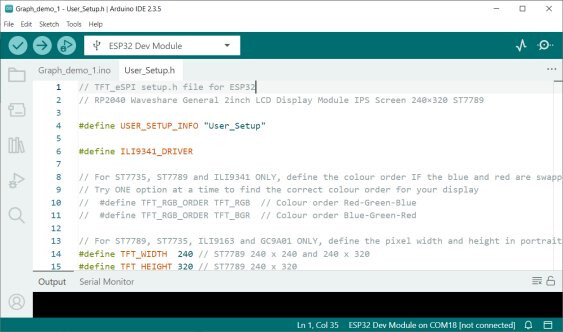
the Arduino IDE then shows tabs for the main .ino file and User_Setup.h


Same goes for the C2 , lots of variants.
I can't even find a ESP32S3 pinout diagram with 2 USB sockets.
I got the ILI9163 and ESP32 WROOM working on the TFT eSPI Library.
have a look at esp32-s3-devkitc-1/user_guide
never had any problems with ESP32 - it is the ESP32S3 that appears to have the problems with TFT-eSPI library

