Posting your sketch will probably answer some questions.
here is the code:
#include <Adafruit_GFX.h>
#include <Adafruit_GrayOLED.h>
#include <Adafruit_SPITFT.h>
#include <Adafruit_SPITFT_Macros.h>
#include <gfxfont.h>
/*--------------------------------------------------------------
Program: voltmeter
Description: DC voltmeter with voltage displayed
on Color TFT LCD to 1 decimal place
Hardware: Arduino NANO with voltage divider on A0.
TFT LCD connected
Software: Developed using Arduino 1.0.3 software
Date: 10 March 2014
Author: johnag
--------------------------------------------------------------*/
int y1[235];
int x1;
#include <Adafruit_GFX.h> // Core graphics library
#include <Adafruit_TFTLCD.h> // Hardware-specific library
#include <SPI.h>
#define LCD_CS A3 // Chip Select goes to Analog 3
#define LCD_CD A2 // Command/Data goes to Analog 2
#define LCD_WR A1 // LCD Write goes to Analog 1
#define LCD_RD A0 // LCD Read goes to Analog 0
#define LCD_RESET A4 // Can alternately just connect to Arduino's reset pin
#define BLACK 0x0000
#define BLUE 0x001F
#define RED 0xF800
#define GREEN 0x07E0
#define CYAN 0x07FF
#define MAGENTA 0xF81F
#define YELLOW 0xFFE0
#define WHITE 0xFFFF
Adafruit_TFTLCD tft(LCD_CS, LCD_CD, LCD_WR, LCD_RD, LCD_RESET);
// voltage divider calibration value
#define Dv1 10.935
// ADC reference voltage / calibration value
#define VREF 5.03
float V1 = {0.00};
void setup()
{
Serial.begin(9600);
Serial.println(F("Using Adafruit 2.8\" TFT Breakout Board Pinout"));
Serial.print("TFT size is "); Serial.print(tft.width()); Serial.print("x"); Serial.println(tft.height());
tft.reset();
uint16_t identifier = tft.readID();
tft.begin(identifier);
tft.fillScreen(BLACK); // clear screen
}
void loop()
{
tft.fillScreen(BLACK);
tft.drawRect(5, 5, 235,315, RED);
/* tft.drawRoundRect(4,150, 120, 100, 5,GREEN);
tft.drawLine(4, 170, 120, 170, GREEN);
tft.drawLine(4, 190, 120, 190, GREEN);
tft.drawLine(4, 210, 120, 210, GREEN);
tft.drawLine(4, 230, 120, 230, GREEN);
tft.drawLine(24, 150, 24, 250, GREEN);
tft.drawLine(44, 150, 44, 250, GREEN);
tft.drawLine(64, 150, 64, 250, GREEN);
tft.drawLine(84, 150, 84, 250, GREEN);
tft.drawLine(104,150, 104, 250,GREEN);
*/
tft.setTextColor(WHITE);
tft.setTextSize(2);
tft.setCursor(20,10);
tft.println(" Portable EKG");
tft.setTextColor(RED);
//tft.setCursor(0,100);
//tft.println(" Caution not a medical device");
V1= analogRead(5);
tft.drawLine(5, 30, tft.width()-1, 30, RED);
tft.drawLine(5, 130, tft.width()-1, 130, RED);
tft.setTextColor(YELLOW,BLACK);

tft.setTextSize(2);

tft.setCursor(45, 40);
tft.println(" PULSE ");

tft.setCursor(40, 80);
tft.setTextSize(3);
tft.setTextColor(RED,BLACK );
tft.print((((V1\*VREF) / 1023)) \* Dv1, 2);
tft.setTextColor(YELLOW,BLACK);
tft.print(" BPM ");
while ( x1 < 235 ){
y1\[x1\]= analogRead(5);
 Serial.println(x1);
 Serial.println(y1\[x1\]);
  y1\[x1\] = map(y1\[x1\], 0, 1023, 0, 120);
tft.drawLine( x1+5, y1\[x1\]+180,x1+5,y1\[x1 +1\]+180,WHITE);
x1 ++;
delay(10);
}
x1=0;
}
The code has many "backstroke" characters which mean "escape code" to computers. I have removed them, and made the code run (for me, without TFT) on a Arduino Nano (328P).
#include <Adafruit_GFX.h>
#include <Adafruit_GrayOLED.h>
#include <Adafruit_SPITFT.h>
#include <Adafruit_SPITFT_Macros.h>
#include <gfxfont.h>
/*--------------------------------------------------------------
  Program: voltmeter
  Description: DC voltmeter with voltage displayed
  on Color TFT LCD to 1 decimal place
  Hardware: Arduino NANO with voltage divider on A0.
  TFT LCD connected
  Software: Developed using Arduino 1.0.3 software
  Date: 10 March 2014
  Author: johnag
  --------------------------------------------------------------*/
int y1[235];
int x1;
#include <Adafruit_GFX.h> // Core graphics library
#include <Adafruit_TFTLCD.h> // Hardware-specific library
#include <SPI.h>
#define LCD_CS A3 // Chip Select goes to Analog 3
#define LCD_CD A2 // Command/Data goes to Analog 2
#define LCD_WR A1 // LCD Write goes to Analog 1
#define LCD_RD A0 // LCD Read goes to Analog 0
#define LCD_RESET A4 // Can alternately just connect to Arduino's reset pin
#define BLACK 0x0000
#define BLUE 0x001F
#define RED 0xF800
#define GREEN 0x07E0
#define CYAN 0x07FF
#define MAGENTA 0xF81F
#define YELLOW 0xFFE0
#define WHITE 0xFFFF
Adafruit_TFTLCD tft(LCD_CS, LCD_CD, LCD_WR, LCD_RD, LCD_RESET);
// voltage divider calibration value
#define Dv1 10.935
// ADC reference voltage / calibration value
#define VREF 5.03
float V1 = {0.00};

void setup()
{
  Serial.begin(9600);
  Serial.println(F("Using Adafruit 2.8 TFT Breakout Board Pinout"));
  Serial.print("TFT size is "); Serial.print(tft.width()); Serial.print("x"); Serial.println(tft.height());
  tft.reset();
  uint16_t identifier = tft.readID();
  tft.begin(identifier);
  tft.fillScreen(BLACK); // clear screen
}

void loop()
{
  tft.fillScreen(BLACK);
  tft.drawRect(5, 5, 235, 315, RED);
  /* tft.drawRoundRect(4,150, 120, 100, 5,GREEN);
    tft.drawLine(4, 170, 120, 170, GREEN);
    tft.drawLine(4, 190, 120, 190, GREEN);
    tft.drawLine(4, 210, 120, 210, GREEN);
    tft.drawLine(4, 230, 120, 230, GREEN);
    tft.drawLine(24, 150, 24, 250, GREEN);
    tft.drawLine(44, 150, 44, 250, GREEN);
    tft.drawLine(64, 150, 64, 250, GREEN);
    tft.drawLine(84, 150, 84, 250, GREEN);
    tft.drawLine(104,150, 104, 250,GREEN);
  */
  tft.setTextColor(WHITE);
  tft.setTextSize(2);
  tft.setCursor(20, 10);
  tft.println(" Portable EKG");
  tft.setTextColor(RED);
  //tft.setCursor(0,100);
  //tft.println(" Caution not a medical device");
  V1 = analogRead(5);
  tft.drawLine(5, 30, tft.width() - 1, 30, RED);
  tft.drawLine(5, 130, tft.width() - 1, 130, RED);
  tft.setTextColor(YELLOW, BLACK);
  tft.setTextSize(2);
  tft.setCursor(45, 40);
  tft.println(" PULSE ");
  tft.setCursor(40, 80);
  tft.setTextSize(3);
  tft.setTextColor(RED, BLACK );
  tft.print((((V1 * VREF) / 1023))  * Dv1, 2);
  tft.setTextColor(YELLOW, BLACK);
  tft.print(" BPM ");
  while ( x1 < 235 ) {
    y1 [x1 ] = analogRead(5);
    Serial.println(x1);
    Serial.println(y1 [x1 ]);
    y1 [x1 ] = map(y1 [x1 ], 0, 1023, 0, 120);
    tft.drawLine( x1 + 5, y1 [x1 ] + 180, x1 + 5, y1 [x1 + 1 ] + 180, WHITE);
    x1 ++;
    delay(10);
  }
  x1 = 0;
}
The error usually happens if the library isn’t installed correctly for the Arduino IDE. Even if the files are in your libraries folder, the IDE might not recognize them. Try this:
Check folder structure: Inside Arduino/libraries, the Adafruit_TFTLCD folder should look like:
Arduino/libraries/Adafruit_TFTLCD/Adafruit_TFTLCD.h
Arduino/libraries/Adafruit_TFTLCD/Adafruit_TFTLCD.cpp
library.properties
Make sure the .h and .cpp are inside a single folder named Adafruit_TFTLCD.
Install via Library Manager: Open Arduino IDE → Sketch → Include Library → Manage Libraries → search for “Adafruit TFTLCD” → Install. This ensures the IDE sees it correctly.
Restart IDE: Sometimes the IDE doesn’t refresh library paths until restarted.
After that, #include <Adafruit_TFTLCD.h> should compile without errors.
I added zip libraries from the manage libraries option in install library in the sketch drop bown
Did you try the corrected version of your original code (Post #24). A stray (or missing) character can have an effect on compile results.
What does a backstroke character look like?
This thing: \
In this line of code, I put a circumflex ( ^ ) under each one of the four...
y1\[x1\] = map(y1\[x1\], 0, 1023, 0, 120); // backstroke "\" creates problems
  ^   ^          ^   ^
I removed all the backstroke from your code and posted it in Post #24.
The forum's post composer adds these backslashes to the post content when you are using the post composer in "rich text editor" mode, and don't use the correct procedure to post your code.
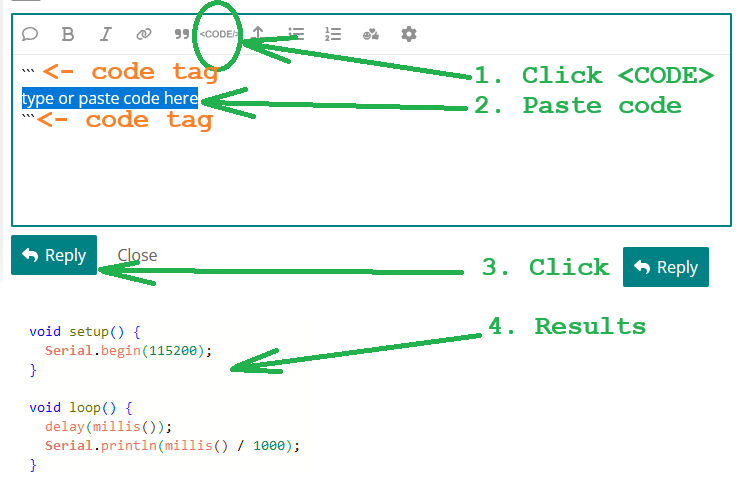
@iamiretheo please read the "How to get the best out of this forum" guide to learn how to correctly post code:
https://forum.arduino.cc/t/how-to-get-the-best-out-of-this-forum/679966#posting-code
As far as I know it's called a backslash 
I wondered what others called them. I call them "escape" if someone understands coding, but "stroke and backstroke" if I ever have casual conversation about them over dinner after watching Passionsspiele at Oberammergau... and "#" is "pound" and "@" is "each"... and the biggie... "{ }" are braces... and all that stuff kids are renaming... I forgot... "circumflex" and not "hat" and "asterisk" not "splat"... I have time to waste using two or more syllables.
According to Unicode, U+005C is a reverse solidus, although I'm partial to another term: reverse virgule. But yeah usually just "backslash"

The menu Sketch > Include Library has two separate choices at the top: Manage Libraries and Add .ZIP Library. Which one did you use?
Is the library currently listed in the Library Manager as installed (with the button to REMOVE)? As mentioned previously, it's listed as Adafruit TFTLCD Library. Another thing to check: are its examples listed; under File > Examples > [Examples from Custom Libraries] Adafruit TFTLCD Library

Thank you. More info to read.
Sorry, I never heard it called a backstroke before, I’ve always heard ide \ chagacter reffered as a back slash and the ^ character refeered to as a caviate.
It seems the naming error is mine, and everyone calls it "backslash"
(but... I've never heard, "By the slash of a pen," so I believe "sounds more fun" is the reason)
I loaded the graphics test example and it compiled and uploaded without errors but it doesn’t display anything on the lcd. So I tried my code again and it still gets compile errors
What should it display? Show the code here (in a code block). The code in Post #24 compiles. I just do not have your hardware for testing. Verify your connections.
Show these (in a code block).
The graphicstest example has some diagnostic messages, like
  if(identifier == 0x9325) {
    Serial.println(F("Found ILI9325 LCD driver"));
  } else if(identifier == 0x9328) {
    Serial.println(F("Found ILI9328 LCD driver"));
  } else if(identifier == 0x7575) {
    Serial.println(F("Found HX8347G LCD driver"));
  } else if(identifier == 0x9341) {
    Serial.println(F("Found ILI9341 LCD driver"));
  } else if(identifier == 0x8357) {
    Serial.println(F("Found HX8357D LCD driver"));
  } else {
    Serial.print(F("Unknown LCD driver chip: "));
Did these and others print what was expected?
If it compiled, you can start moving chunks of your code in, to figure out at what point it stops compiling.
Thank you!
The graphicstest example compiled and uploaded without errors but I didn’t see any output on the LCD. Are the print statements that you mentioned supposed to show up on the LCD or the Serial monitor?