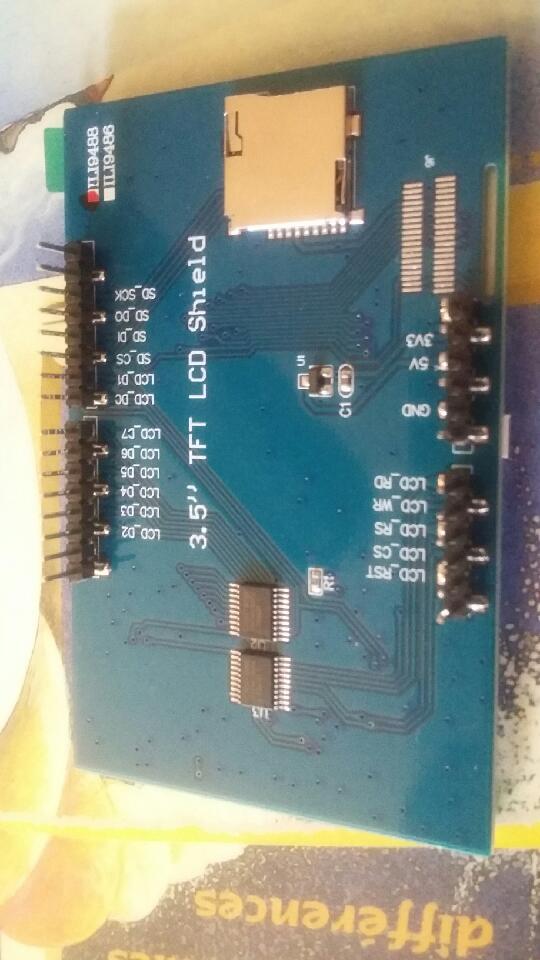
But I do not use the Arduino world, the target is to make a handheld device to display ECG with an AD8232. So I don't use libraries, I expectwriting all in C for a Microchip PIC16 mid range.
I have bought several items, all in 8bits data bus, not SPI, for speed. The blue FR4 versions have 5v and 3v3 pins on connector, but 3v3 is not wired to AMS1117 reg. So I have shorted in and out to supply 3v3 via 5v pin. Even in whoel reset the screen is white, and a deffect for one which has two cyan zones !
I have not set pwm values, not driven display ON, so I expected it should be black. And the memory write for 5000 pixels is not visible.
@elec72, Hi, welcome to the Arduino Forum and its Displays section!
But this is a strange place to ask your question! This is a forum to support Arduino users!
You have a display made specifically for Arduino UNO. There are well-known Arduino libraries that support this configuration. But you don't want to use neither Arduino nor any library.
The best suggestion I can give is: buy a cheap Arduino UNO clone, and gain experience with your display using the Arduino IDE and a library available with the Library Manager, e.g. MCUFRIEND_kbv.
As soon as this works, you can try to extract code from the library for your use with PIC16, it is written in C style, with a C++ class, some other libraries use C++.
These displays often don't have a cleared state after power-up or reset. Content may be random.
Yes your proposal could be a solution, which involves much more time to spend, I have rarely used Arduino environnement, a very little practice. And a second job to extract useful code.
By reading some posts about IL9486 I understand that when the chip does not receive commands the screen is completely , but the datasheet indicates register values after reset so I thought the backlight was off, this is not the case. And a hardware reset has no effect too.
I have also seen that it is not uniquely the 9486, the Chinese put different chips and with Ebay what a pity !
I am completely able to write fron a white sheet, if only I am sure of the chip, without reading the ID inside. I have ordered a few other screens but without certitude.
If you do intend to use the Arduino IDE, then I suggest you install MCUFRIEND_kbv with the Arduino Library Manager. It should auto-detect you display. Or you can use the example it has to read/identify display registers.