Right! This pretty much works.. 
I realised that I had made a mistake in my wiring in the tinkercad simulator, I'll bet it still isn't perfect, but it seems to follow what the sim does, based off Johns original schematic with the octocouplers and with the LED's as Alto suggested.
I used this wiring:
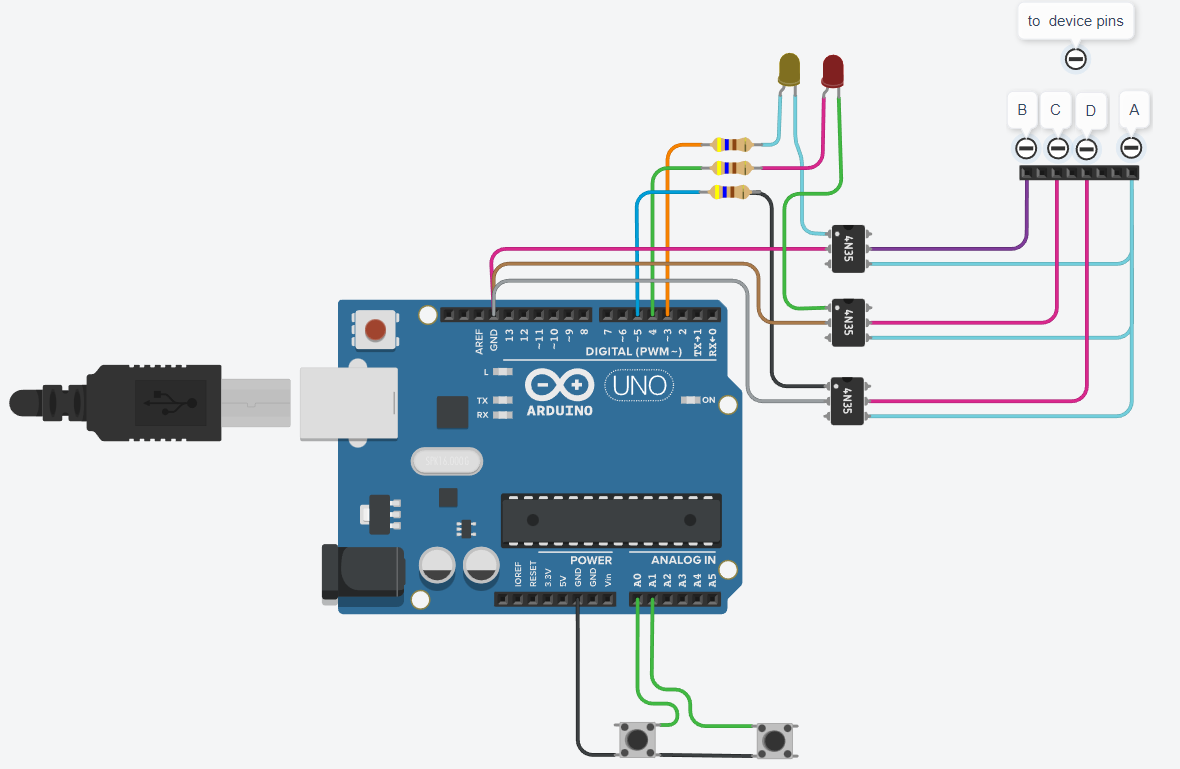
^I know I know, the LED's are in series again - tried to put in parallel and couldn't get them to light in the sim, also I don't have the switches
The tinkercad sim - if anybody cares.
Code:
// https://wokwi.com/projects/355045239740731393
// https://forum.arduino.cc/t/is-it-possible-to-mimic-a-rotary-encoder-with-an-arduino/1075058

void xprintf(const char *format, ...);

const byte led_R = 4;  //channel A
const byte led_Y = 3;  //channel B

const byte upButton = A0;
const byte downButton = A1;


unsigned long now;    // always current millis()

char lineBuffer[32];    // for sprintf. TinkerCod?

void setup()
{
  mySetup(115200);
  xprintf("\nhello world.\n");

  pinMode(upButton, INPUT_PULLUP);
  pinMode(downButton, INPUT_PULLUP);

  pinMode(led_R, OUTPUT);
  pinMode(led_Y, OUTPUT);
}

# define IDLE 0
# define IN   1

void loop()
{
  now = millis();

  if (oneClickFSM() == IDLE) {    // give the quadrature synthesis a chance

    checkCommands();              // not busy, check stimuli and react
  }
}

// just get buttons or serial "commands"
// these just cause one step up or down
// serial character 'z' for up, 'x' for down

void checkCommands()
{
  static unsigned long lastButtonsTime;
  static unsigned char lastUP, lastDOWN;

  if (now - lastButtonsTime > 20) {

    unsigned char thisUP = digitalRead(upButton);
    if (thisUP != lastUP) {

      if (!thisUP)
        kickOneClick(1);

      lastUP = thisUP;
      lastButtonsTime = now;
    }

    unsigned char thisDOWN = digitalRead(downButton);
    if (thisDOWN != lastDOWN) {

      if (!thisDOWN)
        kickOneClick(-1);

      lastDOWN = thisDOWN;
      lastButtonsTime = now;
    }
  }

  if (Serial.available()) {
    char theChar = Serial.read();

    if (theChar == 'z') kickOneClick(1);
    if (theChar == 'x') kickOneClick(-1);
  }
}


// the synthesizer
// call kickOneClick with -1 or 1 to make start click
// call oneClickFSM() frequently, like every pass through the loop

const int phaseTime = 100;  //duration of each phase of quadrature cycle in milliseconds - can be lower
const unsigned char nPhases = 4;
const byte restPhase = 0;   // where in the quad signal do we stay between clicks?

byte xCount;
byte xDirection;

void kickOneClick(int direction)
{
  sprintf(lineBuffer, "kick it %s\n", direction > 0 ? "UP" : "DOWN");
  Serial.print(lineBuffer);

  xDirection = direction;
  xCount = nPhases;
}

bool oneClickFSM()
{
  static unsigned long lastPhase;

  if (!xCount) return IDLE;

  if (now - lastPhase < phaseTime)
    return IN;

  lastPhase = now;
  --xCount;
  quadFSM(xDirection);

  return xCount ? IN : IDLE;
}

const byte xCLKPin = led_Y;
const byte xDTPin = led_R;

byte quadFSM(byte direction)
{
  static byte state = restPhase;

  state += direction;
  state &= 0x3;

//  xprintf("QFSM %d %d (%d)\n", state, direction, xCount);

  switch (state) {
  case 0 :
    digitalWrite(xDTPin, LOW);
    digitalWrite(xCLKPin, LOW);

    break;

  case 1 :
    digitalWrite(xDTPin, HIGH);
    digitalWrite(xCLKPin, LOW);

    break;

  case 2 :
    digitalWrite(xDTPin, HIGH);
    digitalWrite(xCLKPin, HIGH);

    break;

  case 3 :
    digitalWrite(xDTPin, LOW);
    digitalWrite(xCLKPin, HIGH);

    break;
  }
}


//

//
// programmer misses printf...

void xprintf(const char *format, ...)
{
  char buffer[256];
  va_list args;
  va_start(args, format);
  vsprintf(buffer, format, args);
  va_end(args);
  Serial.print(buffer);
}

// programmer forgets day of week, version

void mySetup(unsigned long bandRate)
{
  Serial.begin(bandRate);

  char s[] = __FILE__;
  byte b = sizeof(s);
  while ( (b > 0) && (s[b] != 47)) b--;
  char *u = s + b + 1;

  xprintf("\nHEllo WOrld!\n");
  xprintf("%s  %s\n\n", __DATE__, u);

  xprintf("!\n");
}
Video:

The video shows me typing into the serial monitor x and z. I was able to take it up a notch a bunch of times and also down notches on command. Its great to have got this to work.
There is a very minor issue where you will notice in the video that when I send in the z's or x's slower sometimes it doesn't notch up but stick on that same temp. this seems to be fixed by typing the z's or x's faster.
Really impressed