Hello everyone. I am struggling a bit with the max7219 modules I bought from Aliexpress recently. I want to build a big led panel with dimesions 16x128 pixels with a total of 32 devices. My board is Arduino Uno. I have got 2 FC16_HW modules, 16x64 each, which I soldered together.
I am attaching a picture of the single module and its wiring.


After I soldered them, the wiring looks like that:

I am using the example code from the parola library - Parola_Double_Height_V1
Initially I set in the code HARDWARE_TYPE MD_MAX72XX::FC16_HW , MAX_ZONES 2 and ZONE_SIZE 16 to make 2 rows so that I can make big scrolling text. This was the result:

Text begins scrolling from the bottom right module which is the entry, when it reaches the eighth module, the text goes to the upper right corner, then it goes to the lower left and finally upper left. I tried setting other values for HARDWARE_TYPE but it was getting worse. I confirmed that my max7219 modules are type FC16_HW when I tested the example project MD_MAX72xx_Dynamic_HW which prints the type on the screen.
I tested different ways how to fix this issue. I made 4 zones for each panel side and I can print readable double height text separately on the right and left sides of the led panel.
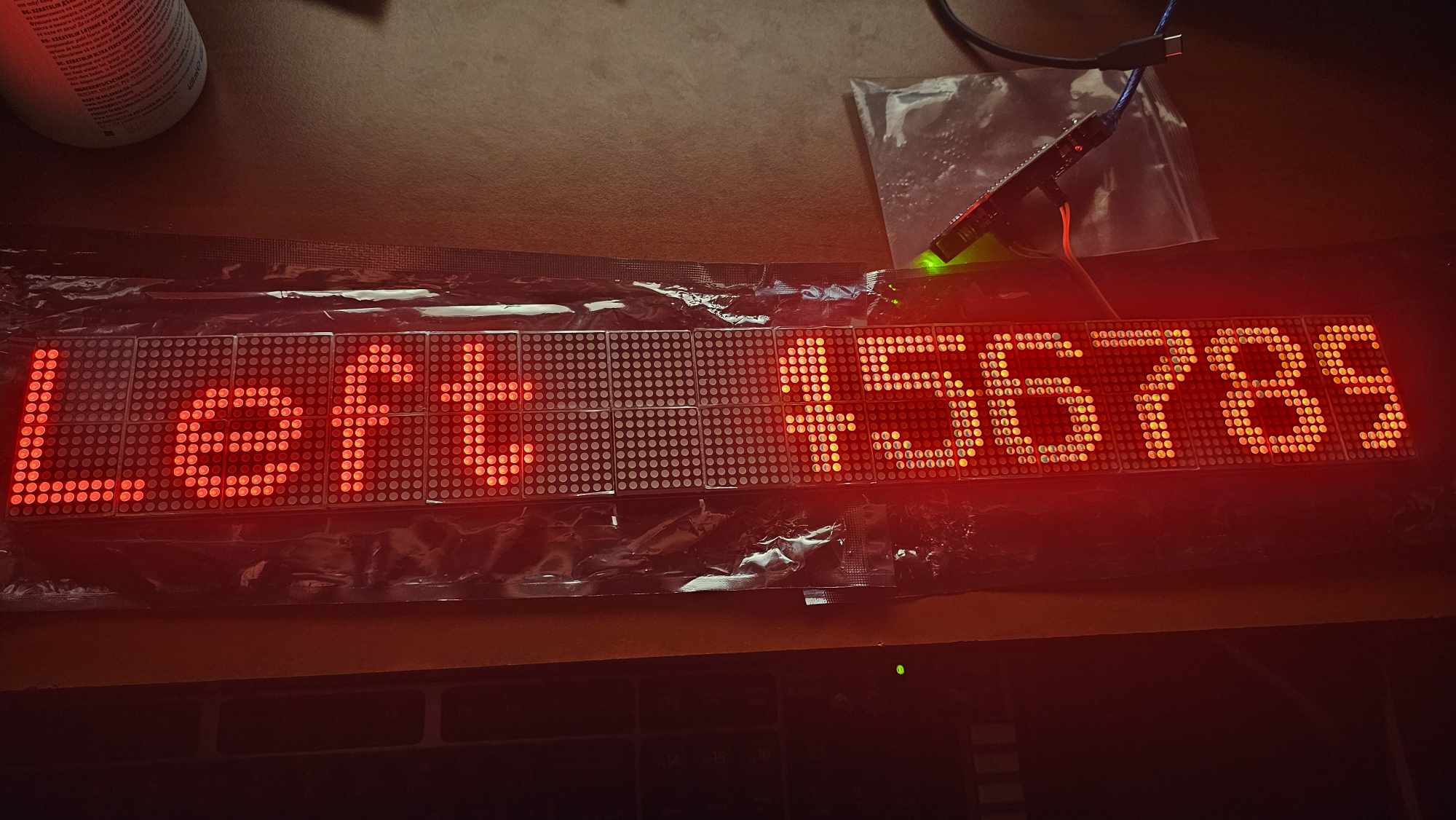
This is the code:
#include <MD_Parola.h>
#include <MD_MAX72xx.h>
#include <SPI.h>
#include "Font_Data.h"

#define HARDWARE_TYPE MD_MAX72XX::FC16_HW
#define MAX_ZONES 4
#define ZONE_SIZE 8
#define MAX_DEVICES (MAX_ZONES * ZONE_SIZE)
#define SCROLL_SPEED  30

#define ZONE_UPPER_LEFT  3
#define ZONE_LOWER_LEFT  2
#define ZONE_UPPER_RIGHT  1
#define ZONE_LOWER_RIGHT  0

#define CLK_PIN   13
#define DATA_PIN  11
#define CS_PIN    10

// HARDWARE SPI
MD_Parola P = MD_Parola(HARDWARE_TYPE, CS_PIN, MAX_DEVICES);

#define ARRAY_SIZE(a) (sizeof(a)/sizeof(a[0]))
char *msg[] =
{
  "Create double height displays using 2 custom fonts and 2 zones",
  "Zone 0 for lower half",
  "Zone 1 for upper half",
  "BIG",
  "ABCDEFGHIJKLMNOPQRSTUVWXYZ",
  "abcdefghijklmnopqrstuvwxyz",
  "0123456789"
};

void setup(void)
{
// initialise the LED display
  P.begin(MAX_ZONES);

  // Set up zones for 2 halves of the display
  // Each zone gets a different font, making up the top
  // and bottom half of each letter
  P.setZone(ZONE_LOWER_RIGHT, 0, 7);
  P.setFont(ZONE_LOWER_RIGHT, BigFontLower);

  P.setZone(ZONE_UPPER_RIGHT, 8, 15);
  P.setFont(ZONE_UPPER_RIGHT, BigFontUpper);

  P.setZone(ZONE_LOWER_LEFT, 16, 23);
  P.setFont(ZONE_LOWER_LEFT, BigFontLower);

  P.setZone(ZONE_UPPER_LEFT, 24, 31);
  P.setFont(ZONE_UPPER_LEFT, BigFontUpper);
  P.setCharSpacing(P.getCharSpacing() * 2); // double height --> double spacing
  P.setIntensity(0);
}

void loop(void)
{
  static uint8_t cycle = 0;

  // Run the animation and then check if BOTH zones have
  // completed. The animations are not the same length due
  // to upper/lower effects being displayed differently.
  P.displayAnimate();

  if (P.getZoneStatus(ZONE_LOWER_RIGHT) && P.getZoneStatus(ZONE_UPPER_RIGHT) && P.getZoneStatus(ZONE_LOWER_LEFT) && P.getZoneStatus(ZONE_UPPER_LEFT))
  {
    P.setFont(ZONE_LOWER_LEFT, BigFontLower);
    P.setFont(ZONE_UPPER_LEFT, BigFontUpper);
    P.displayZoneText(ZONE_LOWER_LEFT, "Left", PA_LEFT, SCROLL_SPEED, 0, PA_PRINT, PA_NO_EFFECT);
    P.displayZoneText(ZONE_UPPER_LEFT, "Left", PA_LEFT, SCROLL_SPEED, 0, PA_PRINT, PA_NO_EFFECT);

    switch (cycle)
    {
    default:
      P.setFont(ZONE_LOWER_RIGHT, BigFontLower);
      P.setFont(ZONE_UPPER_RIGHT, BigFontUpper);
        P.displayZoneText(ZONE_LOWER_RIGHT, msg[cycle], PA_RIGHT, SCROLL_SPEED, 0, PA_SCROLL_LEFT, PA_SCROLL_LEFT);
        P.displayZoneText(ZONE_UPPER_RIGHT, msg[cycle], PA_LEFT, SCROLL_SPEED, 0, PA_SCROLL_LEFT, PA_SCROLL_LEFT);
      break;

    case 1:
      P.setFont(ZONE_LOWER_RIGHT, NULL);
      P.setFont(ZONE_UPPER_RIGHT, BigFontUpper);
      P.displayZoneText(ZONE_LOWER_RIGHT, msg[1], PA_CENTER, SCROLL_SPEED, 0, PA_SCROLL_LEFT, PA_SCROLL_LEFT);
      P.displayZoneText(ZONE_UPPER_RIGHT, msg[3], PA_CENTER, SCROLL_SPEED, 0, PA_PRINT, PA_NO_EFFECT);
      break;

    case 2:
      P.setFont(ZONE_LOWER_RIGHT, BigFontLower);
      P.setFont(ZONE_UPPER_RIGHT, NULL);
      P.displayZoneText(ZONE_LOWER_RIGHT, msg[3], PA_CENTER, SCROLL_SPEED, 0, PA_PRINT, PA_NO_EFFECT);
        P.displayZoneText(ZONE_UPPER_RIGHT, msg[2], PA_CENTER, SCROLL_SPEED, 0, PA_SCROLL_LEFT, PA_SCROLL_LEFT);
      break;

    case 3:
      P.setFont(ZONE_LOWER_RIGHT, BigFontLower);
      P.setFont(ZONE_UPPER_RIGHT, BigFontUpper);
      P.displayZoneText(ZONE_LOWER_RIGHT, msg[3], PA_CENTER, SCROLL_SPEED, 2000, PA_PRINT, PA_NO_EFFECT); // PA_SCROLL_LEFT, PA_SCROLL_LEFT);
      P.displayZoneText(ZONE_UPPER_RIGHT, msg[3], PA_CENTER, SCROLL_SPEED, 2000, PA_PRINT, PA_NO_EFFECT); //PA_SCROLL_RIGHT, PA_SCROLL_RIGHT);
      break;
    }

    // prepare for next pass
    cycle = (cycle + 1) % ARRAY_SIZE(msg);

    // synchronise the start
    P.displayClear();
    P.synchZoneStart();
  }
}
I still can't find a way how to merge the left and right sides to show centered text. I first soldered each panel row DOUT to the DIN of the second panel row but it was messing up because the end of the 1 row is already connected to the start of the 2 row of the same panel. Then I soldered it again as shown on my picture above. I think the only solution could be codewise but I would appreciate any other advices. Does anyone ever used that 16x64 module before?


