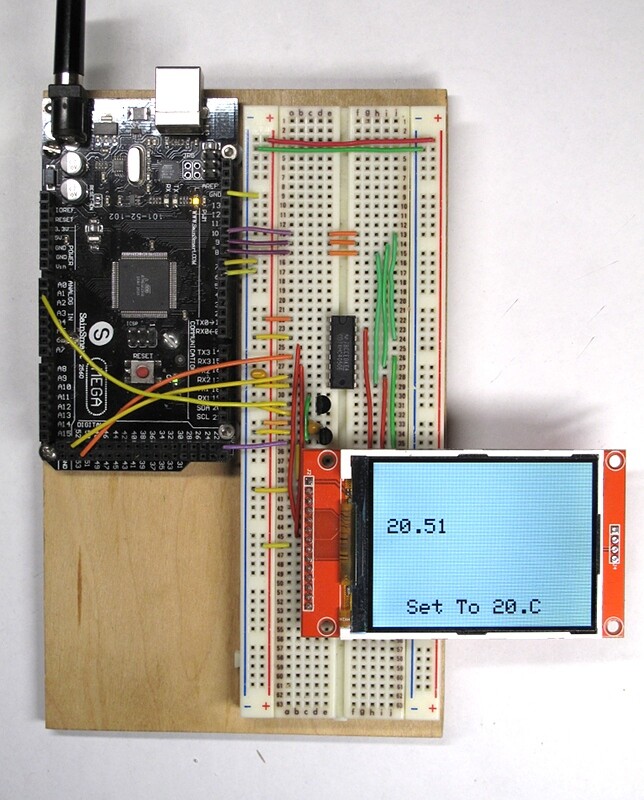
MEGA 2560 Code problem

Hello everyone My problem is I switched from Arduino Uno to MEGA2560 There is a screenshot on Arduino Uno I cannot take a screenshot on Mega2560 I wonder what kind of changes I need to make in my codes I need your help Thank you

#include <EEPROM.h>
#include <Adafruit_GFX.h>       // include Adafruit graphics library
#include <Adafruit_ILI9341.h>   // include Adafruit ILI9341 TFT library
#define TFT_CS    8      // TFT CS  pin is connected to arduino pin 8
#define TFT_RST   9      // TFT RST pin is connected to arduino pin 9
#define TFT_DC    10     // TFT DC  pin is connected to arduino pin 10
// initialize ILI9341 TFT library
Adafruit_ILI9341 tft = Adafruit_ILI9341(TFT_CS, TFT_DC, TFT_RST);
 
int tempPin = A1;  // make variables// thermistor is at A0
int led =5; // led is at pin
float temp;  // make a variable called temp
int settemp; // make a variable called temp
int swtu = 7;  // switch up is at pin 7
int swtd = 6;   // switch down is at pin 6
byte jos = 10;
 
void setup(void){


   pinMode (led,5);  // make led or pin13 an output
  tft.begin();
  Serial.begin(9600);
  tft.setRotation(3);
  tft.fillScreen(ILI9341_WHITE);
  tft.setTextColor(ILI9341_BLACK, ILI9341_WHITE); 


}
void loop(void) {
  tft.setTextSize(3);
tft.setCursor (21,82); 
   double temp = ((5.0/1024.0) * analogRead(A1)) * 10;  //10mV per degree 0.01V/C. Scalling


  tft.print (temp);  // Print the current temp in f
  
  Serial.println (temp);  // print the temp it the serial monitor
  settemp = EEPROM.read(1); // read the settemp on the eeprom

  delay (250); // wait for the lcd to refresh every 250 milliseconds

  if             // if we se the switch up pin reading on 1 or 5 volts
    (digitalRead(swtu)== 1 )
  {
    settemp ++  // add one to the settemp, the settemp is the ideal temperature for you


      ;
  }

else{// other wise do nothing

}

if
(digitalRead (swtd) == 1) 
{
  (settemp --); 
}
else {
 
}

if (temp > settemp)  
{
  digitalWrite (led, 1);  
}
else  
{
  digitalWrite (led,0);
}


tft.setCursor (50,200);  
tft.print ("Set To ");  
tft.print (settemp);
tft.print(".C");
tft.print("   ");
  
Serial.println(settemp); 

EEPROM.write (1,settemp);  


delay (250);  


}

Please use the code formatting tool when you post your code, so it is easier to see.

Screenshot 2024-12-18 101957

Do you mean that the code you pasted is your Uno code and you can't paste your Mega2560 code? If so, why can't you paste your Mega2560 code? Is it because you haven't written it yet?

As far as I understand it, your display uses SPI. If so, which pins do you use for the SPI interface? 11/12/13 will be the wrong answer :wink:

mega 2560 also 8,9,10,11,13 Uno also Same

I didn't understand what you meant.

I want to use the attached code on Mega 2560. So what kind of changes can I make to the Uno code in my attached code so that I can use it on Mega2560 in Papıp?

Perhaps looking at where the SPI pins are on a Mega might be enlightening.

Hmm. No mention of SPI functionality where they were on an Uno...

Where are they? Right here.

When moving to a new board, don't assume that everything is where it was and works the same as it did on the old one. Always check.

Yes, I checked, 50,51,52,53 correspond to the mega but it still did not work. I need a code and a connection diagram that will run my MEGA2560 tft screen ili9341 2.8 MEGA2560. I will rewrite the other codes, no problem.

It's ill advised to write to the EEPROM too often. You're doing it every time through the loop.

EEPROM.update()
method that writes data only if it is different from the previous content of the locations to be written. This solution may save execution time because every write operation takes 3.3 ms; the EEPROM has also a limit of 100,000 write cycles per single location, therefore avoiding rewriting the same value in any location will increase the EEPROM overall life.

source:
https://docs.arduino.cc/learn/programming/eeprom-guide/

1 Like

My problem is not EEPROM

Well, not yet...

2 Likes

pinMode(led, 5); // make led or pin13 an output

should be

 pinMode(led, OUTPUT);  // make led or pin13 an output

int tempPin = A1; // make variables// thermistor is at A0

Which is it? A0 or A1?

1 Like

Yes, problem. But it's not your code.

Well, it's certainly not your code that's preventing things from working. To say your code is correct would be a stretch - but it does display things on the screen.

Here is your sketch, working, with a Mega. I made one change that does not affect display operation - I multiplied by 100 rather than 10 to get the correct temperature.

I have not changed any pin definitions. I simply hooked up SCK and MOSI to the correct SPI pins on the Mega. DC, CS and RESET haven't changed.

TL;DR: there are many problems with your sketch (as others have already pointed out) but nothing that will prevent the display from working with a Mega.

1 Like

And oddly enough, tempPin is never even used in the code...

1 Like

My problem is not the temperature, but to be able to take a screenshot from the mega2560. My only concern is to be able to take an image (for example, just let it say Hello on the screen).

It's just not possible to help someone who refuses to read. I'm done here.

Hello, my code in the attachment works flawlessly on Arduino Uno. Now I want to try this code and the same circuit on MEGA2560. What kind of changes should I make in the codes? If you can help me, I am grateful.

#include <ILI9486_SPI.h> //Hardware-specific library
#if (defined(TEENSYDUINO) && (TEENSYDUINO == 147))
ILI9486_SPI tft(/*CS=*/ 10, /*DC=*/ 15, /*RST=*/ 14);
// for my wirings used for e-paper displays:
#elif defined (ESP8266)
ILI9486_SPI tft(/*CS=D8*/ SS, /*DC=D3*/ 0, /*RST=D4*/ 2); // my D1 mini connection shield for e-paper displays
//ILI9486_SPI tft(/*CS=D8*/ SS, /*DC=D4*/ 2, /*RST=D3*/ 0); // my proto board for RPi display
#elif defined(ESP32)
ILI9486_SPI tft(/*CS=5*/ SS, /*DC=*/ 17, /*RST=*/ 16);
#elif defined(_BOARD_GENERIC_STM32F103C_H_)
ILI9486_SPI tft(/*CS=4*/ SS, /*DC=*/ 3, /*RST=*/ 2);
#elif defined(__AVR)
ILI9486_SPI tft(/*CS=10*/ 8, /*DC=*/ 10, /*RST=*/ 9);
#elif defined(ARDUINO_ARCH_SAM)
ILI9486_SPI tft(/*CS=10*/ SS, /*DC=*/ 6, /*RST=*/ 5); // my proto board
#elif defined(ARDUINO_ARCH_SAMD)
// mapping suggestion for Arduino MKR1000 or MKRZERO
// note: can't use SS on MKR1000: is defined as 24, should be 4
// BUSY -> 5, RST -> 6, DC -> 7, CS-> 4, CLK -> 9, DIN -> 8 // my e-paper connector
ILI9486_SPI tft(/*CS=*/ 4, /*DC=*/ 7, /*RST=*/ 6); // to my proto board
#else
// catch all other default
ILI9486_SPI tft(/*CS=10*/ SS, /*DC=*/ 8, /*RST=*/ 9);
#endif

#if !defined(ESP8266)
#define yield()
#endif

#define BLACK   0x0000
#define BLUE    0x001F
#define RED     0xF800
#define GREEN   0x07E0
#define CYAN    0x07FF
#define MAGENTA 0xF81F
#define YELLOW  0xFFE0
#define WHITE   0xFFFF


void setup() {
  
 Serial.begin(9600); 
tft.setSpiKludge(false);
tft.init();
tft.fillScreen(RED); tft.setRotation(1); tft.setTextColor(WHITE);  tft.setTextSize(4);
tft.setCursor(30, 30);  tft.setRotation(1);
  tft.setTextColor(WHITE);  tft.setTextSize(2);
tft.drawLine(10, 10, 60, 60, WHITE);
tft.drawFastHLine(30, 20, 40, WHITE);
tft.drawRect(50,50, 80, 100, WHITE);
tft.fillRect(200, 150, 100, 60, BLACK);
tft.fillCircle(200, 100, 30, GREEN);
tft.drawTriangle(40, 5, 40, 60, 70, 60, BLACK);
tft.fillTriangle(70, 70, 20, 200, 90, 50, YELLOW);
tft.drawRoundRect(400, 150, 60, 10, 20, BLUE);
tft.fillRoundRect(100, 150, 60, 50, 20, BLUE);  

pinMode(A0,INPUT);            
}

void loop() {

float X=analogRead(A0);
tft.setCursor(300, 130); 
tft.setTextColor(WHITE);
tft.setTextSize(2); 
tft.setRotation(1);
tft.println(X,1);

* Liste ögesi

delay(100);
//tft.init(X);
}


You are aware that on a Mega the SPI pins are not on pins 11/12/13? Consult a Mega pinout diagram if in doubt.

1 Like

sterretje I am a novice in this subject. Could you explain it more clearly? Thank you.