Hye everyone
here is my HC05
i already use 5V with GND to my HC05
However it seems like i don't have " PIN PAIRING " and if i pair with my phone with HC05 I can't control it in any apps that i download in playstore

If your phone pairs with the HC-05, the HC-05 works, and probably has a good baud rate. Verify your app baud rate. If you use a sketch to communicate with the HC-05, verify the sketch baud rate is correct.
The HC-05 is a 3.3V device. Logic level shifters are required to use it with a 5V Arduino.
See these tutorials:
https://www.martyncurrey.com/tag/hc-05/
Well, yes, there is your HC-05..... I submit that "isn't working well" is a complete understatement. It shouldn't be working at all. There is no serial connection to Arduino. All you have is power.
Note that a successful pairing guarantees you nothing but that . Further, pairing has nothing to do with baud rate at either end, and I bet you don't know how to verify the baud rate on the app anyway.
@shafa-11
Check that you have connected your HC-05 with Arduino UNO as per following daigram (Fig-1):

Figure-1:
I took this to mean that in the phone bluetooth settings when he sees the HC05 as an available device the next screen for a blutetooth pairing request does not come up with the "Enter PIN to pair with the xxxxx(Try 0000 or 1234)"
@shafa-11 is this correct? You are experiencing an anomalous pairing process on your phone?
I have one BT that uses 123456... I thought it was broken for two years.
Probably a BLE device. HC-0x use four characters
yes and not to mention that i can't enter the AT+PSWD command
do i need to use resistor ?
since the video that i watch in youtube didn't use any of that
Fig-1 of post #5 is a tested circuit.
HC-05 is a 3.3V device. Vcc = 5V is dropped to 3.3V by an onboard voltage regulator. 3.3V-TX signal of HC-05 is well recognized by UNO as HIGH. 5V-TX signal of UNO must be dropped down to 3.3V signal by the shown resistor network before it is applied to RX-line of HC-05.
can u give me a sketch of the circuit
what should i to if it is a BLE device ?
You can use the Kai Morich [BluetoothSerialTerminal].(https://play.google.com/store/apps/details?id=de.kai_morich.serial_bluetooth_terminal&hl=en_US)
It will show if the device id BT or BLE. There maybe other apps which do this as well. There was another recent thread where someone had a device which looked like an HC05, but was a BLE HC08 instead.
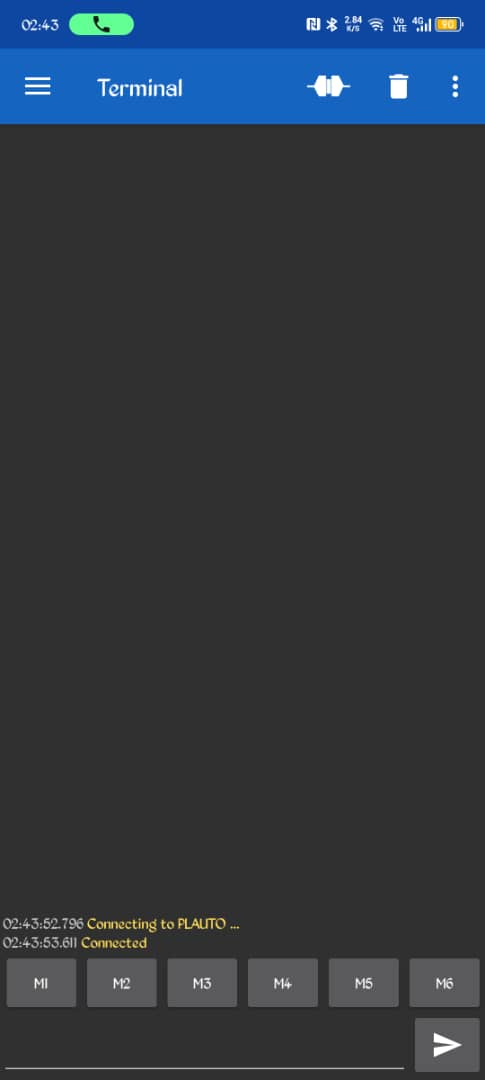
Show that you have tried the advice given.
Tap on the three bars to the left of the word "Terminal", select "Devices" and see if your device is shown as a Bluetooth LE or Bluetooth Classic device.
Carry out the following steps:
(1) Connect BT (Bluetooth) with UNO as per Fig-1. Check that RED-LED of Bluetooth (BT) is blinking continuously at 1 sec interval. The blinking of the LED indicates that the BT is looking for a nearby another BT devices to get paired. The R1-R2 voltage divider is needed to generate 3.3V logic at RX-pin of BT as this pin does not tolerate 5V logic.
Figure-1:
(2) Pair the BT of UNO with the BT of Mobile Phone. If they are paired, the RED-LED of UNO’s BT would be blinking once a while. If pairing process asks for PIN/password, enter 0000 or 1234. In case, the said PIN/Password does not work, then carry out AT (American Telecommunication) commands Task-12.2 of the attached file (pending) to get PIN/Password from BT attached with UNO.
(3) Check the following “Send Settings” for BT of Mobile:
Select Send Data type:	ASCII
Select Ending for Sent data:
\r-CR (carriage Return) : no tick mark
\n-LF (Line Feed)		: no tick mark
(4) Upload the following sketch in UNO. Save the sketch as E1218.
#include<SoftwareSerial.h>
SoftwareSerial SUART(10, 11);

void setup()
{
  Serial.begin(9600);
  SUART.begin(9600);
}

void loop()
{
  byte n = SUART.available(); //char comes from Mobile
  if (n != 0)
  {
    char y1  = SUART.read();  //
    Serial.println(y1);
  }

 //--get char from InputBox and send to Mobile via BT----
  n = Serial.available(); //char comes from InputBox
  if (n != 0)
  {
    char y2 = Serial.read();
    SUART.print(y2);  //send character to BT and then to Mobile
  }
}
(5) Open Serial Monitor (SM) with Newline option for the Line ending box of SM (Fig-2) and Bd = 9600.


Figure-2:
(6) Press RESET Button of UNO.
(7) Enter UNO on the BT Terminal of Mobile Phone and then click on Send button. Check that UNO has appeared on the OutputBox of SM.
(8) Enter A into the InputBox of SM and then click on the Send Button.
(9) Check that A has appeared on the BT Terminal of Mobile Phone.