Help!

Gone on mine also.
Thanks Larry. Added that as a Chrome bookmark. Still prefer have it closer to hand as before when in the forum...
click again on the box with three horizontal bars on the left of your screen. You accidentally clicked it one time to get what you are seeing.
Clicking that 3-bar icon is how I usually get to the display I showed. Now, that no longer includes 'My Posts'. Seems to have been replaced by 'Invite',
Sorry, but have this anything to do with IDE1.X? Maybe better suited for "Website & Forum".
Ciao, Ale.
Yup. I follow the same procedure and can no longer find any way to see my posts. Strange why someone would remove that. I have actually used it before.
You’re right, my mistake. I find navigation difficult in the recently changed category structure. Hopefully a mod can move the thread.

It now says “My Drafts” for me. I do have some; maybe it is only shown in that case.
Try starting a reply, then cancel, and Save draft for later. See if it shows up.
At least they seem to have tested the changes!
If anyone wants to discuss the changes to the emoji picker, please use the existing topic dedicated to that subject:
That's a fine looking red arrow.
All the available/missing cheeseburger subtopics seem to reflect the avatar subtopics.
I have done so. In the future, please take the time to make sure you select an appropriate category for the subject of your topic.
You don't need to do any navigation to select a category when creating a topic. You can simply select the category from the menu:

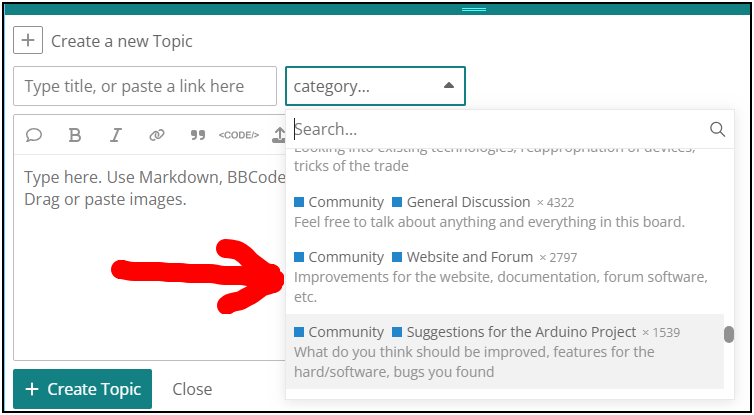
Yep.
I just added some links to the custom section (which I honestly don't recall seeing before, but perhaps I just wasn't paying attention) to restore an Activity link to the sidebar, and add one to the Summary page as well. It's not quite in the same place as it was, but it's close enough for government work as the saying goes.

Great workaround!
The section is only visible if you have added it. So if you hadn't previously added the section (by clicking the + icon at the bottom right corner of the "hamburger" menu), then it is expected that you wouldn't see it before.
Thanks for bringing this problem to my attention. I performed an investigation and found it was the result of an intentional change by developers the Discourse forum framework we use, which was introduced to Arduino Forum by the latest automated update:
The "My Posts" link in desktop sidebar will now be "My Drafts" and only appear when the current user has existing drafts.

I was able to find a way to circumvent this unwanted change and the "My Posts" link is now back in place in the sidebar menu.
Since it is only a peripheral feature, I moved the "Invite" link to the hidden area of the menu that accessed by clicking the "More" menu item.
I don't remember whether that "Invite" item was always present in the sidebar, or if this was another change introduced by a recent Discourse update.
Yes, the new "My Drafts" menu item is only displayed when you have post drafts. I think this is a useful feature, so I left it in place.
If anyone is bothered by the presence of the "My Drafts" menu item cluttering up their sidebar, just delete any drafts you don't have any use for. If there are drafts left that you plan to complete and post, the menu item will serve as a useful reminder to do that and once you have completed the post the menu item will disappear from the sidebar.
Thanks so much, very pleased to see 'My Posts' back in its familiar spot!


