If you remove it you will have to replace it - with a lower value.
Is this a deadman (latching/relay) switch? Does the power applied to the button light the light AND hold the switch "on?" (I see the drawing... only resistor, LED and pushbutton)
1 - no
2 - no
The led lights up but the brightness is low. Look like I need to remove the resistor or change it. But how can I know what is the voltage of the LED?
The LED has no voltage. It uses current, some 10 - 20 mA.
I mean the v drop

Looks like pin 2 is your output..
Pin 1 is 5v
Pin 2 output
Pin 3 Ground
Led should be lit always and pin 2 should go high when you push button..
Going to need a pull down resistor for the output..
good luck.. ~q
The v drop varies depending on the colour. For a red LED, 2.5 volt.
The thing is that I need to connect this button in matrix, so i need pin 1 and to connected for example in pin A1 and 10. If i connect like a say the led lights up but the brightness is low. If i connect it like you say the led became brighter
<edited, removed previous quote; apologies, was incorrect attribution>
connect this button in matrix
Can't put it in a matrix, unless you abandon LED. Reason is, for matrix, both sides of momentary switch need to be 'flexible'. not tied to 5V or GND. Sorry.
Agree
Yeah, I I came to this and I have 1 free slot so i divided this button from the matrix. Connected 1 to + 3 to GND and 2 to the pin. The button is working but it is flickering on and off, if the button is pressed it stops flickering but then the button is open.
#include <Keypad.h>
#include <Joystick.h>

//DEFINITIONS
#define ENABLE_PULLUPS
#define NUMROTARIES 0  //replace "?" with number of rotary encoders you are using
#define NUMBUTTONS 2   //replace "?"with number of buttong you are using
#define NUMROWS 1      //replace "?" with number of rows you have
#define NUMCOLS 3      //replace "?" with number of columns you have
#define joyButton3 7 //it is the start stop button

int lastButton3State = 1;

//BUTTON MATRIX
//first change number of rows and columns to match your button matrix,
//then replace all "?" with numbers (starting from 0)
byte buttons[NUMROWS][NUMCOLS] = {
  { 0, 1, 2 }


};

struct rotariesdef {
  byte pin1;
  byte pin2;
  int ccwchar;
  int cwchar;
  volatile unsigned char state;
};

//ROTARY ENCODERS
//each line controls a different rotary encoder
//the first two numbers refer to the pins the encoder is connected to
//the second two are the buttons each click of the encoder wil press
//do NOT exceed 31 for the final button number
rotariesdef rotaries[NUMROTARIES]{


};

#define DIR_CCW 0x10
#define DIR_CW 0x20
#define R_START 0x0

#ifdef HALF_STEP
#define R_CCW_BEGIN 0x1
#define R_CW_BEGIN 0x2
#define R_START_M 0x3
#define R_CW_BEGIN_M 0x4
#define R_CCW_BEGIN_M 0x5
const unsigned char ttable[6][4] = {
  // R_START (00)
  { R_START_M, R_CW_BEGIN, R_CCW_BEGIN, R_START },
  // R_CCW_BEGIN
  { R_START_M | DIR_CCW, R_START, R_CCW_BEGIN, R_START },
  // R_CW_BEGIN
  { R_START_M | DIR_CW, R_CW_BEGIN, R_START, R_START },
  // R_START_M (11)
  { R_START_M, R_CCW_BEGIN_M, R_CW_BEGIN_M, R_START },
  // R_CW_BEGIN_M
  { R_START_M, R_START_M, R_CW_BEGIN_M, R_START | DIR_CW },
  // R_CCW_BEGIN_M
  { R_START_M, R_CCW_BEGIN_M, R_START_M, R_START | DIR_CCW },
};
#else
#define R_CW_FINAL 0x1
#define R_CW_BEGIN 0x2
#define R_CW_NEXT 0x3
#define R_CCW_BEGIN 0x4
#define R_CCW_FINAL 0x5
#define R_CCW_NEXT 0x6

const unsigned char ttable[7][4] = {
  // R_START
  { R_START, R_CW_BEGIN, R_CCW_BEGIN, R_START },
  // R_CW_FINAL
  { R_CW_NEXT, R_START, R_CW_FINAL, R_START | DIR_CW },
  // R_CW_BEGIN
  { R_CW_NEXT, R_CW_BEGIN, R_START, R_START },
  // R_CW_NEXT
  { R_CW_NEXT, R_CW_BEGIN, R_CW_FINAL, R_START },
  // R_CCW_BEGIN
  { R_CCW_NEXT, R_START, R_CCW_BEGIN, R_START },
  // R_CCW_FINAL
  { R_CCW_NEXT, R_CCW_FINAL, R_START, R_START | DIR_CCW },
  // R_CCW_NEXT
  { R_CCW_NEXT, R_CCW_FINAL, R_CCW_BEGIN, R_START },
};
#endif

//BUTTON MATRIX PART 2
byte rowPins[NUMROWS] = { A1 };     //change "?" to the pins the rows of your button matrix are connected to
byte colPins[NUMCOLS] = { 10, 9, 7 };  //change "?" to the pins the rows of your button matrix are connected to

Keypad buttbx = Keypad(makeKeymap(buttons), rowPins, colPins, NUMROWS, NUMCOLS);

//JOYSTICK SETTINGS
Joystick_ Joystick(JOYSTICK_DEFAULT_REPORT_ID,
                   JOYSTICK_TYPE_JOYSTICK,
                   3,  //number of buttons
                   0,  //number of hat switches
                   //Set as many axis to "true" as you have potentiometers for
                   false,   // y axis
                   false,   // x axis
                   false,   // z axis
                   false,   // rx axis
                   false,   // ry axis
                   false,   // rz axis
                   false,   // rudder
                   false,   // throttle
                   false,   // accelerator
                   false,   // brake
                   false);  // steering wheel

const int numReadings = 20;

int readings[numReadings];  // the readings from the analog input
int index = 0;              // the index of the current reading
int total = 0;              // the running total
int currentOutputLevel = 0;

//POTENTIOMETERS PART 1
//add all the axis' which are enabled above
int zAxis_ = 0;
int RxAxis_ = 0;


void setup() {
  Joystick.begin();
  rotary_init();
  pinMode(joyButton3, INPUT);
  for (int thisReading = 0; thisReading < numReadings; thisReading++) {
    readings[thisReading] = 0;
  }
}

void loop() {

  CheckAllEncoders();
  CheckAllButtons();

  int currentButton3State = !digitalRead(joyButton3);
  if (currentButton3State != lastButton3State){
    Joystick.setButton(2, currentButton3State);
    lastButton3State = currentButton3State;
  }
}


int getAverageOutput(int pinToRead) {
  index = 0;
  total = 0;

  while (index < numReadings) {
    readings[index] = analogRead(pinToRead);
    total = total + readings[index];
    index = index + 1;
    //delay (1);
  }
  return total / numReadings;
}


void CheckAllButtons(void) {
  if (buttbx.getKeys()) {
    for (int i = 0; i < LIST_MAX; i++) {
      if (buttbx.key[i].stateChanged) {
        switch (buttbx.key[i].kstate) {
          case PRESSED:
          case HOLD:
            Joystick.setButton(buttbx.key[i].kchar, 1);
            break;
          case RELEASED:
          case IDLE:
            Joystick.setButton(buttbx.key[i].kchar, 0);
            break;
        }
      }
    }
  }
}


void rotary_init() {
  for (int i = 0; i < NUMROTARIES; i++) {
    pinMode(rotaries[i].pin1, INPUT);
    pinMode(rotaries[i].pin2, INPUT);
#ifdef ENABLE_PULLUPS
    digitalWrite(rotaries[i].pin1, HIGH);
    digitalWrite(rotaries[i].pin2, HIGH);
#endif
  }
}


unsigned char rotary_process(int _i) {
  //Serial.print("Processing rotary: ");
  //Serial.println(_i);
  unsigned char pinstate = (digitalRead(rotaries[_i].pin2) << 1) | digitalRead(rotaries[_i].pin1);
  rotaries[_i].state = ttable[rotaries[_i].state & 0xf][pinstate];
  return (rotaries[_i].state & 0x30);
}

void CheckAllEncoders(void) {
  Serial.println("Checking rotaries");
  for (int i = 0; i < NUMROTARIES; i++) {
    unsigned char result = rotary_process(i);
    if (result == DIR_CCW) {
      Serial.print("Rotary ");
      Serial.print(i);
      Serial.println(" <<< Going CCW");
      Joystick.setButton(rotaries[i].ccwchar, 1);
      delay(50);
      Joystick.setButton(rotaries[i].ccwchar, 0);
    };
    if (result == DIR_CW) {
      Serial.print("Rotary ");
      Serial.print(i);
      Serial.println(" >>> Going CW");
      Joystick.setButton(rotaries[i].cwchar, 1);
      delay(50);
      Joystick.setButton(rotaries[i].cwchar, 0);
    };
  }
  Serial.println("Done checking");
}
can't see how it's wired, but your description fits the signal not having a pullup or pulldown resistor. If it needs a pullup (i.e. switch closing connects pin to ground), use INPUT_PULLUP instead of INPUT; if it needs a pulldown, you'll have to install an external one. Usually, something in the 1-2k ohm range will suffice, though I avoid pulldowns like the plague.
With INPUT_PULLUP its still flickering.
Video: https://youtu.be/VCXJU3hALtE
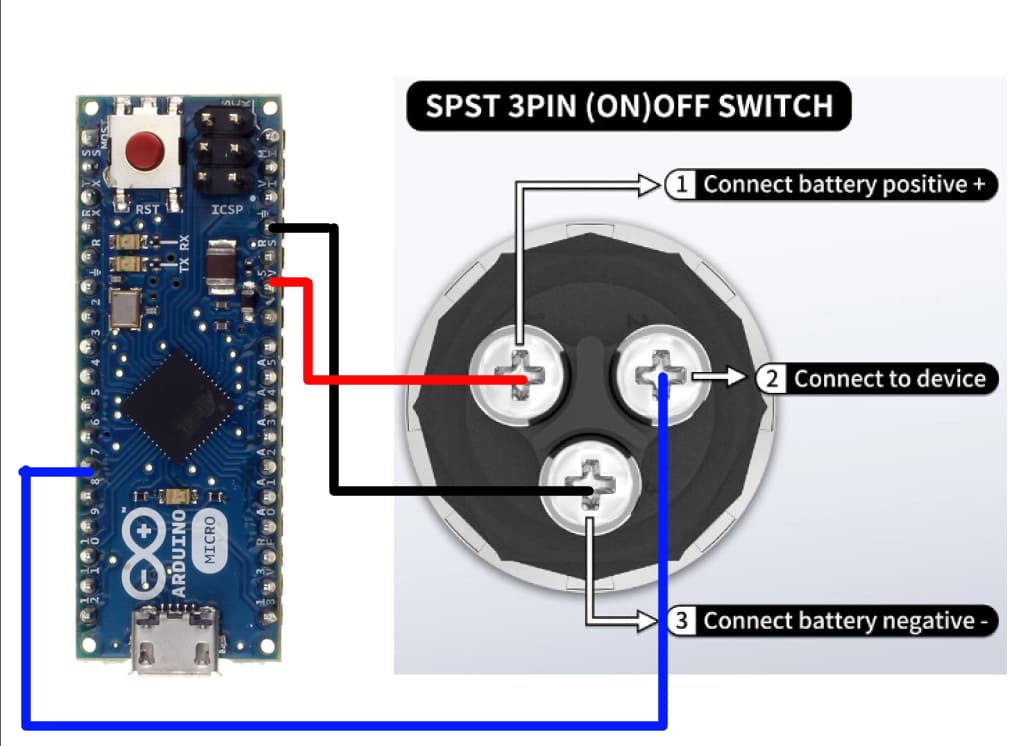
Must be the code, with INPUT_PULLUP the button has no way to ever go LOW, the pull-up keeps it high when not pressed, and pressing it connects pin 2 to pin 1, putting 5V on pin 2, which is a HIGH. With that switch, you need a pull-down resistor, not pull-up.
Looking at your picture of the internals of the switch, I would be inclined to see if there was some way to get an extra wire lead into the switch, and disconnect the resistor from pin 1. That would allow for isolated power for the LED, and you could then put the switch in a matrix.
Yeah I was thinking about that but I dont see the way to do that
I had described both options in my post, but @shot13 seems to have missed that.
A pulldown is what's needed.
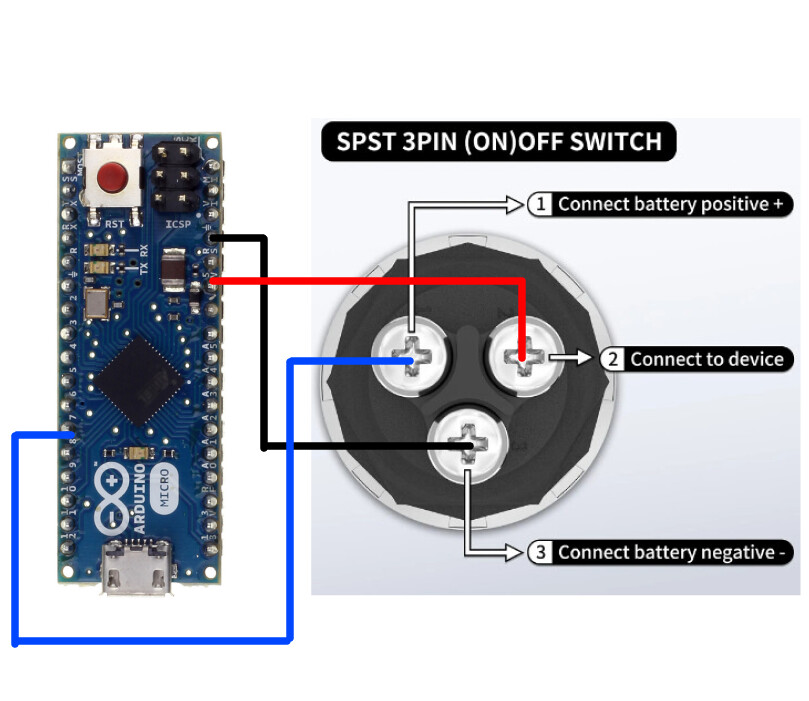
I have connected now like this, and the button is not flickering anymore but is always active and the led lights up only when the btn is pressed
Yes. Missed that sorry. Check please also the last post, how must I connect it now so the light is always on and the button not pressed? Thank you