NRF24L01+PA+LNA problem when using with servos

Hi, i have been trying to make a rc transmitter and receiver. Have done all the soldering. Burnt one of my modules by accidentally by providing it with 7.4v directly(my mistake :smiling_face_with_tear:). Replaced that one. I have attached the photos of the transmitter and receiver.
Earlier(before burning my module) i had tried robin2's tutorial which had worked fine but now my nrf modules are not communicating.
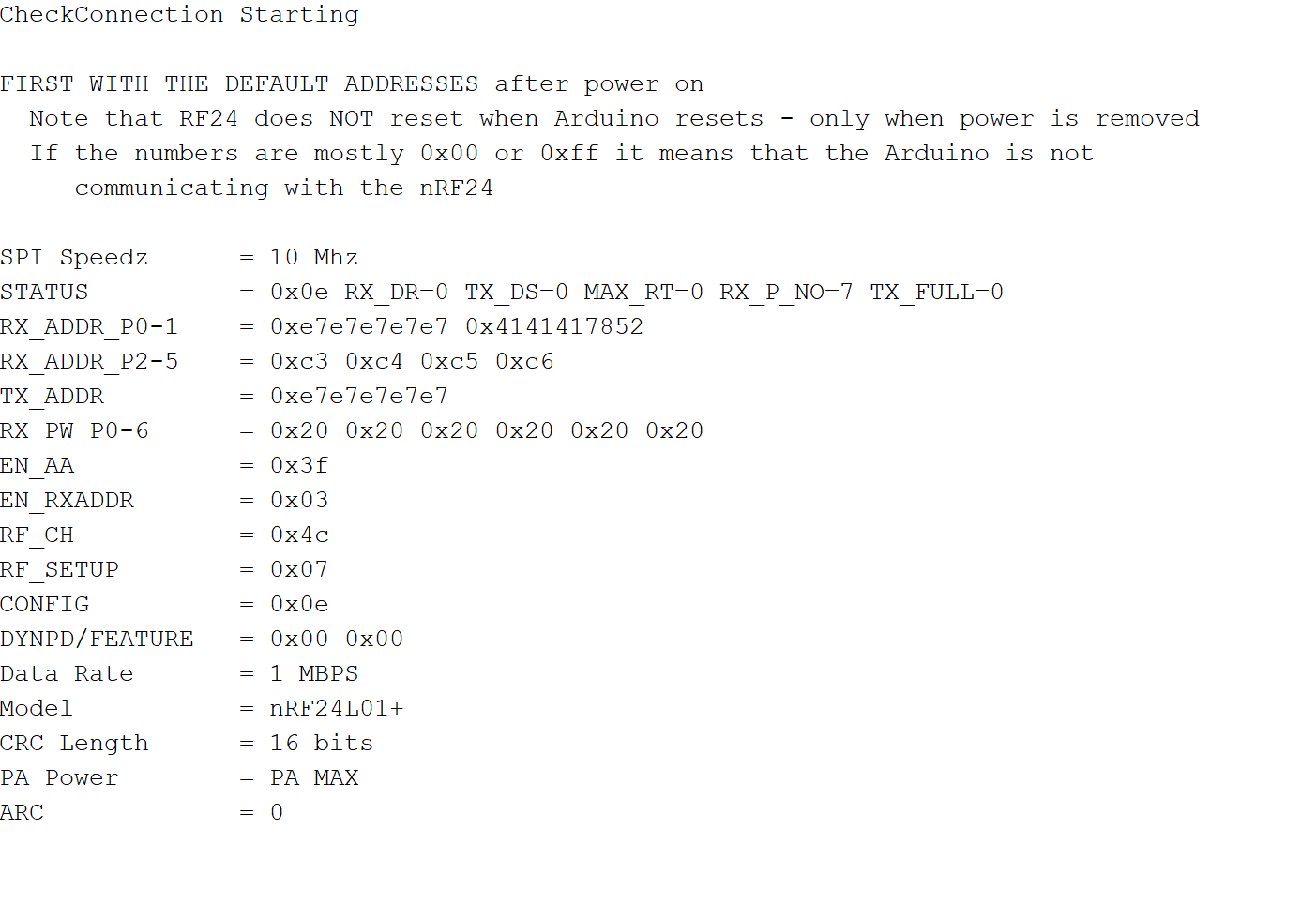
I have tried checking the connection(reply#30) and the connections are all fine (results image attached).


This was of my transmitter

Now for the receiver


Now when i try to have the two modules communicate via the simpletx and simplerx, my modules simply refuse to communicate. The receiver end just prints
SimpleRx Starting
while the transmitter end prints
SimpleTx Starting
Message sent 0 Tx failed
again and again

Here are the pictures.
I will power them from 2 18650 batteries each but for now as im using the serial monitor am just using the cable for power


Here are the code im using as i have edited them a bit

// SimpleTx - the master or the transmitter

#include <SPI.h>
#include <nRF24L01.h>
#include <RF24.h>


#define CE_PIN   7
#define CSN_PIN  8

const byte slaveAddress[5] = {'R','x','A','A','A'};


RF24 radio(CE_PIN, CSN_PIN); // Create a Radio

char dataToSend[10] = "Message 0";
char txNum = '0';


unsigned long currentMillis;
unsigned long prevMillis;
unsigned long txIntervalMillis = 1000; // send once per second


void setup() {
    pinMode(10,OUTPUT);
    Serial.begin(9600);

    Serial.println("SimpleTx Starting");

    radio.begin();
    radio.setDataRate( RF24_1MBPS );
    radio.setPALevel(RF24_PA_MAX);
    radio.setRetries(3,5); // delay, count
    radio.openWritingPipe(slaveAddress);
}

//====================

void loop() {
    currentMillis = millis();
    if (currentMillis - prevMillis >= txIntervalMillis) {
        send();
        prevMillis = millis();
    }
}

//====================

void send() {

    bool rslt;
    rslt = radio.write( &dataToSend, sizeof(dataToSend) );
        // Always use sizeof() as it gives the size as the number of bytes.
        // For example if dataToSend was an int sizeof() would correctly return 2

    Serial.print("Data Sent ");
    Serial.print(dataToSend);
    if (rslt) {
        Serial.println("  Acknowledge received");
        updateMessage();
    }
    else {
        Serial.println("  Tx failed");
    }
}

//================

void updateMessage() {
        // so you can see that new data is being sent
    txNum += 1;
    if (txNum > '9') {
        txNum = '0';
    }
    dataToSend[8] = txNum;
}
// SimpleRx - the slave or the receiver

#include <SPI.h>
#include <nRF24L01.h>
#include <RF24.h>

#define CE_PIN   7
#define CSN_PIN  8

const byte thisSlaveAddress[5] = {'R','x','A','A','A'};

RF24 radio(CE_PIN, CSN_PIN);

char dataReceived[10]; // this must match dataToSend in the TX
bool newData = false;

//===========

void setup() {
    pinMode(10,OUTPUT);
    Serial.begin(9600);
    
    Serial.println("SimpleRx Starting");
    radio.begin();
    radio.setDataRate( RF24_1MBPS );
    radio.setPALevel(RF24_PA_MAX); 
    radio.openReadingPipe(1, thisSlaveAddress);
    radio.startListening();
}

//=============

void loop() {
    getData();
      showData(); 
}

//==============

void getData() {
    if ( radio.available() ) {
        radio.read( &dataReceived, sizeof(dataReceived) );
        newData = true;
    }
}

void showData() {
    if (newData == true) {
        Serial.print("Data received ");
        Serial.println(dataReceived);
        newData = false;
    }
}

Does that mean USB?

Have you tried putting 10uF to 100uF on the power pins?

The high power modules need to be separated by a some distance so as not to overwhelm each other. Also set to low power.

Does that mean USB?

Yes

Have you tried putting 10uf to 100uf on the power pins

Yes, I have put a 100uf 25v electrolytic capacitor, you can even see it in the photo

Also set to low power

I have changed the data rate to 1MBPS to compensate for that and have also tried putting 1 feet distance between them :smiley:

Do i still need to set them to low power?

I would suggest at least a couple of meters distance between the modules and set to low power.

Yes I did see the caps, but it took a moment. Old eyes and cell phone screen. That's why I struck it out.

Ok am going to try that

Tried that but still the same result

Btw,
If i burnt an nrf module by supplying extra power, will its antenna be dead too?

I don't know, but i would not trust it.

The rx light is also not on/blinking in the receiver

Ok thanks, will just keep it aside then

So what should i do now?

You seem to have used up all my tips and tricks.

I have been experimenting with the HC12 radios lately. Similar range, but, I think, easier to use. Check local rules and laws, though.

Yes but they are bit more expensive and less documented

Will welcome any suggestions from anyone as am desperate to get this working

Hi, they managed to work!
I dont know what the problem was. Just removed the capacitor from both, and they work! Definitely wierd...

I am using this code now

#include <SPI.h>
  #include <nRF24L01.h>
  #include <RF24.h>
   
  RF24 radio(7, 8); // select CE,CSN pin 
  const byte address[6] = "00001";
  struct Signal {
  byte throttle;
  byte pitch;
  byte roll;
  byte yaw;
  byte aux1;
  byte aux2;
};
  Signal data;
  
  void ResetData() 
{
  data.throttle = 127;   // Default position of motors
  data.pitch = 127;    
  data.roll = 127;     
  data.yaw = 127;     
  data.aux1 = 127;    
  data.aux2 = 127;    
}
  void setup()
{
  Serial.begin(9600);
  //Start everything up
  radio.begin();
  radio.openWritingPipe(address);
  radio.stopListening(); //start the radio comunication for Transmitter 
 
}
  // Joystick center and its borders 
  int mapJoystickValues(int val, int lower, int middle, int upper, bool reverse)
{
  val = constrain(val, lower, upper);
  if ( val < middle )
  val = map(val, lower, middle, 0, 128);
  else
  val = map(val, middle, upper, 128, 255);
  return ( reverse ? 255 - val : val );
}
  void loop()
{
  ResetData();
  // Control Stick Calibration 
  // Setting may be required for the correct values of the control levers. 
  data.throttle = mapJoystickValues( analogRead(A0), 12, 524, 1020, true );  // "true" or "false" for signal direction 
  data.roll = mapJoystickValues( analogRead(A3), 12, 524, 1020, true );      // "true" or "false" for servo direction 
  data.pitch = mapJoystickValues( analogRead(A2), 12, 524, 1020, true );     // "true" or "false" for servo direction 
  data.yaw = mapJoystickValues( analogRead(A1), 12, 524, 1020, true );       // "true" or "false" for servo direction 
  data.aux1 = mapJoystickValues( analogRead(A4), 12, 524, 1020, true );     // "true" or "false" for servo direction 
  data.aux2 = mapJoystickValues( analogRead(A5), 12, 524, 1020, true );// "true" or "false" for servo direction 
  Serial.print(data.throttle);
  Serial.print('\t');
  Serial.print(data.roll);
  Serial.print('\t');
  Serial.print(data.pitch);
  Serial.print('\t');
  Serial.print(data.yaw);
  Serial.print('\t');
  Serial.print(data.aux1);
  Serial.print('\t');
  Serial.print(data.aux2);
  Serial.println('\t');
  
  radio.write(&data, sizeof(Signal));
}

for the transmitter

And this one

#include <nRF24L01.h>
#include <RF24.h>
#include <Servo.h>
int ch_width_1 = 0;
int ch_width_2 = 0;
int ch_width_3 = 0;
int ch_width_4 = 0;
int ch_width_5 = 0;
int ch_width_6 = 0;
Servo ch1;
Servo ch2;
Servo ch3;
Servo ch4;
Servo ch5;
Servo ch6;
struct Signal {
byte throttle;      
byte pitch;
byte roll;
byte yaw;
byte aux1;
byte aux2;
};
Signal data;

RF24 radio(7, 8);
const byte address[6] = "00001"; 
void ResetData()
{
// Define the inicial value of each data input. 
// The middle position for Potenciometers. (254/2=127) 
data.roll = 127;   
data.pitch = 127;  
data.throttle = 127; 
data.yaw = 127;  
data.aux1 = 127;   
data.aux2 = 127;   
}
void setup()
{
  Serial.begin(9600);
  //Set the pins for each PWM signal 
  ch1.attach(2);
  ch2.attach(3);
  ch3.attach(4);
  ch4.attach(5);
  ch5.attach(6);
  //Configure the NRF24 module
  ResetData();
  radio.begin();
  radio.openReadingPipe(0, address);
  radio.startListening(); //start the radio comunication for receiver 
} 
unsigned long lastRecvTime = 0;
void recvData()
{
if ( radio.available() ) {
radio.read(&data, sizeof(Signal));
lastRecvTime = millis();   // receive the data | data alınıyor
}
}
void loop()
{
recvData();
unsigned long now = millis();
if ( now - lastRecvTime > 1000 ) {
ResetData(); // Signal lost.. Reset data 
}
ch_width_4 = map(data.yaw,      0, 255, 1000, 2000);     // pin D5 (PWM signal)
ch_width_2 = map(data.pitch,    0, 255, 1000, 2000);     // pin D3 (PWM signal)
ch_width_3 = map(data.throttle, 0, 255, 1000, 2000);     // pin D4 (PWM signal)
ch_width_1 = map(data.roll,     0, 255, 1000, 2000);     // pin D2 (PWM signal)
ch_width_5 = map(data.aux1,     0, 255, 1000, 2000);     // pin D6 (PWM signal)
ch_width_6 = map(data.aux2,     0, 255, 1000, 2000);     // pin D7 (PWM signal)
Serial.print(ch_width_1+2);
Serial.print('\t');

Serial.print(ch_width_2);
Serial.print('\t');
Serial.print(ch_width_3);
Serial.print('\t');
Serial.print(ch_width_4);
Serial.print('\t');
Serial.print(ch_width_5);
Serial.print('\t');
Serial.println(ch_width_6);
// Write the PWM signal
ch1.writeMicroseconds(ch_width_1);
ch2.writeMicroseconds(ch_width_2);
ch3.writeMicroseconds(ch_width_3);
ch4.writeMicroseconds(ch_width_4);
ch5.writeMicroseconds(ch_width_5);
ch6.writeMicroseconds(ch_width_6);
}

for the receiver.

The problem is that while it works in the serial monitor(i am able to see the values change accordingly), it doesnt work as well when i connect a servo motor(only got those, no escs :frowning: )
the servo motor just keeps on moving until it reaches the end and then stops. After some time, the servo gets heated up. Opened the servo's top to find out that the motor just keeps on moving without stopping, even though I am changing the joystick and everything. Even tried using different codes, but this stays the same. In the serial monitor, i am able to get the output, but while using it, no dice

@groundfungus
would definitely like your help :pray:

This topic was automatically closed 180 days after the last reply. New replies are no longer allowed.