Hi. I bought this audio module:

It’s a DFPlayer Mini. It has two serial communication pins, TX and RX. I was wondering if I can make it work with only one pin so i just send the commands from the arduino. I don’t care to receive information from the module. Would this be possible? Thanks
you can ignore what the DFPlayer module tells you, it means you can't send requests commands or won't get error codes back
why don't you want or can't you have Rx as well?
there is a version derived from the SoftwareSerial library that only offers Tx (see GitHub - felias-fogg/TXOnlySerial: Transmit-only Software Serial Arduino library - I've never tried it)
Yes, I have done this on one of my projects. It works fine.
Some of the library commands will not work without the Tx connection, but most of them need only the Rx connection.
I used a Wemos D1 Mini, which has a second hardware UART/Serial port, but only the Tx pin is available to use. I connected that to the Rx pin of the DFplayer Mini.
How have you done it? I'm only able to send the command myDFPlayer.play(1); and then it wont work anymore. I tried to use all methods before calling play again, like stop(), reset(), pause(), start().
How have you failed to make it work? It works great for me!
If you want the forum to help you figure out your problem, you are going to have to share 100x more than you have up to now. The forum members do not have psychic powers.
I am sorry. Here’s some more information.
This is the connection of the arduino and the module.
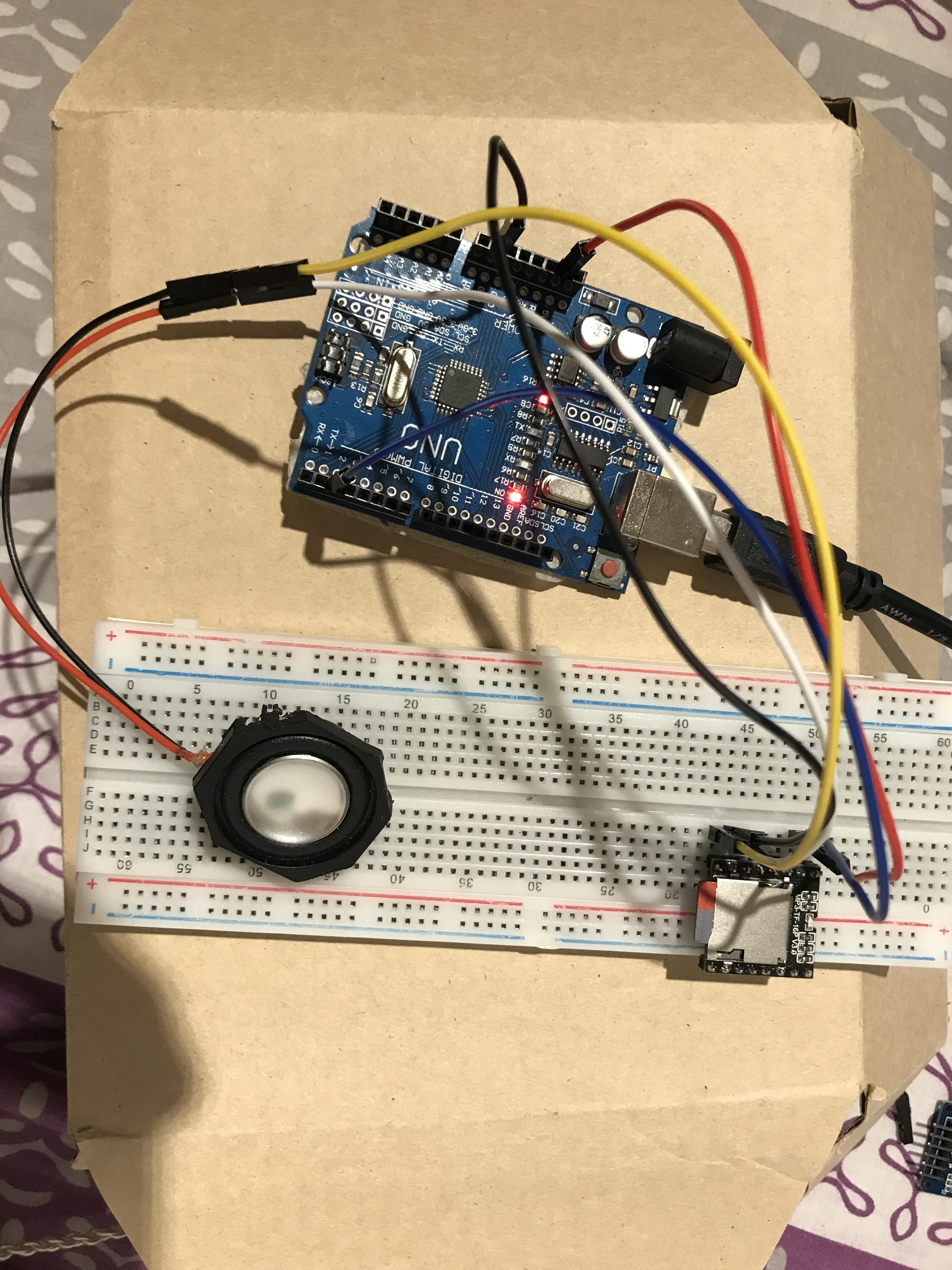
Arduino -> DFPlayer
5v -> VCC
GND -> GND
D2 -> RX
And the speakers accordingy.
The right pin column of the module is not connected to neither + or - rail. I put it there because it doesnt fit other way in my breadboard.
And here’s the code I’m trying to run:
#include <SoftwareSerial.h>
#include <DFRobotDFPlayerMini.h>

SoftwareSerial mySoftwareSerial(3, 2); // RX, TX
DFRobotDFPlayerMini myDFPlayer;

void setup()
{
  mySoftwareSerial.begin(9600);
  myDFPlayer.begin(mySoftwareSerial);

  myDFPlayer.volume(25);
  myDFPlayer.play(1); //this one gets played
  delay(4000);
  myDFPlayer.play(1); //this one doesn't
}

void loop()
{
}
The audio file is maybe 1 second long so i guess it has time to wait that 4 seconds delay and play it again. I can't get it to work.
Thanks for the extra information. Now I am wondering why you asked the question. You could easily connect Uno pin 3 to the Tx pin of the player to find out if the one-way communication was the cause of the problem or not. Have you not done that? If you have done that, and it made no difference, why are you asking if one-way communication is the cause of the problem?
Anyway, do you see the blue led light up on the player when the audio track begins to play? Does the led go off after 1 second? Does it light up again 3 seconds after that?
Yes, sorry for not specifying that. That same code does indeed work when the TX pin is engaged.
When TX pin is not connected no, it does not turn on again. But of course when it is connected it works.
I'm using a Uno board, maybe that's part of the problem? You said that it worked to you but in a different board. I hope I can get this to work. I already spent hours with this.
Thanks for the help!
I finally found a solution. I used another library. I was using <DFRobotDFPlayerMini.h>
and changed to <DFPlayerMini_Fast.h> and it works like a charm.
The library you were using sends requests for information to the module which won’t work if you don’t have Rx
The other library does not.
unless...
You tell it not to. I had forgotten that I had done this in my code:
myDFPlayer.begin(Serial1, /*isACK = */false, /*doReset = */true); //set Serial1 for DFPlayer-mini mp3 module
right
thanks for the reminder
This topic was automatically closed 180 days after the last reply. New replies are no longer allowed.