Hello, I am new to Arduino. I am using the temperature sensor of DS18B20 to try to read the temperature by myself. After reading the article Using DS18(B)20 temperature sensor with Arduino, including using it with the nuElectronics Datalogging Shield(http://sheepdogguides.com/arduino/ar3ne1tt.htm), I used the above code to get 85 and -0.06 got the wrong temperature, can you guys please debug this? Because I read this article, it seems that this code can be used.
Code and schematics please
Your link is no good.
+1 for @apf1979, we need to see the code and a schematic.
Read the forum guidelines to see how to properly post code and some good information on making a good post.
Use the IDE autoformat tool (ctrl-t or Tools, Auto format) before posting code in code tags.
1 Like
It puts a ")" on the end that shouldn't be there. Remove that and it works. The first thing it says though is to go to the new tutorial.
Hi, I use the code same to ([http://sheepdogguides.com/arduino/ar3ne1tt.htm)] and flowing this article to set up. There is my code:
#include "OneWire.h"
#define Sensor_Pin 8 //Set pin number for device
/void OneWireReset(int Pin);//See Note 2
void OneWireOutByte(int Pin, byte d);
byte OneWireInByte(int Pin);/
void setup() {
digitalWrite(Sensor_Pin, LOW); //Init: set to low
pinMode(Sensor_Pin, INPUT);      // sets the pin as input

Serial.begin(9600);

delay(100);
Serial.print("Start for temperature detect:");
}
void loop(){
int HighByte, LowByte, TReading, SignBit, Tc_100, Whole, Fract;
Reset(Sensor_Pin);
WriteByte(Sensor_Pin, 0xcc);
WriteByte(Sensor_Pin, 0x44); // perform temperature conversion, strong pullup for one sec
Reset(Sensor_Pin);
WriteByte(Sensor_Pin, 0xcc);
WriteByte(Sensor_Pin, 0xbe);
LowByte = ReadByte(Sensor_Pin);
HighByte = ReadByte(Sensor_Pin);
TReading = (HighByte << 8) + LowByte;
SignBit = TReading & 0x8000; // test most sig bit
if (SignBit) // negative
{
TReading = (TReading ^ 0xffff) + 1; // 2's comp
}
Tc_100 = (6 * TReading) + TReading / 4; // multiply by (100 * 0.0625) or 6.25
Whole = Tc_100 / 100; // separate off the whole and fractional portions
Fract = Tc_100 % 100;
if (SignBit) // If its negative
{
Serial.print("-");
}
Serial.print(Whole);
Serial.print(".");
if (Fract < 10)
{
Serial.print("0");
}
Serial.print(Fract);
Serial.print("\n");
delay(5000); // 5 second delay. Adjust as necessary
}
#include "OneWire.h"
#include "stdio.h"
void Reset(int port) // reset. fcuntion
{
pinMode(port, INPUT); //set as input
delayMicroseconds(500);
 digitalWrite(port, LOW);
 pinMode(port, OUTPUT); // set as output
 delayMicroseconds(500);
}
void WriteByte(int port, byte num) // output byte d (least sig bit first).
{
byte res;
for(res=8; res!=0; res--)
{
if ((num & 0x01) == 1) // test least sig bit
{
pinMode(port, INPUT); //set as input
delayMicroseconds(60);
     digitalWrite(port, LOW);
     pinMode(port, OUTPUT);  //set as output
     delayMicroseconds(5);

  }
  else
  {
     delayMicroseconds(60);
     pinMode(port, INPUT);  //set as input

     digitalWrite(port, LOW);
     pinMode(port, OUTPUT);  //set as output

  }

  num = num>>1; // num go to next right bit
}
}
byte ReadByte(int port) // read byte, least sig byte first
{
byte num, n, bitnumber;
num=0;

for (n=0; n<8; n++)
{
    digitalWrite(port, LOW);
    pinMode(port, OUTPUT);
    delayMicroseconds(5);
    pinMode(port, INPUT);
    delayMicroseconds(5);
    bitnumber = digitalRead(port);
    delayMicroseconds(50);
    num = (num >> 1) | (bitnumber<<7); // num will go right bit and insert bitnumber in the digitalread bit
}
return(num);
}
#ifndef OneWire_h
#define OneWire_h
#include <inttypes.h>
//#include "WProgram.h" // for delayMicroseconds
#include "pins_arduino.h" // for digitalPinToBitMask, etc
#include "Arduino.h"
void Reset(int port); //reset function
void WriteByte(int port, byte num); //set output byte
byte ReadByte(int port); //set input byte
//OneWire Command
#define Note 0x44 // Tells device to take a temperature reading and put it on the note
#define CopyNote 0x48 // Copy EEPROM
#define READNote 0xBE // Read EEPROM
#define SkipRom 0xCC // Skip ROM
#define MSB 0x8000 //MSB Number
#define LSB 0xffff //LSB Number
#endif
**********************************************************************************And for the schematic, I using the mega2560, GX18B20, and 4K7 resister, there is a photo of
how can i connect them, by the way when I use the One_wire_bus library and DallasTemperature library the data looks good, so connect should be ok, can you guys help me figure it out where I can fix it for code?
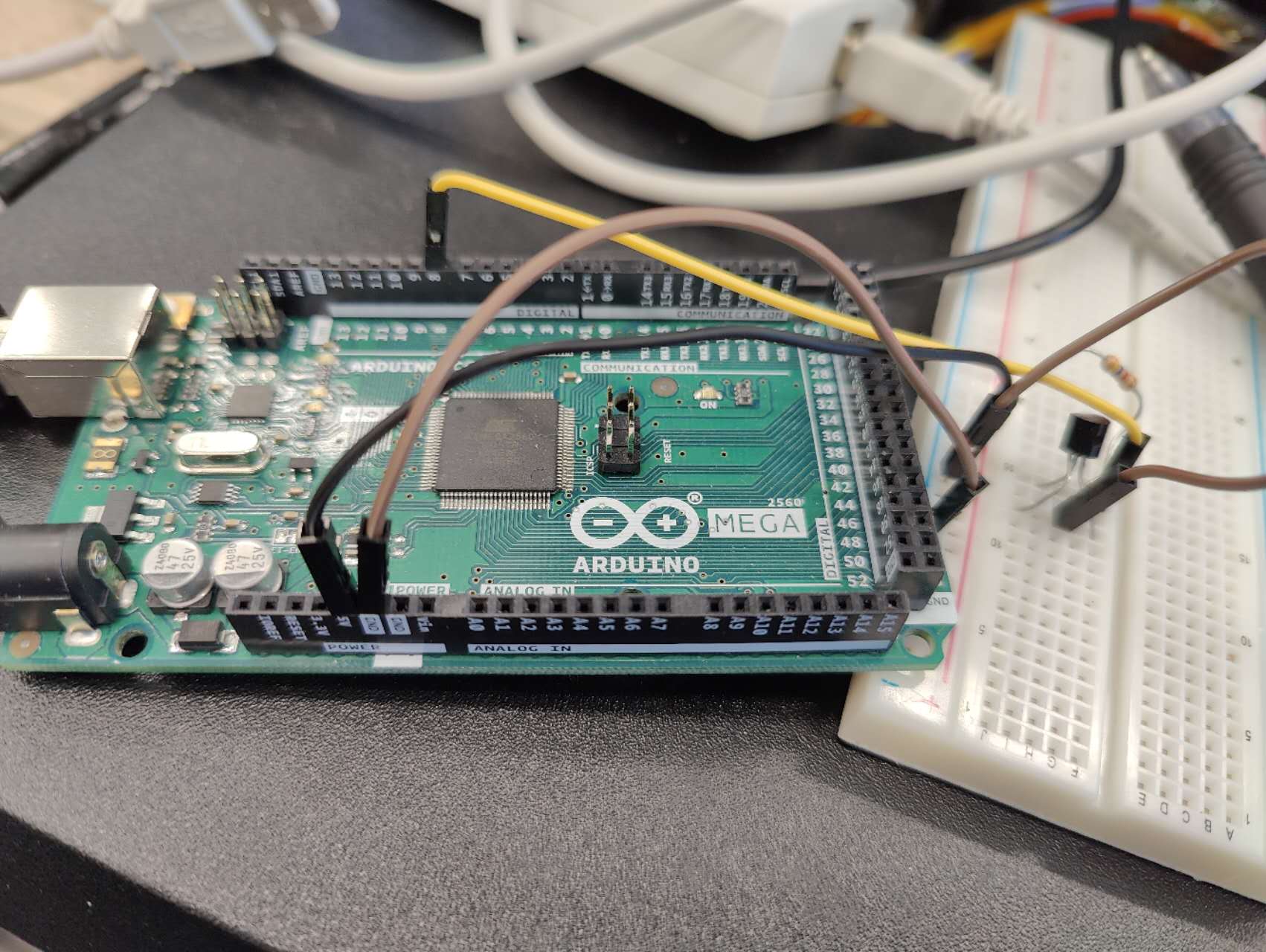

Thanks give me a guide. There is my code:
#include "OneWire.h"
#define Sensor_Pin  8 //Set pin number for device

/*void OneWireReset(int Pin);//See Note 2
void OneWireOutByte(int Pin, byte d);
byte OneWireInByte(int Pin);*/

void setup() {
    digitalWrite(Sensor_Pin, LOW);   //Init: set to low

    pinMode(Sensor_Pin, INPUT);      // sets the pin as input

    Serial.begin(9600);

    delay(100);
    Serial.print("Start for temperature detect:");
}

void loop(){
    int HighByte, LowByte, TReading, SignBit, Tc_100, Whole, Fract;

  Reset(Sensor_Pin);
  WriteByte(Sensor_Pin, 0xcc);
  WriteByte(Sensor_Pin, 0x44); // perform temperature conversion, strong pullup for one sec

  Reset(Sensor_Pin);
  WriteByte(Sensor_Pin, 0xcc);
  WriteByte(Sensor_Pin, 0xbe);

  LowByte = ReadByte(Sensor_Pin);
  HighByte = ReadByte(Sensor_Pin);
  TReading = (HighByte << 8) + LowByte;
  SignBit = TReading & 0x8000;  // test most sig bit
  if (SignBit) // negative
  {
    TReading = (TReading ^ 0xffff) + 1; // 2's comp
  }
  Tc_100 = (6 * TReading) + TReading / 4;    // multiply by (100 * 0.0625) or 6.25

  Whole = Tc_100 / 100;  // separate off the whole and fractional portions
  Fract = Tc_100 % 100;


  if (SignBit) // If its negative
  {
     Serial.print("-");
  }
  Serial.print(Whole);
  Serial.print(".");
  if (Fract < 10)
  {
     Serial.print("0");
  }

  Serial.print(Fract);

      Serial.print("\n");
  delay(5000);      // 5 second delay.  Adjust as necessary
}
#include "OneWire.h"
#include "stdio.h"

void Reset(int port) // reset.  fcuntion
{
     pinMode(port, INPUT); //set as input
     delayMicroseconds(500);

     digitalWrite(port, LOW);
     pinMode(port, OUTPUT); // set as output
     delayMicroseconds(500);

}


void WriteByte(int port, byte num) // output byte d (least sig bit first).
{
   byte res;

   for(res=8; res!=0; res--)
   {
      if ((num & 0x01) == 1)  // test least sig bit
      {
          pinMode(port, INPUT);   //set as input
         delayMicroseconds(60);

         digitalWrite(port, LOW);
         pinMode(port, OUTPUT);  //set as output
         delayMicroseconds(5);

      }
      else
      {
         delayMicroseconds(60);
         pinMode(port, INPUT);  //set as input

         digitalWrite(port, LOW);
         pinMode(port, OUTPUT);  //set as output

      }

      num = num>>1; // num go to next right bit
   }

}


byte ReadByte(int port) // read byte, least sig byte first
{
    byte num, n, bitnumber;

    num=0;

    for (n=0; n<8; n++)
    {
        digitalWrite(port, LOW);
        pinMode(port, OUTPUT);
        delayMicroseconds(5);
        pinMode(port, INPUT);
        delayMicroseconds(5);
        bitnumber = digitalRead(port);
        delayMicroseconds(50);
        num = (num >> 1) | (bitnumber<<7); // num will go right bit and insert bitnumber in the digitalread bit
    }
    return(num);
}
#ifndef OneWire_h
#define OneWire_h
#include <inttypes.h>
//#include "WProgram.h"      // for delayMicroseconds
#include "pins_arduino.h"  // for digitalPinToBitMask, etc
#include "Arduino.h"

void Reset(int port); //reset function
void WriteByte(int port, byte num);  //set output byte
byte ReadByte(int port);    //set input byte

//OneWire Command
#define Note         0x44  // Tells device to take a temperature reading and put it on the note
#define CopyNote     0x48  // Copy EEPROM
#define READNote     0xBE  // Read EEPROM
#define SkipRom      0xCC  // Skip ROM
#define MSB          0x8000 //MSB Number
#define LSB          0xffff //LSB Number


#endif
for the schematic, I using the mega2560, GX18B20, and 4K7 resister, there is a photo of
how can I connect them, which is the same for ([http://sheepdogguides.com/arduino/ar3ne1tt.htm)] . By the way, when I use the One_wire_bus library and DallasTemperature library the data looks good, so connect should be ok, can you guys help me figure it out where I can fix it for code?
Why not use the DallasTemperature library? That makes it pretty easy to use those sensors.
I have my test code for DS18B20 sensors using the DallasTemperature library if you would like it.
The reason why I can not use the library is my company bought GX18B20 and NS18B20 which are not the DS18B20. Even those libraries can work perfectly on the GX18B20 and NS18B20 but for the copyright issue, I can not use them...So try to find the way without the libraries....Please help the poor guy. 
Please forgive me, but I really can't be of any help. I have only used those sensors with the DallasTemperature library and have no idea how to use them otherwise.
Not concerned, thanks for your help! 
There are quite a few hits for a search for "ds18b20 without library". Perhaps something that you can use?
Try to search for some available information, but not too much. There is only one code that I searched that is not working which is from this website:
But on this website, the author said this code should be working ...
I connected a DS18B20 sensor to an Mega and uploaded the code from the page that you linked. The code seems to be working fine. I don't know if your sensors, with different part numbers, will work the same as mine.
To which pin is your sensor connected. It should be pin 14 (TX3) to work with that code.
Here is a sample from the serial monitor:
The temperature rise is from heating with my lighter.
temperature measurement:
27.50
27.50
27.50
46.50
46.50
50.50
63.25
60.00
This is the code:
/* ReadDS18B20
   ver: 6 Jly 2010
   THIS IS A FIRST DRAFT.... WORKS, but scheduled for overhaul.


   Simple, simple test of reading DS18B20
   connected to nuelectronics.com datalogging shield.

   See...

   http://sheepdogguides.com/arduino/ar3ne1tt.htm

   ... for explanation of this code.

   Code lightly adapted from code from nuelectronics.com*/

#define TEMP_PIN  14 //See Note 1, sheepdogguides..ar3ne1tt.htm

void OneWireReset(int Pin);//See Note 2
void OneWireOutByte(int Pin, byte d);
byte OneWireInByte(int Pin);

void setup()
{
   digitalWrite(TEMP_PIN, LOW);
   pinMode(TEMP_PIN, INPUT);      // sets the digital pin as input (logic 1)
   Serial.begin(9600);
   //9600 to match the data rate being used by the
   //serial monitor on my system, which is set to
   //the Arduino default. (Sample code published
   //by nuelectronics used a faster baud rate.)
   delay(100);
   Serial.print("temperature measurement:\n");
}

void loop()
{
   int HighByte, LowByte, TReading, SignBit, Tc_100, Whole, Fract;

   OneWireReset(TEMP_PIN);
   OneWireOutByte(TEMP_PIN, 0xcc);
   OneWireOutByte(TEMP_PIN, 0x44); // perform temperature conversion, strong pullup for one sec

   OneWireReset(TEMP_PIN);
   OneWireOutByte(TEMP_PIN, 0xcc);
   OneWireOutByte(TEMP_PIN, 0xbe);

   LowByte = OneWireInByte(TEMP_PIN);
   HighByte = OneWireInByte(TEMP_PIN);
   TReading = (HighByte << 8) + LowByte;
   SignBit = TReading & 0x8000;  // test most sig bit
   if (SignBit) // negative
   {
      TReading = (TReading ^ 0xffff) + 1; // 2's comp
   }
   Tc_100 = (6 * TReading) + TReading / 4;    // multiply by (100 * 0.0625) or 6.25

   Whole = Tc_100 / 100;  // separate off the whole and fractional portions
   Fract = Tc_100 % 100;


   if (SignBit) // If its negative
   {
      Serial.print("-");
   }
   Serial.print(Whole);
   Serial.print(".");
   if (Fract < 10)
   {
      Serial.print("0");
   }

   Serial.print(Fract);

   Serial.print("\n");
   delay(5000);      // 5 second delay.  Adjust as necessary
}

void OneWireReset(int Pin) // reset.  Should improve to act as a presence pulse
{
   digitalWrite(Pin, LOW);
   pinMode(Pin, OUTPUT); // bring low for 500 us
   delayMicroseconds(500);
   pinMode(Pin, INPUT);
   delayMicroseconds(500);
}

void OneWireOutByte(int Pin, byte d) // output byte d (least sig bit first).
{
   byte n;

   for (n = 8; n != 0; n--)
   {
      if ((d & 0x01) == 1)  // test least sig bit
      {
         digitalWrite(Pin, LOW);
         pinMode(Pin, OUTPUT);
         delayMicroseconds(5);
         pinMode(Pin, INPUT);
         delayMicroseconds(60);
      }
      else
      {
         digitalWrite(Pin, LOW);
         pinMode(Pin, OUTPUT);
         delayMicroseconds(60);
         pinMode(Pin, INPUT);
      }

      d = d >> 1; // now the next bit is in the least sig bit position.
   }

}

byte OneWireInByte(int Pin) // read byte, least sig byte first
{
   byte d, n, b;

   d = 0; //This critical line added 04 Oct 16
   //I hate to think how many derivatives of
   //this code exist elsewhere on my web pages
   //which have NOT HAD this. You may "get away"
   //with not setting d to zero here... but it
   //is A Very Bad Idea to trust to "hidden"
   //initializations!
   //The matter was brought to my attention by
   //a kind reader who was THINKING OF YOU!!!
   //If YOU spot an error, please write in, bring
   //it to my attention, to save the next person
   //grief.

   for (n = 0; n < 8; n++)
   {
      digitalWrite(Pin, LOW);
      pinMode(Pin, OUTPUT);
      delayMicroseconds(5);
      pinMode(Pin, INPUT);
      delayMicroseconds(5);
      b = digitalRead(Pin);
      delayMicroseconds(50);
      d = (d >> 1) | (b << 7); // shift d to right and insert b in most  sig bit position
   }
   return (d);
}
Are you sure that this code needs no license? There is no indication in the code that it is public domain.
Ok...... I am more confused right now..... I copy your code and change it to pin 14(TX3) on the board, and here is what I get:
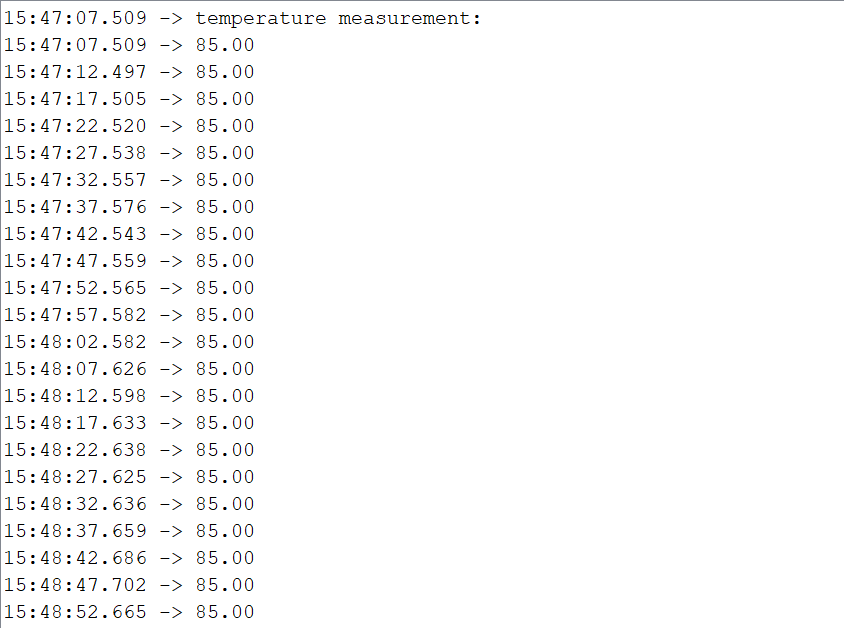
so that is not my code issue...
Can you heat or cool the sensor to see if the output changes?
Yes, I try it, but nothing happened, it always stays at 85, and on the code website, the author has this:" Information: If your sensor returns "85" (degrees C), it is "saying" "Something is wrong." (85 is a rogue value)"
Something wrong but I did not where is the problem.
This topic was automatically closed 180 days after the last reply. New replies are no longer allowed.