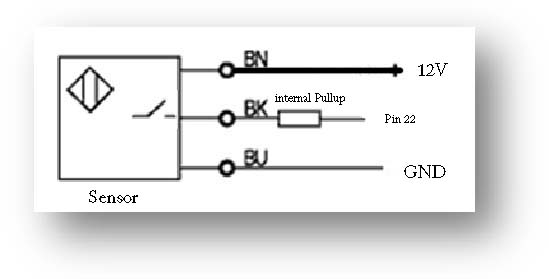
I started a new project and decided to use and IR optical sensor for a start stop switch instead of the standard cherry switch to avoid all the pullups and debouncing code. The problem I'm having is the registering of the high and low, in order for me to make a stepper move I have to hold the switch down to break the IR beam the entire time I want the stepper to move and I'm not sure how code it so I don't have to hold it the whole time.(should have stuck with what I know lol).
The second problem has to do with the Proximity sensor and counting the highs and lows, I previously used a hall sensor to do this but with all the extra steps I went through to use it I thought the Proximity switch would be an easier thing to incorporate. The counting doesn't seem to work the same between the two, if I pass by the hall sensor the code will add a count in the serial screen and it only adds a count when the magnetic field changes but when I try this with the Proximity sensor if I leave the triggering arm in front of the sensor it will continuously count until I move it away from the sensor. When I try to incorporate the counting code into the rest of the program it doesn't count at all either so I have something else interfering.
If anyone can nudge me in the right direction it would be appreciated.
//FOOT SWITCH GLOBALS
const int footswitch = 17;
int footswitchState = 1;

//COUNTER
int staplercounter = 0;
int staplercountercurrentState = 0;
int staplercounterpreviousState = 0;
int staplerSensorcounter = 22;

//Proximity placement sensor
int SwingArmHome = 18;
int SwingArmDown;


#include <AccelStepper.h>
AccelStepper SwingArm(AccelStepper::DRIVER, 32, 33);
AccelStepper Stapler(AccelStepper::DRIVER, 34, 35);


void setup() {
  pinMode(footswitch, INPUT_PULLUP);
  pinMode(staplerSensorcounter, INPUT_PULLUP);
  pinMode(SwingArmHome, INPUT_PULLUP);

  SwingArm.setMaxSpeed(1000);
  Stapler.setMaxSpeed(1000);

}

void loop() {

  Counter();

  SwingArmDown = digitalRead(SwingArmHome);
  staplercountercurrentState = digitalRead(staplerSensorcounter);
  footswitchState = digitalRead(footswitch);

  if (footswitchState == LOW && SwingArmDown == HIGH) {
    SwingArm.move(1);
    SwingArm.setSpeed(600);
  }

  if (footswitchState == LOW && SwingArmDown == LOW) {
    Stapler.setSpeed(800);
    Stapler.move(200);
  }
  SwingArm.runSpeedToPosition();
  Stapler.runSpeedToPosition();

}
void Counter() {
  staplercountercurrentState = digitalRead(staplerSensorcounter);     //used to time all events
  if (staplercountercurrentState != staplercounterpreviousState) {    //check the count and add 1
    if (staplercountercurrentState == 1) {
      staplerSensorcounter = staplerSensorcounter + 1;
      Serial.println(staplerSensorcounter);
    }
  }
  staplercounterpreviousState = staplercountercurrentState;
}
Optical sensorhttps://www.amazon.com/gp/product/B07JMDLD84/ref=ppx_yo_dt_b_search_asin_title?ie=UTF8&psc=1
Proximity
https://www.amazon.com/gp/product/B073XDWWHW/ref=ppx_yo_dt_b_search_asin_title?ie=UTF8&psc=1