hi everyone, I have a plotter pen that does not want to work well, I have tried several grbl and only one makes me move the axes well except the Z axis which when pressed I only receive a small impulse from the X and Y cores. I do not know what to do. help
Which Arduino are you using - an UNO?
Which motor drive board are you using?
Can you provide a sketch/drawing of how you have wired up the motors etc.


I don't know if you mean different GRBL design files or if you are referring to various GRBL driver programs that you have loaded onto the UNO?
I assume you are referring to the X and Y axes?
Can you describe this in a different way as I am unsure what you are trying to say.
After a brief search, It seems that the Z axis (pen up & down) is controlled via a small RC servo.
Did your plotter come with any test files?
EDIT: you may get more help if you move your post to the Motors & CNC section of the forums.
I have tried several grbl drivers and only one makes me move the X and Y axes correctly. the Z axis is controlled by a servo that does not move.
To help us can you explain what you mean by a "grbl driver" please? Is that an instantiation of GRBL on a a board, and if so which version? Or is it a different board? Of do you mean a stepper driver?
Did you connect up the servo correctly? I couldn't make out much from that "assembly" video when I viewed it on my tablet. Did you not get a paper manual with it?
Do you need to "calibrate" the servo positions for pen up and pen down?
What is the servo wired to? That board looks like a shield for running four steppers - is it intended to run a servo too?
I think it is connected well, have you seen the photo?
this is the only one that moves the X and Y axes correctly GitHub - arnabdasbwn/grbl-coreXY-servo: grbl 0.9i with Servo Motor support and CoreXY configuration Used For Crazy Engineer's Drawing Robot
It's not obvious from either photo what the servo is connected to - please could you take a more relevant photo or otherwise explain?
What does that mean exactly?
Here's a section of a still from the "assembly" video you provided from about 13:23.
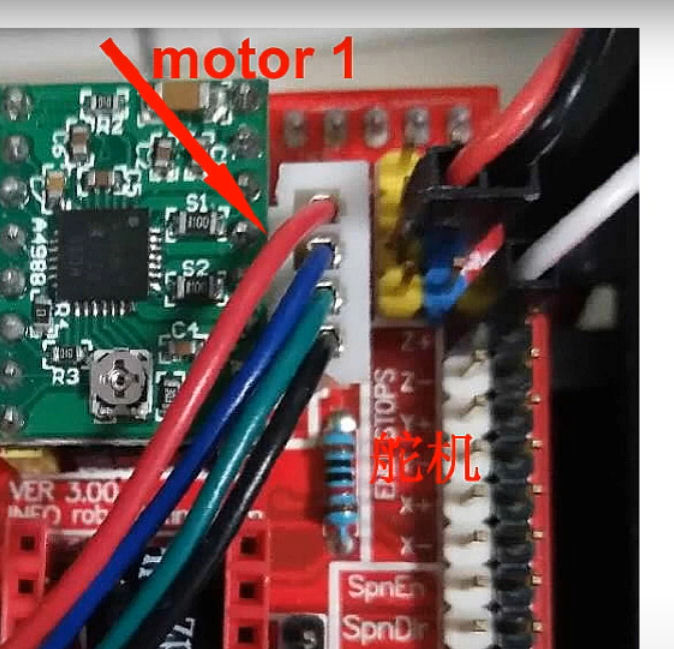
The red and black wires (power for the servo motor and electronics) look to be plugged onto the +5V and GND header pins. The white wire (servo PWM signal?) looks to be plugged into the Z endstop pin, which looks like it should appear on what is pin 11 of an UNO.
That would seem compatible with the GRBL code you linked to in post #14. There's one paragraph near the start of the description that says:
Use the PIN D11 to drive the servo. Use the commands M03 Sxxx (xxx between 0 and 255) to rotate the servo between 0-180. The command M05 turn the servo to zero degrees.
I'm not even a GRBL amateur so it's now at the limit of my experience. Hopefully somebody else can guide you further.
I still think that there would be settings somewhere that define the servo position for what would be pen up and pen down.

If the white wire is on SpnEn (Spin Enable), then it looks like that is connected to pin D12 on the UNO. I would think you would need to modify the GRBL code on the UNO to account for this.
Or you could put it back on Z+ and the GRBL code from your post #14 should work without any changes.
Maybe a GRBL guru will jump in and provide you with a simple g-code file that simply raises and lowers the pen to verify your wiring - if that is how it works as we're now straying beyond my area of knowledge.
Hi,
Write some code that JUST operates the servo.
At this stage lets check that the servo hardware works.
Let's get back to basics.
So have you tried it on Z+, sounds logical, its Z axis.
Tom.. 


PS. Forget GRBL for the moment.
i don't know how to write code 
hope someone help me
What’s your power supply ?
power supply 12V 2A
[testing manual.pdf|attachmen
CDLC7 assembly manual uno cnc 6MM M5.pdf (5,3 MB)
testing manual.pdf (1,5 MB)
t](upload://ja4XDxFybFcM2CJa7XXKcgWa0pA.pdf) (1,5 MB)
hello all I'm looking for a grbl file to make this plotter work. I am attaching the model
How far did you get when you followed the steps in the testing manual you just shared with us?