Hee Guys,
i think i need help, small introductions name is Nigel 30 years old and I am from Holland. I am mechanical engineer so please be kind haha I am not a software pro or anything but I do like Arduino’s.
Goal
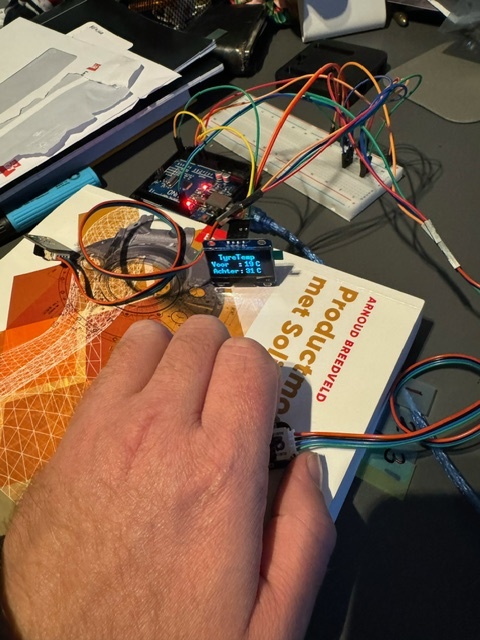
current project is for racing motorbikes, the goal (for now) is to display two int value’s (infrared temperature) for my front and rear tyre on a 1.3 inch Oled screen.
Current hardware
- Two DFRobot MLX90614 infrared sensors
- Arduino uno (for now later nano for on the race bike)
- 1,3 inch Oled Cheap copy of heltec and with an SH1106 something chip I think
Wiring diagram
- Just the o led and two sensor 5V supply en GND
- Everything runs true the SCL and SDA port
Problems
- Temp sensors are not giving a separate value but copy the value
- If I do not adjust the clock speed sensor value s will be all over the place
Code see also below
- I use the u8g2 lib because SH1106 chip and it is very well documented
- Everything works well when I used just the sensors and the LCD with I2C
-
i tried translating it behind the // in english i hope that makes it more clear
thanks in advance
#include <Arduino.h>
#include <SPI.h>
#include <Wire.h>
#include <U8g2lib.h>
#include <DFRobot_MLX90614.h>


// constructor code for SH1106 chip 128x64 size OLED com protocol 1 and comunnicate with I2C
// Also no rotations needed use the U8X8 no pins diffined for comunication

U8G2_SH1106_128X64_NONAME_F_HW_I2C u8g2(U8G2_R0, /* reset=*/ U8X8_PIN_NONE);

#define MLX90614_I2C_ADDR 0x5A                                // mlx9614 Adres Front tyre
#define MLX90614_I2C_ADDR 0x5B                                // mlx9614 Adres Rear tyre
 DFRobot_MLX90614_I2C sensorvoor(MLX90614_I2C_ADDR, &Wire);   // instantiate an object to drive the sensor (no clue bud it works)
 DFRobot_MLX90614_I2C sensorachter(MLX90614_I2C_ADDR, &Wire); // instantiate an object to drive the sensor (no clue bud it works)

  int objectTemp;                                          // Front tyre sensor value
  int objectTemp2;                                         // Rear tyre sensor value

void setup() {
  Serial.begin(9600);                                       // Start seriele monitor
  u8g2.setBusClock(100000);                                 // Set bus speed
  u8g2.begin();                                             // Start display

  sensorvoor.begin();                                       // Start front sensor
  sensorachter.begin();                                     // Start rear sensor

  Serial.println("setup klaar");                            // serial print Setup finisht
}

void loop() {
  delay(2000);

  int objectTemp  = sensorvoor.getObjectTempCelsius();       // Read sensor value for Front tyre and save it in Celcius
  int objectTemp2  = sensorachter.getObjectTempCelsius();    // Read sensor value for Rear tyre and save it in Celcius

  Serial.print("Voorband : ");  Serial.print(objectTemp);  Serial.println(" °C");
  Serial.print("Achterband :"); Serial.print(objectTemp2); Serial.println(" °C");


 u8g2.firstPage();
   u8g2.clearBuffer();
  u8g2.setFont(u8g2_font_ncenB14_tr);            // set font
  u8g2.setCursor(0, 15);
  u8g2.print ("Voor");                           // its the dutch word for Front
  u8g2.setCursor(100, 15);
  u8g2.print(objectTemp);
    u8g2.setCursor (0, 50);
  u8g2.print ("Achter");                         // its the dutch word for Rear
  u8g2.setCursor (100, 50);
  u8g2.print(objectTemp2);


  u8g2.sendBuffer();
}
 Solution button at the bottom of the reply that answered your question, as shown in