Problems with Microduino

Hi! I'm experienced with coding (software only) but struggle with hardware and things like Arduino. I cannot upload sketches or burn bootloader to my Microduino. Reading off of this:

Hardware

Microduino Itty Bitty City (mCookie)

Code problems

I don't think anyone needs the code (just empty setup and loop functions), ask me for it if you want it. But there are some errors.

When trying to burn a bootloader:

Arduino: 1.6.7 (Windows 10), Board: "Microduino/mCookie-Core (168pa), Atmega168pa@16M,5V"

avrdude: stk500_recv(): programmer is not responding
avrdude: stk500_getsync() attempt 1 of 10: not in sync: resp=0x03
avrdude: stk500_recv(): programmer is not responding
avrdude: stk500_getsync() attempt 2 of 10: not in sync: resp=0x03
avrdude: stk500_recv(): programmer is not responding
avrdude: stk500_getsync() attempt 3 of 10: not in sync: resp=0x03
avrdude: stk500_recv(): programmer is not responding
avrdude: stk500_getsync() attempt 4 of 10: not in sync: resp=0x03
avrdude: stk500_recv(): programmer is not responding
avrdude: stk500_getsync() attempt 5 of 10: not in sync: resp=0x03
avrdude: stk500_recv(): programmer is not responding
avrdude: stk500_getsync() attempt 6 of 10: not in sync: resp=0x03
avrdude: stk500_recv(): programmer is not responding
avrdude: stk500_getsync() attempt 7 of 10: not in sync: resp=0x03
avrdude: stk500_recv(): programmer is not responding
avrdude: stk500_getsync() attempt 8 of 10: not in sync: resp=0x03
avrdude: stk500_recv(): programmer is not responding
avrdude: stk500_getsync() attempt 9 of 10: not in sync: resp=0x03
avrdude: stk500_recv(): programmer is not responding
avrdude: stk500_getsync() attempt 10 of 10: not in sync: resp=0x03
Problem uploading to board.  See http://www.arduino.cc/en/Guide/Troubleshooting#upload for suggestions.

  This report would have more information with
  "Show verbose output during compilation"
  enabled in File > Preferences.

That says Windows 10 but I'm actually using Windows 11 (insiders). Arduino IDE is the one for Microduino. Programmer is 'AVR ISP'. If I use 'AVRISP mkII' the error is

avrdude: usbdev_open(): did not find any USB device "usb"

When trying to upload:

Same as above log but 'resp=0xfd', 'resp=0x89' and some others.

Schematics or circuit diagrams

mBattery with Core module on top. I had some trouble with the light on the module not turning on when I turn the mBattery on, but wiggling the module until the pins connected made the (red) light turn on. I suspect that the pins may not be connecting properly. The reset button doesn't seem to do anything.

Research

I have already done a lot of research on this, but Microduino just doesn't have that much support.

About you

No problem with English, very limited experience with microcontrollers and electronics.

Other notes

I have tried using Arduino CLI, but it seems to not support Microduino that well, even with this.

Thanks in advance!

on the Arduino IDE, what did you select under Tools->Board?

why are you concerned with programming the bootloader?

on the Arduino IDE, what did you select under Tools->Board?
Microduino/mCookie-Core (328p)
why are you concerned with programming the bootloader?
Did some research, thought it was corrupt or something

under Tools->Port, do you see a different port (e.g. com2) with the board connected with usb and when not?

When connected with USB: COM5
When not connected at all: 'Port' is disabled

Does anyone know where I can find a minimal program like Blink to test this?

Blink is one of the examples that comes with the Arduino IDE. It's under File->Examples->01.Basics.

Your opening post refers to a board with a 168PA.

Please post a link to the Microduino.

Their site is down, (microduino.cc) but here's a video from them.

image

This is one of the steps of the official Microduino instruction booklet. It doesn't specify which processor to use though. I've tried uploading with the 328p option and same error.

EDIT: Never mind, they have moved to here.

This doesn't work with the Microduino. It seems to be using an Adafruit Neopixel library.

Thanks for the link.

You can not burn the bootloader via USB, you need a dedicated programmer (or other Arduino) for that.

What goes wrong when you do a normal upload (e.g. an empty sketch)? If it fails, please enable verbose output during upload and disable verbose output during compilation under file -> preferences in the IDE. Try to upload again and post the results here. Maybe we can figure out from that what is going wrong.

Do you have a schematic for the the USBTTLC module? Or can you tell us if it has any LEDs on it and how many?
Do you have a multimeter?

It doesn't.

It doesn't.

I wasn't talking about the Blink builtin sketch, but instead the Microduino ColorLED parts.

What goes wrong when you do a normal upload (e.g. an empty sketch)? If it fails, please enable verbose output during upload and disable verbose output during compilation under file -> preferences in the IDE. Try to upload again and post the results here. Maybe we can figure out from that what is going wrong.

Although uploading works now with 'Arduino as ISP', (I now understand that I don't need to burn a bootloader), the 27 pins still connect very poorly.

Do you have a schematic for the the USBTTLC module? Or can you tell us if it has any LEDs on it and how many?

I don't know what a USBTTLC module is. Assuming that it is the mCookie Core, I don't have a schematic and there is 1 LED.

Do you have a multimeter?

Yes. I imagine this would help with solving the pin connecting issue.

EDIT: Uploading only works some of the time, so it may be the pin connecting issue.

EDIT 2:


This USBttlC? I don't have it and probably don't need it. But the mBattery works similarly right? Here's a page about the pin layout.

EDIT 3:

  • Bad connection between the Core module and mBattery (yellow battery)
    The gold pins between the Core module and mBattery may be bad, which results in being unable to program.
    Solution: Carefully clean the contacts (gold pins & gold pads) on both the Core module and mBattery with rubbing alcohol. Also check for defective pins or pads on both modules.

[from the wiki]

I'll try this and see if it works.

In which case you should install that library; you can use the library manager for that. I thought that you were talking about the suggested blink that was suggested in post #7.

I think that that is my mistake; I was talking about the mBattery that comes with the kit. That is what you connect to the PC as far as I understand it.

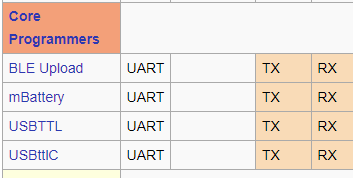
That only makes sense if the mBattery contains a programmer. The below however indicates that it internally connects to TX and RX and does not have a programmer.

You will have to sort that out (see your EDIT 3).

In which case you should install that library;

I used

#include <Adafruit_NeoPixel.h>

I think that that is my mistake; I was talking about the mBattery that comes with the kit. That is what you connect to the PC as far as I understand it.

I don't have a schematic for that.

That only makes sense if the mBattery contains a programmer. The below however indicates that it internally connects to TX and RX and does not have a programmer.

Your image didn't attach.

That does not install the library. Which version of the IDE do you use?

As far as I know, it did (check in two different browsers). But the description:
In the pinout that you provided is a section "Core programmers"; for the mBattery, it indicates that it uses TX and RX.

I cleaned all the pins and it seems to be working fine (so far). I'm so grateful that this 6 year old board still works. Thank you so much for the help! I'll reply if there are more problems.

And I still wanted to suggest to return it under warranty if you did not come right :joy:

Good luck with your experiments.

This topic was automatically closed 180 days after the last reply. New replies are no longer allowed.