The example below creates an object that integrates the board and the ATtiny, and has functions like ss.begin(), ss.pinMode(), and ss.digitalWrite() that instructs the ATtiny. How could I apply this to libraries such as the BMA4000 library (found on this page)?
The ATtiny1616 breakout doesn't have RX/TX pins. Could I use a software serial library? And again, how could I implement it so that the ATtiny receives the instructions and not the board it's connected to? The reason I need RX/TX pins is to connect to the BlueSMiRF, so I'm also inquiring if it's feasible to connect the ATtiny to the bluetooth board.
Can this ATtiny breakout board run without being connected to an Arduino board (assuming it's connected to power and ground), or does it need to be connected for the sketch to run?
I know that's a lot of questions, but any help or guidance would be greatly appreciated. Thank you.
/*
 * This example shows how to blink a pin on a seesaw.
 * It is written to use the built-in LED on the ATtiny817 breakout with seesaw.
 */

#include "Adafruit_seesaw.h"

Adafruit_seesaw ss;

#define BLINK_PIN 5

void setup() {
  Serial.begin(115200);

  while (!Serial) delay(10);   // wait until serial port is opened

  if(!ss.begin()){
    Serial.println("seesaw not found!");
    while(1) delay(10);
  }

  Serial.println(F("seesaw started OK!"));

  ss.pinMode(BLINK_PIN, OUTPUT);
}

void loop() {
  ss.digitalWrite(BLINK_PIN, LOW);   // turn the LED on (the LED is tied low)
  delay(1000);                       // wait for a second
  ss.digitalWrite(BLINK_PIN, HIGH);    // turn the LED off
  delay(1000);
}
Edit: I'm trying to upload sketches via UPDI but I'm getting the error: A programmer is required to upload
I have power and ground connected, as well as RX/TX connected to a 1k OHM resistor, which connects to the UPDI pin. Then in the Arduino IDE, I have the following parameters set:
Board: ATtiny
Chip: Attiny1616
Programmer: Serial UPDI: Slow 57600 baud
The Adafruit Attiny1616 board is pre-programmed with what they call the "seesaw" firmware.
This allows it to connect to an Arduino or CircuitPython board (via i2c), and act as a sort of "IO expander" chip.
As the Adafruit product page says:
Please note: The boards do not come with a bootloader. If you want to do development on seesaw (e.g. changing the configuration) you need a separate UPDI programming setup! The firmware we put on is available as this example sketch, compiled using the megaTinyCore.
Once you're using megaTinyCore, there is a Serial Port on the pins labeled 6 (RXD) and 7 (TXD), that will be usable as "Serial"
You will need a UPDI programmer to burn software other than the preinstalled seesaw firmware (if you burn the bootloader, you'll only need a USB/Serial adapter thereafter.)
Thank you for your response. Just to confirm, I need a UPDI programmer to burn MegaTinyCore onto the chip? And after doing so I can program the board like an Arduino board? Would I use the UPDI programmer to upload the sketch? What board would I have to select to upload a sketch to it?
Yes. Well, you only NEED the UPDI programmer for burning the bootloader and setting fuses, so you're not really burning MegaTinyCore. A UPDI programmer can be made from a USB/Serial dongle or other Arduino, relatively easily.
And after doing so I can program the board like an Arduino board?
Yes.
Would I use the UPDI programmer to upload the sketch?
Your choice. If your burn the bootloader, you can upload sketches via the serial port. Or you can use "upload using programmer" to upload sketches without needing the bootloader.
What board would I have to select to upload a sketch to it?
Once you've installed MegaTinyCore in the IDE, you'll have "Board" selections MegaTinyCore / "ATtiny3216/1616/1606/816/806/416/406 w/ Optiboot" and similar. Once those are set, you'll have additional menus for setting the exact chip type, and other options.
Thank you for all the help thus far. A couple of follow up questions: What pins would I need to connect from an Arduino board to the ATtiny1616 to burn the bootloader? And would I be able to use those same pins to upload a sketch afterwards, or do I need a USB to Serial cable for that? And what code exactly am I burning to the bootloader?
And would I be able to use those same pins to upload a sketch afterwards, or do I need a USB to Serial cable for that?
Those pins are all you need, if you select the board type without bootloader, or use "upload using programmer." If you select the Optiboot board version, then you can upload through the USB to Serial cable - Rx, Tx, Gnd, and perhaps RESET from DTR via a cap.
And what code exactly am I burning to the bootloader?
The "burn bootloader" command of Arduino has two functions:
Initialize the device fuses as appropriate for the Arduino environment and the settings in the Tools menu for the chip. For example, if you're using the bootloader, it will set the fuses on the tiny1616 with the correct "bootsize" fuse value.
(optionally) load optiboot_x into the bootloader section of the flash memory. See megaTinyCore/megaavr/bootloaders/optiboot_x at master · SpenceKonde/megaTinyCore · GitHub optiboot_x is a tiny serial bootloader that loads code over the serial port; on the new tiny devices, it will require that the sketch be "relocated" to the beginning of the "application section." (MegaTinyCore will do that automatically in the Arduino IDE, but it's something to be aware of if you were to want to use some other IDE.)
Okay, so if I understand correctly, first I need to connect the Arduino to the ATtiny1616. What pin on the Arduino do I need to connect to the ATtiny UPDI pin? Then I set the chip to ATtiny1616 in the "tools" tab. Once that connection is made, I can press the burn bootloader button, and then moving forward any sketches I upload with that configuration will go to the ATtiny chip?
Edit: I was also wondering if I'd be able to use a Qwiic sensor and connect it to one of the Qwiic I2C ports on the ATtiny breakout board and use it's library just like a regular board.
After reading the linked documentation I'm still unsure as how to connect an Arduino to the ATtiny1616 to burn the bootloader. Any further clarification would be greatly appreciated. Thank you.
Edit: I found some clarification on the connection, however, I'm still unsure as what to upload to the Arduino. I found this repository made by the same creator as the link quoted, but the Arduino file itself is blank, so I'm not sure how or what to upload to my board.
I am looking into an alternative, which is to use a serial adapter as UPDI programmer. Does anyone know of one that is recomended? Or would it be easier to use the Optiboot/USB to Serial method?
I also read something about connecting a pin from reset to ground on an Arduino board and then connecting RX/TX and uploading serially. Is that feasible?
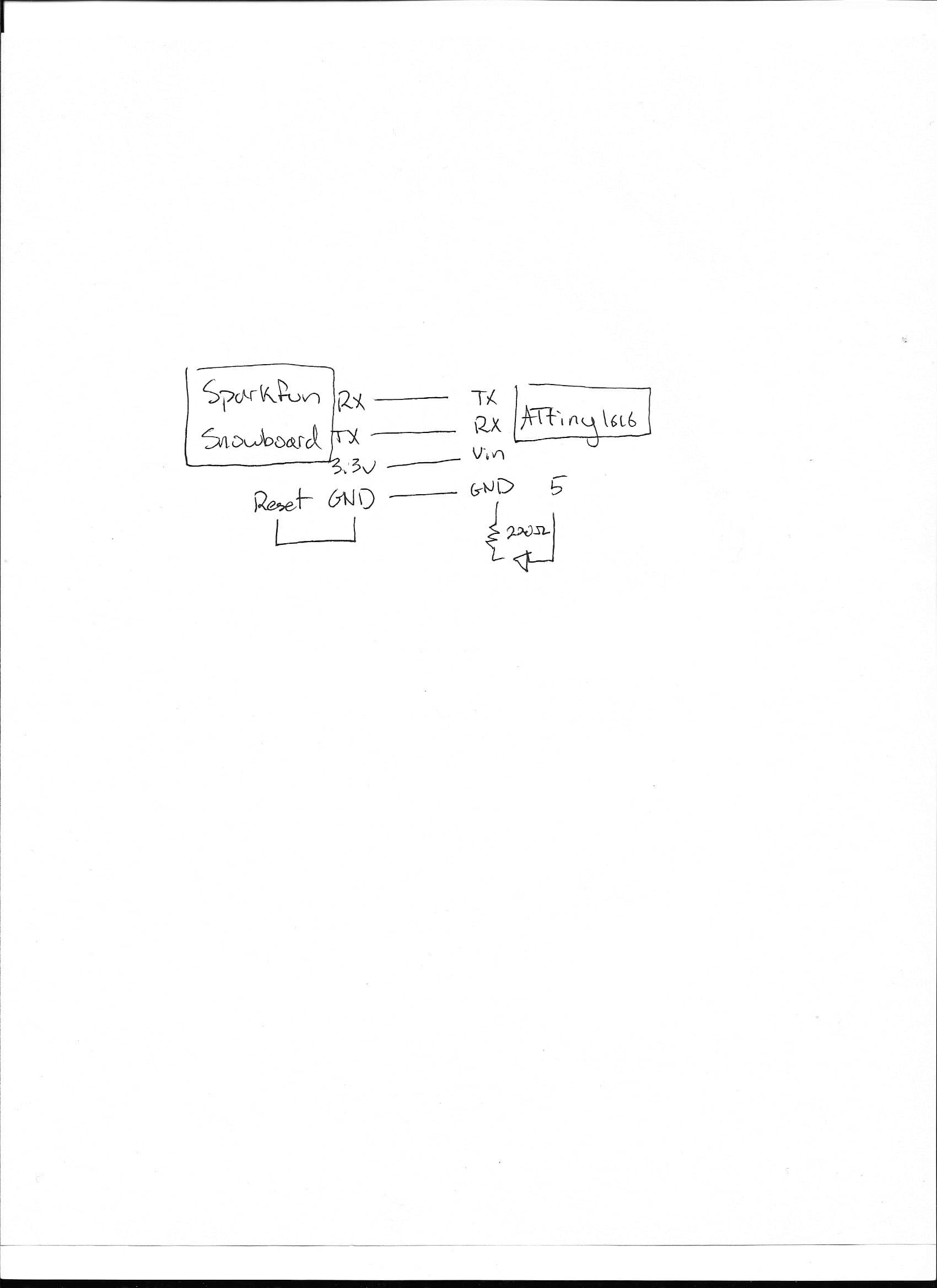
Below is a picture, schematic, and code for my attempt to program the ATtiny. I get the errors, either "programmer is not responding" or "a programmer is required to upload" when uploading. Did I miss a step?
I narrowed down that I need to select 1616 w/ Optiboot for the board. However, when uploading I get the error:
avrdude: stk500_recv(): programmer is not responding
avrdude: stk500_getsync() attempt 10 of 10: not in sync: resp=0x00
What am I missing?
Edit:
I found another method which is using the Arduino as a UPDI programmer. I am using this firmware and getting an error uploading to my Arduino compatible board:
Compilation error: avr/io.h: No such file or directory
Does anyone know why this would be?
Another update: Upon using a board with an Atmega chip, I get a different error:
Compilation error: 'UCSRHOST_USARTA' was not declared in this scope
There you said that you did hit "burn bootloader ". If that succeeded then , from that point on, you then use an unmodified usb/uart adaptor connected to the TX/RX of the attiny1616 (but crossed) to load sketches. Loading a bootloader on this device has the effect of repurposing the updi pin as a reset pin and thus prevents further updi programming. A 12volt pulse on the reset/updi pin restores its original function but care is required not to ruin any connected devices. On such small low pin count devices some recommend not using a bootloader and loading sketches using updi.
Oh Yes, it appears to be correct that the UPDI pin still remains after loading a bootloader, contrary to what I said. Reading this makes me glad that I have not used the bootloader on the small TinyAVR devices.
Thank you for the responses. I'm not totally sure if it's burned fully because from what I remember;I terminated the burning of the bootloader. I'm not sure why I tried burning the bootloader in the first place but I'd like to reset the chip and connect via USB-Serial to UPDI.
When uploading the sketch however, I get this error:
pymcuprog.pymcuprog_errors.PymcuprogError: UPDI initialisation failed
Using w/Optiboot I get this error:
avrdude: stk500_getsync() attempt 10 of 10: not in sync: resp=0x20
An error occurred while uploading the sketch
I suggest you try the option without the bootloader first, get that working say with the blink sketch adapted for your chosen led pin then, if required, look at using the bootloader. That is, when you select the board, select the attiny1616 without the bootloader.
The Adafruit usb adaptor you have purchased has a 3v3 level on its pins because it is intended for a raspberry pi etc. You should therefore try powering the attiny1616 also at 3v3.
If you still have trouble, include a screenshot of the Tools menu in the IDE and the latest picture of your wiring.
How have you connected that external green led ? Are you using an "unused" pin as a connector ? Remember that by default there is already software (seesaw?) loaded on that attiny1616 which may use those pins.
The power pin of that USB to TTL Serial Cable provides 5v but the pins are 3v3. How have you connected the voltage regulator solder jumper on the ATtiny1616? Is the onboard 3v3 regulator in circuit or not ?
You are aware that that breadboard has split power rails ?
What sketch have you attempted to upload when you got the error message ?
Thank you for your response. I am using pin 5 for the LED, and I don't know if that is unused. I misunderstood your previous post; I thought the Serial Cable provided 3.3V. I am using a Mac, and the code I tried uploading is below:
From the picture (post #17), it is not clear how the external led is wired because it appears to be connected directly to two of the attiny1616 pins. It looks like 3 and 5 from this angle. I guess that the pin labelling on that breakout board refers to the Arduino pin numbers and not, say, the package pin numbers.
The TX and RX pins on that Serial device are 3v3 (that is they swing between 0 and 3v3). The power lead is 5v because it is directly derived from USB on the host Mac. What I don't know is if this is important but, because you are having such trouble, one thing to try is run the ATtiny1616 at 3v3 instead of 5v. Since the ATtiny1616 had an onboard 3v3 regulator it should be easy enough to try.