Hello,
I want to configure this RS485 Soil moisture and Temperature sensor with ESP Wroom 32, also I've an rs485 module. can somebody pls help me with the code and wiring interface.
This is my sensor,
Hello,
I want to configure this RS485 Soil moisture and Temperature sensor with ESP Wroom 32, also I've an rs485 module. can somebody pls help me with the code and wiring interface.
This is my sensor,
I moved your topic to an appropriate forum category @lums1.
In the future, please take some time to pick the forum category that best suits the subject of your topic. There is an "About the _____ category" topic at the top of each category that explains its purpose.
This is an important part of responsible forum usage, as explained in the "How to get the best out of this forum" guide. The guide contains a lot of other useful information. Please read it.
Thanks in advance for your cooperation.
Search these forums for NPK sensor and you will find lots of help. Make sure that you have the datasheet from the manufacturer that details the comms messages as they do vary amongst the various NPK sensors seen here.
Thanks for replying mark, I did checked them already but unfortunately i didn't get any leads from them.
I picked this code:
#include <SoftwareSerial.h>
#define RE 7

#define DE 6
const uint32_t TIMEOUT = 500UL;
const byte moist[] = {0x3C, 0x61, 0x05, 0x11, 0xDD, 0xA4};

const byte temp[] = {0x01, 0x03, 0x00, 0x01, 0x00, 0x01, 0xD5, 0xCA};

const byte EC[] = {0x01, 0x03, 0x00, 0x02, 0x00, 0x01, 0x25, 0xCA};

const byte PH[] = {0x01, 0x03, 0x00, 0x03, 0x00, 0x01, 0x74, 0x0A};
byte values[11];

SoftwareSerial mod(2, 3); // Rx pin, Tx pin
void setup() {

//  Serial.begin(9600);

Serial.begin(4800);

mod.begin(4800);

pinMode(RE, OUTPUT);

pinMode(DE, OUTPUT);
delay(500);

}
void loop() {

uint16_t val1, val2, val3, val4;
Serial.println("Moisture: ");

val1 = moisture();

float Val1 = val1 * 0.1;

delay(1000);

//Serial.print(val1);

Serial.print(Val1);

Serial.println(" %");

Serial.println("-----");

//delay(1000);
Serial.println("Temperature: ");

val2 = temperature();

float Val2 = val2 * 0.1;

delay(1000);

//Serial.print(val2);

Serial.print(Val2);

Serial.println(" *C");

Serial.println("-----");

//delay(1000);
Serial.println("Conductivity: ");

val3 = conductivity();

delay(1000);

Serial.print(val3);

Serial.println(" us/cm");

Serial.println("-----");
Serial.println("Ph: ");

val4 = ph();

float Val4 = val4 * 0.1;

delay(1000);

//Serial.print(val4);

Serial.print(Val4);

Serial.println(" ph");

Serial.println("-----");
delay(5000);

}
int16_t moisture() {

uint32_t startTime = 0;

uint8_t  byteCount = 0;
digitalWrite(DE, HIGH);

digitalWrite(RE, HIGH);

delay(10);

mod.write(moist, sizeof(moist));

mod.flush();

digitalWrite(DE, LOW);

digitalWrite(RE, LOW);
startTime = millis();

while ( millis() - startTime <= TIMEOUT ) {

if (mod.available() && byteCount < sizeof(values) ) {

values[byteCount++] = mod.read();

printHexByte(values[byteCount - 1]);

}

}

Serial.println();

return (int16_t)(values[4] << 8 | values[5]);
}
int16_t temperature() {

uint32_t startTime = 0;

uint8_t  byteCount = 0;
digitalWrite(DE, HIGH);

digitalWrite(RE, HIGH);

delay(10);

mod.write(temp, sizeof(temp));

mod.flush();

digitalWrite(DE, LOW);

digitalWrite(RE, LOW);
startTime = millis();

while ( millis() - startTime <= TIMEOUT ) {

if (mod.available() && byteCount < sizeof(values) ) {

values[byteCount++] = mod.read();

printHexByte(values[byteCount - 1]);

}

}

Serial.println();

return (int16_t)(values[4] << 8 | values[5]);
}
int16_t conductivity() {

uint32_t startTime = 0;

uint8_t  byteCount = 0;
digitalWrite(DE, HIGH);

digitalWrite(RE, HIGH);

delay(10);

mod.write(EC, sizeof(EC));

mod.flush();

digitalWrite(DE, LOW);

digitalWrite(RE, LOW);
startTime = millis();

while ( millis() - startTime <= TIMEOUT ) {

if (mod.available() && byteCount < sizeof(values) ) {

values[byteCount++] = mod.read();

printHexByte(values[byteCount - 1]);

}

}

Serial.println();

return (int16_t)(values[4] << 8 | values[5]);
}
int16_t ph() {

uint32_t startTime = 0;

uint8_t  byteCount = 0;
digitalWrite(DE, HIGH);

digitalWrite(RE, HIGH);

delay(10);

mod.write(PH, sizeof(PH));

mod.flush();

digitalWrite(DE, LOW);

digitalWrite(RE, LOW);
startTime = millis();

while ( millis() - startTime <= TIMEOUT ) {

if (mod.available() && byteCount < sizeof(values) ) {

values[byteCount++] = mod.read();

printHexByte(values[byteCount - 1]);

}

}

Serial.println();

return (int16_t)(values[4] << 8 | values[5]);
}
void printHexByte(byte b)

{

Serial.print((b >> 4) & 0xF, HEX);

Serial.print(b & 0xF, HEX);

Serial.print(' ');

}
but didn't get any output.
additionally, I used Arduino Uno with this code instead i want to use ESP32.
Do you have it wired this way:
Red -> 5V
Black -> GND
Yellow -> A
Blue -> B
Yes.
Do you mean everything was zero or nothing at all printed?
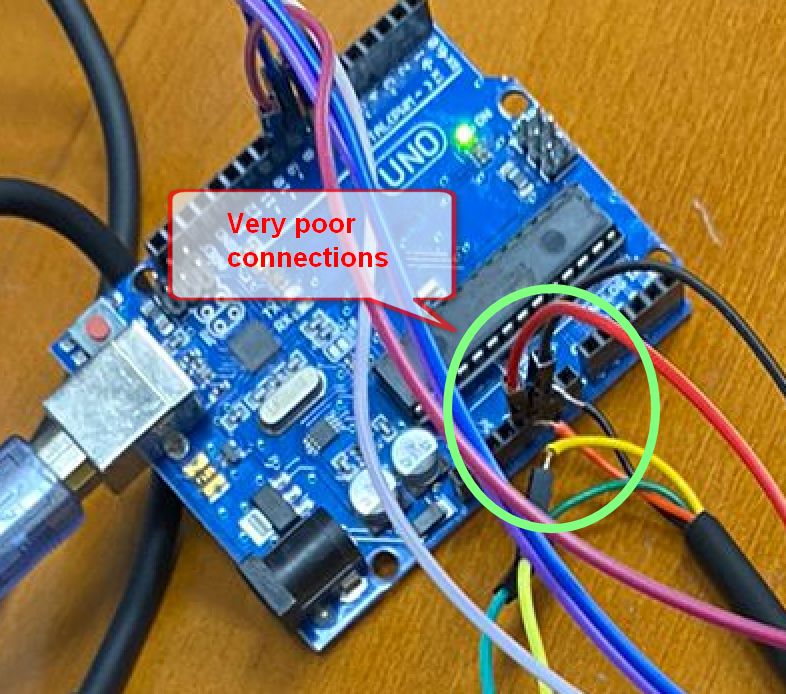
Can you show a picture of how you have things connected
When I run the program I get this:
Moisture:
Temperature:
Conductivity:
Ph:
Even with no response at all from the sensor, you should see some text on your serial monitor.
is it because of my sensor? or anything else.
Something else.
Disconnect the sensor and see if it prints something
You need to set the serial monitor baud to 4800
Show your connections to the RS485 module
Without seeing the datasheet for your particular NPK sensor, I can tell you that the moisture array is completely wrong. Assuming your device address is 01, then the array data should start 0x01, 0x03.
The temperature, electrical conductivity (EC) and pH are valid Modbus messages.
You really need the datasheet / user guide in order to know which parameter is in which register for your specific sensor.
Your RS485 connections are wrong
RS485 RO connects to Uno pin2
RS485 DI connects to Uno pin3