I am trying to get a example to work, from the book-" Arduino Workshop" , written by John Boxall
Circuit hookup on page 129, sketch on page 130.
Project involves hooking up Arduino to a 74HC595 shift resister IC, controlling a 5161AS-1 common cathode seven segment display module.
I have double checked what pins light up what segments of the seven segment display. Meaning-- I know I have the wires hooked from the shift register, to the display hooked up correctly. The shift register is powered correctly. The 7-segment display is grounded. The hookup from the Arduino to the shift register has been checked a number of times.
I copied the sketch below and it uploaded just fine. The 7-segment display does not light up any of the segments. Sketch is below. I can't understand what I am doing wrong?
[code] #define DATA 6 #define LATCH 8 #define CLOCK 10
int digits [] = {252,96,218,242,102,182,190,224,254,246,238,62,156,122,158,142};
void setup()
{
pinMode(LATCH,OUTPUT);
pinMode(CLOCK, OUTPUT);
pinMode(DATA, OUTPUT);
}
void loop()
{
int i;
for ( i=0 ; i< 16; i++)
{
digitalWrite(LATCH,LOW);
shiftOut(DATA,CLOCK, LSBFIRST, digits [i]);
digitalWrite(LATCH,HIGH);
delay(250);
}
for ( i = 0 ; i < 16 ; i++)
{
digitalWrite(LATCH, LOW);
shiftOut(DATA, CLOCK, LSBFIRST, digits[i]+1);
digitalWrite(LATCH, HIGH);
delay(250);
}
}
Thanks for trying to help me TomGeorge. I am taking your advice. I printed the 8 pages of "How to get the best out of this forum". I will read every word and try to understand. I will have several questions after I read the information closely. For now---TomGeorge---I have never understood how to use code tags---and still don't know after reading the instructions. Could you help me understand? I am guessing I could use them to edit my own code. Also guessing others can use them to edit my code, is that correct? What is strange to me is why would I be editing my own code? Seems to me I would just correct the code. Anyway, I don't fully understand code tags.
To answer your question--Yes, I have the 595 connected to the ground of the controller. I checked it with a volt meter and am getting 5 volts powering the 595.
I am trying to figure out how to post my schematic. I took a picture on my phone, and sent that to my email. From the email I downloaded the picture to my documents and a couple of other places. Could not figure out how to transfer schematic to the Forum post. Trying to drag the picture to copy did not work. I need a detailed description of how to get my schematic posted?
I read "How to get the best out of this Forum" 4 times. I am sure I will screw up, because I am just learning. My Arduino skill level is low. My Forum skill level is low. My computer skills are moderate. My electronic skill are very high.
Explain to me in real simple terms how to transfer the schematic picture I transferred to my computer. Thanks, sorry I am so dumb.
I can't even figure out how to get back to my post on the Forum. I am just replying through my email notice. When I go to the Forum how do I get back to my post?
I read the 8 pages of How to get the best out of this forum. I have read it over and over 4 times. I am sure I will still do something wrong, because I am not an expert like some of you guys. I am trying to reply to my post, besides not being able to find it, I have not figured out how to post a schematic diagram. I took a picture of my schematic on my phone, then sent it to my email. Then I sent it to my documents. Tried every way in the world, the schematic where I could put it on the post. Dragging the schematic picture did not work. My skill level in electronics is high. My skill level in Arduino is low. My skill level on the Forum is almost zero. I don't know how to get the schematic picture to where I can post it on the Forum.
Where there is a will there is a way. I finally figured out how to send the schematic.
The sketch uploads without error messages. The 7 segment display does not light up any of the segments. In other words nothing happens once it uploads.
What I expected it to do: Display in turn the digits 0 through 9, and then the letters A through F. The cycle repeats with the decimal-point LED turned on.
The int digits in the code above come from the display segment matrix. They are decimal values for the 8 bit values of the segments.
I am new to Arduino, and new to the Forum. I don't know how to post like the experts that have been doing it a long time. My skill level is high in electronics, but very poor in Arduino skills. But--I am trying my best without any training. Would like to know why this schematic and sketch does not work? Thanks for your help.
Then you should be familiar with techniques to troubleshoot a circuit. Have you tested each component in isolation? Test the display by connecting the common pin to ground with a resistor, then probe the other pins with a flying lead from 5V to check you can light each segment. Test the Arduino with a single 5mm led + resistor by uploading the blink sketch from the examples menu. Testing the shift register in isolation is a little more difficult. Maybe connect it to the Arduino and use your sketch above but connect one shift register output to a 5mm led + resistor.
By the way, given your high skill level in electronics, did you spot that there is something missing from this circuit? What component should be associated with any digital IC?
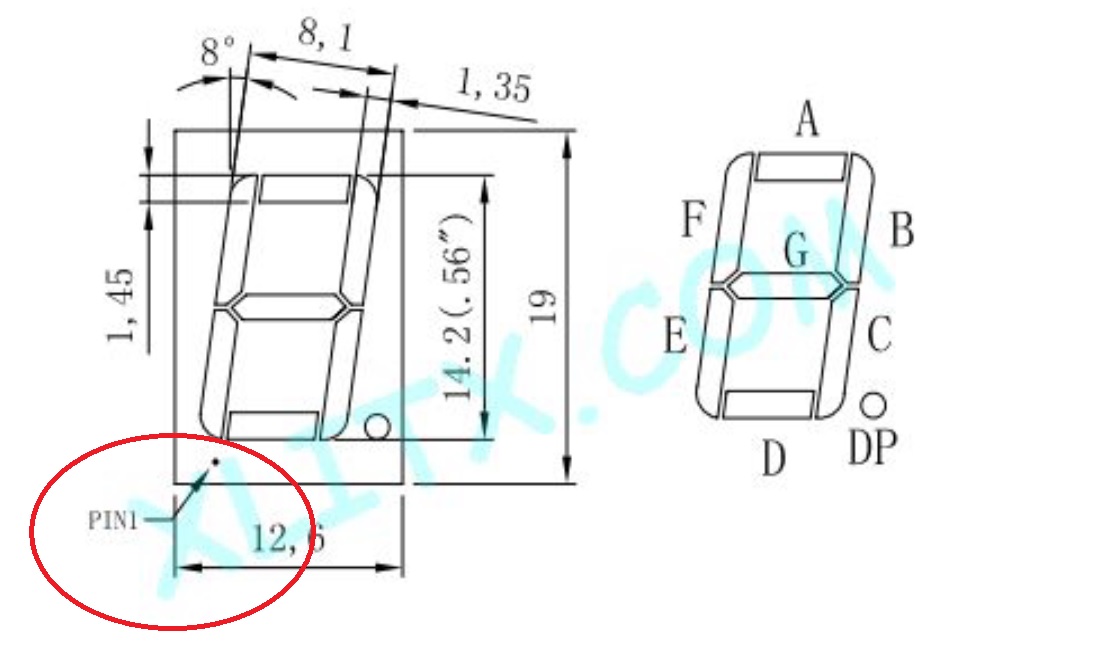
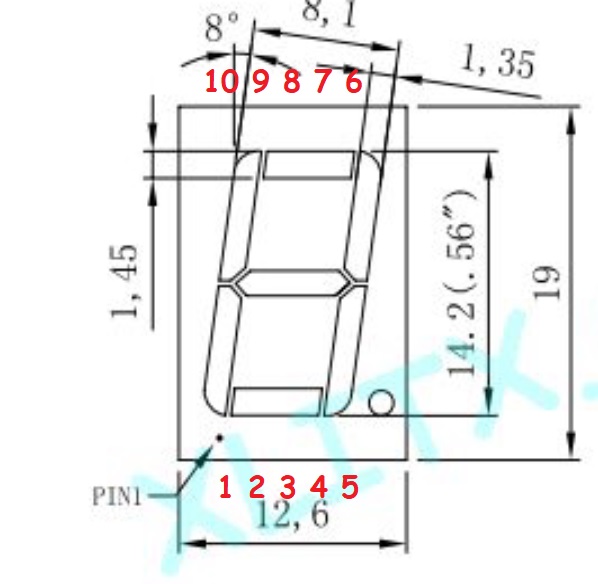
TomGeorge, your pin out is correct, but the actual pins are on the ends not the side. So the diagram of the 7 segment display is a bit deceiving. The order of the pins on the end where DP is from left to DP- pin 5 is (i,2,3,4,5). On the opposite end from right to left (6,7,8,9,10). I put power to each pin to make sure I was correct. I screwed up testing pin 7. I touched 5 volts to it without the 560 resistor in place. It burned the LED up immediately. The best way to understand the pin out is to power each pin. I looked to see if I had any more single 7 segment displays. I did have one, but it was common anode, and I need a common cathode.
I will order one, and get back with you guys once I install it and see what happens. I am thinking the reason it did not work is because I had the 7 segment pins in the wrong place.
Thanks for your comments PaulRB. Not sure how to accurately test the shift register, that would be a good thing for me to study how to. One component associated with any digital IC is a power supply. I made sure I had power and ground to both the 74HC595 and the 7 segment display. The 5 volts came from the Arduino.
I will get back soon. Thanks for everyone's help!
TomGeorge here is the diagram you requested. It is hand drawn. The pins are correct, because I lit every one individually-- of the LEDs with a 560 ohm resistor and 5 volts DC. I ordered some new parts because I burned up the only 7 segment display I had. Pin 7 is the one I burned up--the A. Burned because I put 5 volts to the LED without a resistor. Will get back to testing once I get the new parts. I am guessing the problem was I had the 7 segment display pins hooked up wrong. If that is not the case I am not sure how to check the shift register. I have a high and low pulse detector I made, but that would be difficult to check what the shift register does. If anyone knows a simple way to test a shift register--please come forward. I guess one might do it with a series of LEDs and a sketch on the Arduino. I will be back after I get the new parts.
I decided to do some testing before the new 7 segment displays come in. I want to make sure everything else is OK before I hook up the new 7 segment display.
To test, I decided to hook up 8 LEDs and run a simple code that would light them. The code runs through the Arduino, to a 74HC595 shift register, to the LEDs. When I ran the code, again, none of the LEDs lit up. That means something is either wrong with the 74HC595, or the Arduino, because I know the code is good and tested. I ran the BLINK sample on the Arduino, and the Arduino ran perfectly. That meant the 74HC595 has a problem. I looked at the 74HC595 data sheet concerning the maximum current of the 8 outputs, and the total allowed maximum current. The data sheet is somewhat confusing. I did a further google search and found many people concerned about the maximum current of the outputs and total of the 74HC595. I saw that many other people had similar problems. The data sheet says Vcc and ground can handle up to 70mA. Other sources say each output can handle up to 6mA, and the total is 35mA. This seems strange to me since 6mAX8 outputs=48mA If it is 70mA, each output could handle a little more than 8mA, because 8mAX8=64mA
When i ran the 7 segment display at some point I know many of the LEDs were on. Figuring what was happening with my setup: The red LEDs are 1.8 volts, therefore current for each one would be 5voltsX1.8/divided by my 680 resistor. This equals .0132, or 13 mA per output. There are 8 outputs, so 8 times 13mA= 104mA total. Far more than 70mA
I have concluded that I have exceeded the current limits of the 74HC595, meaning it is toast. I know it would be better to drive LEDs with transistors. This is the exact same problem I was having driving LEDs with the digital potentiometers. Examples in books and on the internet are not always accurate. From now on I am taking nothing for granted concerning driving LEDs. I should have read the data sheet closer where it recommends 6mA per output.
One other thing I might mention. In my original circuit power being provided by the Arduino it would be best to have a capacitor between +5V and ground, to smooth out any possible problems with the clocking of the 74HC595.
So----what am I going to do? I am going to install another 74HC595, with each resistor going to the 8 LEDs being very large. Making sure I don't exceed the current rating, and where I can see the LEDs light up.
No, that's not what I was referring to. Yes, every chip needs a power supply. The thing I am thinking of is related to that, but it's much more local to each chip.
EDIT:
...there it is!
Actually 2 caps, 2 different values, for 2 slightly different reasons.