SR04M-2 doesn't give any lecture

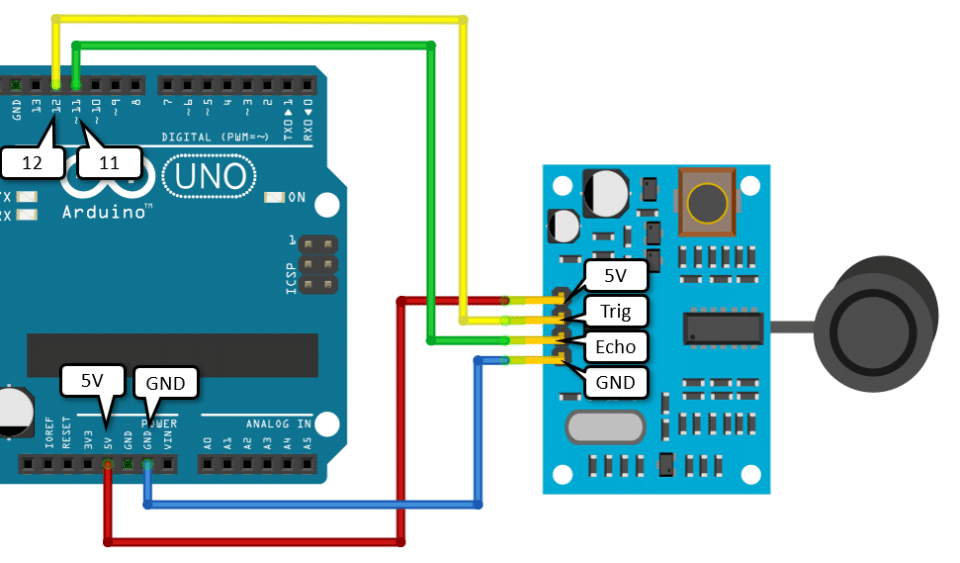
Hi guys, first post but eternal hell with this sensor. Already buyed 3 sensors, this time a SR04M-2 and definitly can't make it works.

I'm testing with a simple code and connection and all i get is 0.

Hope you can give me some light of knowledge :frowning:

const int trigPin = 12;
const int echoPin = 11;

void setup() {
  Serial.begin(115200);
  pinMode(trigPin, OUTPUT);
  pinMode(echoPin, INPUT);
}

void loop() {
  digitalWrite(trigPin, LOW);
  delayMicroseconds(5);

  digitalWrite(trigPin, HIGH);
  delayMicroseconds(10);
  digitalWrite(trigPin, LOW);

  long duration = pulseIn(echoPin, HIGH);
  long distance = duration * 0.034 / 2;

  Serial.print("Distance:");
  Serial.println(distance);
  delay(100);
}

Check your wiring. The code works.

Speaking of light! The documentation says a LED will light when the trigger pulse is received. Do you see the LED blink?

@xfpd I checked twice my wiring, seems to be all right. bought new wires and all :frowning:

@Paul_KD7HB it has a little red led blinking really fast. Also the sensor make this soft click very fast that i understand is how it works but keeps showing distance 0 no matter what i point

i made a video so you can check that should be working right: Imgur: The magic of the Internet
(sorry for the mess, have a really hard weeks)
EDIT: in the video i'm now using 11 / 10 for Tx/Rx

Does it look like this?
There should not be a resistor in the red square.

@jim-p yeah, seems to be the same. and yes, doesn't have a resistor there

The code can't be made any simpler but you might try making the 10us delay a little longer like 15us.

Are you sure you have that wired right.
I found this:


and

both are opposite of what you show.

I have also found references to non-intuitive TRIG/ECHO direction (send or receive). Try swapping TRIG and ECHO.

Try making some test with this code and thing that @jim-p says:

const int trigPin = 3;
const int echoPin = 2;

void setup() {
  Serial.begin(115200);
  pinMode(trigPin, OUTPUT);
  pinMode(echoPin, INPUT);
}

void loop() {
  digitalWrite(trigPin, LOW);
  delayMicroseconds(5);

  digitalWrite(trigPin, HIGH);
  delayMicroseconds(15);
  digitalWrite(trigPin, LOW);

  long duration = pulseIn(echoPin, HIGH);
  long distance = duration * 0.034 / 2;

  Serial.print("Distance:");
  Serial.println(distance);
  delay(100);
}

So now the blinking red light its steady and sensor dont "click" anymore,

lectures are this:

If you had it connected as you show in post #1 then Vcc and GND were backwards and that more than likely burned out the sensor

@jim-p image 1 was just a scheme and i was really careful to not switch vcc and ground, i know i can burn things that way. But if you not see anything wrong besides im gonna try with another sensor i have. But i want to know if the led should get seady, should blink, the sensor shoudl make this clip sound fast.

really getting on my nerves :frowning:

According to your last image, Vcc and GND are correct but the Trig and Echo are reversed.

well, that's good, so it should blink and make that noise. And still no lectures.

Maybe ff is the way

Maybe the underwater variety makes an audible ping?

I found a solution. This is a cheap clone module from Ali. I have exactly the same one. To get this to work I experimented with delay. The default value in the usage examples is 10us. So... my sensor works fine at 250us. It detects walls and monitor very well, but soft objects such as people's bodies detects sometimes. It does not detect carpeted floors at all. My working code:

// srt04-mode0

#define TRIGPIN 16
#define ECHOPIN 17

float duration, distance;
int result;

void setup() {
  Serial.begin(115200);
  pinMode(ECHOPIN, INPUT);
  pinMode(TRIGPIN, OUTPUT);
}

void loop() {
  digitalWrite(TRIGPIN, LOW);
  delayMicroseconds(2);

  digitalWrite(TRIGPIN, HIGH);
  delayMicroseconds(250); //10 originally

  digitalWrite(TRIGPIN, LOW);

  duration = pulseIn(ECHOPIN, HIGH);

  distance = (duration / 2) * 0.0343;
  result = round(distance) + 2; //calibration and round to cm

  Serial.print("distance: ");
  Serial.print(result);
  Serial.println(" cm");

  delay(100);
}