Stand-alone flash-programmer for ESP8266?

I am searching for a way to flash ESP-8266 devices without using the development IDE (Arduino or PlatformIO).
I want to switch between several versions of my program, which is available as a binary file for each version. No need to change source code and recompile/upload all the time...
Also when duplicating a design there is no need to bring up the development system when the binary is already compiled...

So is there some Windows/Linux tool that can be used over the serial port on the ESP8266 to flash it with fw bin file?

My boards are equipped with buttons for reset and flash selection, so I can set the chip into programming mode quite easily.

But what to use to talk to the ESP8266 to send the image over?

1 Like

Take a look at esptool.exe , it's possible that you already have it on your PC if you installed the esp board manager

OK thanks!
You were right, it is there. :slight_smile:

It was a while since I had to do this so I had forgotten about esptool...

When I use esptool towards the board it seems to work according to the feedback shown below, but when the device is restarted afterwards it is still running the same old (flawed) firmware!

What am I missing here?
BTW, my device is an ESP-07s, to which I have added the needed external circuitry.

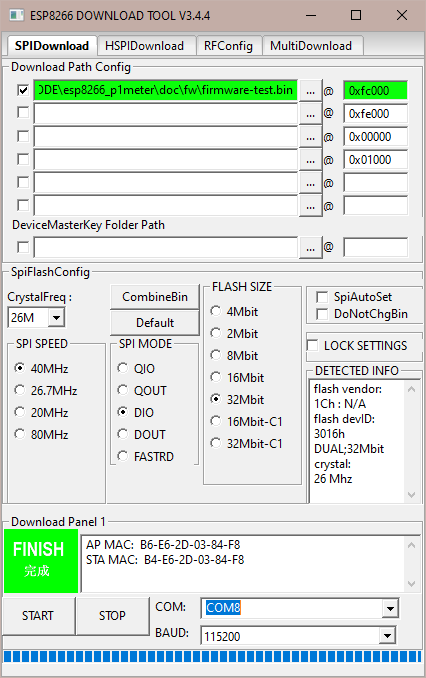
My settings are in the screenshot below, it came up like this when I started it so I just changed the bin file path and the com port number.
(I don't know what the numbers in the top right panels mean, they were there when I opened the application, maybe there should be other values, but what do they mean?)

And the output from the programming session (sorry about the length, I cut away most repeated lines) is shown below.

What is going on here? It seems to work but does not result in the transfer requested...
Same f/w after the burn. :frowning:

D:\Engineering\Arduino\esp8266_p1meter\doc\fw\firmware-test.bin
test offset :  1032192 0xfc000
case ok
************
check_res: (True, [[u'D:\\Engineering\\Arduino\\esp8266_p1meter\\doc\\fw\\firmware-test.bin', 1032192]])
is running :  False
************
set STOP FLG:  True
*********************
pic path: ./RESOURCE/IDLE_S.bmp
***********************
rep_path : C:\Programs\esptool\bin_tmp\downloadPanel1
offset: 1032192
filename: D:\Engineering\Arduino\esp8266_p1meter\doc\fw\firmware-test.bin
self.cp.disable_change_bin: 0
----------------
TEST!!!!
SELF.COMSTR: COM8
test running : False
BAUD 0 : 115200
test COM: COM8 <type 'unicode'>
test self._COM: COM8
test baud:  115200
======
CONNECT BAUD: 115200
============
test type : <type 'unicode'>
COM type: string
is open:  False
serial port opened
-----------
baud: 115200
root baud: 115200
-------------
===============
BAUD :  115200
===============
Connecting...
*********************
pic path: ./RESOURCE/SYNC_S.bmp
***********************
chip sync ok!
0x3ff00050: f8c40000
0x3ff00054: 02000384
0x3ff00058: 0800b000
0x3ff0005c: 00b4e62d
EFUSE MODE : 1
reg0:f8c40000
reg1:02000384
reg2:0800b000
reg3:00b4e62d
check_err_0: 0b
check_err_1: 00
check_err_2: 00
check_err_3: 02
check_err_4: 0b
====================
EFUSE NORMAL MODE
====================
=========================
CRC IN MODE 1:
crc_calc_res: 8
target crc val: 8
=========================
=========================
CRC IN MODE 1:
crc_calc_res: 196
target crc val: 196
=========================


==================
EFUSE LOG:
======================
EFUSE LOG:
---------------
REG0:F8C40000
REG1:02000384
REG2:0800b000
REG3:00B4E62D
----------------
====================
EFUSE NORMAL MODE
====================
EFUSE CHECK PASS...
48bit mac
debug:
-----------------------
 b4 e6 2d 03 84 f8
CUSTOM_ID: 00 80 00 00 00 0C 40 00
CUSTOM_ID: 00800000000C4000
-----------------------
crc_efuse_4bit: 0
crc_calc_4bit: 7
48bit mac
MAC AP : B6-E6-2D-03-84-F8
MAC STA: B4-E6-2D-03-84-F8
get mac res:  True
('tttest uuuuuuuuuuart : uart reg: ', 456)
(' baudrate: ', 115200)
get crystal: 26265600
get flash id : 0xff16301c
 manufacturer_id: 0x1c

 device_id: 0x3016

vendor: 28
mode: 48
size: 22
DEBUG!!!!
SET FLASH PARAMS
filename:  C:\Programs\esptool\bin_tmp\downloadPanel1\firmware-test.bin
offset :  1032192
Erasing flash in old style...
*********************
pic path: ./RESOURCE/DOWNLOAD_S.bmp
***********************
Traceback (most recent call last):
  File "download_panel_info.pyo", line 539, in update_pic
AttributeError: ESPDOWNLOAD instance has no attribute 'ESP_MAC_BT'
Took 1.26s to erase flash block
TEST !!!!
FAST BAUD: 115200
fACTORY REBOOT MODE:  False
Running Cesanta flasher (speed 115200)...
params:  ┬☺
MEMORY START
ELSE.... 26
P: OHAI
Writing 483328 @ 0xfc000... 0 (0 %)
1024 (0 %)
2048 (0 %)
....
481280 (99 %)
482304 (99 %)
483328 (100 %)

Wrote 483328 bytes at 0x000fc000 in 41.9 seconds (92.3 kbit/s)...
Leaving...
com closed
*********************
pic path: ./RESOURCE/FINISH_S.bmp
***********************

May be of some help.........

https://www.youtube.com/watch?v=du7aMBWMGcI

@BosseB any kind of modification to the flash of your controller comes with risk if you don't do it right.

I don't have the knowledge or experience with your device or software to be able to advise you with any level of confidence.

I did one quick google and I did come across a video that may be useful, the presenter is using a download tool that looks very much like the one you have shown.

hope this helps

Turns out that the top right panels were wrong!
I reset the top box to 0x00000 and erased the other 3, then the programming of flash started working and my new version of the f/w ran.

I can now get on with debugging on the device! :grinning:

So for now the case is closed.

You might start here, it may be all that's needed but bad news is that the forum lost member Crossroads to COVID.

This topic was automatically closed 180 days after the last reply. New replies are no longer allowed.