Table Tennis Score board

Hi I am very New to this forum, i am not technically sound person.
i want suggestions on my sketch on Table tennis score board.
my program giving error,
error
C:\Users\Srinivas\Documents\Arduino\ScoreBoard_rewrite\ScoreBoard_rewrite.ino:62:19: error: 'p1Buttonpress' cannot be used as a function
if(p1Buttonpress())
^
C:\Users\Srinivas\Documents\Arduino\ScoreBoard_rewrite\ScoreBoard_rewrite.ino:72:19: error: 'p2Buttonpress' cannot be used as a function
if(p2Buttonpress())
^
C:\Users\Srinivas\Documents\Arduino\ScoreBoard_rewrite\ScoreBoard_rewrite.ino:82:19: error: 'p3Buttonpress' cannot be used as a function
if(p3Buttonpress())
^
C:\Users\Srinivas\Documents\Arduino\ScoreBoard_rewrite\ScoreBoard_rewrite.ino:84:3: error: 'playerone' was not declared in this scope
playerone--;
^~~~~~~~~
C:\Users\Srinivas\Documents\Arduino\ScoreBoard_rewrite\ScoreBoard_rewrite.ino:84:3: note: suggested alternative: 'playerOne'
playerone--;
^~~~~~~~~
playerOne
C:\Users\Srinivas\Documents\Arduino\ScoreBoard_rewrite\ScoreBoard_rewrite.ino:92:18: error: 'p4Buttonpress' cannot be used as a function
if(p4Buttonpress())
^
C:\Users\Srinivas\Documents\Arduino\ScoreBoard_rewrite\ScoreBoard_rewrite.ino:94:2: error: 'playerone' was not declared in this scope
playerone--;
^~~~~~~~~
C:\Users\Srinivas\Documents\Arduino\ScoreBoard_rewrite\ScoreBoard_rewrite.ino:94:2: note: suggested alternative: 'playerOne'
playerone--;
^~~~~~~~~
playerOne

#include "LedControl.h"
#include <MD_MAX72xx.h>
#include "SevSeg.h"

bool p1Buttonpress;
bool p2Buttonpress;
bool p3Buttonpress;
bool p4Buttonpress;

LedControl lc = LedControl(12, 11, 10, 1);

int playerOne = 0;
int playerTwo = 0;

int rightdigit = 0;
int leftdigit = 0; 

#define switchOne 2
#define switchTwo 3
#define switchThree 4
#define switchFour 5

bool bPress = false;

int p1buttonState = 0;
int lastp1buttonState = 0;
int p2buttonState = 0;
int lastp2buttonState = 0;
int p3buttonState = 0;
int lastp3buttonState = 0;
int p4buttonState = 0;
int lastp4buttonState = 0;

void setup() 
{
  pinMode(switchOne, INPUT_PULLUP);
  pinMode(switchTwo, INPUT_PULLUP);
  pinMode(switchThree, INPUT_PULLUP);
  pinMode(switchFour, INPUT_PULLUP);

  lc.shutdown(0, false); // wake up Max7219
  lc.setIntensity(0, 7);
  lc.clearDisplay(0);

  lc.setDigit(0, 0, 0, false);
  lc.setDigit(0, 1, 0, false);
  lc.setDigit(0, 2, 0, false);
  lc.setDigit(0, 3, 0, false);
  lc.setDigit(0, 4, 0, false);
  lc.setDigit(0, 5, 0, false);
  lc.setDigit(0, 6, 0, false);
  lc.setDigit(0, 7, 0, false);
}

void loop() 
{
 p1buttonState=digitalRead(switchOne);
 p1buttonState=digitalRead(switchTwo);
 p1buttonState=digitalRead(switchThree);
 p1buttonState =digitalRead(switchFour);

 if(p1Buttonpress()) 
 {
  playerOne++;
  rightdigit=playerOne%10;
  leftdigit=playerOne%100/10;
  lc.setDigit(0,0,rightdigit,true);
  lc.setDigit(0,1,leftdigit,false);
  delay(5);
 }

 if(p2Buttonpress())
  {
  playerTwo++;
  rightdigit=playerTwo%10;
  leftdigit=playerTwo%100/10;
  lc.setDigit(0,2,rightdigit,true);
  lc.setDigit(0,3,leftdigit,false);
  delay(5);
 }

 if(p3Buttonpress()) 
 {
  playerone--;
  rightdigit=playerOne%10;
  leftdigit=playerOne%100/10;
  lc.setDigit(0,0,rightdigit,true);
  lc.setDigit(0,1,leftdigit,false);
  delay(5);
 }

if(p4Buttonpress())
 {
 playerone--;
 rightdigit=playerOne%10;
 leftdigit=playerOne%100/10;
 lc.setDigit(0,2,rightdigit,true);
 lc.setDigit(0,3,leftdigit,false);
 delay(5);
 }
  
  //Function call starts from hear.
  bool p1Buttonpress()
  {
    bool isPress = false;
    if(p1buttonState!=lastp1buttonState)
    {
      if(p1buttonState == LOW)
      {
        bPress = true;
        isPress = true;
        Serial.println("Player One Score");
      }
      else
      {
        Serial.println("off");
      }
        delay(50);
     }
     lastp1buttonState = p1buttonState;
     return isPress;
  }
  bool p2Buttonpress()
  {
    bool isPress=false;
    if(p2buttonState!=lastp2buttonState)
    {
      if(p2buttonState==LOW)
      {
        bPress=true;
        isPress=true;
        Serial.println("Player Two Score");
      }else
      {
        Serial.println("off");
      }
        delay(50);
    }
     lastp2buttonState=p2buttonState;
     return isPress;
  }
 bool p3Buttonpress()
  {
    bool isPress=false;
    if(p3buttonState!=lastp3buttonState)
    {
      if(p3buttonState==LOW)
      {
        bPress=true;
        isPress=true;
         Serial.println("Player One Score");
      }else
      {
        Serial.println("off");
      }
        delay(50);
     }
     lastp3buttonState = p3buttonState;
     return isPress;
  }

 bool p4Buttonpress()
  {
    bool isPress=false;
    if(p4buttonState!=lastp4buttonState)
    {
      if(p4buttonState==LOW)
      {
        bPress=true;
        isPress=true;
         Serial.println("Player Two Score");
      }else
      {
        Serial.println("off");
      }
        delay(50);
    }
     lastp4buttonState = p4buttonState;
     return isPress;
  }
 }

Welcome to the forum

You have p1buttonPress declared as a boolean variable

bool p1Buttonpress;

but you also have a function of the same name

 //Function call starts from hear.
  bool p1Buttonpress()

You never use the variable so delete it
The same goes for other variables/function names

Also :

playerone--;

The variable is actually named playerOne

do you see the problem in the more properly formatted listing below

void loop()
{
    p1buttonState=digitalRead(switchOne);
    p1buttonState=digitalRead(switchTwo);
    p1buttonState=digitalRead(switchThree);
    p1buttonState =digitalRead(switchFour);

    if(p1Buttonpress())
    {
        playerOne++;
        rightdigit=playerOne%10;
        leftdigit=playerOne%100/10;
        lc.setDigit(0,0,rightdigit,true);
        lc.setDigit(0,1,leftdigit,false);
        delay(5);
    }

    if(p2Buttonpress())
    {
        playerTwo++;
        rightdigit=playerTwo%10;
        leftdigit=playerTwo%100/10;
        lc.setDigit(0,2,rightdigit,true);
        lc.setDigit(0,3,leftdigit,false);
        delay(5);
    }

    if(p3Buttonpress())
    {
        playerone--;
        rightdigit=playerOne%10;
        leftdigit=playerOne%100/10;
        lc.setDigit(0,0,rightdigit,true);
        lc.setDigit(0,1,leftdigit,false);
        delay(5);
    }

    if(p4Buttonpress())
    {
        playerone--;
        rightdigit=playerOne%10;
        leftdigit=playerOne%100/10;
        lc.setDigit(0,2,rightdigit,true);
        lc.setDigit(0,3,leftdigit,false);
        delay(5);
    }

    //Function call starts from hear.
    bool p1Buttonpress()
    {
        bool isPress = false;
        if(p1buttonState!=lastp1buttonState)
        {
            if(p1buttonState == LOW)
            {
                bPress = true;
                isPress = true;
                Serial.println("Player One Score");
            }
            else
            {
                Serial.println("off");
            }
            delay(50);
        }
        lastp1buttonState = p1buttonState;
        return isPress;
    }

    ...

I guess user @springcs0 does not see it.

Your code is missing a closing brace here

  if (p4Buttonpress())
  {
    playerone--;
    rightdigit = playerOne % 10;
    leftdigit = playerOne % 100 / 10;
    lc.setDigit(0, 2, rightdigit, true);
    lc.setDigit(0, 3, leftdigit, false);
    delay(5);
  }
// <<<< HERE there is missing a closing curly brace "}"

//without the closing curly brace all code below is only visible INSIDE function loop()
// and this is the reason why the code is indented and does not start at columm 1

  //Function DEFINITIONS start from hear.
  bool p1Buttonpress()
  {
    bool isPress = false;
    if (p1buttonState != lastp1buttonState)
    {
      if (p1buttonState == LOW)
      {
        bPress = true;
        isPress = true;
        Serial.println("Player One Score");
      }
      else
      {
        Serial.println("off");
      }
      delay(50);
    }
    lastp1buttonState = p1buttonState;

if you insert the closing curly brace the indention looks like this

  if (p4Buttonpress())
  {
    playerone--;
    rightdigit = playerOne % 10;
    leftdigit = playerOne % 100 / 10;
    lc.setDigit(0, 2, rightdigit, true);
    lc.setDigit(0, 3, leftdigit, false);
    delay(5);
  }
} // <- <- <- closing curly brace "}"

//WITH the closing curly brace all code below is visible GLOBALLY
// code starts an indention at columm 1 WITHOUT indention

//Function DEFINITIONS start from hear.
bool p1Buttonpress()
{
  bool isPress = false;
  if (p1buttonState != lastp1buttonState)
  {
    if (p1buttonState == LOW)
    {
      bPress = true;
      isPress = true;
      Serial.println("Player One Score");
    }
    else
    {
      Serial.println("off");
    }
    delay(50);
  }

best regards Stefan

1 Like

A more glaring problem is that p1buttonState is only ever going to reflect the state of switchFour.

1 Like

Hi
Thanks for every one for your immense support on my post and code is compiled with zero errors.
can any one just tell me all LED' s are continuously off with this program, need suggestion on this.

#include <LedControl.h>
#include <MD_MAX72xx.h>
#include <SPI.h>
#define HARDWARE_TYPE MD_MAX72XX::FC16_HW
//#define HARDWARE_TYPE MD_MAX72XX::GENERIC_HW


/*bool p1Buttonpress;
bool p2Buttonpress;
bool p3Buttonpress;
bool p4Buttonpress;
*/
LedControl lc = LedControl(12, 11, 10, 1);

int playerOne = 0;
int playerTwo = 0;

int rightdigit = 0;
int leftdigit = 0; 

#define MAX_DEVICES 1
#define switchOne 2
#define switchTwo 3
#define switchThree 4
#define switchFour 5

bool bPress = false;

int p1buttonState = 0;
int lastp1buttonState = 0;
int p2buttonState = 0;
int lastp2buttonState = 0;
int p3buttonState = 0;
int lastp3buttonState = 0;
int p4buttonState = 0;
int lastp4buttonState = 0;

int games_wonbyp1=0;
int games_wonbyp2=0;

void setup() 
{
  pinMode(switchOne, INPUT_PULLUP);
  pinMode(switchTwo, INPUT_PULLUP);
  pinMode(switchThree, INPUT_PULLUP);
  pinMode(switchFour, INPUT_PULLUP);

  lc.shutdown(0, false); // wake up Max7219
  lc.setIntensity(0, 2);
  lc.clearDisplay(0);

  lc.setDigit(0, 0, 0, false);
  lc.setDigit(0, 1, 0, false);
  lc.setDigit(0, 2, 0, true);
  lc.setDigit(0, 3, 0, true);
  lc.setDigit(0, 4, 0, false);
  lc.setDigit(0, 5, 0, false);
  lc.setDigit(0, 6, 0, false);
  lc.setDigit(0, 7, 0, false);
}

void loop() 
{
 p1buttonState=digitalRead(switchOne);
 p2buttonState=digitalRead(switchTwo);
 p3buttonState=digitalRead(switchThree);
 p4buttonState =digitalRead(switchFour);

  if(p1ButtonPress())
 {
  playerOne++;
  games_wonbyp1=playerOne;
  rightdigit=playerOne%10;
  leftdigit=playerOne%100/10;
  lc.setDigit(0,0,rightdigit,true);
  lc.setDigit(0,1,leftdigit,false);
  delay(5);
 }

 if(p2Buttonpress())
  {
  playerTwo++;
  games_wonbyp2=playerTwo;
  rightdigit=playerTwo%10;
  leftdigit=playerTwo%100/10;
  lc.setDigit(0,2,rightdigit,true);
  lc.setDigit(0,3,leftdigit,false);
  delay(5);
 }

 if(p3Buttonpress()) 
 {
  playerOne--;
  rightdigit=playerOne%10;
  leftdigit=playerOne%100/10;
  lc.setDigit(0,0,rightdigit,true);
  lc.setDigit(0,1,leftdigit,false);
  delay(5);
 }

if(p4Buttonpress())
 {
 playerTwo--;
 rightdigit=playerOne%10;
 leftdigit=playerOne%100/10;
 lc.setDigit(0,2,rightdigit,true);
 lc.setDigit(0,3,leftdigit,false);
 delay(5);
 }
if (playerOne==11 && playerTwo< 10)
    {
      Serial.print("Player1 has Won");
     games_wonbyp1++;
      lc.setDigit(0, 4,games_wonbyp1, false);
      return;
    }

    if (playerTwo==11 && playerOne < 10)
    {
      Serial.print("Player2 has Won");
     games_wonbyp2++;
     lc.setDigit(0, 5,games_wonbyp2, false);
      return;
    }
    if (playerOne>=10 && playerTwo>=10)
    {
      if ((playerOne- playerTwo)==2)
      {
      Serial.print("Player1 has Won");
     games_wonbyp1++;
      lc.setDigit(0, 5, games_wonbyp1, false);
      }
      if ((playerTwo- playerOne)==2)
      {
      Serial.print("Player2 has Won");
     games_wonbyp2++;
      lc.setDigit(0, 5, games_wonbyp2, false);
      }
    }
    /*if (playerOne != a)
      {
        lc.setDigit(0, 4, dis_set1, false);
       
      }*/
}


  //Function call starts from hear.
  bool p1ButtonPress()
  {
    bool isPress = false;
    if(p1buttonState!=lastp1buttonState)
    {
      if(p1buttonState == LOW)
      {
        bPress = true;
        isPress = true;
        Serial.println("Player One Score");
      }
      else
      {
        Serial.println("off");
      }
        delay(50);
     lastp1buttonState = p1buttonState;
     return isPress;
    }
  }
  bool p2Buttonpress()
  {
    bool isPress=false;
    if(p2buttonState!=lastp2buttonState)
    {
      if(p2buttonState==LOW)
      {
        bPress=true;
        isPress=true;
        Serial.println("Player Two Score");
      }else
      {
        Serial.println("off");
      }
        delay(50);
     lastp2buttonState=p2buttonState;
     return isPress;
    }
  }
 bool p3Buttonpress()
  {
    bool isPress=false;
    if(p3buttonState!=lastp3buttonState)
    {
      if(p3buttonState==LOW)
      {
        bPress=true;
        isPress=true;
         Serial.println("Player One Score");
      }else
      {
        Serial.println("off");
      }
        delay(50);
     lastp3buttonState = p3buttonState;
     return isPress;
    }
  }

 bool p4Buttonpress()
  {
    bool isPress=false;
    if(p4buttonState!=lastp4buttonState)
    {
      if(p4buttonState==LOW)
      {
        bPress=true;
        isPress=true;
         Serial.println("Player Two Score");
      }else
      {
        Serial.println("off");
      }
        delay(50);
     lastp4buttonState = p4buttonState;
     return isPress;
    }
  }`````

I am glad that you got it working but

Please follow the advice given in the link below when posting code, in particular the section entitled 'Posting code and common code problems'

Use code tags (the < CODE/ > icon above the compose window) to make it easier to read and copy for examination

https://forum.arduino.cc/t/how-to-get-the-best-out-of-this-forum

Do you want to go on annoying the users?
I am very sure you don't.

The most inportant thing is that you use

not shouting just emphasizing

Code-Tags

for posting the code
read this short tutorial and then RE-Edit your posting with the pencil-icon

best regards Stefan

suggest you write a small program to verify your understanding of the display driver library you're using

I can't. Off can mean many things. As @gcjr suggests, get out some code you did neither write nor mess with and see if you can get something happening outside the context of your own goals for the dispaly.

But examples for the LedControl library do not

#include <LedControl.h>
#include <MD_MAX72xx.h>
#include <SPI.h>

include those other two libraries. It looks like you may make no direct use of them. See if it compikles with the latter two removed, just to get rid of codes lines with no purpose if you can.

I don't think it is the problem that needs fixing. Hard to tell. Maybe later when you post the code properly so it can be read.

You might want to run the IDE Autoformat tool on it first also.

a7

i did not have idea, sorry for the inconvenience caused, i have posted the code in correct format.
thank you

alto can please tell me why my logic is not working, as you asked me to post the code in correct format i posted.

I commented previously noting that you had a boolean variable and a function with the same name. This may or may not have been causing a problem and I see that you have commented out the declaration of p1Buttonpress

However, you seem not to have done the same with the other buttonpress variables and functions

I think the next step is yours.

Using code you did not write and did not modify, or at least making the tiniest of changes, see if you can confirm that your display is functional and that you have wired and powered it correctly.

Then we can look at your logic, which will have been proven to be the problem area.

a7

Hi
Thanks for every one who replied my post and help to build

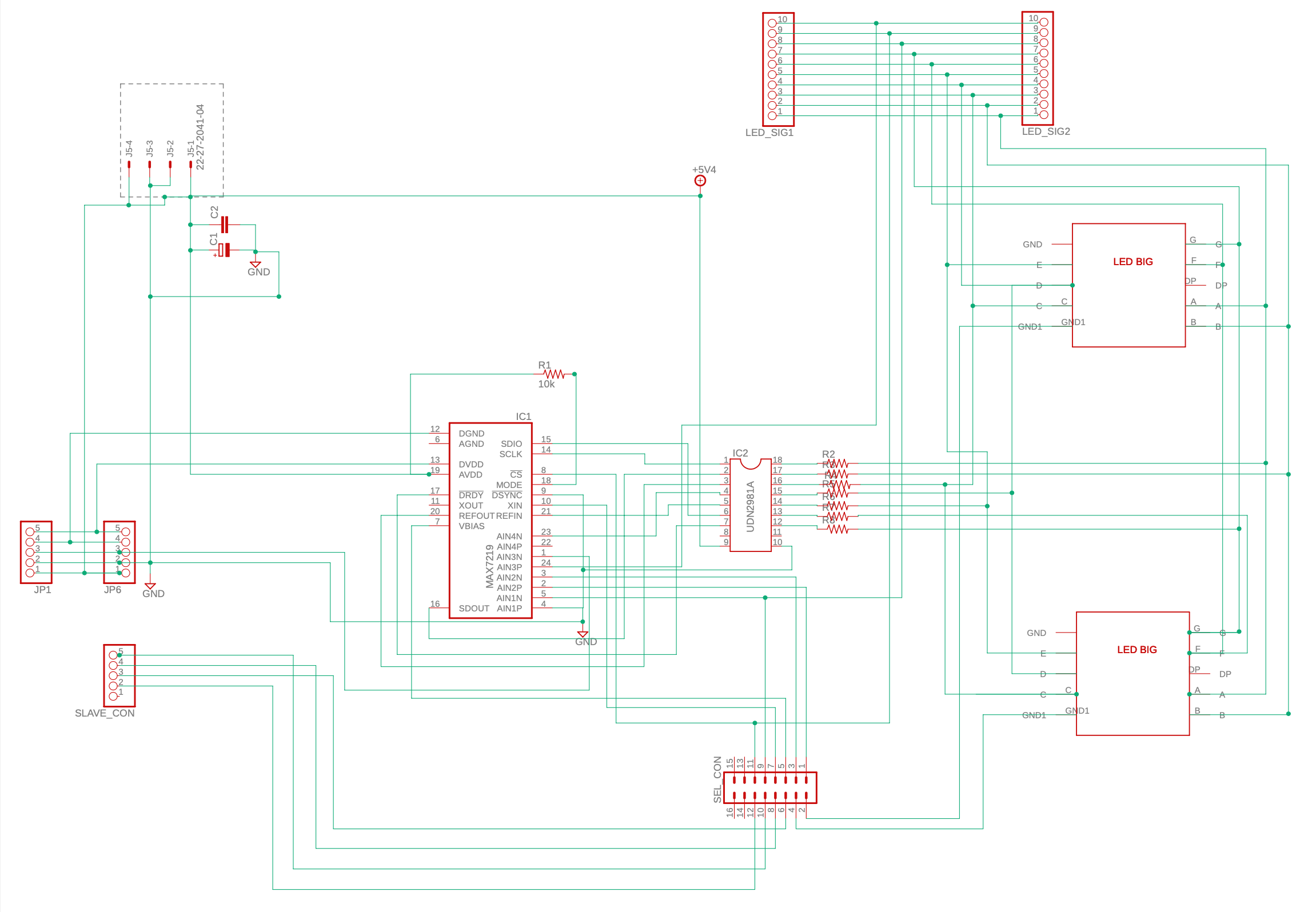
, actually i have setup a score board circuit by making pcb for 7 segment display, i will just brief my circuit and i will post the program and schematic also
i have used 2" 7 segment display and totally Six 7 segment display's
and used two max7219 devices to drive the display's.
i have used three 7 segment display's for one max7219 and drive a display and used 2981 ic 8 channel source driver for driving a 2" 7 segment display.
since display need 20 mA for each segment so one 7 segment display need 140 mA
of current.

Still now circuit not working, the program which i have attached, same i have uploaded program to the Arduino Uno which i have attached and all display's already switched on lights up with a half bright(where it suposed to be without on when no signal is given) below picture can see.

Please can any body suggest.

type or paste code here
```#include <SPI.h>
#include <LedControl.h> // Library used for communcation with 7 segment

//LedControl lc = LedControl (8,9,7,0);     // Arduino pins – DIN, CLK, CS, one devices
LedControl lc = LedControl(12, 11, 10,1); //  (DIN, CLK, LOAD, number of Max7219 chips)
//pin 12 is connected to the DataIn 
 //pin 11 is connected to the CLK 
 //pin 10 is connected to LOAD 
// Variable to hold current scores

int displayone = 0;
int displaytwo = 0;

#define switchone 2
#define switchtwo 3
//#define switchthree 4
//#define switchfour 5

int playerOne = 0;
int playerTwo = 0;

int rightdigit = 0;
int leftdigit = 0;

bool p1IN = HIGH;
bool p2IN = HIGH;
bool p1DEC = HIGH;
bool p2DEC = HIGH;

int games_wonbyp1 = 0;
int games_wonbyp2 = 0;

int var1 = 0;

int val;

void setup()
{
  Serial.begin(9600);
  // Initialize the MAX7219 device

int devices=lc.getDeviceCount();
  //we have to init all devices in a loop
  for(int address=0;address<devices;address++) {
    /*The MAX72XX is in power-saving mode on startup*/
    lc.shutdown(address,false);
    /* Set the brightness to a medium values */
    lc.setIntensity(address,1);
    /* and clear the display */
    lc.clearDisplay(address);
  }

/*lc.shutdown (0, false);            // wake up display
lc.shutdown(1,false);

lc.setIntensity(0,10);             // sets brightness (0~15 possible values)
lc.setIntensity(1,10);

  lc.clearDisplay(0);            // clear screen 
  lc.clearDisplay(1);*/

    p1IN = digitalRead(switchone);
    p2IN = digitalRead(switchtwo);
   // p1DEC = digitalRead(switchthree);
    //p2DEC = digitalRead(switchfour);
}
void loop()
{
    if(p1IN == false)
    {
      val= 0;
    }
    if(p2IN == false)
    {
      val=1;
    }
    if(p1DEC==false)
    {
      val=2;
    }
    if(p2DEC==false)
    {
      val=3;
    }
    switch (val)
    {
    case 0:
        p1IN = true;
        playerOne++;
        rightdigit = playerOne % 10;
        leftdigit = playerOne % 100 / 10;
        lc.setDigit(0, 0, rightdigit, false);
        lc.setDigit(0, 4, leftdigit, false);
        delay(5);
        if (playerOne == 11 && playerTwo < 10)
        {
            Serial.print("Player1 has Won");
            games_wonbyp1++;
            lc.setDigit(0, 0, games_wonbyp1, false);
            return;
        }
        if (playerOne >= 10 && playerTwo >= 10)
        {
            if ((playerOne - playerTwo) == 2)
            {
                Serial.print("Player1 has Won");
                games_wonbyp1++;
                lc.setDigit(0, 3, games_wonbyp1, false);
            }
        break;

      case 1:
        p2IN = true;
        playerTwo++;
        rightdigit = playerTwo % 10;
        leftdigit = playerTwo % 100 / 10;
        lc.setDigit(1, 0, rightdigit, false);
        lc.setDigit(1, 4, leftdigit, false);
        delay(5);
        if (playerTwo == 11 && playerOne < 10)
        {
            Serial.print("Player2 has Won");
            games_wonbyp2++;
            lc.setDigit(1, 5, games_wonbyp2, false);
            return;
        }
        if (playerOne >= 10 && playerTwo >= 10)
        {
            if ((playerTwo - playerOne) == 2)
            {
                Serial.print("Player2 has Won");
                games_wonbyp2++;
                lc.setDigit(1, 3, games_wonbyp2, false);
            }
        break;
        default:
            break;
        }
    }
}}```

I suggest that you use google-translate.
All I understand is: Your score-board does not work as expected.

I do NOT understand more.

Write a detailed description in your mother-language and let do google-translate the translation. A translated description is 10 times more worth than a short worded english post. Because there is much more detail-information in it.

Without doing some basic checks if your hardware is working properly all code-modifying is useless.

don't understand why SDIO (15) and SCLK (14) are connected to the UDN2981 driver and not to the SPI interface pins of the processor

the circuit for those who want to see it directly in the forum

This topic was automatically closed 180 days after the last reply. New replies are no longer allowed.