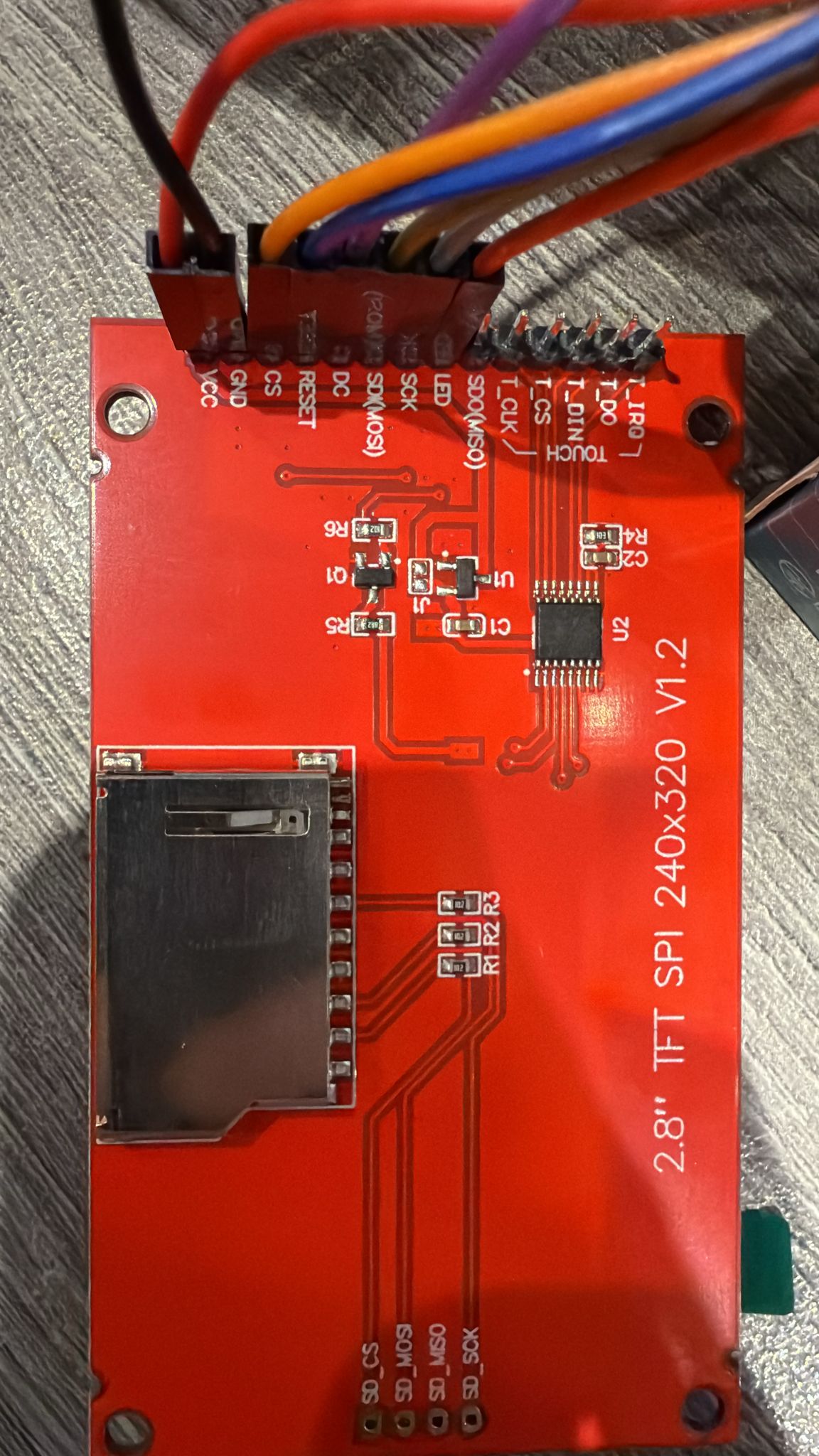
TFT_eSPI ILI9341 not working

Hi everyone. My TFT eSPI ILI9341 display does not work. I have tried literally EVERYTHING to fix it.

I started by attaching the board to a Arduino ESP32-S3. The wiring pictures are attached below:
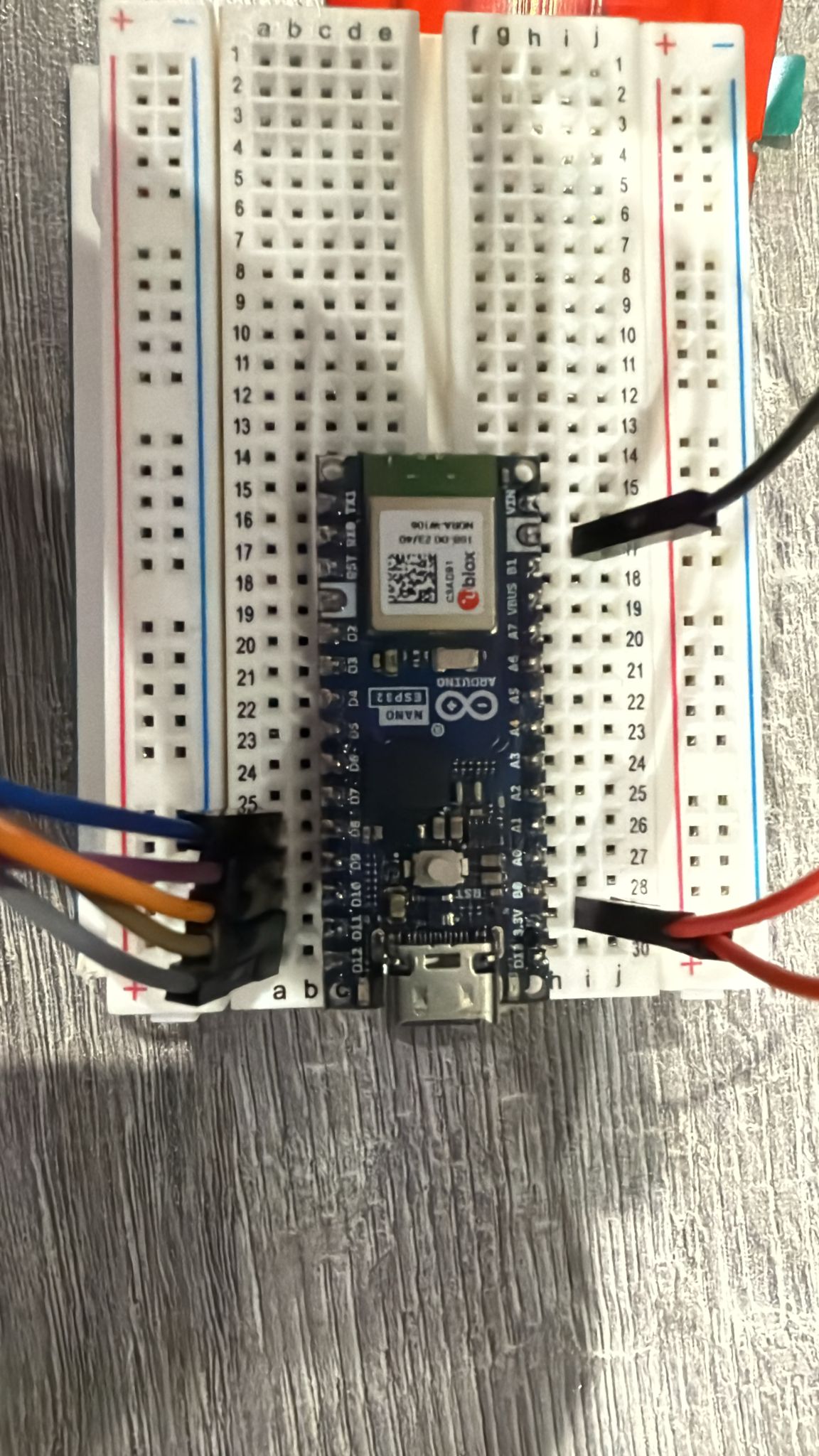

VCC -> 3.3V
GND -> GND
CS -> D10
RESET -> D8
DC -> D9
SDI(MOSI) -> D11
SCK -> D12
LED -> 3.3V

I then downloaded the Arduino ESP32 Boards by Arduino [2.0.18-arduino.5] board package from the Arduino IDE 2.3.6 Boards Manager.

I have also tried esp32 by Espressif Systems [3.2.1] and no luck either.

I then installed the TFT_eSPI by Bodmer [2.5.43] library. I then navigated to the User_Setup_Select.h file in the library directory and commented out the include statement that points to the default setup file (#include <User_Setup.h>). I then wrote underneath #include <User_Setups/Setup_Arduino_Nano_ESP32_S3_ILI9341.h> and that file had the content:

// Setup for Arduino Nano ESP32-S3 with ILI9341 TFT

#define ILI9341_DRIVER

#define TFT_WIDTH  240
#define TFT_HEIGHT 320

// Define the pins used
#define TFT_CS     10  // Chip select control pin
#define TFT_DC      9  // Data Command control pin
#define TFT_RST     8  // Reset pin (could connect to EN or 3.3V if not used)

#define TFT_MOSI   11  // SPI MOSI
#define TFT_SCLK   12  // SPI Clock
#define TFT_MISO   -1  // Not used

#define LOAD_GLCD
#define LOAD_FONT2
#define LOAD_FONT4
#define LOAD_FONT6
#define LOAD_FONT7
#define LOAD_FONT8
#define LOAD_GFXFF

#define SMOOTH_FONT

#define SPI_FREQUENCY  40000000
#define SPI_READ_FREQUENCY  20000000
#define SPI_TOUCH_FREQUENCY  2500000

I then decided to run an example sketch which is:

//   Diagnostic test for the displayed colour order
//
// Written by Bodmer 17/2/19 for the TFT_eSPI library:
// https://github.com/Bodmer/TFT_eSPI

/* 
 Different hardware manufacturers use different colour order
 configurations at the hardware level.  This may result in
 incorrect colours being displayed.

 Incorrectly displayed colours could also be the result of
 using the wrong display driver in the library setup file.

 Typically displays have a control register (MADCTL) that can
 be used to set the Red Green Blue (RGB) colour order to RGB
 or BRG so that red and blue are swapped on the display.

 This control register is also used to manage the display
 rotation and coordinate mirroring. The control register
 typically has 8 bits, for the ILI9341 these are:

 Bit Function
 7   Mirror Y coordinate (row address order)
 6   Mirror X coordinate (column address order)
 5   Row/column exchange (for rotation)
 4   Refresh direction (top to bottom or bottom to top in portrait orientation)
 3   RGB order (swaps red and blue)
 2   Refresh direction (top to bottom or bottom to top in landscape orientation)
 1   Not used
 0   Not used

 The control register bits can be written with this example command sequence:
 
    tft.writecommand(TFT_MADCTL);
    tft.writedata(0x48);          // Bits 6 and 3 set
    
 0x48 is the default value for ILI9341 (0xA8 for ESP32 M5STACK)
 in rotation 0 orientation.
 
 Another control register can be used to "invert" colours,
 this swaps black and white as well as other colours (e.g.
 green to magenta, red to cyan, blue to yellow).
 
 To invert colours insert this line after tft.init() or tft.begin():

    tft.invertDisplay( invert ); // Where invert is true or false

*/

#include <SPI.h>

#include <TFT_eSPI.h>       // Hardware-specific library

TFT_eSPI tft = TFT_eSPI();  // Invoke custom library

void setup(void) {
  tft.init();

  tft.fillScreen(TFT_BLACK);
  tft.drawRect(0, 0, tft.width(), tft.height(), TFT_GREEN);

  // Set "cursor" at top left corner of display (0,0) and select font 4
  tft.setCursor(0, 4, 4);

  // Set the font colour to be white with a black background
  tft.setTextColor(TFT_WHITE);

  // We can now plot text on screen using the "print" class
  tft.println(" Initialised default\n");
  tft.println(" White text");
  
  tft.setTextColor(TFT_RED);
  tft.println(" Red text");
  
  tft.setTextColor(TFT_GREEN);
  tft.println(" Green text");
  
  tft.setTextColor(TFT_BLUE);
  tft.println(" Blue text");

  delay(5000);

}

void loop() {

  tft.invertDisplay( false ); // Where i is true or false
 
  tft.fillScreen(TFT_BLACK);
  tft.drawRect(0, 0, tft.width(), tft.height(), TFT_GREEN);

  tft.setCursor(0, 4, 4);

  tft.setTextColor(TFT_WHITE);
  tft.println(" Invert OFF\n");

  tft.println(" White text");
  
  tft.setTextColor(TFT_RED);
  tft.println(" Red text");
  
  tft.setTextColor(TFT_GREEN);
  tft.println(" Green text");
  
  tft.setTextColor(TFT_BLUE);
  tft.println(" Blue text");

  delay(5000);


  // Binary inversion of colours
  tft.invertDisplay( true ); // Where i is true or false
 
  tft.fillScreen(TFT_BLACK);
  tft.drawRect(0, 0, tft.width(), tft.height(), TFT_GREEN);

  tft.setCursor(0, 4, 4);

  tft.setTextColor(TFT_WHITE);
  tft.println(" Invert ON\n");

  tft.println(" White text");
  
  tft.setTextColor(TFT_RED);
  tft.println(" Red text");
  
  tft.setTextColor(TFT_GREEN);
  tft.println(" Green text");
  
  tft.setTextColor(TFT_BLUE);
  tft.println(" Blue text");

  delay(5000);
}

The IDE complies the sketch and then starts downloading it. The output reads:

Sketch uses 327393 bytes (10%) of program storage space. Maximum is 3145728 bytes.
Global variables use 30904 bytes (9%) of dynamic memory, leaving 296776 bytes for local variables. Maximum is 327680 bytes.
dfu-util 0.11-arduino4

Copyright 2005-2009 Weston Schmidt, Harald Welte and OpenMoko Inc.
Copyright 2010-2021 Tormod Volden and Stefan Schmidt
This program is Free Software and has ABSOLUTELY NO WARRANTY
Please report bugs to http://sourceforge.net/p/dfu-util/tickets/

Opening DFU capable USB device...
Device ID 2341:0070
Device DFU version 0101
Claiming USB DFU Interface...
Setting Alternate Interface #0 ...
Determining device status...
DFU state(2) = dfuIDLE, status(0) = No error condition is present
DFU mode device DFU version 0101
Device returned transfer size 4096
Copying data from PC to DFU device

Download[                         ]   0%            0 bytes
Download[                         ]   3%        12288 bytes
Download[=                        ]   4%        16384 bytes
Download[==                       ]   8%        28672 bytes
Download[===                      ]  12%        40960 bytes
Download[====                     ]  16%        53248 bytes
Download[====                     ]  17%        57344 bytes
Download[=====                    ]  20%        69632 bytes
Download[======                   ]  24%        81920 bytes
Download[=======                  ]  28%        94208 bytes
Download[=======                  ]  29%        98304 bytes
Download[========                 ]  32%       106496 bytes
Download[=========                ]  37%       122880 bytes
Download[==========               ]  40%       135168 bytes
Download[==========               ]  41%       139264 bytes
Download[===========              ]  44%       147456 bytes
Download[============             ]  48%       159744 bytes
Download[=============            ]  53%       176128 bytes
Download[=============            ]  54%       180224 bytes
Download[==============           ]  56%       188416 bytes
Download[===============          ]  60%       200704 bytes
Download[================         ]  64%       212992 bytes
Download[================         ]  65%       217088 bytes
Download[=================        ]  69%       229376 bytes
Download[==================       ]  72%       241664 bytes
Download[===================      ]  76%       253952 bytes
Download[===================      ]  77%       258048 bytes
Download[====================     ]  80%       266240 bytes
Download[=====================    ]  85%       282624 bytes
Download[======================   ]  88%       294912 bytes
Download[======================   ]  90%       299008 bytes
Download[=======================  ]  92%       307200 bytes
Download[======================== ]  96%       319488 bytes
Download[=========================] 100%       327760 bytes
Download done.
DFU state(7) = dfuMANIFEST, status(0) = No error condition is present
DFU state(2) = dfuIDLE, status(0) = No error condition is present
Done!

At the point in which the output says "done", the board seems to disconnect from my computer. It is no longer listed in the ports section and is not listed in my device manager. In order to get it to connect again I have to press the RST button twice in quick succession in order to enter bootloader mode and the LED fades green.

The display just stays white with a tiny little flickering at the start.

I have brought another display - same result, tried everything again with an Arduino UNO R3, tested every wire to check they work, used different libraries (Adafruit ILI9341 by Adafruit [1.6.2]), and swapped the USB wire. I have tried the exact same thing on two separate machines.

I have also tried completing resetting the bootloader based on: https://support.arduino.cc/hc/en-us/articles/9810414060188-Reset-the-Arduino-bootloader-on-the-Nano-ESP32

I have noticed that the board disconnects as soon as tft.init();

This code works and the serial response is given:

#include <SPI.h>
#include <TFT_eSPI.h>

TFT_eSPI tft = TFT_eSPI();

void setup() {
  Serial.begin(9600);
  delay(1000); 
  // tft.init();
  Serial.println("Serial started");
}

void loop() {
  Serial.println("Loop running...");
  delay(1000);
}

Uncommenting the tft.init(); causes the board to disconnect and reconnect constantly. As far as I can tell it is only this specific sketch that causes the board to constantly connect and reconnect. With example sketches (provided by the library) it just disconnects entirely.

For the record, the board, and original display was provided to me for a work experience placement, and using their computers it worked. It is only when I uploaded a sketch from my computer that the board started acting completely unresponsive. This leads me to believe that it may be a configuration on my side but I am completely clueless as to what to do moving forward.

Any ideas on what to do next or perhaps if anyone has had this issue knows how to fix it, I would really appreciate advice.

Thanks in advanced.

The key to solving this is determining what is different between the work setup and yours. My suspicion is there is a user_setup.h on the work machine that you do not have.

Yes definitely. But I’m trying to understand what is different with my setup. I cannot see how anything I’m doing is incorrect.

My money is on the user_setup.h

I’ve linked my user setup file in the original post. Can you see anything wrong with it?

I have never used that approach but am aware of it.
My approach is to choose one of the libraries then test with the sample sketches contained in the library.

Hallo there, yes I know about this tricky TFT_eSPI library. Maybe you should try to find out what the real default HW-SPI pins are. Then try to use the Adafruit_ILI9341.h library first with an example provided. In the Adafruit library you only need to specify the DC, CS and RST pins the MOSI and CLK are known by the library. If this works you can switch to the TFT_eSPI library and use the same pins.
Actually, I had the same problem using TFT_eSPI on a ESP32-C3 board and found the strange fact that this library does not work with esp32 board package beyond version 2.0.14. I am using on my PC version 2.0.9 and it works. On my notebook I had a version 3.1.x and no way to make the display show something nice. I´m not sure but I think that the ESP32-S3 board is also included in this bucky behaviour.

Maybe it's not your main problem, but on that display you should either use 5V for Vcc or short with little blob of solder the pads marked as J1, closed to voltage regulatur U1.

Ciao, Ale.

I'll add a link to @galacticobmg's topic where this problem was discussed and resolved:

@salvo9879 if you take a look at that topic, you may find the solution to your problem. You can start at post #13 in that topic as the preceding posts are irrelevant.

the following works with a ESP32-S3-DevKitC-1, IDE 2.3.5, TFT_eSPI V2.5.43 and ESP32 core 2.0.14

//  ESP32-S3-DevKitC-1 TFT_eSPI library  example TFT_Print_Test

// File>Examples>TFT_eSPI>320 * 240>TFT_Print_Test

// NOTE - PROBLEMS
// using  ESP32 core 2.3.0 and 2.0.17  goes into a reboot loop
// using ESP32 core 2.0.14 works OK

// SETUP
// in C:\Users\bb\Documents\Arduino\libraries\TFT_eSPI\User_Setup_Select.h
// uncomment line
//   #include <User_Setups/Setup70b_ESP32_S3_ILI9341.h>    // Setup file for ESP32 S3 with SPI ILI9341

// in C:\Users\bb\Documents\Arduino\libraries\TFT_eSPI\User_Setups/Setup70b_ESP32_S3_ILI9341.h
/*  define the GPIO pins, e.g.
#define TFT_CS   SS     // 10 
#define TFT_MOSI MOSI   // 11
#define TFT_SCLK SCK    // 12
#define TFT_MISO MISO   // 13

#define TFT_DC   9
#define TFT_RST  4
*/
// 5Volt power to display VCC if J1 is open
// LED to 3.3V

/*  
 Test the tft.print() viz. the libraries embedded write() function

 This sketch used font 2, 4, 7
 
 Make sure all the required fonts are loaded by editing the
 User_Setup.h file in the TFT_eSPI library folder.

  #########################################################################
  ###### DON'T FORGET TO UPDATE THE User_Setup.h FILE IN THE LIBRARY ######
  #########################################################################
 */

#include <SPI.h>

#include <TFT_eSPI.h> // Hardware-specific library

TFT_eSPI tft = TFT_eSPI();       // Invoke custom library

#define TFT_GREY 0x5AEB // New colour

void setup(void) {
  //uint16_t ID = tft.readID();
  Serial.begin(115200);
  delay(2000);
  Serial.println("\n\nESP32S3 TFT_eSPI library  example TFT_Print_Test");
  //Serial.println(ID);
  Serial.printf("TFT_MOSI %d\n", TFT_MOSI);
  Serial.printf("TFT_MISO %d\n", TFT_MISO);
  Serial.printf("TFT_SCLK %d\n", TFT_SCLK);
  Serial.printf("TFT_CS %d\n", TFT_CS);
 Serial.printf("TFT_DC %d\n", TFT_DC);
 Serial.printf("TFT_RST %d\n", TFT_RST);

  tft.init();
  tft.setRotation(2);
}

void loop() {
  
  // Fill screen with random colour so we can see the effect of printing with and without 
  // a background colour defined
  tft.fillScreen(random(0xFFFF));
  
  // Set "cursor" at top left corner of display (0,0) and select font 2
  // (cursor will move to next line automatically during printing with 'tft.println'
  //  or stay on the line is there is room for the text with tft.print)
  tft.setCursor(0, 0, 2);
  // Set the font colour to be white with a black background, set text size multiplier to 1
  tft.setTextColor(TFT_WHITE,TFT_BLACK);  tft.setTextSize(1);
  // We can now plot text on screen using the "print" class
  tft.println("Hello World!");
  
  // Set the font colour to be yellow with no background, set to font 7
  tft.setTextColor(TFT_YELLOW); tft.setTextFont(7);
  tft.println(1234.56);
  
  // Set the font colour to be red with black background, set to font 4
  tft.setTextColor(TFT_RED,TFT_BLACK);    tft.setTextFont(4);
  tft.println((long)3735928559, HEX); // Should print DEADBEEF

  // Set the font colour to be green with black background, set to font 4
  tft.setTextColor(TFT_GREEN,TFT_BLACK);
  tft.setTextFont(4);
  tft.println("Groop");
  tft.println("I implore thee,");

  // Change to font 2
  tft.setTextFont(2);
  tft.println(F("my foonting turlingdromes.")); // Can store strings in FLASH to save RAM
  tft.println("And hooptiously drangle me");
  tft.println("with crinkly bindlewurdles,");
  // This next line is deliberately made too long for the display width to test
  // automatic text wrapping onto the next line
  tft.println("Or I will rend thee in the gobberwarts with my blurglecruncheon, see if I don't!");
  
  // Test some print formatting functions
  float fnumber = 123.45;
   // Set the font colour to be blue with no background, set to font 4
  tft.setTextColor(TFT_BLUE);    tft.setTextFont(4);
  tft.print("Float = "); tft.println(fnumber);           // Print floating point number
  tft.print("Binary = "); tft.println((int)fnumber, BIN); // Print as integer value in binary
  tft.print("Hexadecimal = "); tft.println((int)fnumber, HEX); // Print as integer number in Hexadecimal
  delay(10000);
}


edit Documents\Arduino\libraries\TFT_eSPI\User_Setup_Select.h

// This header file contains a list of user setup files and defines which one the
// compiler uses when the IDE performs a Verify/Compile or Upload.
//
// Users can create configurations for different boards and TFT displays.
// This makes selecting between hardware setups easy by "uncommenting" one line.

// The advantage of this hardware configuration method is that the examples provided
// with the library should work with immediately without any other changes being
// needed. It also improves the portability of users sketches to other hardware
// configurations and compatible libraries.
//
// Create a shortcut to this file on your desktop to permit quick access for editing.
// Re-compile and upload after making and saving any changes to this file.

// Example User_Setup files are stored in the "User_Setups" folder. These can be used
// unmodified or adapted for a particular hardware configuration.

#ifndef USER_SETUP_LOADED //  Lets PlatformIO users define settings in
                          //  platformio.ini, see notes in "Tools" folder.

///////////////////////////////////////////////////////
//   User configuration selection lines are below    //
///////////////////////////////////////////////////////

// Only ONE line below should be uncommented to define your setup.  Add extra lines and files as needed.

#include <User_Setup.h>           // Default setup is root library folder

//#include <User_Setups/Setup1_ILI9341.h>  // Setup file for ESP8266 configured for my ILI9341
//#include <User_Setups/Setup2_ST7735.h>   // Setup file for ESP8266 configured for my ST7735
//#include <User_Setups/Setup3_ILI9163.h>  // Setup file for ESP8266 configured for my ILI9163
//#include <User_Setups/Setup4_S6D02A1.h>  // Setup file for ESP8266 configured for my S6D02A1
//#include <User_Setups/Setup5_RPi_ILI9486.h>        // Setup file for ESP8266 configured for my stock RPi TFT
//#include <User_Setups/Setup6_RPi_Wr_ILI9486.h>     // Setup file for ESP8266 configured for my modified RPi TFT
//#include <User_Setups/Setup7_ST7735_128x128.h>     // Setup file for ESP8266 configured for my ST7735 128x128 display
//#include <User_Setups/Setup8_ILI9163_128x128.h>    // Setup file for ESP8266 configured for my ILI9163 128x128 display
//#include <User_Setups/Setup9_ST7735_Overlap.h>     // Setup file for ESP8266 configured for my ST7735
//#include <User_Setups/Setup10_RPi_touch_ILI9486.h> // Setup file for ESP8266 configured for ESP8266 and RPi TFT with touch

//#include <User_Setups/Setup11_RPi_touch_ILI9486.h> // Setup file configured for ESP32 and RPi TFT with touch
//#include <User_Setups/Setup12_M5Stack_Basic_Core.h>// Setup file for the ESP32 based M5Stack (Basic Core only)
//#include <User_Setups/Setup13_ILI9481_Parallel.h>  // Setup file for the ESP32 with parallel bus TFT
//#include <User_Setups/Setup14_ILI9341_Parallel.h>  // Setup file for the ESP32 with parallel bus TFT
//#include <User_Setups/Setup15_HX8357D.h>           // Setup file for ESP8266 configured for HX8357D
//#include <User_Setups/Setup16_ILI9488_Parallel.h>  // Setup file for the ESP32 with parallel bus TFT
//#include <User_Setups/Setup17_ePaper.h>            // Setup file for ESP8266 and any Waveshare ePaper display
//#include <User_Setups/Setup18_ST7789.h>            // Setup file for ESP8266 configured for ST7789

//#include <User_Setups/Setup19_RM68140_Parallel.h>	 // Setup file configured for RM68140 with parallel bus

//#include <User_Setups/Setup20_ILI9488.h>           // Setup file for ESP8266 and ILI9488 SPI bus TFT
//#include <User_Setups/Setup21_ILI9488.h>           // Setup file for ESP32 and ILI9488 SPI bus TFT

//#include <User_Setups/Setup22_TTGO_T4.h>           // Setup file for ESP32 and TTGO T4 version 1.2
//#include <User_Setups/Setup22_TTGO_T4_v1.3.h>      // Setup file for ESP32 and TTGO T4 version 1.3
//#include <User_Setups/Setup23_TTGO_TM.h>           // Setup file for ESP32 and TTGO TM ST7789 SPI bus TFT
//#include <User_Setups/Setup24_ST7789.h>            // Setup file for DSTIKE/ESP32/ESP8266 configured for ST7789 240 x 240
//#include <User_Setups/Setup25_TTGO_T_Display.h>    // Setup file for ESP32 and TTGO T-Display ST7789V SPI bus TFT
//#include <User_Setups/Setup26_TTGO_T_Wristband.h>  // Setup file for ESP32 and TTGO T-Wristband ST7735 SPI bus TFT

//#include <User_Setups/Setup27_RPi_ST7796_ESP32.h>    // ESP32   RPi MHS-4.0 inch Display-B
//#include <User_Setups/Setup28_RPi_ST7796_ESP8266.h>  // ESP8266 RPi MHS-4.0 inch Display-B

//#include <User_Setups/Setup29_ILI9341_STM32.h>          // Setup for Nucleo board
//#include <User_Setups/Setup30_ILI9341_Parallel_STM32.h> // Setup for Nucleo board and parallel display
//#include <User_Setups/Setup31_ST7796_Parallel_STM32.h>  // Setup for Nucleo board and parallel display
//#include <User_Setups/Setup32_ILI9341_STM32F103.h>      // Setup for "Blue/Black Pill"

//#include <User_Setups/Setup33_RPi_ILI9486_STM32.h>      // Setup for Nucleo board

//#include <User_Setups/Setup34_ILI9481_Parallel_STM32.h> // Setup for Nucleo board and parallel display
//#include <User_Setups/Setup35_ILI9341_STM32_Port_Bus.h> // Setup for STM32 port A parallel display

//#include <User_Setups/Setup36_RPi_touch_ST7796.h>      // Setup file configured for ESP32 and RPi ST7796 TFT with touch

//#include <User_Setups/Setup42_ILI9341_ESP32.h>           // Setup file for ESP32 and SPI ILI9341 240x320
//#include <User_Setups/Setup43_ST7735.h>            // Setup file for ESP8266 & ESP32 configured for my ST7735S 80x160
//#include <User_Setups/Setup44_TTGO_CameraPlus.h>   // Setup file for ESP32 and TTGO T-CameraPlus ST7789 SPI bus TFT    240x240
//#include <User_Setups/Setup45_TTGO_T_Watch.h>      // Setup file for ESP32 and TTGO T-Watch ST7789 SPI bus TFT  240x240
//#include <User_Setups/Setup46_GC9A01_ESP32.h>      // Setup file for ESP32 and GC9A01 SPI bus TFT  240x240

//#include <User_Setups/Setup47_ST7735.h>            // Setup file for ESP32 configured for ST7735 128 x 128 animated eyes

//#include <User_Setups/Setup50_SSD1963_Parallel.h>  // Setup file for ESP32 and SSD1963 TFT display

//#include <User_Setups/Setup51_LilyPi_ILI9481.h>    // Setup file for LilyGo LilyPi with ILI9481 display
//#include <User_Setups/Setup52_LilyPi_ST7796.h>     // Setup file for LilyGo LilyPi with ST7796 display

//#include <User_Setups/Setup60_RP2040_ILI9341.h>              // Setup file for RP2040 with SPI ILI9341
//#include <User_Setups/Setup61_RP2040_ILI9341_PIO_SPI.h>      // Setup file for RP2040 with PIO SPI ILI9341
//#include <User_Setups/Setup62_RP2040_Nano_Connect_ILI9341.h> // Setup file for RP2040 with SPI ILI9341

//#include <User_Setups/Setup66_Seeed_XIAO_Round.h>     // Setup file for Seeed XIAO with GC9A01 240x240

//#include <User_Setups/Setup70_ESP32_S2_ILI9341.h>     // Setup file for ESP32 S2 with SPI ILI9341
#include <User_Setups/Setup70b_ESP32_S3_ILI9341.h>    // Setup file for ESP32 S3 with SPI ILI9341
//#include <User_Setups/Setup70c_ESP32_C3_ILI9341.h>    // Setup file for ESP32 C3 with SPI ILI9341
//#include <User_Setups/Setup70d_ILI9488_S3_Parallel.h> // Setup file for ESP32 S3 with SPI ILI9488

//#include <User_Setups/Setup71_ESP32_S2_ST7789.h>       // Setup file for ESP32 S2 with ST7789
//#include <User_Setups/Setup72_ESP32_ST7789_172x320.h>  // Setup file for ESP32 with ST7789 1.47" 172x320

//#include <User_Setups/Setup100_RP2040_ILI9488_parallel.h> // Setup file for Pico/RP2040 with 8-bit parallel ILI9488
//#include <User_Setups/Setup101_RP2040_ILI9481_parallel.h> // Setup file for Pico/RP2040 with 8-bit parallel ILI9481
//#include <User_Setups/Setup102_RP2040_ILI9341_parallel.h> // Setup file for Pico/RP2040 with 8-bit parallel ILI9341
//#include <User_Setups/Setup103_RP2040_ILI9486_parallel.h> // Setup file for Pico/RP2040 with 8-bit parallel ILI9486
//#include <User_Setups/Setup104_RP2040_ST7796_parallel.h>  // Setup file for Pico/RP2040 with 8-bit parallel ST7796

//#include <User_Setups/Setup105_RP2040_ST7796_16bit_parallel.h>  // Setup file for RP2040 16-bit parallel display
//#include <User_Setups/Setup106_RP2040_ILI9481_16bit_parallel.h> // Setup file for RP2040 16-bit parallel display
//#include <User_Setups/Setup107_RP2040_ILI9341_16bit_parallel.h> // Setup file for RP2040 16-bit parallel display
//#include <User_Setups/Setup108_RP2040_ST7735.h> // Setup file for Waveshare RP2040 board with onboard ST7735 0.96" 160x80 display

//#include <User_Setups/Setup135_ST7789.h>           // Setup file for ESP8266 and ST7789 135 x 240 TFT

//#include <User_Setups/Setup136_LilyGo_TTV.h>       // Setup file for ESP32 and Lilygo TTV ST7789 SPI bus TFT  135x240
//#include <User_Setups/Setup137_LilyGo_TDisplay_RP2040.h>  // Setup file for Lilygo T-Display RP2040 (ST7789 on SPI bus with 135x240 TFT)

//#include <User_Setups/Setup138_Pico_Explorer_Base_RP2040_ST7789.h> // Setup file for Pico Explorer Base by Pimoroni for RP2040 (ST7789 on SPI bus with 240x240 TFT)

//#include <User_Setups/Setup200_GC9A01.h>           // Setup file for ESP32 and GC9A01 240 x 240 TFT

//#include <User_Setups/Setup201_WT32_SC01.h>        // Setup file for ESP32 based WT32_SC01 from Seeed

//#include <User_Setups/Setup202_SSD1351_128.h>      // Setup file for ESP32/ESP8266 based SSD1351 128x128 1.5inch OLED display

//#include <User_Setups/Setup203_ST7789.h>     // Setup file for ESP32/ESP8266 based ST7789 240X280 1.69inch TFT 

//#include <User_Setups/Setup204_ESP32_TouchDown.h>     // Setup file for the ESP32 TouchDown based on ILI9488 480 x 320 TFT 

//#include <User_Setups/Setup205_ESP32_TouchDown_S3.h>     // Setup file for the ESP32 TouchDown S3 based on ILI9488 480 x 320 TFT 

//#include <User_Setups/Setup206_LilyGo_T_Display_S3.h>     // For the LilyGo T-Display S3 based ESP32S3 with ST7789 170 x 320 TFT
//#include <User_Setups/Setup207_LilyGo_T_HMI.h>            // For the LilyGo T-HMI S3 based ESP32S3 with ST7789 240 x 320 TFT
//#include <User_Setups/Setup209_LilyGo_T_Dongle_S3.h>      // For the LilyGo T-Dongle S3 based ESP32 with ST7735 80 x 160 TFT
//#include <User_Setups/Setup210_LilyGo_T_Embed_S3.h>         // For the LilyGo T-Embed S3 based ESP32S3 with ST7789 170 x 320 TFT
//#include <User_Setups/Setup211_LilyGo_T_QT_Pro_S3.h>         // For the LilyGo T-QT Pro S3 based ESP32S3 with GC9A01 128 x 128 TFT
// #include <User_Setups/Setup212_LilyGo_T_PicoPro.h>         // For the LilyGo T-PICO-Pro with ST7796 222 x 480 TFT
// #include <User_Setups/Setup213_LilyGo_T_Beam_Shield.h>         // For the LilyGo T-BEAM V1.x with ST7796 222 x 480 TFT

//#include <User_Setups/Setup250_ESP32_S3_Box_Lite.h>      // For the ESP32 S3 Box Lite
//#include <User_Setups/Setup251_ESP32_S3_Box.h>            // For the ESP32 S3 Box

//#include <User_Setups/Setup301_BW16_ST7735.h>            // Setup file for Bw16-based boards with ST7735 160 x 80 TFT
//#include <User_Setups/Setup302_Waveshare_ESP32S3_GC9A01.h>            // Setup file for Waveshare ESP32-S3-Touch-LCD-1.28 board with GC9A01 240*240 TFT

//#include <User_Setups/SetupX_Template.h>     // Template file for a setup


//#include <User_Setups/Dustin_ILI9488.h>          // Setup file for Dustin Watts PCB with ILI9488
//#include <User_Setups/Dustin_ST7796.h>           // Setup file for Dustin Watts PCB with ST7796
//#include <User_Setups/Dustin_ILI9488_Pico.h>     // Setup file for Dustin Watts Pico PCB with ST7796
//#include <User_Setups/Dustin_ST7789_Pico.h>      // Setup file for Dustin Watts PCB with ST7789 240 x 240 on 3.3V adapter board
//#include <User_Setups/Dustin_GC9A01_Pico.h>      // Setup file for Dustin Watts PCB with GC9A01 240 x 240 on 3.3V adapter board
//#include <User_Setups/Dustin_GC9A01_ESP32.h>     // Setup file for Dustin Watts PCB with GC9A01 240 x 240 on 3.3V adapter board
//#include <User_Setups/Dustin_STT7789_ESP32.h>    // Setup file for Dustin Watts PCB with ST7789 240 x 240 on 3.3V adapter board
//#include <User_Setups/Dustin_ILI9341_ESP32.h>    // Setup file for Dustin Watts PCB with ILI9341
//#include <User_Setups/ILI9225.h>

#endif // USER_SETUP_LOADED


/////////////////////////////////////////////////////////////////////////////////////
//                                                                                 //
//     DON'T TINKER WITH ANY OF THE FOLLOWING LINES, THESE ADD THE TFT DRIVERS     //
//       AND ESP8266 PIN DEFINITONS, THEY ARE HERE FOR BODMER'S CONVENIENCE!       //
//                                                                                 //
/////////////////////////////////////////////////////////////////////////////////////


// Identical looking TFT displays may have a different colour ordering in the 16-bit colour
#define TFT_BGR 0   // Colour order Blue-Green-Red
#define TFT_RGB 1   // Colour order Red-Green-Blue

// Legacy setup support, RPI_DISPLAY_TYPE replaces RPI_DRIVER
#if defined (RPI_DRIVER)
  #if !defined (RPI_DISPLAY_TYPE)
    #define RPI_DISPLAY_TYPE
  #endif
#endif

// Legacy setup support, RPI_ILI9486_DRIVER form is deprecated
// Instead define RPI_DISPLAY_TYPE and also define driver (e.g. ILI9486_DRIVER) 
#if defined (RPI_ILI9486_DRIVER)
  #if !defined (ILI9486_DRIVER)
    #define ILI9486_DRIVER
  #endif
  #if !defined (RPI_DISPLAY_TYPE)
    #define RPI_DISPLAY_TYPE
  #endif
#endif

// Invoke 18-bit colour for selected displays
#if !defined (RPI_DISPLAY_TYPE) && !defined (TFT_PARALLEL_8_BIT) && !defined (TFT_PARALLEL_16_BIT) && !defined (ESP32_PARALLEL)
  #if defined (ILI9481_DRIVER) || defined (ILI9486_DRIVER) || defined (ILI9488_DRIVER)
    #define SPI_18BIT_DRIVER
  #endif
#endif

// Load the right driver definition - do not tinker here !
#if   defined (ILI9341_DRIVER) || defined(ILI9341_2_DRIVER) || defined (ILI9342_DRIVER)
     #include <TFT_Drivers/ILI9341_Defines.h>
     #define  TFT_DRIVER 0x9341
#elif defined (ST7735_DRIVER)
     #include <TFT_Drivers/ST7735_Defines.h>
     #define  TFT_DRIVER 0x7735
#elif defined (ILI9163_DRIVER)
     #include <TFT_Drivers/ILI9163_Defines.h>
     #define  TFT_DRIVER 0x9163
#elif defined (S6D02A1_DRIVER)
     #include <TFT_Drivers/S6D02A1_Defines.h>
     #define  TFT_DRIVER 0x6D02
#elif defined (ST7796_DRIVER)
      #include "TFT_Drivers/ST7796_Defines.h"
      #define  TFT_DRIVER 0x7796
#elif defined (ILI9486_DRIVER)
     #include <TFT_Drivers/ILI9486_Defines.h>
     #define  TFT_DRIVER 0x9486
#elif defined (ILI9481_DRIVER)
     #include <TFT_Drivers/ILI9481_Defines.h>
     #define  TFT_DRIVER 0x9481
#elif defined (ILI9488_DRIVER)
     #include <TFT_Drivers/ILI9488_Defines.h>
     #define  TFT_DRIVER 0x9488
#elif defined (HX8357D_DRIVER)
     #include "TFT_Drivers/HX8357D_Defines.h"
     #define  TFT_DRIVER 0x8357
#elif defined (EPD_DRIVER)
     #include "TFT_Drivers/EPD_Defines.h"
     #define  TFT_DRIVER 0xE9D
#elif defined (ST7789_DRIVER)
     #include "TFT_Drivers/ST7789_Defines.h"
     #define  TFT_DRIVER 0x7789
#elif defined (R61581_DRIVER)
     #include "TFT_Drivers/R61581_Defines.h"
     #define  TFT_DRIVER 0x6158
#elif defined (ST7789_2_DRIVER)
     #include "TFT_Drivers/ST7789_2_Defines.h"
     #define  TFT_DRIVER 0x778B
#elif defined (RM68140_DRIVER)
     #include "TFT_Drivers/RM68140_Defines.h"
     #define  TFT_DRIVER 0x6814
#elif defined (SSD1351_DRIVER)
     #include "TFT_Drivers/SSD1351_Defines.h"
     #define  TFT_DRIVER 0x1351
#elif defined (SSD1963_480_DRIVER)
     #include "TFT_Drivers/SSD1963_Defines.h"
     #define  TFT_DRIVER 0x1963
#elif defined (SSD1963_800_DRIVER)
     #include "TFT_Drivers/SSD1963_Defines.h"
     #define  TFT_DRIVER 0x1963
#elif defined (SSD1963_800ALT_DRIVER)
     #include "TFT_Drivers/SSD1963_Defines.h"
     #define  TFT_DRIVER 0x1963
#elif defined (SSD1963_800BD_DRIVER)
     #include "TFT_Drivers/SSD1963_Defines.h"
     #define  TFT_DRIVER 0x1963
#elif defined (GC9A01_DRIVER)
     #include "TFT_Drivers/GC9A01_Defines.h"
     #define  TFT_DRIVER 0x9A01
#elif defined (ILI9225_DRIVER)
     #include "TFT_Drivers/ILI9225_Defines.h"
     #define  TFT_DRIVER 0x9225
#elif defined (RM68120_DRIVER)
     #include "TFT_Drivers/RM68120_Defines.h"
     #define  TFT_DRIVER 0x6812
#elif defined (HX8357B_DRIVER)
     #include "TFT_Drivers/HX8357B_Defines.h"
     #define  TFT_DRIVER 0x835B
#elif defined (HX8357C_DRIVER)
     #include "TFT_Drivers/HX8357C_Defines.h"
     #define  TFT_DRIVER 0x835C

                              // <<<<<<<<<<<<<<<<<<<<<<<< ADD NEW DRIVER HERE
                              // XYZZY_init.h and XYZZY_rotation.h must also be added in TFT_eSPI.cpp
#elif defined (XYZZY_DRIVER)
     #include "TFT_Drivers/XYZZY_Defines.h"
     #define  TFT_DRIVER 0x0000
#else
     #define  TFT_DRIVER 0x0000
#endif

// These are the pins for ESP8266 boards
//      Name   GPIO    NodeMCU      Function
#define PIN_D0  16  // GPIO16       WAKE
#define PIN_D1   5  // GPIO5        User purpose
#define PIN_D2   4  // GPIO4        User purpose
#define PIN_D3   0  // GPIO0        Low on boot means enter FLASH mode
#define PIN_D4   2  // GPIO2        TXD1 (must be high on boot to go to UART0 FLASH mode)
#define PIN_D5  14  // GPIO14       HSCLK
#define PIN_D6  12  // GPIO12       HMISO
#define PIN_D7  13  // GPIO13       HMOSI  RXD2
#define PIN_D8  15  // GPIO15       HCS    TXD0 (must be low on boot to enter UART0 FLASH mode)
#define PIN_D9   3  //              RXD0
#define PIN_D10  1  //              TXD0

#define PIN_MOSI 8  // SD1          FLASH and overlap mode
#define PIN_MISO 7  // SD0
#define PIN_SCLK 6  // CLK
#define PIN_HWCS 0  // D3

#define PIN_D11  9  // SD2
#define PIN_D12 10  // SD4

// This header file contains a list of user setup files and defines which one the
// compiler uses when the IDE performs a Verify/Compile or Upload.
//
// Users can create configurations for different boards and TFT displays.
// This makes selecting between hardware setups easy by "uncommenting" one line.

// The advantage of this hardware configuration method is that the examples provided
// with the library should work with immediately without any other changes being
// needed. It also improves the portability of users sketches to other hardware
// configurations and compatible libraries.
//
// Create a shortcut to this file on your desktop to permit quick access for editing.
// Re-compile and upload after making and saving any changes to this file.

// Example User_Setup files are stored in the "User_Setups" folder. These can be used
// unmodified or adapted for a particular hardware configuration.

#ifndef USER_SETUP_LOADED //  Lets PlatformIO users define settings in
                          //  platformio.ini, see notes in "Tools" folder.

///////////////////////////////////////////////////////
//   User configuration selection lines are below    //
///////////////////////////////////////////////////////

// Only ONE line below should be uncommented to define your setup.  Add extra lines and files as needed.

#include <User_Setup.h>           // Default setup is root library folder

//#include <User_Setups/Setup1_ILI9341.h>  // Setup file for ESP8266 configured for my ILI9341
//#include <User_Setups/Setup2_ST7735.h>   // Setup file for ESP8266 configured for my ST7735
//#include <User_Setups/Setup3_ILI9163.h>  // Setup file for ESP8266 configured for my ILI9163
//#include <User_Setups/Setup4_S6D02A1.h>  // Setup file for ESP8266 configured for my S6D02A1
//#include <User_Setups/Setup5_RPi_ILI9486.h>        // Setup file for ESP8266 configured for my stock RPi TFT
//#include <User_Setups/Setup6_RPi_Wr_ILI9486.h>     // Setup file for ESP8266 configured for my modified RPi TFT
//#include <User_Setups/Setup7_ST7735_128x128.h>     // Setup file for ESP8266 configured for my ST7735 128x128 display
//#include <User_Setups/Setup8_ILI9163_128x128.h>    // Setup file for ESP8266 configured for my ILI9163 128x128 display
//#include <User_Setups/Setup9_ST7735_Overlap.h>     // Setup file for ESP8266 configured for my ST7735
//#include <User_Setups/Setup10_RPi_touch_ILI9486.h> // Setup file for ESP8266 configured for ESP8266 and RPi TFT with touch

//#include <User_Setups/Setup11_RPi_touch_ILI9486.h> // Setup file configured for ESP32 and RPi TFT with touch
//#include <User_Setups/Setup12_M5Stack_Basic_Core.h>// Setup file for the ESP32 based M5Stack (Basic Core only)
//#include <User_Setups/Setup13_ILI9481_Parallel.h>  // Setup file for the ESP32 with parallel bus TFT
//#include <User_Setups/Setup14_ILI9341_Parallel.h>  // Setup file for the ESP32 with parallel bus TFT
//#include <User_Setups/Setup15_HX8357D.h>           // Setup file for ESP8266 configured for HX8357D
//#include <User_Setups/Setup16_ILI9488_Parallel.h>  // Setup file for the ESP32 with parallel bus TFT
//#include <User_Setups/Setup17_ePaper.h>            // Setup file for ESP8266 and any Waveshare ePaper display
//#include <User_Setups/Setup18_ST7789.h>            // Setup file for ESP8266 configured for ST7789

//#include <User_Setups/Setup19_RM68140_Parallel.h>	 // Setup file configured for RM68140 with parallel bus

//#include <User_Setups/Setup20_ILI9488.h>           // Setup file for ESP8266 and ILI9488 SPI bus TFT
//#include <User_Setups/Setup21_ILI9488.h>           // Setup file for ESP32 and ILI9488 SPI bus TFT

//#include <User_Setups/Setup22_TTGO_T4.h>           // Setup file for ESP32 and TTGO T4 version 1.2
//#include <User_Setups/Setup22_TTGO_T4_v1.3.h>      // Setup file for ESP32 and TTGO T4 version 1.3
//#include <User_Setups/Setup23_TTGO_TM.h>           // Setup file for ESP32 and TTGO TM ST7789 SPI bus TFT
//#include <User_Setups/Setup24_ST7789.h>            // Setup file for DSTIKE/ESP32/ESP8266 configured for ST7789 240 x 240
//#include <User_Setups/Setup25_TTGO_T_Display.h>    // Setup file for ESP32 and TTGO T-Display ST7789V SPI bus TFT
//#include <User_Setups/Setup26_TTGO_T_Wristband.h>  // Setup file for ESP32 and TTGO T-Wristband ST7735 SPI bus TFT

//#include <User_Setups/Setup27_RPi_ST7796_ESP32.h>    // ESP32   RPi MHS-4.0 inch Display-B
//#include <User_Setups/Setup28_RPi_ST7796_ESP8266.h>  // ESP8266 RPi MHS-4.0 inch Display-B

//#include <User_Setups/Setup29_ILI9341_STM32.h>          // Setup for Nucleo board
//#include <User_Setups/Setup30_ILI9341_Parallel_STM32.h> // Setup for Nucleo board and parallel display
//#include <User_Setups/Setup31_ST7796_Parallel_STM32.h>  // Setup for Nucleo board and parallel display
//#include <User_Setups/Setup32_ILI9341_STM32F103.h>      // Setup for "Blue/Black Pill"

//#include <User_Setups/Setup33_RPi_ILI9486_STM32.h>      // Setup for Nucleo board

//#include <User_Setups/Setup34_ILI9481_Parallel_STM32.h> // Setup for Nucleo board and parallel display
//#include <User_Setups/Setup35_ILI9341_STM32_Port_Bus.h> // Setup for STM32 port A parallel display

//#include <User_Setups/Setup36_RPi_touch_ST7796.h>      // Setup file configured for ESP32 and RPi ST7796 TFT with touch

//#include <User_Setups/Setup42_ILI9341_ESP32.h>           // Setup file for ESP32 and SPI ILI9341 240x320
//#include <User_Setups/Setup43_ST7735.h>            // Setup file for ESP8266 & ESP32 configured for my ST7735S 80x160
//#include <User_Setups/Setup44_TTGO_CameraPlus.h>   // Setup file for ESP32 and TTGO T-CameraPlus ST7789 SPI bus TFT    240x240
//#include <User_Setups/Setup45_TTGO_T_Watch.h>      // Setup file for ESP32 and TTGO T-Watch ST7789 SPI bus TFT  240x240
//#include <User_Setups/Setup46_GC9A01_ESP32.h>      // Setup file for ESP32 and GC9A01 SPI bus TFT  240x240

//#include <User_Setups/Setup47_ST7735.h>            // Setup file for ESP32 configured for ST7735 128 x 128 animated eyes

//#include <User_Setups/Setup50_SSD1963_Parallel.h>  // Setup file for ESP32 and SSD1963 TFT display

//#include <User_Setups/Setup51_LilyPi_ILI9481.h>    // Setup file for LilyGo LilyPi with ILI9481 display
//#include <User_Setups/Setup52_LilyPi_ST7796.h>     // Setup file for LilyGo LilyPi with ST7796 display

//#include <User_Setups/Setup60_RP2040_ILI9341.h>              // Setup file for RP2040 with SPI ILI9341
//#include <User_Setups/Setup61_RP2040_ILI9341_PIO_SPI.h>      // Setup file for RP2040 with PIO SPI ILI9341
//#include <User_Setups/Setup62_RP2040_Nano_Connect_ILI9341.h> // Setup file for RP2040 with SPI ILI9341

//#include <User_Setups/Setup66_Seeed_XIAO_Round.h>     // Setup file for Seeed XIAO with GC9A01 240x240

//#include <User_Setups/Setup70_ESP32_S2_ILI9341.h>     // Setup file for ESP32 S2 with SPI ILI9341
#include <User_Setups/Setup70b_ESP32_S3_ILI9341.h>    // Setup file for ESP32 S3 with SPI ILI9341
//#include <User_Setups/Setup70c_ESP32_C3_ILI9341.h>    // Setup file for ESP32 C3 with SPI ILI9341
//#include <User_Setups/Setup70d_ILI9488_S3_Parallel.h> // Setup file for ESP32 S3 with SPI ILI9488

//#include <User_Setups/Setup71_ESP32_S2_ST7789.h>       // Setup file for ESP32 S2 with ST7789
//#include <User_Setups/Setup72_ESP32_ST7789_172x320.h>  // Setup file for ESP32 with ST7789 1.47" 172x320

//#include <User_Setups/Setup100_RP2040_ILI9488_parallel.h> // Setup file for Pico/RP2040 with 8-bit parallel ILI9488
//#include <User_Setups/Setup101_RP2040_ILI9481_parallel.h> // Setup file for Pico/RP2040 with 8-bit parallel ILI9481
//#include <User_Setups/Setup102_RP2040_ILI9341_parallel.h> // Setup file for Pico/RP2040 with 8-bit parallel ILI9341
//#include <User_Setups/Setup103_RP2040_ILI9486_parallel.h> // Setup file for Pico/RP2040 with 8-bit parallel ILI9486
//#include <User_Setups/Setup104_RP2040_ST7796_parallel.h>  // Setup file for Pico/RP2040 with 8-bit parallel ST7796

//#include <User_Setups/Setup105_RP2040_ST7796_16bit_parallel.h>  // Setup file for RP2040 16-bit parallel display
//#include <User_Setups/Setup106_RP2040_ILI9481_16bit_parallel.h> // Setup file for RP2040 16-bit parallel display
//#include <User_Setups/Setup107_RP2040_ILI9341_16bit_parallel.h> // Setup file for RP2040 16-bit parallel display
//#include <User_Setups/Setup108_RP2040_ST7735.h> // Setup file for Waveshare RP2040 board with onboard ST7735 0.96" 160x80 display

//#include <User_Setups/Setup135_ST7789.h>           // Setup file for ESP8266 and ST7789 135 x 240 TFT

//#include <User_Setups/Setup136_LilyGo_TTV.h>       // Setup file for ESP32 and Lilygo TTV ST7789 SPI bus TFT  135x240
//#include <User_Setups/Setup137_LilyGo_TDisplay_RP2040.h>  // Setup file for Lilygo T-Display RP2040 (ST7789 on SPI bus with 135x240 TFT)

//#include <User_Setups/Setup138_Pico_Explorer_Base_RP2040_ST7789.h> // Setup file for Pico Explorer Base by Pimoroni for RP2040 (ST7789 on SPI bus with 240x240 TFT)

//#include <User_Setups/Setup200_GC9A01.h>           // Setup file for ESP32 and GC9A01 240 x 240 TFT

//#include <User_Setups/Setup201_WT32_SC01.h>        // Setup file for ESP32 based WT32_SC01 from Seeed

//#include <User_Setups/Setup202_SSD1351_128.h>      // Setup file for ESP32/ESP8266 based SSD1351 128x128 1.5inch OLED display

//#include <User_Setups/Setup203_ST7789.h>     // Setup file for ESP32/ESP8266 based ST7789 240X280 1.69inch TFT 

//#include <User_Setups/Setup204_ESP32_TouchDown.h>     // Setup file for the ESP32 TouchDown based on ILI9488 480 x 320 TFT 

//#include <User_Setups/Setup205_ESP32_TouchDown_S3.h>     // Setup file for the ESP32 TouchDown S3 based on ILI9488 480 x 320 TFT 

//#include <User_Setups/Setup206_LilyGo_T_Display_S3.h>     // For the LilyGo T-Display S3 based ESP32S3 with ST7789 170 x 320 TFT
//#include <User_Setups/Setup207_LilyGo_T_HMI.h>            // For the LilyGo T-HMI S3 based ESP32S3 with ST7789 240 x 320 TFT
//#include <User_Setups/Setup209_LilyGo_T_Dongle_S3.h>      // For the LilyGo T-Dongle S3 based ESP32 with ST7735 80 x 160 TFT
//#include <User_Setups/Setup210_LilyGo_T_Embed_S3.h>         // For the LilyGo T-Embed S3 based ESP32S3 with ST7789 170 x 320 TFT
//#include <User_Setups/Setup211_LilyGo_T_QT_Pro_S3.h>         // For the LilyGo T-QT Pro S3 based ESP32S3 with GC9A01 128 x 128 TFT
// #include <User_Setups/Setup212_LilyGo_T_PicoPro.h>         // For the LilyGo T-PICO-Pro with ST7796 222 x 480 TFT
// #include <User_Setups/Setup213_LilyGo_T_Beam_Shield.h>         // For the LilyGo T-BEAM V1.x with ST7796 222 x 480 TFT

//#include <User_Setups/Setup250_ESP32_S3_Box_Lite.h>      // For the ESP32 S3 Box Lite
//#include <User_Setups/Setup251_ESP32_S3_Box.h>            // For the ESP32 S3 Box

//#include <User_Setups/Setup301_BW16_ST7735.h>            // Setup file for Bw16-based boards with ST7735 160 x 80 TFT
//#include <User_Setups/Setup302_Waveshare_ESP32S3_GC9A01.h>            // Setup file for Waveshare ESP32-S3-Touch-LCD-1.28 board with GC9A01 240*240 TFT

//#include <User_Setups/SetupX_Template.h>     // Template file for a setup


//#include <User_Setups/Dustin_ILI9488.h>          // Setup file for Dustin Watts PCB with ILI9488
//#include <User_Setups/Dustin_ST7796.h>           // Setup file for Dustin Watts PCB with ST7796
//#include <User_Setups/Dustin_ILI9488_Pico.h>     // Setup file for Dustin Watts Pico PCB with ST7796
//#include <User_Setups/Dustin_ST7789_Pico.h>      // Setup file for Dustin Watts PCB with ST7789 240 x 240 on 3.3V adapter board
//#include <User_Setups/Dustin_GC9A01_Pico.h>      // Setup file for Dustin Watts PCB with GC9A01 240 x 240 on 3.3V adapter board
//#include <User_Setups/Dustin_GC9A01_ESP32.h>     // Setup file for Dustin Watts PCB with GC9A01 240 x 240 on 3.3V adapter board
//#include <User_Setups/Dustin_STT7789_ESP32.h>    // Setup file for Dustin Watts PCB with ST7789 240 x 240 on 3.3V adapter board
//#include <User_Setups/Dustin_ILI9341_ESP32.h>    // Setup file for Dustin Watts PCB with ILI9341
//#include <User_Setups/ILI9225.h>

#endif // USER_SETUP_LOADED


/////////////////////////////////////////////////////////////////////////////////////
//                                                                                 //
//     DON'T TINKER WITH ANY OF THE FOLLOWING LINES, THESE ADD THE TFT DRIVERS     //
//       AND ESP8266 PIN DEFINITONS, THEY ARE HERE FOR BODMER'S CONVENIENCE!       //
//                                                                                 //
/////////////////////////////////////////////////////////////////////////////////////


// Identical looking TFT displays may have a different colour ordering in the 16-bit colour
#define TFT_BGR 0   // Colour order Blue-Green-Red
#define TFT_RGB 1   // Colour order Red-Green-Blue

// Legacy setup support, RPI_DISPLAY_TYPE replaces RPI_DRIVER
#if defined (RPI_DRIVER)
  #if !defined (RPI_DISPLAY_TYPE)
    #define RPI_DISPLAY_TYPE
  #endif
#endif

// Legacy setup support, RPI_ILI9486_DRIVER form is deprecated
// Instead define RPI_DISPLAY_TYPE and also define driver (e.g. ILI9486_DRIVER) 
#if defined (RPI_ILI9486_DRIVER)
  #if !defined (ILI9486_DRIVER)
    #define ILI9486_DRIVER
  #endif
  #if !defined (RPI_DISPLAY_TYPE)
    #define RPI_DISPLAY_TYPE
  #endif
#endif

// Invoke 18-bit colour for selected displays
#if !defined (RPI_DISPLAY_TYPE) && !defined (TFT_PARALLEL_8_BIT) && !defined (TFT_PARALLEL_16_BIT) && !defined (ESP32_PARALLEL)
  #if defined (ILI9481_DRIVER) || defined (ILI9486_DRIVER) || defined (ILI9488_DRIVER)
    #define SPI_18BIT_DRIVER
  #endif
#endif

// Load the right driver definition - do not tinker here !
#if   defined (ILI9341_DRIVER) || defined(ILI9341_2_DRIVER) || defined (ILI9342_DRIVER)
     #include <TFT_Drivers/ILI9341_Defines.h>
     #define  TFT_DRIVER 0x9341
#elif defined (ST7735_DRIVER)
     #include <TFT_Drivers/ST7735_Defines.h>
     #define  TFT_DRIVER 0x7735
#elif defined (ILI9163_DRIVER)
     #include <TFT_Drivers/ILI9163_Defines.h>
     #define  TFT_DRIVER 0x9163
#elif defined (S6D02A1_DRIVER)
     #include <TFT_Drivers/S6D02A1_Defines.h>
     #define  TFT_DRIVER 0x6D02
#elif defined (ST7796_DRIVER)
      #include "TFT_Drivers/ST7796_Defines.h"
      #define  TFT_DRIVER 0x7796
#elif defined (ILI9486_DRIVER)
     #include <TFT_Drivers/ILI9486_Defines.h>
     #define  TFT_DRIVER 0x9486
#elif defined (ILI9481_DRIVER)
     #include <TFT_Drivers/ILI9481_Defines.h>
     #define  TFT_DRIVER 0x9481
#elif defined (ILI9488_DRIVER)
     #include <TFT_Drivers/ILI9488_Defines.h>
     #define  TFT_DRIVER 0x9488
#elif defined (HX8357D_DRIVER)
     #include "TFT_Drivers/HX8357D_Defines.h"
     #define  TFT_DRIVER 0x8357
#elif defined (EPD_DRIVER)
     #include "TFT_Drivers/EPD_Defines.h"
     #define  TFT_DRIVER 0xE9D
#elif defined (ST7789_DRIVER)
     #include "TFT_Drivers/ST7789_Defines.h"
     #define  TFT_DRIVER 0x7789
#elif defined (R61581_DRIVER)
     #include "TFT_Drivers/R61581_Defines.h"
     #define  TFT_DRIVER 0x6158
#elif defined (ST7789_2_DRIVER)
     #include "TFT_Drivers/ST7789_2_Defines.h"
     #define  TFT_DRIVER 0x778B
#elif defined (RM68140_DRIVER)
     #include "TFT_Drivers/RM68140_Defines.h"
     #define  TFT_DRIVER 0x6814
#elif defined (SSD1351_DRIVER)
     #include "TFT_Drivers/SSD1351_Defines.h"
     #define  TFT_DRIVER 0x1351
#elif defined (SSD1963_480_DRIVER)
     #include "TFT_Drivers/SSD1963_Defines.h"
     #define  TFT_DRIVER 0x1963
#elif defined (SSD1963_800_DRIVER)
     #include "TFT_Drivers/SSD1963_Defines.h"
     #define  TFT_DRIVER 0x1963
#elif defined (SSD1963_800ALT_DRIVER)
     #include "TFT_Drivers/SSD1963_Defines.h"
     #define  TFT_DRIVER 0x1963
#elif defined (SSD1963_800BD_DRIVER)
     #include "TFT_Drivers/SSD1963_Defines.h"
     #define  TFT_DRIVER 0x1963
#elif defined (GC9A01_DRIVER)
     #include "TFT_Drivers/GC9A01_Defines.h"
     #define  TFT_DRIVER 0x9A01
#elif defined (ILI9225_DRIVER)
     #include "TFT_Drivers/ILI9225_Defines.h"
     #define  TFT_DRIVER 0x9225
#elif defined (RM68120_DRIVER)
     #include "TFT_Drivers/RM68120_Defines.h"
     #define  TFT_DRIVER 0x6812
#elif defined (HX8357B_DRIVER)
     #include "TFT_Drivers/HX8357B_Defines.h"
     #define  TFT_DRIVER 0x835B
#elif defined (HX8357C_DRIVER)
     #include "TFT_Drivers/HX8357C_Defines.h"
     #define  TFT_DRIVER 0x835C

                              // <<<<<<<<<<<<<<<<<<<<<<<< ADD NEW DRIVER HERE
                              // XYZZY_init.h and XYZZY_rotation.h must also be added in TFT_eSPI.cpp
#elif defined (XYZZY_DRIVER)
     #include "TFT_Drivers/XYZZY_Defines.h"
     #define  TFT_DRIVER 0x0000
#else
     #define  TFT_DRIVER 0x0000
#endif

// These are the pins for ESP8266 boards
//      Name   GPIO    NodeMCU      Function
#define PIN_D0  16  // GPIO16       WAKE
#define PIN_D1   5  // GPIO5        User purpose
#define PIN_D2   4  // GPIO4        User purpose
#define PIN_D3   0  // GPIO0        Low on boot means enter FLASH mode
#define PIN_D4   2  // GPIO2        TXD1 (must be high on boot to go to UART0 FLASH mode)
#define PIN_D5  14  // GPIO14       HSCLK
#define PIN_D6  12  // GPIO12       HMISO
#define PIN_D7  13  // GPIO13       HMOSI  RXD2
#define PIN_D8  15  // GPIO15       HCS    TXD0 (must be low on boot to enter UART0 FLASH mode)
#define PIN_D9   3  //              RXD0
#define PIN_D10  1  //              TXD0

#define PIN_MOSI 8  // SD1          FLASH and overlap mode
#define PIN_MISO 7  // SD0
#define PIN_SCLK 6  // CLK
#define PIN_HWCS 0  // D3

#define PIN_D11  9  // SD2
#define PIN_D12 10  // SD4

edit Documents\Arduino\libraries\TFT_eSPI\User_Setups/Setup70b_ESP32_S3_ILI9341.h to select the GPIO pins you have used

// Setup for the ESP32 S3 with ILI9341 display
// Note SPI DMA with ESP32 S3 is not currently supported
#define USER_SETUP_ID 70
// See SetupX_Template.h for all options available
#define ILI9341_DRIVER

#define TFT_CS   SS     // 10 
#define TFT_MOSI MOSI   // 11
#define TFT_SCLK SCK    // 12
#define TFT_MISO MISO   // 13

#define TFT_DC   9
#define TFT_RST  4


//#define TOUCH_CS 16 // Optional for touch screen

#define LOAD_GLCD
#define LOAD_FONT2
#define LOAD_FONT4
#define LOAD_FONT6
#define LOAD_FONT7
#define LOAD_FONT8
#define LOAD_GFXFF

#define SMOOTH_FONT

// FSPI (or VSPI) port (SPI2) used unless following defined. HSPI port is (SPI3) on S3.
//#define USE_HSPI_PORT

//#define SPI_FREQUENCY  27000000
#define SPI_FREQUENCY  40000000   // Maximum for ILI9341

#define SPI_READ_FREQUENCY  6000000 // 6 MHz is the maximum SPI read speed for the ST7789V

#define SPI_TOUCH_FREQUENCY 2500000

note TFT 5Volt power to display VCC if J1 is open if closed 3.3V
LED backlight to 3.3V

This topic was automatically closed 180 days after the last reply. New replies are no longer allowed.