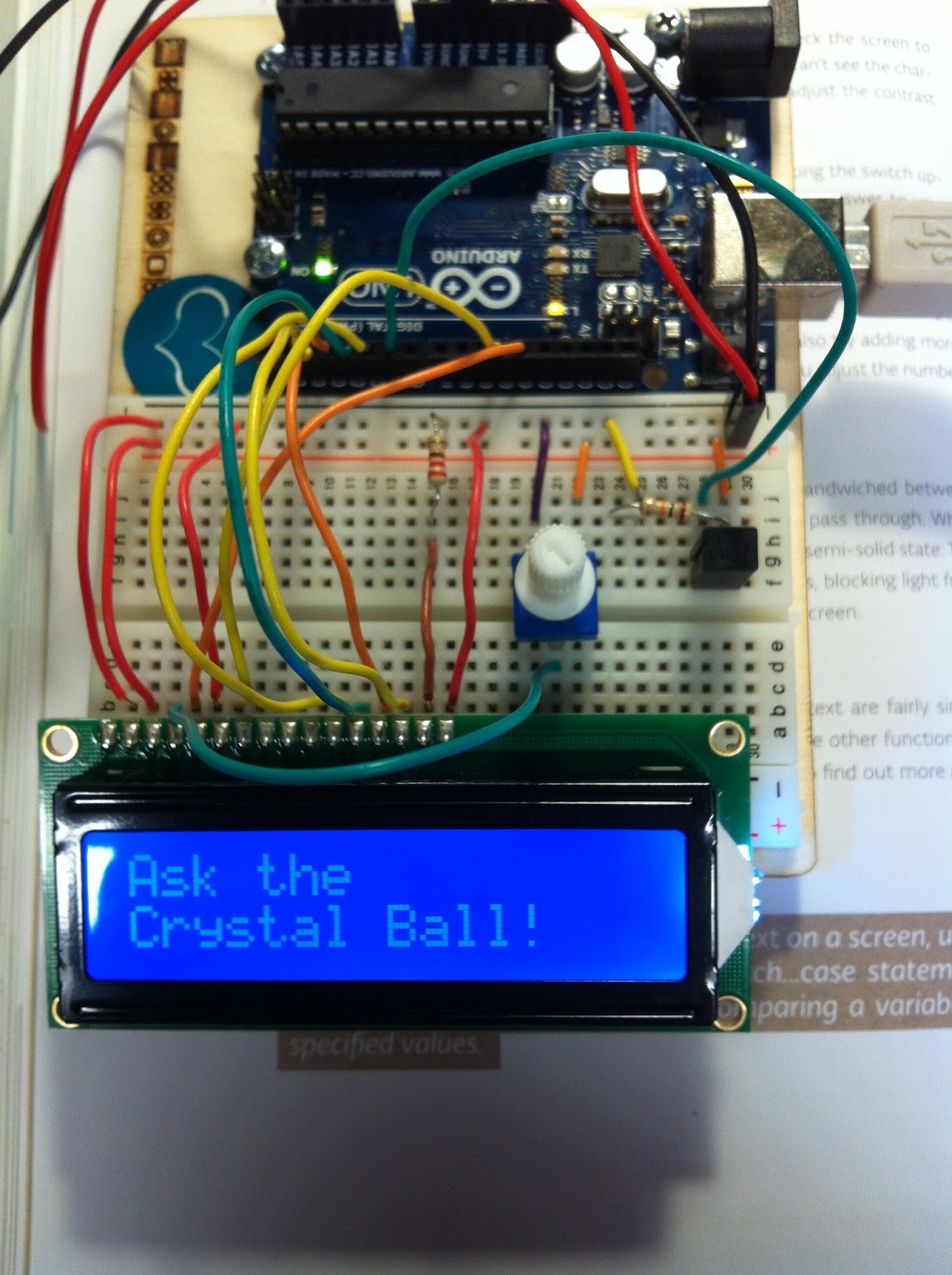
Hello,
My friend and I are working on the Crystal Ball Project for school and are finding lots of trouble with the LCD. We aren't quite sure what the issue is, we believe that it's not the code but we'll including it in the thread. We're just not sure why the LCD isn't saying "Ask the Crystal Ball a Question" and would appreciate it if you could look over the coding and wiring to check what we're doing wrong thanks! click this link for the photo: https://drive.google.com/file/d/0Bw1_PpUwJfM1eTUyakppYmV1STA/view?usp=sharing
#include <LiquidCrystal.h>
LiquidCrystal lcd(12, 11, 5, 4, 3, 2);
const int switchPin = 6 ;
int switchState = 0;
int prevSwitchState = 0;
int reply;
void setup() {
  lcd.begin(16, 2);
  pinMode(switchPin,INPUT);
  lcd.print("Ask the");
  lcd.setCursor(0,1);
  lcd.print("Crystal Ball!");
}
void loop() {
  switchState = digitalRead(switchPin);
  if (switchState != prevSwitchState) {
    if (switchState == LOW) {
      reply = random(8);
      lcd.clear();

lcd.setCursor(0,0);
lcd.print("The ball says:");
lcd.setCursor(0,1);
switch(reply){
  case 0:
  lcd.print("Yes");
  break;
  case 1:
  lcd.print("Most Likely");
  break;
  case 2:
  lcd.print("Certainly");
  break;
  case 3:
  lcd.print("Outlook Good");
  break;
  case 4:
  lcd.print("Unsure");
  break;
  case 5:
  lcd.print("Ask again");
  break;
  case 6:
  lcd.print("Doubtful");
  break;
  case 7:
  lcd.print("No");
  break;
}
}
}
prevSwitchState = switchState;
}
Hello,
My friend and I are working on the Crystal Ball Project for school and are finding lots of trouble with the LCD. We aren't quite sure what the issue is, we believe that it's not the code but we'll including it in the thread. We're just not sure why the LCD isn't saying "Ask the Crystal Ball a Question" and would appreciate it if you could look over the coding and wiring to check what we're doing wrong thanks! click this link for the photo:
I guess that you used the unmodified code and got as far as compiling and loading the sketch to the Arduino.
One trap for the unwary is the contrast adjustment on the LCD (type 1602 etc). If that is not correct, usually set by a potentiometer, you see a nice bright screen but no text.
A quick suggestion when wiring up these projects on temporary project boards. Use red jumpers for the Plus power and black jumpers for all ground connections. Makes it much easier to avoid costly wiring mistakes. Also, if you have several colors of jumper wires available try to mix them up a little and not have the same color congregate in one small area of different signals.
When taking a photo of the board it is very helpful to frame the shot so that individual wires can be traced. If they disappear under other wires of the same color then include another picture from a different angle. We can only see what you provide to us, we are not there to twist and turn the board for a better view.
Most importantly, when suggestions are made that ruffle your feathers, snapping back will not improve your chances of getting additional help.