Two questions about the stack size

Q1) How can I increase the stack size for an Arduino Uno, I've tried

SET_LOOP_TASK_STACK_SIZE(16*1024);

and

CONFIG_ARDUINO_LOOP_STACK_SIZE (16*1024);

but neither compile. I've tried before and after the includes in the source file.

Q2) Does the MEGA have a bigger stack than the UNO?

The uno has a fixed ram size.
As far as I know it cannot be increased.
Where did you find your code? Chat GTP?

Yes, mega has more ram...
The amount of stack is the amount of ram - heap - globals...

Thanks for the info.

No need to be sarcastic. I found the code in this forum. Just search SET_LOOP_TASK_STACK_SIZE in this forum.

Uno R3 total RAM is 2K. So you can't set the stack to 16K.

These settings are for ESP32, which uses separate tasks in FreeRTOS, each with their own stack. (It's the SET_ one for the main setup+loop that goes in the sketch.) They don't work on Uno.

2 Likes

Do you mean:
stack = amount of ram - (heap + globals)

?

Yes, mathematically that is equivalent.

I assume you wanted to increase the stack because your program is not working right.
Are you sure it is a stack issue?

I moved your topic to an appropriate forum category.
In the future, please take some time to pick the forum category that best suits the subject of your topic. There is an "About the _____ category" topic at the top of each category that explains its purpose.
This is an important part of responsible forum usage, as explained in the "How to get the best out of this forum" guide. The guide contains a lot of other useful information. Please read it.
Thanks in advance for your cooperation.

1 Like

As others have said, you can't.
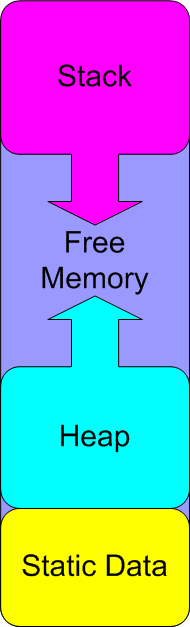
The memory layout for an Uno R3 or classic Nano is like this:


The symbols shown in green are provided by the Arduino system files and can be used by a sketch’s source code to obtain information about the memory usage. The size of static data, used for globals and other static data, is fixed at build time, it's what gets printed out at the end of the build process. The size of the stack and heap varies whilst the sketch is running.

2 Likes

Because it is part of RTOS or Espressif's ESP32 board package; I use neither so not sure.

PS
In future please post the sketch and the error messages that you get.

While the diagram is correct, it seems unconventional to me. I think most people think of High Mem at the top of the diagram, thus the general understanding that the heap grows "up" (memory is dynamically allocated with increasing addresses) and the stack grows "down" (stack pointer is decreased as more data is pushed on).

indeed, usually like this

source = You know you have a memory problem when... | Memories of an Arduino | Adafruit Learning System

1 Like

Yes, I'm sure it is a stack size issue.

  1. It is a recursive solution to a mathematical problem which works well in VS C++ console
  2. It does not crash when I interrupt the recursion at an earlier stage.
  3. When it does not crash it gives identical replies to the VS C++ solution
  4. If I reduce the size of data in the recursive function I can do deeper into the recursion.

Recursion is an ideal and working answer to my problem, especially since it has a limit, it will never be very very deep.

I'm hoping the Arduino Mega will solve my problem.

Thanks for posting that very simple to understand diagram. I should have looked at that before posting my idiot question.

You mean on a PC with gigabytes of memory

Thanks for the clarification.

That is almost irrelevant, the recursion takes up a few K of memory. Too many for the UNO it turns out.

yeah, and your uno has 2KB in total...

The Mega has 8KB of ram.

Yes, you are repeating what I said in the post you replied to:

"That is almost irrelevant, the recursion takes up a few K of memory. Too many for the UNO it turns out."