Thank you @ZinggJM. and yes the epaper uses the HSPI outputs.
The interesting thing is, I cannot even get the SD card reader by itself to function with the waveshare ESP32 board. I always get that same error when connecting power. When removing the VSPI pins to the SD card reader except for ground and power, I still get the same error, which lends me to believe it may be an issue with this particular SD card reader, and not so much the HSPI/VSPI.
Reading the amazon reviews on the SD card, it seems other folks have had issues using this SD card reader when used in conjunction with other peripherals, and it required resoldering some of the board connections to make it work. In an attempt to chase down the problem, I ordered an adafruit SD card reader to try out, Will update you once that comes in. Thank you again,
Yes i already tried the GxEPD2_750C_Z08 driver but didn't work. I only get e-paper busy messages.
I can try persuading waveshare, or maybe arrange something with buying/sending it to you.
Still in doubt about the size, might be buying a larger one from good display, saw those are supported.
I connected it through the "Pico-ePaper-Driver-Board" to a RP2040 Nano Connect. This worked well, kind of. I had troubles with hibernation and waking up again after a power loss. I circumvented this by hibernating in code (that the EPD object is in hibernation state), waking up again and then draw something.
After letting the project rest for a bit, I wanted to finish it. Suddenly it won't draw anything anymore
The first timeout is expected as this is from the putting the device into hibernate. Afterwards it seems to wake up, but does not draw anything. Also the timings seem too short.
I have no Oscilloscope atm. so I'm a bit in the dark.
On the schematics I found what I was looking for: it has the "clever" reset circuit.
So, my question is: do you use the shortened reset pulse?
Please also tell which or what example code you use.
Jean-Marc
Added:
Please also tell which panel you selected in GxEPD2.
Your display may be related to post 3265, and the panel seems to be from DKE (from inking FPC-????).
It's so great to see your continued work on GxEPD2!
I was wondering if you've considered adding support for GDEY073D46 (7.3" 7-color) yet. I just got one and I'd love to integrate it with other code using your library already.
If you haven't already received your own sample, I hear that Good Display would like to provide you with a one. I would happily chip in the shipping cost, if needed.
Thank you for the link. I didn't notice their new products yet. But this one seems sold out already.
I did not hear yet that Good Display would provide any display. I will take contact per mail.
No need to provide shipping cost. I would even have ordered that display, had I noticed.
Any free sample could be sent with my next order, to share the shipping cost.
And the value of this display is higher anyway than the tax-free (VAT) limit for Switzerland.
We have low VAT, but the added handling fee is higher in this value range.
Could you tell me how you connect this e-paper display to a processor board?
The flex connector has too many connections for the DESPI-C02.
I am rather busy currently, too busy to go into details.
I'm using display GDEW075Z08 with red and trying to use the grayscale and i see that command is not executed display.setTextColor(GxEPD_DARKGREY);
as the library doesn't support the grayscale for this display..
meanwhile i can see there's in the documentation some ideas about how to implement it but I'm not sure if the documentation is just a copy paste from other display that has grayscale!
till this moment I'm not sure if it's doable or not ..
I also noticed while showing red pixels the screen somehow show the light and then dark grey before it settles in red..
There are some few 3-color displays that can do grey levelsdifferential refresh instead of 3-color, either for full screen or for a partial window. In GxEPD2x_FastBlackWhiteOnColor and GxEPD2x_MixedTest you can see on which panels this is supported by GxEPD2.
This was just a test, because Good Display had examples for this. There may be more now. These might also be capable for grey levels instead of 3-color.
I don't have time to investigate and go into more details for now.
Your "error report" looks like a boot mode issue, strapping mode problem.
See document esp32_datasheet_en.pdf page 11, available on the espressif website.
Maybe pullup resistors on GPIO0 and GPIO5 would help. A link to your SD card board might help, if there is a schematic available.
And of course, your connection to the SD board would be needed.
I have updated the example GxEPD2_SD_Example. It shows two of the three options to use SD card boards with the WS ESP32 Driver board.
The updated example will be part of the next release, but is currently only on GitHub.
// The Wavehare ESP32 Driver Board uses uncommon SPI pins for the FPC connector. It uses HSPI pins, but SCK and MOSI are swapped.
// To use HW SPI with the ESP32 Driver Board, HW SPI pins need be re-mapped in any case. Can be done using either HSPI or VSPI.
// Other SPI clients can either be connected to the same SPI bus as the e-paper, or to the other HW SPI bus, or through SW SPI.
// The logical configuration would be to use the e-paper connection on HSPI with re-mapped pins, and use VSPI for other SPI clients.
// VSPI with standard VSPI pins is used by the global SPI instance of the Arduino IDE ESP32 package.
//
// Alternately VSPI with re-mapped pins can be used with the ESP32 Driver Board FPC connector.
// This was used with the original example GxEPD2_WS_ESP32_Driver.ino.
// Then the standard HW SPI pins can be used for other clients through HSPI with re-mapped pins.
// This is not the prefered configuration, but also works. Available in this example for test.

// uncomment next line to use HSPI for EPD (and VSPI for SD), e.g. with Waveshare ESP32 Driver Board
//#define USE_HSPI_FOR_EPD
// alternately uncomment next line to use HSPI for SD (and VSPI for EPD), e.g. with Waveshare ESP32 Driver Board
//#define USE_HSPI_FOR_SD

Jean-Marc
@ZinggJM So the interesting thing is that the ESP32 works fine when connected to the SD card reader. The ESP32 boots up, initializes with no issue. But when it goes to initialize the SD card reader this error happens. If I give power to the SD card reader, it will still only happen when I initialize the SD card. Then its a continuous loop of that boot error until I remove power, at which point the ESP32 reboots fine. I have tried two different SD card readers, both with the same result. :
@ZinggJM I appreciate taking the time to help. If you havent yet realized, I am a beginner, so i would appreciate a bit of patience. If you dont want to respond thats fine but please be respectful at least.
If you wouldnt mind detailing more about the boot kill / DO issue i would appreciate it. Obvisouly I am missing some key piece pf information here on how the esp 32 works. Again not all of us on this forum are experts, its just a side hobby for fun.
Apologies for sending the esp8266 link, i meant to send this sd card reader link
I try to be respectful. But I have a problem when "Newbies" spare time by providing minimal information, often event if asked for more, and so waste my time. There are many things I don't know by heart, and thus often take considerable time searching for information.
This is irrelevant, caused by your misleading information. The boot mode issue can be caused by a connected peripheral device, pulling a strapping pin to the wrong level on release of reset. The kill /DO issue would arise, if the level converter would also drive the DO pin, to 5V when high. This is not the case with the Adafruit SD board. I would have checked if you would have provided the link to the device on the Adafruit website.
Thinking a bit further, the error causing the repeated reset might be caused by the SPI begin() code, trying to attach a pin that is already attached. I have encountered this when I made some mistake preparing and testing the new version of GxEPD2_SD_Example.ino.
I might consider continuing trying to help you, if you tested with this updated GxEPD2_SD_Example.ino, using either of the two options, and with SD connected to the standard HW SPI pins.
I need complete and correct information. The wiring you used and the code you used.
If you use the example with one of the WS driver options uncommented, and the standard HW SPI pins, then I have this information, and know it should work, as I have verified by tests.
Jean-Marc
Added:
Your HiLetgo SD board is the same I use for test. I assume it uses a bidirectional level converter (too lazy to check), which may cause the 5V issue.
For use with 3.3V processors, I connect its VCC to 3.3V, and add a jumper to short the LDO, the two pins nearer to the connector of the 3 pins of this fat LDO (AMS1117).
With the HiLetGo SD card reader I have made some progress. Now I no longer get the boot flash memory error (neither on ESP32 nor on SD card initialization, but the SD card does fail to initialize still. With the Adafruit board though, I still get that same flash boot error.
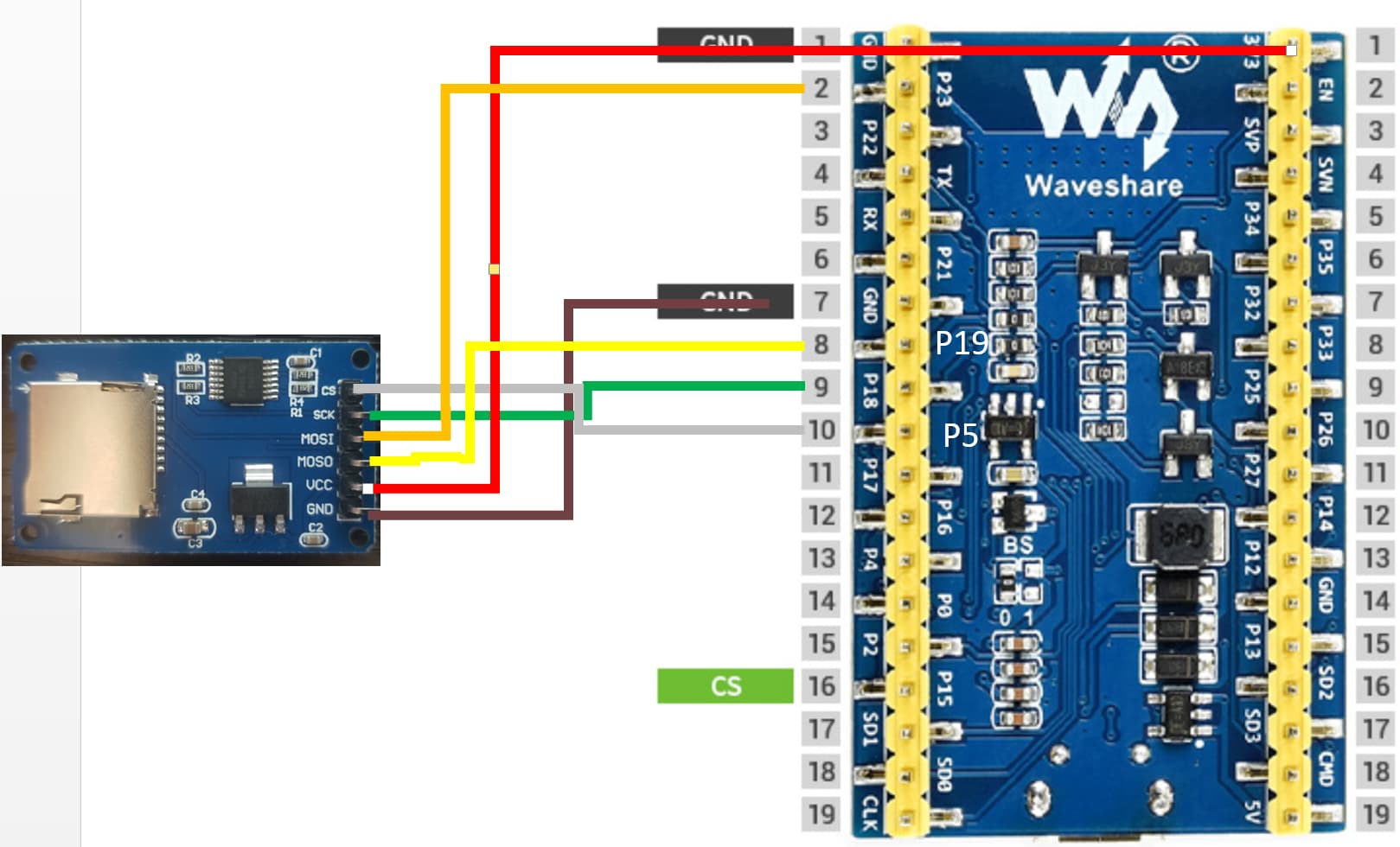
New users can only embed one image per post lol...so I will reply again with my wiring schematic.
Here is the code I am using. I also included the GxEPD2_display_selection_new_style.h
// GxEPD2_SD_Example : Display Library example for SPI e-paper panels from Dalian Good Display and boards from Waveshare.
// Requires HW SPI and Adafruit_GFX. Caution: the e-paper panels require 3.3V supply AND data lines!
//
// Display Library based on Demo Example from Good Display: http://www.e-paper-display.com/download_list/downloadcategoryid=34&isMode=false.html
//
// BMP handling code extracts taken from: https://github.com/prenticedavid/MCUFRIEND_kbv/tree/master/examples/showBMP_kbv_Uno
//
// Author: Jean-Marc Zingg
//
// Version: see library.properties
//
// Library: https://github.com/ZinggJM/GxEPD2
//
// note that BMP bitmaps are drawn at physical position in physical orientation of the screen

// Supporting Arduino Forum Topics:
// Waveshare e-paper displays with SPI: http://forum.arduino.cc/index.php?topic=487007.0
// Good Display ePaper for Arduino: https://forum.arduino.cc/index.php?topic=436411.0

// see GxEPD2_wiring_examples.h for wiring suggestions and examples

// **** NOTE that the mapping suggestion may need modification depending on SD board used! ****
// ********************************************************************************************
//
// NOTE for use with Waveshare ESP32 Driver Board:
// **** also need to select the constructor with the parameters for this board in GxEPD2_display_selection_new_style.h ****
//
// The Wavehare ESP32 Driver Board uses uncommon SPI pins for the FPC connector. It uses HSPI pins, but SCK and MOSI are swapped.
// To use HW SPI with the ESP32 Driver Board, HW SPI pins need be re-mapped in any case. Can be done using either HSPI or VSPI.
// Other SPI clients can either be connected to the same SPI bus as the e-paper, or to the other HW SPI bus, or through SW SPI.
// The logical configuration would be to use the e-paper connection on HSPI with re-mapped pins, and use VSPI for other SPI clients.
// VSPI with standard VSPI pins is used by the global SPI instance of the Arduino IDE ESP32 package.
//
// Alternately VSPI with re-mapped pins can be used with the ESP32 Driver Board FPC connector.
// This was used with the original example GxEPD2_WS_ESP32_Driver.ino.
// Then the standard HW SPI pins can be used for other clients through HSPI with re-mapped pins.
// This is not the prefered configuration, but also works. Available in this example for test.

// uncomment next line to use HSPI for EPD (and VSPI for SD), e.g. with Waveshare ESP32 Driver Board
#define USE_HSPI_FOR_EPD
// alternately uncomment next line to use HSPI for SD (and VSPI for EPD), e.g. with Waveshare ESP32 Driver Board
//#define USE_HSPI_FOR_SD

// base class GxEPD2_GFX can be used to pass references or pointers to the display instance as parameter, uses ~1.2k more code
// enable or disable GxEPD2_GFX base class
#define ENABLE_GxEPD2_GFX 0

// uncomment next line to use class GFX of library GFX_Root instead of Adafruit_GFX
//#include <GFX.h>
// Note: if you use this with ENABLE_GxEPD2_GFX 1:
//       uncomment it in GxEPD2_GFX.h too, or add #include <GFX.h> before any #include <GxEPD2_GFX.h>

#include <GxEPD2_BW.h>
#include <GxEPD2_3C.h>
#include <GxEPD2_7C.h>
#include <Fonts/FreeMonoBold9pt7b.h>

#if defined(ESP32)

#include "FS.h"
#include "SD.h"
#include "SPI.h"

#else

#include <SPI.h>
#include <SD.h>

#endif

// #define EPD_CS before #include "GxEPD2_display_selection_new_style.h" to override default
#if defined (ESP8266)
#define SD_CS SS  // e.g. for RobotDyn Wemos D1 mini SD board
#define EPD_CS D1 // alternative I use with RobotDyn Wemos D1 mini SD board
#endif

#if defined(ESP32)
#if defined(USE_HSPI_FOR_EPD) || defined(USE_HSPI_FOR_SD)
#define SD_CS SS
#define EPD_CS 15
SPIClass hspi(HSPI);
#else
#define SD_CS 2  // adapted to my wiring
#endif
#endif

#if defined(__AVR)
#define SD_CS 6  // adapt to your wiring
#define EPD_CS SS // adapt to your wiring
// most AVR Arduinos have not enough RAM for use with SD and buffered graphics
// !!! use GxEPD2_SD_AVR_Example.ino instead !!!
//GxEPD2_154 display(/*CS=10*/ EPD_CS, /*DC=*/ 8, /*RST=*/ 9, /*BUSY=*/ 7);
#endif

// select the display class and display driver class in the following file (new style):
// don't forget to modify or override EPD_CS if needed
#include "GxEPD2_display_selection_new_style.h"

// function declaration with default parameter
// note that BMP bitmaps are drawn at physical position in physical orientation of the screen
void drawBitmapFromSD(const char *filename, int16_t x, int16_t y, bool with_color = true);

// bitmap drawing using buffered graphics, e.g. for small bitmaps or for GxEPD2_154c
// draws BMP bitmap according to set orientation
// partial_update selects refresh mode (not effective for GxEPD2_154c)
// overwrite = true does not clear buffer before drawing, use only if buffer is full height
void drawBitmapFromSD_Buffered(const char *filename, int16_t x, int16_t y, bool with_color = true, bool partial_update = false, bool overwrite = false);

void setup()
{
  Serial.begin(115200);
  Serial.println();
    Serial.println("ESP32 initialized");
  uint32_t deadline = millis() + 10 * 1000;
  while (static_cast<int32_t>(deadline - millis()) > 0) {
    delay(1000);
    Serial.println(static_cast<int32_t>(deadline - millis()) / 1000);
  }
  Serial.println("GxEPD2_SD_Example");

#if defined(ESP32) && defined(USE_HSPI_FOR_EPD)
  hspi.begin(13, 12, 14, 15); // remap hspi for EPD (swap pins)
  display.epd2.selectSPI(hspi, SPISettings(4000000, MSBFIRST, SPI_MODE0));
#elif defined(ESP32) && defined(USE_HSPI_FOR_SD)
  SPI.begin(13, 12, 14, 15); // remap SPI for EPD
  hspi.begin(SCK, MISO, MOSI, SS); // remap hspi for SD
#endif
  display.init(115200);

  Serial.print("Initializing SD card...");
#if defined(ESP32) && defined(USE_HSPI_FOR_SD)
  if (!SD.begin(SD_CS, hspi))
  {
    Serial.println("SD failed!");
    return;
  }
#else
  if (!SD.begin(SD_CS))
  {
    Serial.println("SD failed!");
    return;
  }
#endif
  Serial.println("SD OK!");

  if ((display.epd2.panel == GxEPD2::GDEW0154Z04) || (display.epd2.panel == GxEPD2::ACeP565) || false)
  {
    drawBitmapsBuffered_200x200();
    drawBitmapsBuffered_other();
  }
  else
  {
    drawBitmaps_200x200();
    drawBitmaps_other();
  }

  //drawBitmaps_test();
  //drawBitmapsBuffered_test();

  Serial.println("GxEPD2_SD_Example done");
}

void loop(void)
{
}

void drawBitmaps_200x200()
{
  int16_t x = (display.width() - 200) / 2;
  int16_t y = (display.height() - 200) / 2;
  drawBitmapFromSD("logo200x200.bmp", x, y);
  delay(2000);
  drawBitmapFromSD("first200x200.bmp", x, y);
  delay(2000);
  drawBitmapFromSD("second200x200.bmp", x, y);
  delay(2000);
  drawBitmapFromSD("third200x200.bmp", x, y);
  delay(2000);
  drawBitmapFromSD("fourth200x200.bmp", x, y);
  delay(2000);
  drawBitmapFromSD("fifth200x200.bmp", x, y);
  delay(2000);
  drawBitmapFromSD("sixth200x200.bmp", x, y);
  delay(2000);
  drawBitmapFromSD("seventh200x200.bmp", x, y);
  delay(2000);
  drawBitmapFromSD("eighth200x200.bmp", x, y);
  delay(2000);
}

void drawBitmaps_other()
{
  int16_t w2 = display.width() / 2;
  int16_t h2 = display.height() / 2;
  drawBitmapFromSD("parrot.bmp", w2 - 64, h2 - 80);
  delay(2000);
  drawBitmapFromSD("betty_1.bmp", w2 - 100, h2 - 160);
  delay(2000);
  drawBitmapFromSD("betty_4.bmp", w2 - 102, h2 - 126);
  delay(2000);
  drawBitmapFromSD("marilyn_240x240x8.bmp", w2 - 120, h2 - 120);
  delay(2000);
  drawBitmapFromSD("miniwoof.bmp", w2 - 60, h2 - 80);
  delay(2000);
  drawBitmapFromSD("t200x200.bmp", w2 - 100, h2 - 100);
  delay(2000);
  drawBitmapFromSD("test.bmp", w2 - 120, h2 - 160);
  delay(2000);
  drawBitmapFromSD("tiger.bmp", w2 - 160, h2 - 120);
  delay(2000);
  drawBitmapFromSD("tiger_178x160x4.bmp", w2 - 89, h2 - 80);
  delay(2000);
  drawBitmapFromSD("tiger_240x317x4.bmp", w2 - 120, h2 - 160);
  delay(2000);
  drawBitmapFromSD("tiger_320x200x24.bmp", w2 - 160, h2 - 100);
  delay(2000);
  drawBitmapFromSD("tiger16T.bmp", w2 - 160, h2 - 120);
  delay(2000);
  drawBitmapFromSD("woof.bmp", w2 - 120, h2 - 160);
  delay(2000);
  drawBitmapFromSD("bitmap640x384_1.bmp", 0, 0);
  delay(2000);
}

void drawBitmaps_test()
{
  int16_t w2 = display.width() / 2;
  int16_t h2 = display.height() / 2;
  drawBitmapFromSD("betty_4.bmp", w2 - 102, h2 - 126);
  delay(2000);
  drawBitmapFromSD("bb4.bmp", 0, 0);
  delay(2000);
  drawBitmapFromSD("output5.bmp", 0, 0);
  delay(2000);
  drawBitmapFromSD("output6.bmp", 0, 0);
  delay(2000);
  drawBitmapFromSD("tractor_1.bmp", 0, 0);
  delay(2000);
  drawBitmapFromSD("tractor_4.bmp", 0, 0);
  delay(2000);
  drawBitmapFromSD("tractor_8.bmp", 0, 0);
  delay(2000);
  drawBitmapFromSD("tractor_11.bmp", 0, 0);
  delay(2000);
  drawBitmapFromSD("tractor_44.bmp", 0, 0);
  delay(2000);
  drawBitmapFromSD("tractor_88.bmp", 0, 0);
  delay(2000);
}

void drawBitmapsBuffered_200x200()
{
  int16_t x = (display.width() - 200) / 2;
  int16_t y = (display.height() - 200) / 2;
  drawBitmapFromSD_Buffered("logo200x200.bmp", x, y);
  delay(2000);
  drawBitmapFromSD_Buffered("first200x200.bmp", x, y);
  delay(2000);
  drawBitmapFromSD_Buffered("second200x200.bmp", x, y);
  delay(2000);
  drawBitmapFromSD_Buffered("third200x200.bmp", x, y);
  delay(2000);
  drawBitmapFromSD_Buffered("fourth200x200.bmp", x, y);
  delay(2000);
  drawBitmapFromSD_Buffered("fifth200x200.bmp", x, y);
  delay(2000);
  drawBitmapFromSD_Buffered("sixth200x200.bmp", x, y);
  delay(2000);
  drawBitmapFromSD_Buffered("seventh200x200.bmp", x, y);
  delay(2000);
  drawBitmapFromSD_Buffered("eighth200x200.bmp", x, y);
  delay(2000);
}

void drawBitmapsBuffered_other()
{
  int16_t w2 = display.width() / 2;
  int16_t h2 = display.height() / 2;
  drawBitmapFromSD_Buffered("parrot.bmp", w2 - 64, h2 - 80);
  delay(2000);
  drawBitmapFromSD_Buffered("betty_1.bmp", w2 - 100, h2 - 160);
  delay(2000);
  drawBitmapFromSD_Buffered("betty_4.bmp", w2 - 102, h2 - 126);
  delay(2000);
  drawBitmapFromSD_Buffered("marilyn_240x240x8.bmp", w2 - 120, h2 - 120);
  delay(2000);
  drawBitmapFromSD_Buffered("miniwoof.bmp", w2 - 60, h2 - 80);
  delay(2000);
  drawBitmapFromSD_Buffered("t200x200.bmp", w2 - 100, h2 - 100);
  delay(2000);
  drawBitmapFromSD_Buffered("test.bmp", w2 - 120, h2 - 160);
  delay(2000);
  drawBitmapFromSD_Buffered("tiger.bmp", w2 - 160, h2 - 120);
  delay(2000);
  drawBitmapFromSD_Buffered("tiger_178x160x4.bmp", w2 - 89, h2 - 80);
  delay(2000);
  drawBitmapFromSD_Buffered("tiger_240x317x4.bmp", w2 - 120, h2 - 160);
  delay(2000);
  drawBitmapFromSD_Buffered("tiger_320x200x24.bmp", w2 - 160, h2 - 100);
  delay(2000);
  drawBitmapFromSD_Buffered("tiger16T.bmp", w2 - 160, h2 - 120);
  delay(2000);
  drawBitmapFromSD_Buffered("woof.bmp", w2 - 120, h2 - 160);
  delay(2000);
  drawBitmapFromSD_Buffered("bitmap640x384_1.bmp", 0, 0);
  delay(2000);
}

void drawBitmapsBuffered_test()
{
  int16_t w2 = display.width() / 2;
  int16_t h2 = display.height() / 2;
  drawBitmapFromSD_Buffered("betty_4.bmp", w2 - 102, h2 - 126);
  delay(2000);
  drawBitmapFromSD_Buffered("bb4.bmp", 0, 0, false, true, true);
  delay(2000);
}

//static const uint16_t input_buffer_pixels = 20; // may affect performance
static const uint16_t input_buffer_pixels = 800; // may affect performance

static const uint16_t max_row_width = 1448; // for up to 6" display 1448x1072
static const uint16_t max_palette_pixels = 256; // for depth <= 8

uint8_t input_buffer[3 * input_buffer_pixels]; // up to depth 24
uint8_t output_row_mono_buffer[max_row_width / 8]; // buffer for at least one row of b/w bits
uint8_t output_row_color_buffer[max_row_width / 8]; // buffer for at least one row of color bits
uint8_t mono_palette_buffer[max_palette_pixels / 8]; // palette buffer for depth <= 8 b/w
uint8_t color_palette_buffer[max_palette_pixels / 8]; // palette buffer for depth <= 8 c/w
uint16_t rgb_palette_buffer[max_palette_pixels]; // palette buffer for depth <= 8 for buffered graphics, needed for 7-color display

void drawBitmapFromSD(const char *filename, int16_t x, int16_t y, bool with_color)
{
  File file;
  bool valid = false; // valid format to be handled
  bool flip = true; // bitmap is stored bottom-to-top
  uint32_t startTime = millis();
  if ((x >= display.epd2.WIDTH) || (y >= display.epd2.HEIGHT)) return;
  Serial.println();
  Serial.print("Loading image '");
  Serial.print(filename);
  Serial.println('\'');
#if defined(ESP32)
  file = SD.open(String("/") + filename, FILE_READ);
  if (!file)
  {
    Serial.print("File not found");
    return;
  }
#else
  file = SD.open(filename);
  if (!file)
  {
    Serial.print("File not found");
    return;
  }
#endif
  // Parse BMP header
  if (read16(file) == 0x4D42) // BMP signature
  {
    uint32_t fileSize = read32(file);
    uint32_t creatorBytes = read32(file); (void)creatorBytes; //unused
    uint32_t imageOffset = read32(file); // Start of image data
    uint32_t headerSize = read32(file);
    uint32_t width  = read32(file);
    int32_t height = (int32_t) read32(file);
    uint16_t planes = read16(file);
    uint16_t depth = read16(file); // bits per pixel
    uint32_t format = read32(file);
    if ((planes == 1) && ((format == 0) || (format == 3))) // uncompressed is handled, 565 also
    {
      Serial.print("File size: "); Serial.println(fileSize);
      Serial.print("Image Offset: "); Serial.println(imageOffset);
      Serial.print("Header size: "); Serial.println(headerSize);
      Serial.print("Bit Depth: "); Serial.println(depth);
      Serial.print("Image size: ");
      Serial.print(width);
      Serial.print('x');
      Serial.println(height);
      // BMP rows are padded (if needed) to 4-byte boundary
      uint32_t rowSize = (width * depth / 8 + 3) & ~3;
      if (depth < 8) rowSize = ((width * depth + 8 - depth) / 8 + 3) & ~3;
      if (height < 0)
      {
        height = -height;
        flip = false;
      }
      uint16_t w = width;
      uint16_t h = height;
      if ((x + w - 1) >= display.epd2.WIDTH)  w = display.epd2.WIDTH  - x;
      if ((y + h - 1) >= display.epd2.HEIGHT) h = display.epd2.HEIGHT - y;
      if (w <= max_row_width) // handle with direct drawing
      {
        valid = true;
        uint8_t bitmask = 0xFF;
        uint8_t bitshift = 8 - depth;
        uint16_t red, green, blue;
        bool whitish = false;
        bool colored = false;
        if (depth == 1) with_color = false;
        if (depth <= 8)
        {
          if (depth < 8) bitmask >>= depth;
          //file.seek(54); //palette is always @ 54
          file.seek(imageOffset - (4 << depth)); // 54 for regular, diff for colorsimportant
          for (uint16_t pn = 0; pn < (1 << depth); pn++)
          {
            blue  = file.read();
            green = file.read();
            red   = file.read();
            file.read();
            //Serial.print(red); Serial.print(" "); Serial.print(green); Serial.print(" "); Serial.println(blue);
            whitish = with_color ? ((red > 0x80) && (green > 0x80) && (blue > 0x80)) : ((red + green + blue) > 3 * 0x80); // whitish
            colored = (red > 0xF0) || ((green > 0xF0) && (blue > 0xF0)); // reddish or yellowish?
            if (0 == pn % 8) mono_palette_buffer[pn / 8] = 0;
            mono_palette_buffer[pn / 8] |= whitish << pn % 8;
            if (0 == pn % 8) color_palette_buffer[pn / 8] = 0;
            color_palette_buffer[pn / 8] |= colored << pn % 8;
          }
        }
        display.clearScreen();
        uint32_t rowPosition = flip ? imageOffset + (height - h) * rowSize : imageOffset;
        for (uint16_t row = 0; row < h; row++, rowPosition += rowSize) // for each line
        {
          uint32_t in_remain = rowSize;
          uint32_t in_idx = 0;
          uint32_t in_bytes = 0;
          uint8_t in_byte = 0; // for depth <= 8
          uint8_t in_bits = 0; // for depth <= 8
          uint8_t out_byte = 0xFF; // white (for w%8!=0 border)
          uint8_t out_color_byte = 0xFF; // white (for w%8!=0 border)
          uint32_t out_idx = 0;
          file.seek(rowPosition);
          for (uint16_t col = 0; col < w; col++) // for each pixel
          {
            // Time to read more pixel data?
            if (in_idx >= in_bytes) // ok, exact match for 24bit also (size IS multiple of 3)
            {
              in_bytes = file.read(input_buffer, in_remain > sizeof(input_buffer) ? sizeof(input_buffer) : in_remain);
              in_remain -= in_bytes;
              in_idx = 0;
            }
            switch (depth)
            {
              case 24:
                blue = input_buffer[in_idx++];
                green = input_buffer[in_idx++];
                red = input_buffer[in_idx++];
                whitish = with_color ? ((red > 0x80) && (green > 0x80) && (blue > 0x80)) : ((red + green + blue) > 3 * 0x80); // whitish
                colored = (red > 0xF0) || ((green > 0xF0) && (blue > 0xF0)); // reddish or yellowish?
                break;
              case 16:
                {
                  uint8_t lsb = input_buffer[in_idx++];
                  uint8_t msb = input_buffer[in_idx++];
                  if (format == 0) // 555
                  {
                    blue  = (lsb & 0x1F) << 3;
                    green = ((msb & 0x03) << 6) | ((lsb & 0xE0) >> 2);
                    red   = (msb & 0x7C) << 1;
                  }
                  else // 565
                  {
                    blue  = (lsb & 0x1F) << 3;
                    green = ((msb & 0x07) << 5) | ((lsb & 0xE0) >> 3);
                    red   = (msb & 0xF8);
                  }
                  whitish = with_color ? ((red > 0x80) && (green > 0x80) && (blue > 0x80)) : ((red + green + blue) > 3 * 0x80); // whitish
                  colored = (red > 0xF0) || ((green > 0xF0) && (blue > 0xF0)); // reddish or yellowish?
                }
                break;
              case 1:
              case 4:
              case 8:
                {
                  if (0 == in_bits)
                  {
                    in_byte = input_buffer[in_idx++];
                    in_bits = 8;
                  }
                  uint16_t pn = (in_byte >> bitshift) & bitmask;
                  whitish = mono_palette_buffer[pn / 8] & (0x1 << pn % 8);
                  colored = color_palette_buffer[pn / 8] & (0x1 << pn % 8);
                  in_byte <<= depth;
                  in_bits -= depth;
                }
                break;
            }
            if (whitish)
            {
              // keep white
            }
            else if (colored && with_color)
            {
              out_color_byte &= ~(0x80 >> col % 8); // colored
            }
            else
            {
              out_byte &= ~(0x80 >> col % 8); // black
            }
            if ((7 == col % 8) || (col == w - 1)) // write that last byte! (for w%8!=0 border)
            {
              output_row_color_buffer[out_idx] = out_color_byte;
              output_row_mono_buffer[out_idx++] = out_byte;
              out_byte = 0xFF; // white (for w%8!=0 border)
              out_color_byte = 0xFF; // white (for w%8!=0 border)
            }
          } // end pixel
          uint16_t yrow = y + (flip ? h - row - 1 : row);
          display.writeImage(output_row_mono_buffer, output_row_color_buffer, x, yrow, w, 1);
        } // end line
        Serial.print("loaded in "); Serial.print(millis() - startTime); Serial.println(" ms");
        display.refresh();
      }
    }
  }
  file.close();
  if (!valid)
  {
    Serial.println("bitmap format not handled.");
  }
}

void drawBitmapFromSD_Buffered(const char *filename, int16_t x, int16_t y, bool with_color, bool partial_update, bool overwrite)
{
  File file;
  bool valid = false; // valid format to be handled
  bool flip = true; // bitmap is stored bottom-to-top
  bool has_multicolors = display.epd2.panel == GxEPD2::ACeP565;
  uint32_t startTime = millis();
  if ((x >= display.width()) || (y >= display.height())) return;
  Serial.println();
  Serial.print("Loading image '");
  Serial.print(filename);
  Serial.println('\'');
#if defined(ESP32)
  file = SD.open(String("/") + filename, FILE_READ);
  if (!file)
  {
    Serial.print("File not found");
    return;
  }
#else
  file = SD.open(filename);
  if (!file)
  {
    Serial.print("File not found");
    return;
  }
#endif
  // Parse BMP header
  if (read16(file) == 0x4D42) // BMP signature
  {
    uint32_t fileSize = read32(file);
    uint32_t creatorBytes = read32(file); (void)creatorBytes; //unused
    uint32_t imageOffset = read32(file); // Start of image data
    uint32_t headerSize = read32(file);
    uint32_t width  = read32(file);
    int32_t height = (int32_t) read32(file);
    uint16_t planes = read16(file);
    uint16_t depth = read16(file); // bits per pixel
    uint32_t format = read32(file);
    if ((planes == 1) && ((format == 0) || (format == 3))) // uncompressed is handled, 565 also
    {
      Serial.print("File size: "); Serial.println(fileSize);
      Serial.print("Image Offset: "); Serial.println(imageOffset);
      Serial.print("Header size: "); Serial.println(headerSize);
      Serial.print("Bit Depth: "); Serial.println(depth);
      Serial.print("Image size: ");
      Serial.print(width);
      Serial.print('x');
      Serial.println(height);
      // BMP rows are padded (if needed) to 4-byte boundary
      uint32_t rowSize = (width * depth / 8 + 3) & ~3;
      if (depth < 8) rowSize = ((width * depth + 8 - depth) / 8 + 3) & ~3;
      if (height < 0)
      {
        height = -height;
        flip = false;
      }
      uint16_t w = width;
      uint16_t h = height;
      if ((x + w - 1) >= display.width())  w = display.width()  - x;
      if ((y + h - 1) >= display.height()) h = display.height() - y;
      //if (w <= max_row_width) // handle with direct drawing
      {
        valid = true;
        uint8_t bitmask = 0xFF;
        uint8_t bitshift = 8 - depth;
        uint16_t red, green, blue;
        bool whitish = false;
        bool colored = false;
        if (depth == 1) with_color = false;
        if (depth <= 8)
        {
          if (depth < 8) bitmask >>= depth;
          //file.seek(54); //palette is always @ 54
          file.seek(imageOffset - (4 << depth)); //54 for regular, diff for colorsimportant
          for (uint16_t pn = 0; pn < (1 << depth); pn++)
          {
            blue  = file.read();
            green = file.read();
            red   = file.read();
            file.read();
            whitish = with_color ? ((red > 0x80) && (green > 0x80) && (blue > 0x80)) : ((red + green + blue) > 3 * 0x80); // whitish
            colored = (red > 0xF0) || ((green > 0xF0) && (blue > 0xF0)); // reddish or yellowish?
            if (0 == pn % 8) mono_palette_buffer[pn / 8] = 0;
            mono_palette_buffer[pn / 8] |= whitish << pn % 8;
            if (0 == pn % 8) color_palette_buffer[pn / 8] = 0;
            color_palette_buffer[pn / 8] |= colored << pn % 8;
            rgb_palette_buffer[pn] = ((red & 0xF8) << 8) | ((green & 0xFC) << 3) | ((blue & 0xF8) >> 3);
          }
        }
        if (partial_update) display.setPartialWindow(x, y, w, h);
        else display.setFullWindow();
        display.firstPage();
        do
        {
          //if (!overwrite) display.fillScreen(GxEPD_WHITE);
          uint32_t rowPosition = flip ? imageOffset + (height - h) * rowSize : imageOffset;
          for (uint16_t row = 0; row < h; row++, rowPosition += rowSize) // for each line
          {
            uint32_t in_remain = rowSize;
            uint32_t in_idx = 0;
            uint32_t in_bytes = 0;
            uint8_t in_byte = 0; // for depth <= 8
            uint8_t in_bits = 0; // for depth <= 8
            uint16_t color = GxEPD_WHITE;
            file.seek(rowPosition);
            for (uint16_t col = 0; col < w; col++) // for each pixel
            {
              // Time to read more pixel data?
              if (in_idx >= in_bytes) // ok, exact match for 24bit also (size IS multiple of 3)
              {
                in_bytes = file.read(input_buffer, in_remain > sizeof(input_buffer) ? sizeof(input_buffer) : in_remain);
                in_remain -= in_bytes;
                in_idx = 0;
              }
              switch (depth)
              {
                case 24:
                  blue = input_buffer[in_idx++];
                  green = input_buffer[in_idx++];
                  red = input_buffer[in_idx++];
                  whitish = with_color ? ((red > 0x80) && (green > 0x80) && (blue > 0x80)) : ((red + green + blue) > 3 * 0x80); // whitish
                  colored = (red > 0xF0) || ((green > 0xF0) && (blue > 0xF0)); // reddish or yellowish?
                  color = ((red & 0xF8) << 8) | ((green & 0xFC) << 3) | ((blue & 0xF8) >> 3);
                  break;
                case 16:
                  {
                    uint8_t lsb = input_buffer[in_idx++];
                    uint8_t msb = input_buffer[in_idx++];
                    if (format == 0) // 555
                    {
                      blue  = (lsb & 0x1F) << 3;
                      green = ((msb & 0x03) << 6) | ((lsb & 0xE0) >> 2);
                      red   = (msb & 0x7C) << 1;
                      color = ((red & 0xF8) << 8) | ((green & 0xFC) << 3) | ((blue & 0xF8) >> 3);
                    }
                    else // 565
                    {
                      blue  = (lsb & 0x1F) << 3;
                      green = ((msb & 0x07) << 5) | ((lsb & 0xE0) >> 3);
                      red   = (msb & 0xF8);
                      color = (msb << 8) | lsb;
                    }
                    whitish = with_color ? ((red > 0x80) && (green > 0x80) && (blue > 0x80)) : ((red + green + blue) > 3 * 0x80); // whitish
                    colored = (red > 0xF0) || ((green > 0xF0) && (blue > 0xF0)); // reddish or yellowish?
                  }
                  break;
                case 1:
                case 4:
                case 8:
                  {
                    if (0 == in_bits)
                    {
                      in_byte = input_buffer[in_idx++];
                      in_bits = 8;
                    }
                    uint16_t pn = (in_byte >> bitshift) & bitmask;
                    whitish = mono_palette_buffer[pn / 8] & (0x1 << pn % 8);
                    colored = color_palette_buffer[pn / 8] & (0x1 << pn % 8);
                    in_byte <<= depth;
                    in_bits -= depth;
                    color = rgb_palette_buffer[pn];
                  }
                  break;
              }
              if (with_color && has_multicolors)
              {
                // keep color
              }
              else if (whitish)
              {
                color = GxEPD_WHITE;
              }
              else if (colored && with_color)
              {
                color = GxEPD_COLORED;
              }
              else
              {
                color = GxEPD_BLACK;
              }
              uint16_t yrow = y + (flip ? h - row - 1 : row);
              display.drawPixel(x + col, yrow, color);
            } // end pixel
          } // end line
          Serial.print("page loaded in "); Serial.print(millis() - startTime); Serial.println(" ms");
        }
        while (display.nextPage());
        Serial.print("loaded in "); Serial.print(millis() - startTime); Serial.println(" ms");
      }
    }
  }
  file.close();
  if (!valid)
  {
    Serial.println("bitmap format not handled.");
  }
}

uint16_t read16(File& f)
{
  // BMP data is stored little-endian, same as Arduino.
  uint16_t result;
  ((uint8_t *)&result)[0] = f.read(); // LSB
  ((uint8_t *)&result)[1] = f.read(); // MSB
  return result;
}

uint32_t read32(File& f)
{
  // BMP data is stored little-endian, same as Arduino.
  uint32_t result;
  ((uint8_t *)&result)[0] = f.read(); // LSB
  ((uint8_t *)&result)[1] = f.read();
  ((uint8_t *)&result)[2] = f.read();
  ((uint8_t *)&result)[3] = f.read(); // MSB
  return result;
}