Waveshare e-paper displays with SPI

I assume you have uncommented this line:

#include <GxGDEW042T2/GxGDEW042T2.cpp>

and connected the display according to:

// mapping from Waveshare 2.9inch e-Paper to Wemos D1 mini
// BUSY -> D2, RST -> D4, DC -> D3, CS -> D8, CLK -> D5, DIN -> D7, GND -> GND, 3.3V -> 3.3

Then it should work.

You should also try the basic example: GxEPD_SPI_TestExample.ino

Busy Timeout is an indication of SPI not working correctly. The 4.2" has BUSY active HIGH.
1.54", 2.13" and 2.9" have BUSY active low.

If you disconnect the display the BUSY pin will have the default level, which I don't know.

Make sure the cable is firmly pushed in on the display side. Check continuity of the cable connection with ohm-meter, I have seen and heard of bad DuPont connectors.

For Newbies I recommend GxEPD2_AVR for AVR Arduinos, GxEPD2_32 for 32bit Arduinos.

Hello.

i have also the BUSY TIMEOUT Problem.
I use a Waveshare 4.2 TriColor an so I use
#include <GxGDEW042Z15/GxGDEW042Z15.cpp>

When display.update() is called the Display flickers for many Seconds before I got a clean output on it.

I use WEMOS D1 Mini Pro. My Wiring is okay but what about the BUSY-Line. It is connected to D2 is this correct?
I think the BUSY-Line from the Display should be connected to ESPs MISO-Line. The D1 Mini Pro's MISO line is D6 (pin 12) but using this PIN does not solve the Problem.

Any Idea where my Problem could be find.

THX so much - especially for this LIB

MacPIT69

3-color e-paper displays have a long update/refresh time, >15 seconds.
Do you see Busy Timeout in Serial Monitor?

The default BUSY line suggestion is D2, but you can also use D6, but it must be same value as in the constructor.

Jean-Marc

Here's one of my video takes a long time to update
Three-color ePaper 2.9

Hello Jean-Marc.
From your previous posts, I understand that you are looking for LUT for color e-papers and you have only 2.7 inches.
I also have for 2.9 and 4.2 inches. If you want, I'll put them here.

Hello @beee,

Yes, please!

I should soon have time to experiment with waveform tables again.
And I am sure other e-paper users will be glad to try this also.
Thank you,

Jean-Marc

LUT for GDEW029Z10

const unsigned char lut_vcom0[] ={	0x14	,0x01	,0x01	,0x05	,0x07	,0x05	,0x0C	,0x0C	,0x0A	,0x04	,0x04	,0x0A	,0x05	,0x07	,0x05	};
const unsigned char lut_w[] ={	0x14	,0x01	,0x01	,0x45	,0x07	,0x05	,0x8C	,0x4C	,0x0A	,0x84	,0x44	,0x0A	,0x85	,0x07	,0x05	};
const unsigned char lut_b[] ={	0x14	,0x01	,0x01	,0x05	,0x87	,0x05	,0x8C	,0x4C	,0x0A	,0x84	,0x44	,0x0A	,0x05	,0x47	,0x05	};
const unsigned char lut_g1[] ={	0x94	,0x81	,0x01	,0x05	,0x87	,0x05	,0x8C	,0x4C	,0x0A	,0x84	,0x44	,0x0A	,0x05	,0x07	,0x05	};
const unsigned char lut_g2[] ={	0x94	,0x81	,0x01	,0x05	,0x87	,0x05	,0x8C	,0x4C	,0x0A	,0x84	,0x44	,0x0A	,0x05	,0x07	,0x05	};
const unsigned char lut_vcom1[] ={	0x01	,0x09	,0x23	,0x06	,0x04	,0x01	,0x00	,0x00	,0x00	,0x00	,0x00	,0x00	,0x00	,0x00	,0x00	};
const unsigned char lut_red0[] ={	0x81	,0x49	,0x23	,0x46	,0x44	,0x01	,0x00	,0x00	,0x00	,0x00	,0x00	,0x00	,0x00	,0x00	,0x00	};
const unsigned char lut_red1[] ={	0x01	,0x09	,0x23	,0x06	,0x04	,0x01	,0x00	,0x00	,0x00	,0x00	,0x00	,0x00	,0x00	,0x00	,0x00	};

void lut_bw(void)
{
	unsigned int count;
	EPD_W21_WriteCMD(0x20);
	for(count=0;count<15;count++)	     
		{EPD_W21_WriteDATA(lut_vcom0[count]);}
	
	EPD_W21_WriteCMD(0x21);
	for(count=0;count<15;count++)	     
		{EPD_W21_WriteDATA(lut_w[count]);}   
	
	EPD_W21_WriteCMD(0x22);
	for(count=0;count<15;count++)	     
		{EPD_W21_WriteDATA(lut_b[count]);}    
	
	EPD_W21_WriteCMD(0x23);
	for(count=0;count<15;count++)	     
		{EPD_W21_WriteDATA(lut_g1[count]);}    
	
	EPD_W21_WriteCMD(0x24);
	for(count=0;count<15;count++)	     
		{EPD_W21_WriteDATA(lut_g2[count]);}          
}
void lut_red(void)
{
	unsigned int count;
	EPD_W21_WriteCMD(0x25);
	for(count=0;count<15;count++)	     
		{EPD_W21_WriteDATA(lut_vcom1[count]);}
	
	EPD_W21_WriteCMD(0x26);
	for(count=0;count<15;count++)	     
		{EPD_W21_WriteDATA(lut_red0[count]); }  
	
	EPD_W21_WriteCMD(0x27);
	for(count=0;count<15;count++)	     
		{EPD_W21_WriteDATA(lut_red1[count]); }   
}

LUT for GDEW042Z15

const unsigned char lut_vcomDC[] =
{
0x00	,0x1A	,0x1A	,0x00	,0x00	,0x01,		
0x00	,0x0A	,0x0A	,0x00	,0x00	,0x08,		
0x00	,0x0E	,0x01	,0x0E	,0x01	,0x10,		
0x00	,0x0A	,0x0A	,0x00	,0x00	,0x08,		
0x00	,0x04	,0x10	,0x00	,0x00	,0x05,		
0x00	,0x03	,0x0E	,0x00	,0x00	,0x0A,		
0x00	,0x23	,0x00	,0x00	,0x00	,0x01	,0x00	,0x00
};


//R21H
const unsigned char lut_ww[] ={
0x90	,0x1A	,0x1A	,0x00	,0x00	,0x01,
0x40	,0x0A	,0x0A	,0x00	,0x00	,0x08,
0x84	,0x0E	,0x01	,0x0E	,0x01	,0x10,
0x80	,0x0A	,0x0A	,0x00	,0x00	,0x08,
0x00	,0x04	,0x10	,0x00	,0x00	,0x05,
0x00	,0x03	,0x0E	,0x00	,0x00	,0x0A,
0x00	,0x23	,0x00	,0x00	,0x00	,0x01
					};
//R22H	r
const unsigned char lut_r[] ={
0xA0	,0x1A	,0x1A	,0x00	,0x00	,0x01,
0x00	,0x0A	,0x0A	,0x00	,0x00	,0x08,
0x84	,0x0E	,0x01	,0x0E	,0x01	,0x10,
0x90	,0x0A	,0x0A	,0x00	,0x00	,0x08,
0xB0	,0x04	,0x10	,0x00	,0x00	,0x05,
0xB0	,0x03	,0x0E	,0x00	,0x00	,0x0A,
0xC0	,0x23	,0x00	,0x00	,0x00	,0x01
					};
//R23H	w
const unsigned char lut_w[] ={
0x90	,0x1A	,0x1A	,0x00	,0x00	,0x01,
0x40	,0x0A	,0x0A	,0x00	,0x00	,0x08,
0x84	,0x0E	,0x01	,0x0E	,0x01	,0x10,
0x80	,0x0A	,0x0A	,0x00	,0x00	,0x08,
0x00	,0x04	,0x10	,0x00	,0x00	,0x05,
0x00	,0x03	,0x0E	,0x00	,0x00	,0x0A,
0x00	,0x23	,0x00	,0x00	,0x00	,0x01
					};
//R24H	b
const unsigned char lut_b[] ={
0x90	,0x1A	,0x1A	,0x00	,0x00	,0x01,
0x20	,0x0A	,0x0A	,0x00	,0x00	,0x08,
0x84	,0x0E	,0x01	,0x0E	,0x01	,0x10,
0x10	,0x0A	,0x0A	,0x00	,0x00	,0x08,
0x00	,0x04	,0x10	,0x00	,0x00	,0x05,
0x00	,0x03	,0x0E	,0x00	,0x00	,0x0A,
0x00	,0x23	,0x00	,0x00	,0x00	,0x01
					};

void lut(void)
{
	unsigned int count;
	SPI4W_WRITECOM(0x20);
	for(count=0;count<44;count++)	     
		{SPI4W_WRITEDATA(lut_vcomDC[count]);}

//	SPI4W_WRITECOM(0x21);
//	for(count=0;count<42;count++)	     
//		{SPI4W_WRITEDATA(lut_ww[count]);}   
	
	SPI4W_WRITECOM(0x22);
	for(count=0;count<42;count++)	     
		{SPI4W_WRITEDATA(lut_r[count]);} 

	SPI4W_WRITECOM(0x23);
	for(count=0;count<42;count++)	     
		{SPI4W_WRITEDATA(lut_w[count]);}  

	SPI4W_WRITECOM(0x24);
	for(count=0;count<42;count++)	     
		{SPI4W_WRITEDATA(lut_b[count]);} 
}

I do not know why GOOD DISPLAY does not send "lut_ww" :-/

@beee

Thank you for your support!

lut_ww is not needed for 3-color displays (it is usually available and sent anyway), because these displays do not use differential update waveforms, like the b/w displays.

Jean-Marc

I just wondered where this information can be found. I checked if Good Display has updated their demo source.

Hi all, has anyone get running e-paper display from Waveshare with Robotdyn Wifi NodeM board (https://robotdyn.com/what-s-new/wifi-nodem-esp8266-32m-flash-ch340g.html) together with GxEPD library? I'm wondering how to properly connect SPI e-paper display to this board, and properly configure the connection on the core.

Nothign happen on the display when test application GxEPD_SPI_TestExample run.

On serial I'm getting something like that:

setup
setup done
Busy Timeout!
_wakeUp Power On : 20000262
Busy Timeout!
drawBitmap : 20000408
Busy Timeout!
_sleep Power Off : 20000741

Pin connections:

BUSY - D2
RST   - D4
DC    - D3
CS    - D8
CLK   - D5
DIN   - D7

My configuration section looks like:

// GxIO_SPI(SPIClass& spi, int8_t cs, int8_t dc, int8_t rst = -1, int8_t bl = -1);
GxIO_Class io(SPI, 15, 0, 2); // arbitrary selection of D3(=0), D4(=2), selected for default of GxEPD_Class
// GxGDEP015OC1(GxIO& io, uint8_t rst = 2, uint8_t busy = 4);
GxEPD_Class display(io); // default selection of D4(=2), D2(=4)


void setup()
{
  Serial.begin(115200);
  Serial.println();
  Serial.println("setup");

  display.init();

  Serial.println("setup done");
}

Pins are connected as on image below:

Thanks in advance.

I will answer when I am back home.

Your picture is missing. To post a picture and show it directly, you add it as attachment, then post or save the post, then copy the link to the attachment, then open the post for modify, and add the picture with the picture icon and paste the link.

Your ESP8266 is a NodeMCU with the usual "Dx" inking and denomination, like the Wemos D1 mini.
As far as I see you use the pin mapping as suggested. So it should work.

The BUSY timeouts indicate that your SPI communication does not work.
Make sure that the connection is correct, and the connector to the display is firmly pushed in, and the DuPont connectors are good and make good contact.

I've attached correctly the image. I've double checked the connection and nothing happened.

Have you selected the correct display class for your 2.7" display?
From the picture I assume it is the 3-color display, but I am not sure.
I will try to follow the colored wires to the NodeMCU board tomorrow.

davidjwatts:
multiple of 8!!! That was it, it worked when I changed my image from 100px wide to 96px. Thank you!

So glad I decided to read through this forum topic. Multiples of 8 = the magic sauce. THANK YOU!

programista25:
I've attached correctly the image. I've double checked the connection and nothing happened.

Your wiring looks correct, but the connector to the display may not be pushed in enough.
You may need to do continuity test on all connection with an ohm-meter.

Please tell which board you select in the Arduino IDE to compile for, and if you use a special package for RobotDyn ESP8266, so I can check for potential issues with the SPI definitions.

ZinggJM:
Please tell which board you select in the Arduino IDE to compile for, and if you use a special package for RobotDyn ESP8266, so I can check for potential issues with the SPI definitions.

I've tried NodeMCU 0.9 (ESP-12 Module) and Generic ESP 8266 Module boards.

I will check with the meter all of the pins and give you response later on today.

Ok, both use the SPI pin definitions in common.h of generic:

#define PIN_SPI_SS   (15)
#define PIN_SPI_MOSI (13)
#define PIN_SPI_MISO (12)
#define PIN_SPI_SCK  (14)

So this should not be the cause, unless RobotDyn did something very strange.

Explanation:

From my experience, any output pin of ESP8266 can be used for CS, but the predefined SS pin can't be used for anything else, if SPI is used.

And there is one pin that shouldn't be used as input, because it determines boot mode. I do not know by heart which one.

ZinggJM:
I had downloaded the code from Ben Krasnow and it did not work on my display.

I may re-try this experiment, and try his waveform table with my code sometime.

Do you refer to the GxGDEW042T2_FPU version, or the original GxGDEW042T2 version?

Both versions work with the internal wavetable (OTP of the controller) for full update.

Maybe the quality of your display is inferior, maybe it is even not from Good Display.

Jean-Marc

Could you please post the LUT you use (with code tags)? this would make it easy for me to compare,
and for me and for others also to experiment with it.

I have started work on this.

The code from Ben Krasnow did not and still does not work for me, because my changes for Wemos D1 mini must be incomplete. Reason still to be analysed. Usually I had no problem adapting Waveshare demo code. But with this I still get unknown processor exceptions.

A 16k buffer on the stack was the reason. Ben Krasnow's example works ok.

PartialUpdateExample with GxGDEW042T2 on the Waveshare 4.2 b/w looks bad after some partial updates, it looks much better on my older GDEW042T2 panel from Good Display, re-verified.
The older display does not have two halves of the display with different degradation.

The full update wavetables of the demo code from Waveshare and Ben Krasnow produce better results with the actual display than the wavetable in OTP. As far as I remember there is one different value in lut_vcom0. On the older panel the results seem equal.

The fast partial update waveform from GxGDEW042T2_FPU gives better result than the one from Ben Kransnow in my opinion.

GxGDEW042T2 is now with fast partial update support and with waveform table from Waveshare demo for full update.

GxGDEW042T2_BK is available for comparison.

Jean-Marc

ZinggJM:
From my experience, any output pin of ESP8266 can be used for CS, but the predefined SS pin can't be used for anything else, if SPI is used.

And there is one pin that shouldn't be used as input, because it determines boot mode. I do not know by heart which one.

Problem solved, thanks for the help!

It turned out, that the small SPI connector does not work. I've tried to use this Raspbery output pin and now everything is working with defauld configuration.

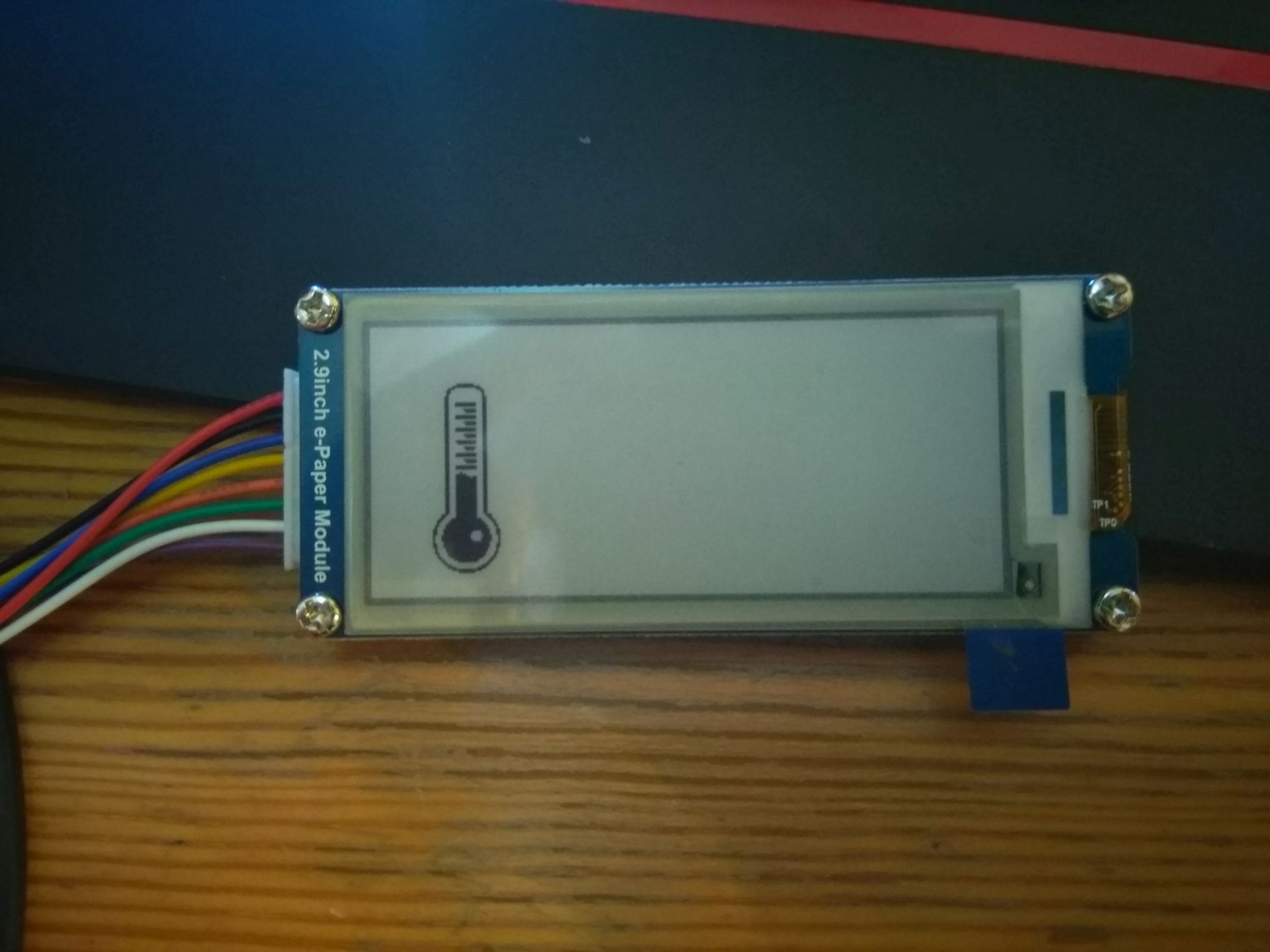
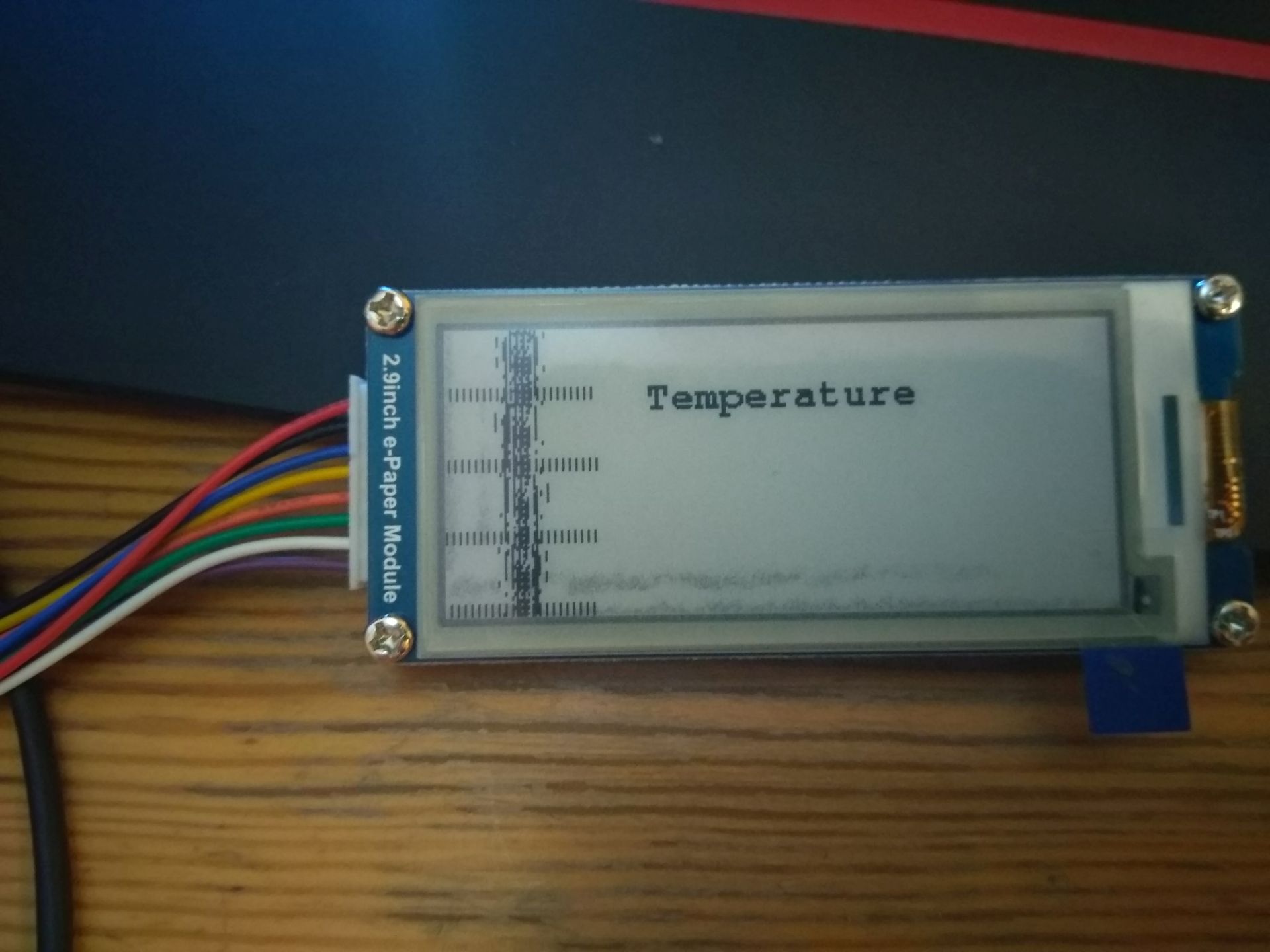
Hello I am trying to make a small weather station. I have a small problem with partial update of the display. For now I was trying to display static image and then every 5sec display a temperature. For testing I am printing millis.

Well so I display static image and then I am trying to do a partial update. This where things goes wrong. See attached pictures. Before partial update and after. Image was made by image2lcd with vertical scan.
Can you please tell where am I making an mistake? And how to avoid it in the future?

Thanks
Tomas

#include <GxEPD.h>
#include <GxGDEH029A1/GxGDEH029A1.cpp>
#include <GxIO/GxIO_SPI/GxIO_SPI.cpp>
#include <GxIO/GxIO.cpp>
#include "teplomer.c"
#include "teplomer4.c"
#include "bezramecku.c"
#include <Fonts/FreeSansBold24pt7b.h>
#include <Fonts/FreeMonoBold9pt7b.h>


GxIO_Class io(SPI, SS, D3, D4);
GxEPD_Class display(io);


#include "DHT.h"


#define pinDHT            12         // Pin which is connected to the DHT sensor.
#define typDHT11           DHT21     // DHT 21 (AM2301)

DHT mojeDHT(pinDHT, typDHT11);


void setup() {
  Serial.begin(9600);
  display.init();
  display.fillRect(0, 0, 295, 295, GxEPD_BLACK);  
  display.update();
   delay(5000);

  display.drawExampleBitmap(gImage_teplomer4, 10, 0, 90, 80, GxEPD_BLACK);
  display.update();

   // display.drawExampleBitmap(gImage_teplomer4, sizeof(gImage_teplomer4), GxEPD::bm_flip_y | GxEPD::bm_partial_update);
   display.drawExampleBitmap(gImage_teplomer4, sizeof(gImage_teplomer4), GxEPD::bm_default | GxEPD::bm_partial_update);

}


void loop() {


  mojeDHT.begin();
  float tep = mojeDHT.readTemperature();
  float vlh = mojeDHT.readHumidity();
  showPartialUpdate(tep);

  delay(5000);
}

void showPartialUpdate(float teplota)
{
  unsigned long time;
  time = millis();

  const GFXfont* f = &FreeMonoBold9pt7b;
  uint16_t box_x = 90;
  uint16_t box_y = 20;
  uint16_t box_w = 120;
  uint16_t box_h = 50;
  uint16_t cursor_y = box_y + 16;
  display.setRotation(1);
  display.setFont(f);
  display.setTextColor(GxEPD_BLACK);
  display.fillRect(box_x, box_y, box_w, box_h, GxEPD_WHITE);
  display.setCursor(box_x, cursor_y);
   display.print(time);
  display.updateWindow(box_x, box_y, box_w, box_h, true);

}