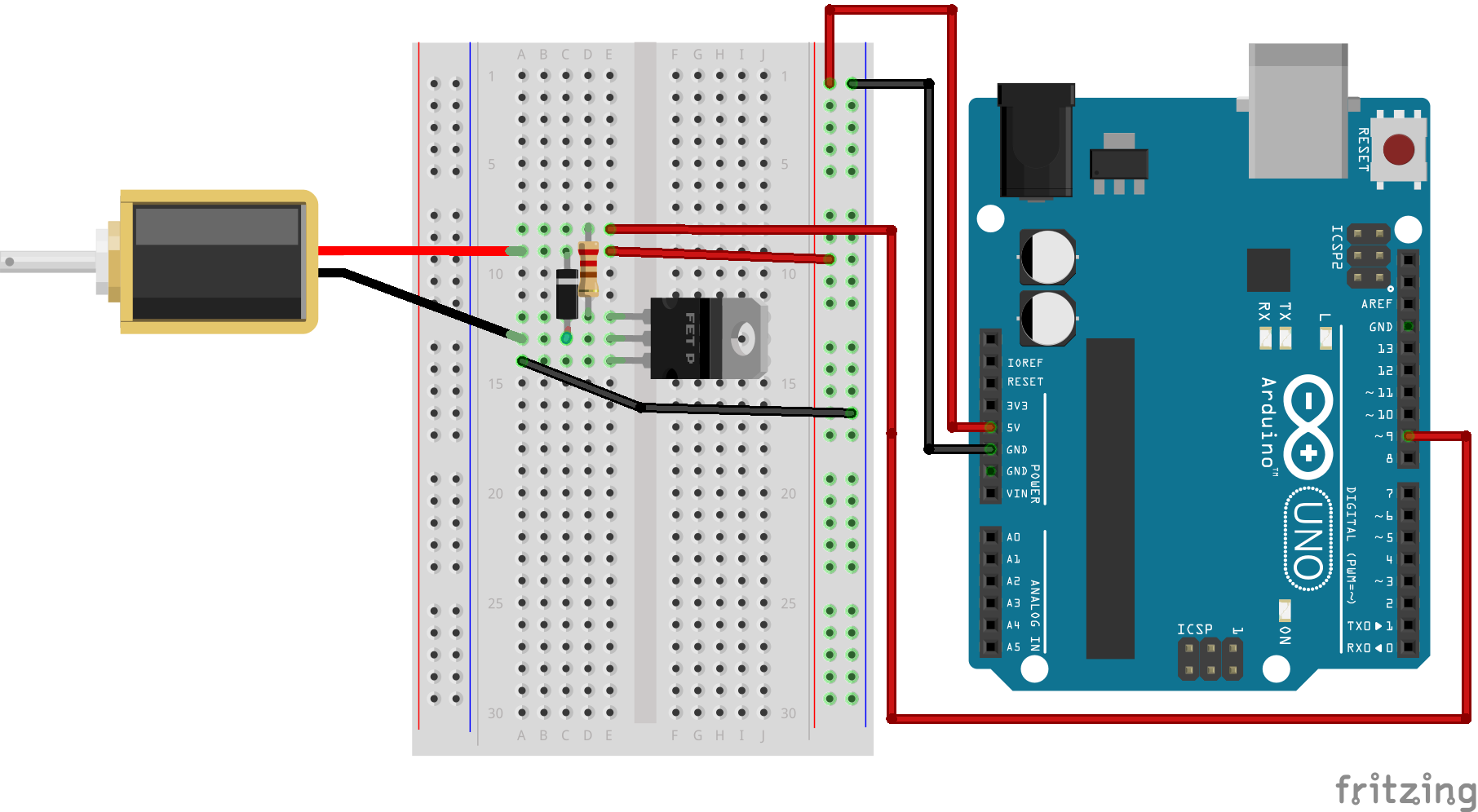
So which solenoid is it, 6V or 12V or 24V? How are you powering it? None of those voltages are available from an Arduino and I can't see any power supply in your picture. A circuit diagram would be more useful.
slipstick:
So which solenoid is it, 6V or 12V or 24V? How are you powering it? None of those voltages are available from an Arduino and I can't see any power supply in your picture. A circuit diagram would be more useful.
Steve
Sorry, it's a 6V solenoid, and I've tried both using only the power from the USB cable and a 12v power suppply.
I've noticed that if I push the solenoid it stays in place for a second, so it's trying to do something, but seems like it has not enough power.
Let's try again. What EXACTLY is the +ve side of the solenoid connected to? What value resistor is connected between pin9 and the transistor base. It would really be a lot easier to work out what going on if you just posted a hand-drawn circuit diagram. Words really don't cut it.
slipstick:
Let's try again. What EXACTLY is the +ve side of the solenoid connected to? What value resistor is connected between pin9 and the transistor base. It would really be a lot easier to work out what going on if you just posted a hand-drawn circuit diagram. Words really don't cut it.
The + side of the solenoid is connected to the 5V pin on the Arduino UNO, and I'm using a 1k resistor, as I listed on my post.
Since the original post I've read about someone having a similar problem, and looks like the transistor they were using was not powerful enough, so I'm leaning to that same thing being my problem and I've ordered some TIP120 to try them.
skerritt:
The connections are the same as in the linked url
Since the original post I've read about someone having a similar problem, and looks like the transistor they were using was not powerful enough, so I'm leaning to that same thing being my problem and I've ordered some TIP120 to try them.
It could also well be that the current draw of the solenoid when it turns on drops the supply voltage of the Arduino to the point it causes the processor to reset or other wise disturbs it. And, if it's a 6V solenoid you're already underpowering it by giving it only the +5V of the Arduino board. In any case, it's preferable to have the solenoid powered by its own independent power supply - with ground of PS connected to ground of Arduino.
Your solenoid is rated at 300mA. That's not really too much for a 2N2222 but it is too much to try to get from the Arduino 5V pin, particularly when you're powering it from 12V. Try powering the solenoid with a separate 6V (4 x AA) battery and it will almost certainly start working.
slipstick:
Your solenoid is rated at 300mA. That's not really too much for a 2N2222 but it is too much to try to get from the Arduino 5V pin, particularly when you're powering it from 12V. Try powering the solenoid with a separate 6V (4 x AA) battery and it will almost certainly start working.
Steve
So, if I don't want to use batteries, I should get a 5V solenoid instead?
Whatever voltage solenoid you use you will still need a power supply of some sort. Trying to drive a solenoid via the 5V pin is never going to work well.
That tutorial is simply wrong I'm afraid, and you found out the hard way - A logic supply rail is not
the reliable way to power inductive components like relays/solenoids/motors - at worst you can
blow up your logic chips doing this, typically you'll have reliability issues due to inductive noise spikes.
Use a separate supply for your solenoid, common the grounds. Make sure the supply is upto the task
(this is often a mistake beginners make - every time you power something with a supply its your
responsibility to check that the supply is the right polarity, of a suitable voltage and can supply
enough current.) Never rush, always check (and recheck) such things, rushing causes mistakes,
burnt components and frustration...
Learn to use your electronic eyes - the multimeter (and 'scope if you have one) - they will tell you
whats happening - in particular is the supply voltage holding up under load? Also check if anything
is getting hot (carefully - a thermal camera is ideal, a tentative finger is usable on low voltage circuits).