Okay, so I got a genuine Arduino UNO R3 here. Running windows 10. It is updated. I also have the 1.8.13 version of the Arduino IDE. All is working well, I then have an issue uploading a sketch to the board and go to the ports tab and see that it is greyed out. I look up a solution on these forums that is a few years old that says to uninstall, unplug, replug, then reinstall and that should fix it. I go to device manager to uninstall, unplug, replug, and the computer doesn't reinstall automatically as the post said it would, and I can't figure out how to reinstall the driver. Whereas before it would say "Arduino Uno" under either the "other devices" or "ports" section on device manager, I only ever get "unknown USB device" under the "universal serial bus controllers" section
When plugged into the computer it makes the connection noise. The error it gives is "USB Device not recognized". When I go to device manager the associated port says "unknown USB device". I right-click on it and select update driver. I go to "Browse my computer for drivers". I locate the driver folder at C:\Program Files (x86)\Arduino\drivers and select next. Windows says "the best drivers for your device are already installed"* and still lists the device as an unknown USB device. I go back and choose "let me pick from a list of available drivers on my computer". I click on "have disk" and again navigate to C:\Program Files (x86)\Arduino\drivers and click next. I get the error "the folder you specified doesn't contain a compatible software driver for your device. if the folder contains a driver make sure it is designed to work with Windows for x64 based systems." I search the web and find that disabling the driver signature requirement sometimes helps, so I hold shift while the computer is restarting, get to the blue screen with the troubleshooting options, restart and press 7 to select "disable driver signature enforcement". Go through the same process as described above and still get the errors as described before.
I even uninstalled and reinstalled the IDE. Bupkiss.
I have been at this for 5 hours now, I am losing my mind. I don't know if this is relevant but I have two knockoff Arduino Uno boards that literally will work only every other day. So if I plug in board A and use it, it won't work the next day, but board B will and I have to use that one instead, then the next day B won't work and I have to use A again, and so on and so forth. Hence receiving the genuine Uno board for x-mas hoping to eliminate this issue, under the impression it was just an issue with the knock-offs. To be fair it was working for a few hours until I followed the advice to uninstall from the device manager.
(*what the heck does this mean? how does windows know the best driver is installed if the USB device isn't recognized?)
Hello Gozeraye, I just wrote a huge post about this and it got deleted. This problem is not you. There is something wrong with this update. I regret installing 1.8.13. I lost my entire sketch book, I'm devastated. The IDE freezes Everytime it detects the smallest error in sketchs. It run odd all together, it has trouble loading libraries, the list of issue will take up probably 5 pages here, so I'm not going to list them all again. But I have not changed anything in my setup. No uninstalls, same Arduinos I've been using for over 2 years with no problems. Absolutely nothing has been changed except installing the new update. Something is wrong with the program. I hope we get a response from this, because I lost a year's worth of work.
al514: Please do not muddy the water here - you are reporting a completely different issue than the OP (and your problems are also unique to you or your system... you have confirmed that the Arduino folder within your documents folder no longer contains your sketches?).
Why am I having so many issues after updating then? And if we're supposed to do all this deactivating of system tools, why is that not in the instructions for installing? I'm trying not to over react but it's extremely frustrating. I apologise for that, believe me, get aggravated like this isn't part of my personality. what should I try? The IDE just freezes and beeps at me if I push anything
I disconnected what I had connected to it (a 4 row lcd with backack and a DS3231 clock module) and reinsierted the cable. The system recognized it as an arduino uno r3 and it shows in the device manager. Huzzah. I will remember this trick in the future. Do you know why that changes how the computer sees the board?
Huzzah aside, i am getting the error I got before which led me to delete the board from the device manager in the first place. I turned on verbose compile and upload messages and have the following error:
Using Port                    : COM3
Using Programmer              : arduino
Overriding Baud Rate          : 115200

avrdude: ser_open(): can't open device "\\.\COM3": Access is denied.
avrdude done.  Thank you.


Problem uploading to board.  See http://www.arduino.cc/en/Guide/Troubleshooting#upload for suggestions.
And here is my board. My lens flare is bad but I hope it's clear enough:
I think I will reinstall the previous version, I also read that the update had a new breakout window for working with the code? Where is that? Very confused here. I mean I love all this and the idea, but it takes a long time to learn how to use these boards. Everything was so good before.
Huzzah aside, i am getting the error I got before which led me to delete the board from the device manager in the first place. I turned on verbose compile and upload messages and have the following error:
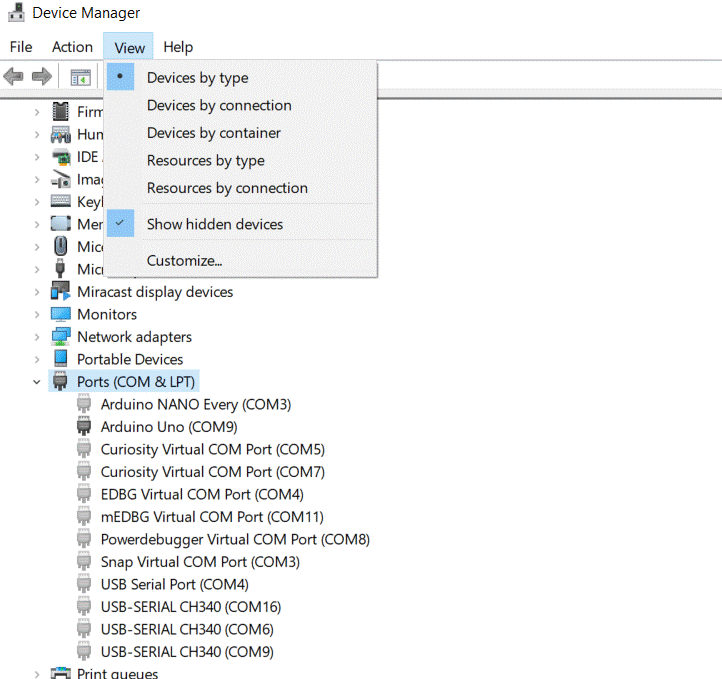
Have you checked for failed or greyed-out device installations using COM3 in device manager? Turn on "show hidden devices" Then delete (uninstall) any greyed out COM3 device(s).