Hi all,
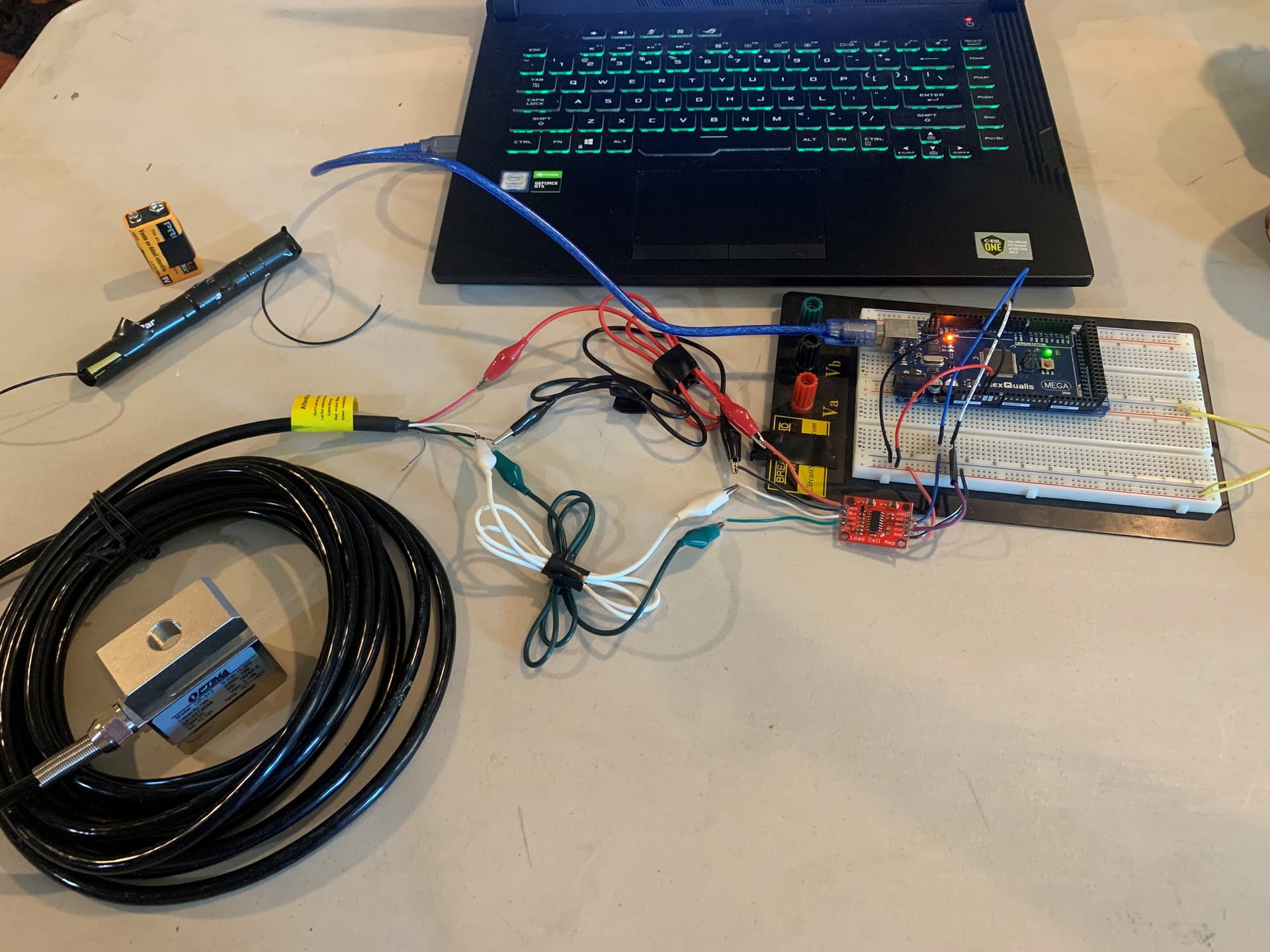
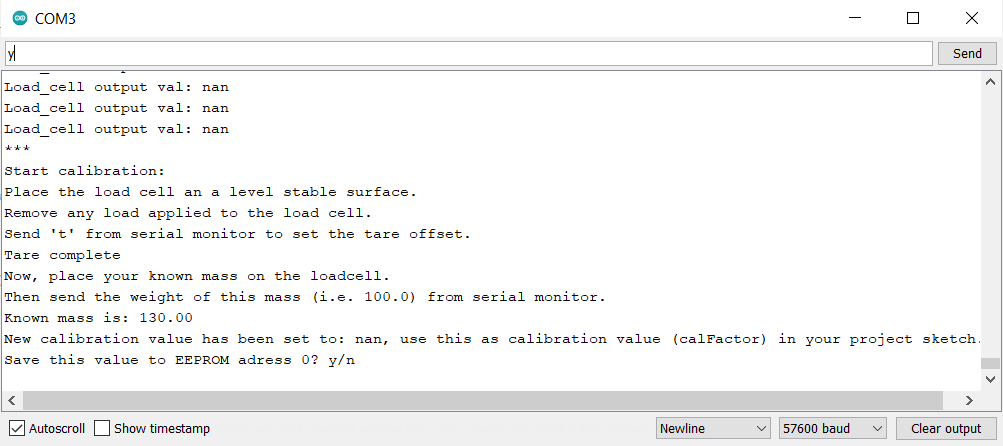
I'm using a 5-wire, 1000lb Optima-312 load cell with a SparkFun HX711 and a RexQualis Mega 2560 Arduino but no matter what I do I can't get a reading/calibration after trying many different code libraries. When asked to place a known mass on the load cell and enter its weight, the code confirms the known weight I entered but says the calibration weight is either 0.00 or "nan" regardless of which library I use. Has anyone had a similar issue or know of a fix?
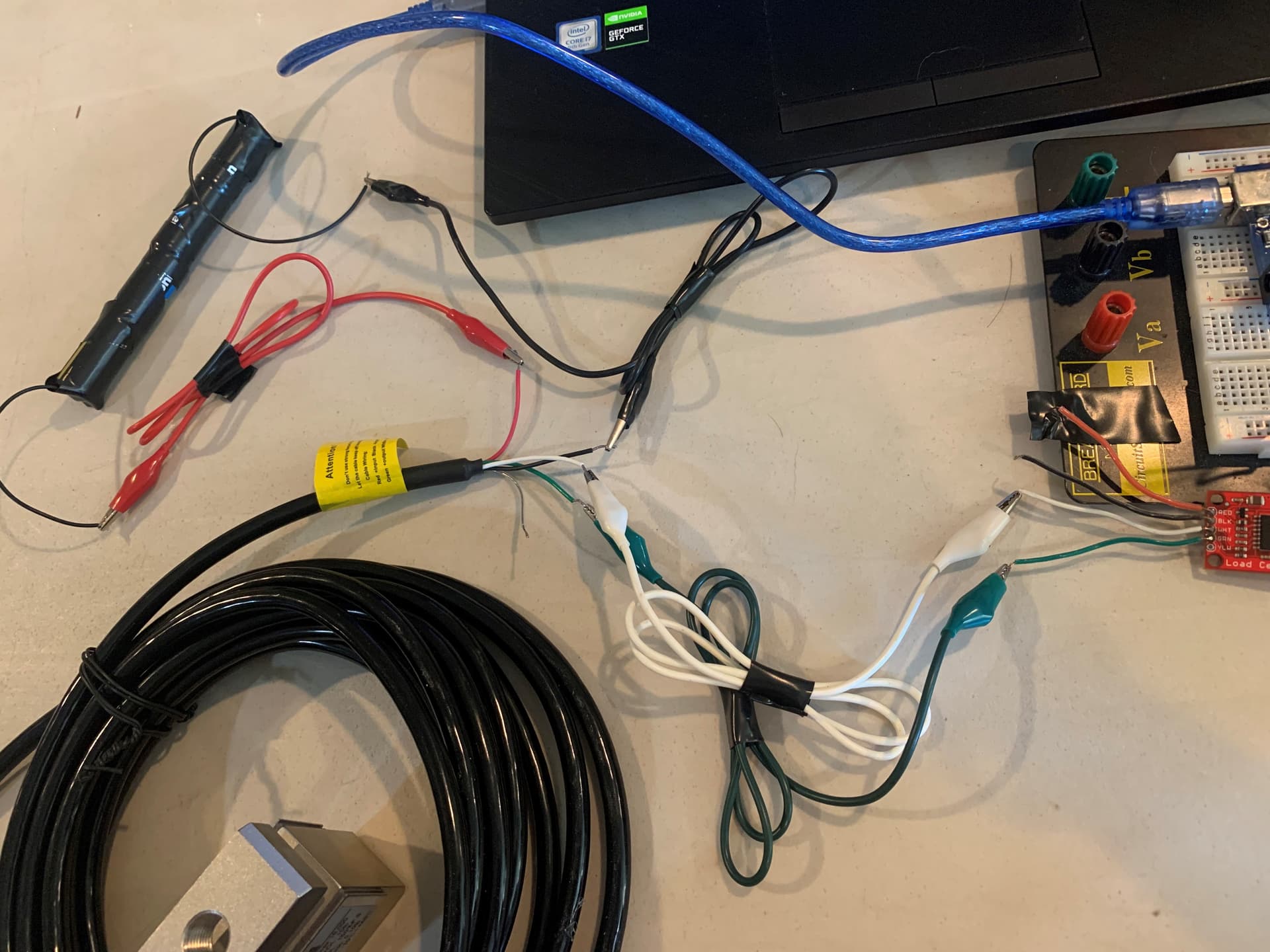
My load cell has a recommended voltage of 10-15v but no minimum voltage listed (I've tried powering it from the HX711, as well as with its power fed by a separate 9v/12v battery so as not to fry the Arduino) and I've tried testing resistances between each wire, which matches what the calibration sheet listed. Also, it lists the minimum weight it'll pick up as 0.1lbs (45g), and I've tried calibrating with weights ranging from 130g to 9072g (20lb weight).
For Serial Monitor setups (no LCD display) I'm using the following setup and code from Indrek Luuk's YouTube channel/website (with the HX711_ADC code from Olav Kallhovd)
(Picture of the wire connections)

Calibration code, part of the HX711_ADC "example" library
/*
   -------------------------------------------------------------------------------------
   HX711_ADC
   Arduino library for HX711 24-Bit Analog-to-Digital Converter for Weight Scales
   Olav Kallhovd sept2017
   -------------------------------------------------------------------------------------
*/

/*
   This example file shows how to calibrate the load cell and optionally store the calibration
   value in EEPROM, and also how to change the value manually.
   The result value can then later be included in your project sketch or fetched from EEPROM.

   To implement calibration in your project sketch the simplified procedure is as follow:
       LoadCell.tare();
       //place known mass
       LoadCell.refreshDataSet();
       float newCalibrationValue = LoadCell.getNewCalibration(known_mass);
*/

#include <HX711_ADC.h>
#if defined(ESP8266)|| defined(ESP32) || defined(AVR)
#include <EEPROM.h>
#endif

//pins:
const int HX711_dout = 4; //mcu > HX711 dout pin
const int HX711_sck = 5; //mcu > HX711 sck pin

//HX711 constructor:
HX711_ADC LoadCell(HX711_dout, HX711_sck);

const int calVal_eepromAdress = 0;
unsigned long t = 0;

void setup() {
  Serial.begin(57600); delay(10);
  Serial.println();
  Serial.println("Starting...");

  LoadCell.begin();
  //LoadCell.setReverseOutput(); //uncomment to turn a negative output value to positive
  unsigned long stabilizingtime = 2000; // preciscion right after power-up can be improved by adding a few seconds of stabilizing time
  boolean _tare = true; //set this to false if you don't want tare to be performed in the next step
  LoadCell.start(stabilizingtime, _tare);
  if (LoadCell.getTareTimeoutFlag() || LoadCell.getSignalTimeoutFlag()) {
    Serial.println("Timeout, check MCU>HX711 wiring and pin designations");
    while (1);
  }
  else {
    LoadCell.setCalFactor(1.0); // user set calibration value (float), initial value 1.0 may be used for this sketch
    Serial.println("Startup is complete");
  }
  while (!LoadCell.update());
  calibrate(); //start calibration procedure
}

void loop() {
  static boolean newDataReady = 0;
  const int serialPrintInterval = 0; //increase value to slow down serial print activity

  // check for new data/start next conversion:
  if (LoadCell.update()) newDataReady = true;

  // get smoothed value from the dataset:
  if (newDataReady) {
    if (millis() > t + serialPrintInterval) {
      float i = LoadCell.getData();
      Serial.print("Load_cell output val: ");
      Serial.println(i);
      newDataReady = 0;
      t = millis();
    }
  }

  // receive command from serial terminal
  if (Serial.available() > 0) {
    char inByte = Serial.read();
    if (inByte == 't') LoadCell.tareNoDelay(); //tare
    else if (inByte == 'r') calibrate(); //calibrate
    else if (inByte == 'c') changeSavedCalFactor(); //edit calibration value manually
  }

  // check if last tare operation is complete
  if (LoadCell.getTareStatus() == true) {
    Serial.println("Tare complete");
  }

}

void calibrate() {
  Serial.println("***");
  Serial.println("Start calibration:");
  Serial.println("Place the load cell an a level stable surface.");
  Serial.println("Remove any load applied to the load cell.");
  Serial.println("Send 't' from serial monitor to set the tare offset.");

  boolean _resume = false;
  while (_resume == false) {
    LoadCell.update();
    if (Serial.available() > 0) {
      if (Serial.available() > 0) {
        char inByte = Serial.read();
        if (inByte == 't') LoadCell.tareNoDelay();
      }
    }
    if (LoadCell.getTareStatus() == true) {
      Serial.println("Tare complete");
      _resume = true;
    }
  }

  Serial.println("Now, place your known mass on the loadcell.");
  Serial.println("Then send the weight of this mass (i.e. 100.0) from serial monitor.");

  float known_mass = 0;
  _resume = false;
  while (_resume == false) {
    LoadCell.update();
    if (Serial.available() > 0) {
      known_mass = Serial.parseFloat();
      if (known_mass != 0) {
        Serial.print("Known mass is: ");
        Serial.println(known_mass);
        _resume = true;
      }
    }
  }

  LoadCell.refreshDataSet(); //refresh the dataset to be sure that the known mass is measured correct
  float newCalibrationValue = LoadCell.getNewCalibration(known_mass); //get the new calibration value

  Serial.print("New calibration value has been set to: ");
  Serial.print(newCalibrationValue);
  Serial.println(", use this as calibration value (calFactor) in your project sketch.");
  Serial.print("Save this value to EEPROM adress ");
  Serial.print(calVal_eepromAdress);
  Serial.println("? y/n");

  _resume = false;
  while (_resume == false) {
    if (Serial.available() > 0) {
      char inByte = Serial.read();
      if (inByte == 'y') {
#if defined(ESP8266)|| defined(ESP32)
        EEPROM.begin(512);
#endif
        EEPROM.put(calVal_eepromAdress, newCalibrationValue);
#if defined(ESP8266)|| defined(ESP32)
        EEPROM.commit();
#endif
        EEPROM.get(calVal_eepromAdress, newCalibrationValue);
        Serial.print("Value ");
        Serial.print(newCalibrationValue);
        Serial.print(" saved to EEPROM address: ");
        Serial.println(calVal_eepromAdress);
        _resume = true;

      }
      else if (inByte == 'n') {
        Serial.println("Value not saved to EEPROM");
        _resume = true;
      }
    }
  }

  Serial.println("End calibration");
  Serial.println("***");
  Serial.println("To re-calibrate, send 'r' from serial monitor.");
  Serial.println("For manual edit of the calibration value, send 'c' from serial monitor.");
  Serial.println("***");
}

void changeSavedCalFactor() {
  float oldCalibrationValue = LoadCell.getCalFactor();
  boolean _resume = false;
  Serial.println("***");
  Serial.print("Current value is: ");
  Serial.println(oldCalibrationValue);
  Serial.println("Now, send the new value from serial monitor, i.e. 696.0");
  float newCalibrationValue;
  while (_resume == false) {
    if (Serial.available() > 0) {
      newCalibrationValue = Serial.parseFloat();
      if (newCalibrationValue != 0) {
        Serial.print("New calibration value is: ");
        Serial.println(newCalibrationValue);
        LoadCell.setCalFactor(newCalibrationValue);
        _resume = true;
      }
    }
  }
  _resume = false;
  Serial.print("Save this value to EEPROM adress ");
  Serial.print(calVal_eepromAdress);
  Serial.println("? y/n");
  while (_resume == false) {
    if (Serial.available() > 0) {
      char inByte = Serial.read();
      if (inByte == 'y') {
#if defined(ESP8266)|| defined(ESP32)
        EEPROM.begin(512);
#endif
        EEPROM.put(calVal_eepromAdress, newCalibrationValue);
#if defined(ESP8266)|| defined(ESP32)
        EEPROM.commit();
#endif
        EEPROM.get(calVal_eepromAdress, newCalibrationValue);
        Serial.print("Value ");
        Serial.print(newCalibrationValue);
        Serial.print(" saved to EEPROM address: ");
        Serial.println(calVal_eepromAdress);
        _resume = true;
      }
      else if (inByte == 'n') {
        Serial.println("Value not saved to EEPROM");
        _resume = true;
      }
    }
  }
  Serial.println("End change calibration value");
  Serial.println("***");
}