Yes. That's what I would do.

Same issue
Sketch uses 3958 bytes (13%) of program storage space. Maximum is 28672 bytes.
Global variables use 149 bytes (5%) of dynamic memory, leaving 2411 bytes for local variables. Maximum is 2560 bytes.
Forcing reset using 1200bps open/close on port COM12
processing.app.debug.RunnerException
	at cc.arduino.packages.uploaders.SerialUploader.uploadUsingPreferences(SerialUploader.java:152)
	at cc.arduino.UploaderUtils.upload(UploaderUtils.java:77)
	at processing.app.SketchController.upload(SketchController.java:732)
	at processing.app.SketchController.exportApplet(SketchController.java:703)
	at processing.app.Editor$UploadHandler.run(Editor.java:2061)
	at java.lang.Thread.run(Thread.java:748)
Caused by: processing.app.SerialException: Error touching serial port 'COM12'.
	at processing.app.Serial.touchForCDCReset(Serial.java:107)
	at cc.arduino.packages.uploaders.SerialUploader.uploadUsingPreferences(SerialUploader.java:136)
	... 5 more
Caused by: jssc.SerialPortException: Port name - COM12; Method name - openPort(); Exception type - Port busy.
	at jssc.SerialPort.openPort(SerialPort.java:164)
	at processing.app.Serial.touchForCDCReset(Serial.java:101)
	... 6 more
This is the complete upload message you should see with "Blink"
Sketch uses 3958 bytes (13%) of program storage space. Maximum is 28672 bytes.
Global variables use 149 bytes (5%) of dynamic memory, leaving 2411 bytes for local variables. Maximum is 2560 bytes.
Performing 1200-bps touch reset on serial port COM29
Waiting for upload port...
Upload port found on COM23
"C:\Users\Richard Marantz\AppData\Local\Arduino15\packages\arduino\tools\avrdude\6.3.0-arduino17/bin/avrdude" "-CC:\Users\Richard Marantz\AppData\Local\Arduino15\packages\arduino\tools\avrdude\6.3.0-arduino17/etc/avrdude.conf" -v -V -patmega32u4 -cavr109 "-PCOM23" -b57600 -D "-Uflash:w:C:\Users\Richard Marantz\AppData\Local\Temp\arduino\sketches\0C7C3D6F488DEEBCFF968196FE3559DD/Blink.ino.hex:i"

avrdude: Version 6.3-20190619
         Copyright (c) 2000-2005 Brian Dean, http://www.bdmicro.com/
         Copyright (c) 2007-2014 Joerg Wunsch

         System wide configuration file is "C:\Users\Richard Marantz\AppData\Local\Arduino15\packages\arduino\tools\avrdude\6.3.0-arduino17/etc/avrdude.conf"

         Using Port                    : COM23
         Using Programmer              : avr109
         Overriding Baud Rate          : 57600
         AVR Part                      : ATmega32U4
         Chip Erase delay              : 9000 us
         PAGEL                         : PD7
         BS2                           : PA0
         RESET disposition             : dedicated
         RETRY pulse                   : SCK
         serial program mode           : yes
         parallel program mode         : yes
         Timeout                       : 200
         StabDelay                     : 100
         CmdexeDelay                   : 25
         SyncLoops                     : 32
         ByteDelay                     : 0
         PollIndex                     : 3
         PollValue                     : 0x53
         Memory Detail                 :

                                  Block Poll               Page                       Polled
           Memory Type Mode Delay Size  Indx Paged  Size   Size #Pages MinW  MaxW   ReadBack
           ----------- ---- ----- ----- ---- ------ ------ ---- ------ ----- ----- ---------
           eeprom        65    20     4    0 no       1024    4      0  9000  9000 0x00 0x00
           flash         65     6   128    0 yes     32768  128    256  4500  4500 0x00 0x00
           lfuse          0     0     0    0 no          1    0      0  9000  9000 0x00 0x00
           hfuse          0     0     0    0 no          1    0      0  9000  9000 0x00 0x00
           efuse          0     0     0    0 no          1    0      0  9000  9000 0x00 0x00
           lock           0     0     0    0 no          1    0      0  9000  9000 0x00 0x00
           calibration    0     0     0    0 no          1    0      0     0     0 0x00 0x00
           signature      0     0     0    0 no          3    0      0     0     0 0x00 0x00

         Programmer Type : butterfly
         Description     : Atmel AppNote AVR109 Boot Loader

Connecting to programmer: .
Found programmer: Id = "CATERIN"; type = S
    Software Version = 1.0; No Hardware Version given.
Programmer supports auto addr increment.
Programmer supports buffered memory access with buffersize=128 bytes.

Programmer supports the following devices:
    Device code: 0x44

avrdude: devcode selected: 0x44
avrdude: AVR device initialized and ready to accept instructions

Reading | ################################################## | 100% 0.00s

avrdude: Device signature = 0x1e9587 (probably m32u4)
avrdude: reading input file "C:\Users\Richard Marantz\AppData\Local\Temp\arduino\sketches\0C7C3D6F488DEEBCFF968196FE3559DD/Blink.ino.hex"
avrdude: writing flash (3958 bytes):

Writing | ################################################## | 100% 0.30s

avrdude: 3958 bytes of flash written

avrdude done.  Thank you.
Performing 1200-bps touch reset on serial port COM29
Waiting for upload port...
Upload port found on COM23
You can see that there is a switch between the usb port and the programming port. It's also possible to put the device into programming mode manually with the reset button, but it needs to be timed correctly.
You do not need to select any programmer. None should be selected.
from the looks of it my board does not have a programing button do i have to maybe jump two pins for this?
also the app will not let me select " NONE" in the program list like i dont see that option
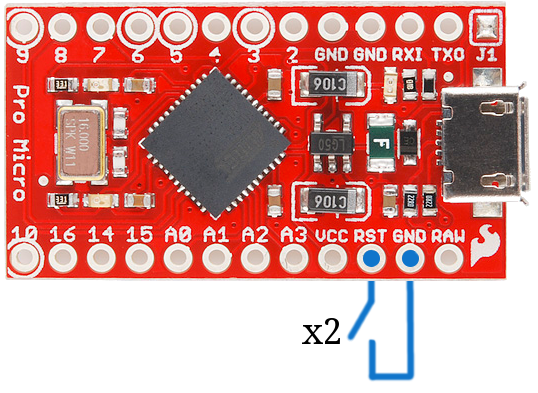
Yes, look at the spark fun documentation for the Pro Micro. You can jumper rst to gnd.
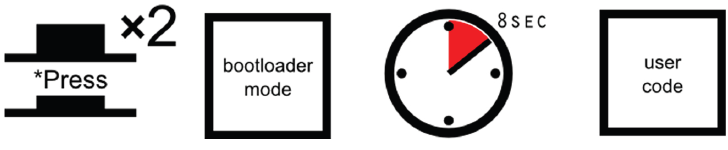
When a Pro Micro is externally reset (by pulling the RST pin low), it'll only briefly (<750ms) start the bootloader before continuing on to the sketch. If you need the bootloader to run longer, resetting twice quickly will get the Pro Micro to enter bootloader mode for eight seconds.
 |
 |
|---|---|
| Pro Micro and Fio v3 | Pro Micro, Fio v3, and any SparkFun Atmega32U4-based board reset functionality. Press reset twice, quickly to enter bootloader mode. |
Resetting the Pro Micro's, in particular, can be tricky, because there's no reset button. The 'RST' pins needs to be connected to ground to initiate a reset. This can be done with a small piece of wire, or an externally connected button.
the app will not let me select " NONE" in the program list like i don't see that option
The Ide/avrdude will ignore any selection you make.
If you close and reopen the ide, and selection will go away.
Can you load a program now, or are you still having issues?
Sketch uses 3958 bytes (13%) of program storage space. Maximum is 28672 bytes.
Global variables use 149 bytes (5%) of dynamic memory, leaving 2411 bytes for local variables. Maximum is 2560 bytes.
PORTS {COM1, COM11, } / {COM1, COM11, } => {}
PORTS {COM1, COM11, } / {COM1, COM11, } => {}
PORTS {COM1, COM11, } / {COM1, COM11, } => {}
PORTS {COM1, COM11, } / {COM1, COM11, } => {}
PORTS {COM1, COM11, } / {COM1, COM11, } => {}
PORTS {COM1, COM11, } / {COM1, COM11, } => {}
PORTS {COM1, COM11, } / {COM1, COM11, } => {}
PORTS {COM1, COM11, } / {COM1, COM11, } => {}
PORTS {COM1, COM11, } / {COM1, COM11, } => {}
PORTS {COM1, COM11, } / {COM1, COM11, } => {}
PORTS {COM1, COM11, } / {COM1, COM11, } => {}
PORTS {COM1, COM11, } / {COM1, COM11, } => {}
PORTS {COM1, COM11, } / {COM1, COM11, } => {}
PORTS {COM1, COM11, } / {COM1, COM11, } => {}
PORTS {COM1, COM11, } / {COM1, COM11, } => {}
PORTS {COM1, COM11, } / {COM1, COM11, } => {}
PORTS {COM1, COM11, } / {COM1, COM11, } => {}
PORTS {COM1, COM11, } / {COM1, COM11, } => {}
PORTS {COM1, COM11, } / {COM1, COM11, } => {}
PORTS {COM1, COM11, } / {COM1, COM11, } => {}
PORTS {COM1, COM11, } / {COM1, COM11, } => {}
PORTS {COM1, COM11, } / {COM1, COM11, } => {}
PORTS {COM1, COM11, } / {COM1, COM11, } => {}
PORTS {COM1, COM11, } / {COM1, } => {}
PORTS {COM1, } / {COM1, } => {}
PORTS {COM1, } / {COM1, COM12, } => {COM12, }
Found upload port: COM12
C:\Users\Ector\AppData\Local\Arduino15\packages\arduino\tools\avrdude\6.3.0-arduino17/bin/avrdude -CC:\Users\Ector\AppData\Local\Arduino15\packages\arduino\tools\avrdude\6.3.0-arduino17/etc/avrdude.conf -v -patmega32u4 -cavr109 -PCOM12 -b57600 -D -Uflash:w:C:\Users\Ector\AppData\Local\Temp\arduino_build_421054/Blinktest.ino.hex:i

avrdude: Version 6.3-20190619
         Copyright (c) 2000-2005 Brian Dean, http://www.bdmicro.com/
         Copyright (c) 2007-2014 Joerg Wunsch

         System wide configuration file is "C:\Users\Ector\AppData\Local\Arduino15\packages\arduino\tools\avrdude\6.3.0-arduino17/etc/avrdude.conf"

         Using Port                    : COM12
         Using Programmer              : avr109
         Overriding Baud Rate          : 57600
avrdude: ser_open(): can't open device "\\.\COM12": Access is denied.


avrdude done.  Thank you.

Problem uploading to board.  See https://support.arduino.cc/hc/en-us/sections/360003198300 for suggestions.
this is the error i got try again?
are you wanting me to enter boot loader mode?
No. Let the ide put the device into bootloader mode with the 1200 bps touch.
I'm not clear why you got the last error message you did about not being able to open COM 12.
yeah that access denied is what started all of this from the start
do you think this could be a chip issue i got it off of amazon it updated with no problem though thats why im so confused
What should this be should i uninstall this stuff?


I don't have any experience with the Pro Micro, but I think you want to use the Sparkfun boards package, and not the Arduino board package from 1.8.6.
https://learn.sparkfun.com/tutorials/pro-micro--fio-v3-hookup-guide/all
You will then be able to select the Pro Micro from the Sparkfun AVR boards in the tools for board selection.
thanks agian for all of your help im not really sure what to do im gonna tackle this tomorrow again
Please try again the Old Arduino IDE 1.8.19.
My IDE has different colors but it IS IDE 1.8.19
When choosing a board there should be an option
Leonardo
.

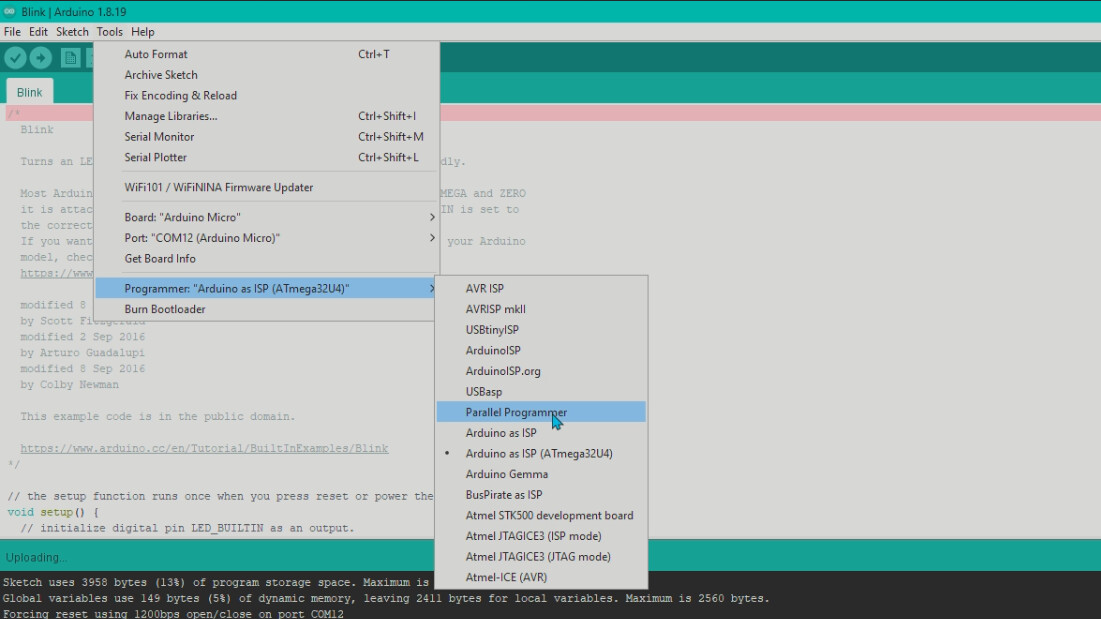
and in IDE 1.8.19 choosing no programmer looks like this
There is simply NO black point left of any entry

You seem to fiddle around with a lot of options but you are not describing to what you have adjusted what.
Usually the COM-port-number is given by windows. You don't have to adjust this manually
Once You had COM256. Did you adjust this manually?
In the device-manager you have an entry

That is where the weirdness starts.
Did you adjust this name manually ?
or
did windows itself choose this name?
Do you have a second microcontroller ?
Step 1
- Open Windows device manager.
- Double tap the reset button on the Pro Micro (or use a wire).
The entry in Windows device manager should change for approximately 8 seconds.
If it doesn't, you will have to burn the bootloader.
If the above gives you the bootloader on a certain port, you can continue.
Step 2
- Start the IDE (1.8.x).
- The selected port is irrelevant but COM1 is a safe bet; the port must exists in the IDE.
- Start the upload of an innocent sketch (e.g. new).
- Double tap the reset button on the Pro Micro when the IDE reports the memory usage or when you see the lines
PORTS {COM1, COM11, } / {COM1, COM11, } => {}

Please forget about the Tools > Programmer menu selection. The menu selection only has an effect when you do an "Upload Using Programmer" or "Burn Bootloader" operation. It has absolutely no effect when you do a normal upload.
So it makes absolutely no difference what you have selected from this menu and the programmer selection has absolutely nothing to do with the error you are experiencing when attempting to upload to your board.
great thanks for that information!
Sketch uses 3956 bytes (13%) of program storage space. Maximum is 28672 bytes.
Global variables use 149 bytes (5%) of dynamic memory, leaving 2411 bytes for local variables. Maximum is 2560 bytes.
PORTS {COM1, COM11, } / {COM1, COM11, } => {}
PORTS {COM1, COM11, } / {COM1, COM11, } => {}
PORTS {COM1, COM11, } / {COM1, } => {}
PORTS {COM1, } / {COM1, } => {}
PORTS {COM1, } / {COM1, } => {}
PORTS {COM1, } / {COM1, } => {}
PORTS {COM1, } / {COM1, COM11, } => {COM11, }
Found upload port: COM11
C:\Users\Ector\AppData\Local\Arduino15\packages\arduino\tools\avrdude\6.3.0-arduino17/bin/avrdude -CC:\Users\Ector\AppData\Local\Arduino15\packages\arduino\tools\avrdude\6.3.0-arduino17/etc/avrdude.conf -v -patmega32u4 -cavr109 -PCOM11 -b57600 -D -Uflash:w:C:\Users\Ector\AppData\Local\Temp\arduino_build_298967/Blink.ino.hex:i

avrdude: Version 6.3-20190619
         Copyright (c) 2000-2005 Brian Dean, http://www.bdmicro.com/
         Copyright (c) 2007-2014 Joerg Wunsch

         System wide configuration file is "C:\Users\Ector\AppData\Local\Arduino15\packages\arduino\tools\avrdude\6.3.0-arduino17/etc/avrdude.conf"

         Using Port                    : COM11
         Using Programmer              : avr109
         Overriding Baud Rate          : 57600
avrdude: ser_open(): can't open device "\\.\COM11": Access is denied.


avrdude done.  Thank you.

Problem uploading to board.  See https://support.arduino.cc/hc/en-us/sections/360003198300 for suggestions.
This is the error i got after doing what you asked me to! i have a new chip coming in Saturday hopefully it fixes the issue.. if not ill just have to use a keyboard and solder to the points or something