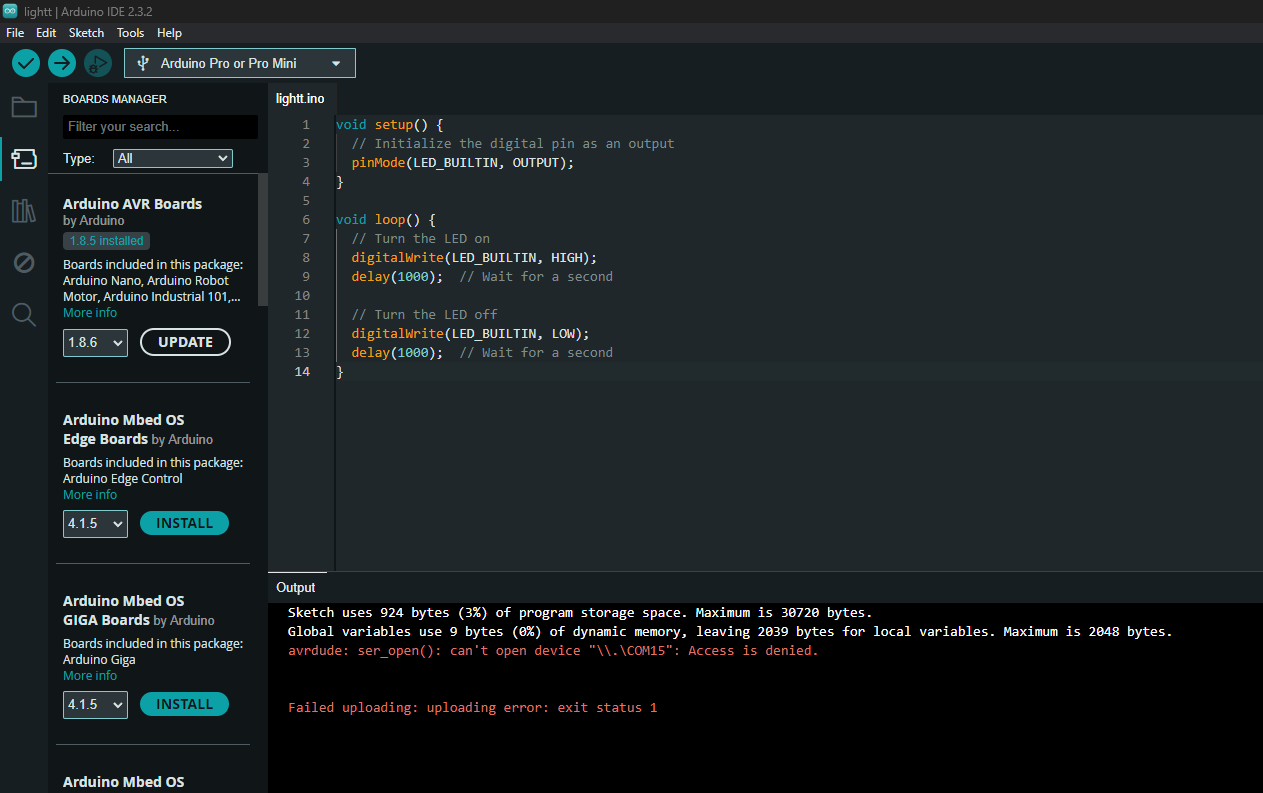
i have tried Changing the com port so Meany times and re installing things i don't know what to do

i have tired
new cable
new com number (diffrent times)
reinstalling arduino software
Have you considered reading:
There's also, recently posted:
Hi @ectorplays
welcome to the arduino-forum.
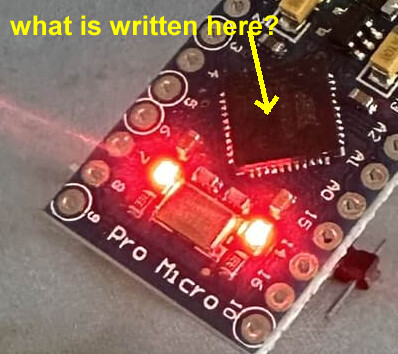
You have posted a picture of your microcontroller-board.
anyway can you please provide a link from where you bought this microcontroller-board.
What operating-system are you using?
If it is windows. What does the device-manager show if you have plugged in your microcontroller-board?
Your screenshot shows that the IDE is adjusted to Arduino Pro or Pro Mini

It seems to be a pro micro
If the shown microcontroller really is a pro micro this means your
Your IDE is adjusted to the chip Atmega 328P (pro Mini)
and in case your microcontroller-board really is a pro micro this has a chip
Atmega32U4 which is a totally different chip
This can't work.
The picture that shows the microcontroller-board has a too low resolution to be readable

So please post a picture where the letters on your microcontroller-board a clearly readable
If you don't zoom in so much, it's actually quite clearly a Pro Micro.
@ectorplays can fro Arduino Micro or Leonardo.
a7


there is printed "pro micro"
Though your device-manager shows

Is this COM-Port 9 the one that appears with plug in
and
vanishes with disconnect your microontroller-board?
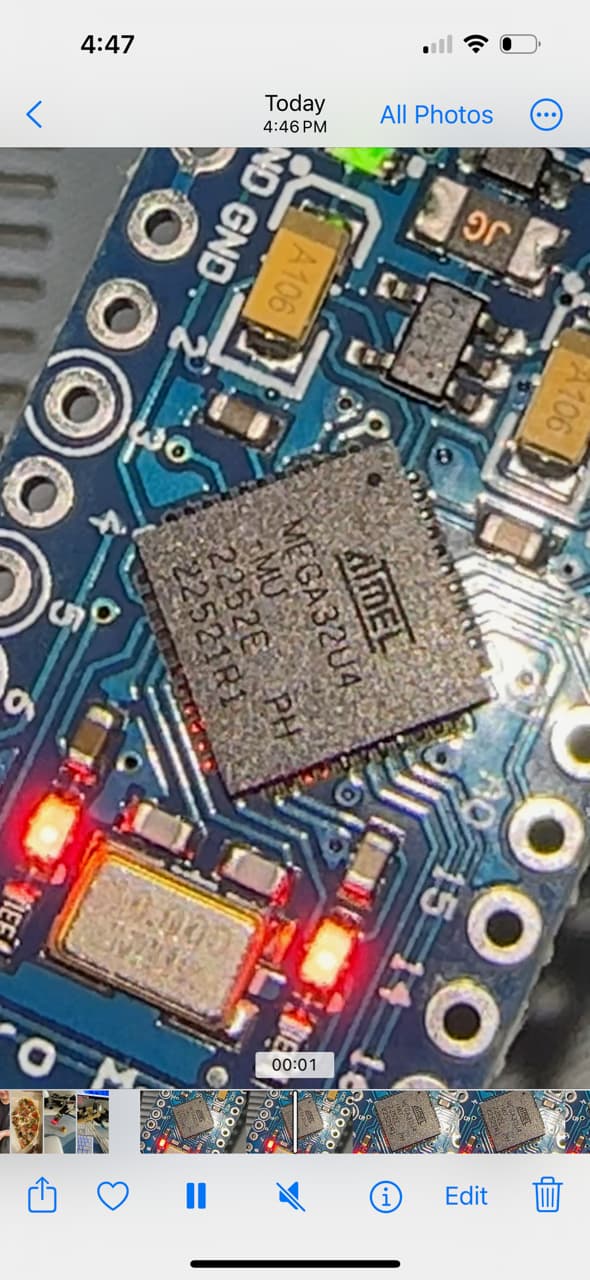
still can't read the chip-number on the microcontroller-chip itself
If I plug in a pro micro to my Lenovo Thinkpad T480 running windows 11 the device-manager shows Arduino Leonardo

properties show these details


additionally have a look at this thread
downgrading to what exact version?
try
Yes it really is an Atmega32U4.
If I do a reset on my pro micro it shows
for some seconds and then it jumps bacl to COM7 leonardo


I can not confirm you issue. The library example JoystickTest.ino from the ArduinoJoystickLibrary by MHieronimus compiles and uploads onto an Arduino Micro. I'm using Windows 10 with IDE 2.3.2. The code also loaded correctly using 1.8.19.
In the IDE under File, navigate to Preferences and click on "Show Verbose Ouput" during compile and upload.
Please post the complete message after you see this
Sketch uses 10150 bytes (35%) of program storage space. Maximum is 28672 bytes.
Global variables use 348 bytes (13%) of dynamic memory, leaving 2212 bytes for local variables. Maximum is 2560 bytes.
You may want to try reinstall the IDE.


Please post what you see as a text copy from the ide window, It's very hard to read the screen shots.
Sketch uses 3958 bytes (13%) of program storage space. Maximum is 28672 bytes.
Global variables use 149 bytes (5%) of dynamic memory, leaving 2411 bytes for local variables. Maximum is 2560 bytes.
Forcing reset using 1200bps open/close on port COM256
processing.app.debug.RunnerException
	at cc.arduino.packages.uploaders.SerialUploader.uploadUsingPreferences(SerialUploader.java:152)
	at cc.arduino.UploaderUtils.upload(UploaderUtils.java:77)
	at processing.app.SketchController.upload(SketchController.java:732)
	at processing.app.SketchController.exportApplet(SketchController.java:703)
	at processing.app.Editor$UploadHandler.run(Editor.java:2061)
	at java.lang.Thread.run(Thread.java:748)
Caused by: processing.app.SerialException: Error touching serial port 'COM256'.
	at processing.app.Serial.touchForCDCReset(Serial.java:107)
	at cc.arduino.packages.uploaders.SerialUploader.uploadUsingPreferences(SerialUploader.java:136)
	... 5 more
Caused by: jssc.SerialPortException: Port name - COM256; Method name - openPort(); Exception type - Port busy.
	at jssc.SerialPort.openPort(SerialPort.java:164)
	at processing.app.Serial.touchForCDCReset(Serial.java:101)
	... 6 more
my bad!
this is the code/
/*
  Blink

  Turns an LED on for one second, then off for one second, repeatedly.

  Most Arduinos have an on-board LED you can control. On the UNO, MEGA and ZERO
  it is attached to digital pin 13, on MKR1000 on pin 6. LED_BUILTIN is set to
  the correct LED pin independent of which board is used.
  If you want to know what pin the on-board LED is connected to on your Arduino
  model, check the Technical Specs of your board at:
  https://www.arduino.cc/en/Main/Products

  modified 8 May 2014
  by Scott Fitzgerald
  modified 2 Sep 2016
  by Arturo Guadalupi
  modified 8 Sep 2016
  by Colby Newman

  This example code is in the public domain.

  https://www.arduino.cc/en/Tutorial/BuiltInExamples/Blink
*/

// the setup function runs once when you press reset or power the board
void setup() {
  // initialize digital pin LED_BUILTIN as an output.
  pinMode(LED_BUILTIN, OUTPUT);
}

// the loop function runs over and over again forever
void loop() {
  digitalWrite(LED_BUILTIN, HIGH);   // turn the LED on (HIGH is the voltage level)
  delay(1000);                       // wait for a second
  digitalWrite(LED_BUILTIN, LOW);    // turn the LED off by making the voltage LOW
  delay(1000);                       // wait for a second
}
The 1200 bps touch that puts the Micro into programming mode is not being received correctly on port 256.
The fact that the COM Port number is so high seems unusual.
Is that what the ide indicates as the port for the micro and is that reflected in the Device Manager?
I have had issues with how Windows handles the native serial ports on the Micro. You may want to restart your computer, and see if you show the board at 256.
it showing 259 is me getting upset that its not working i have been trying new ports all day and nothing is working i can do a uninstall from windows Device Manager and let windows pick the port it wants if you think thats better