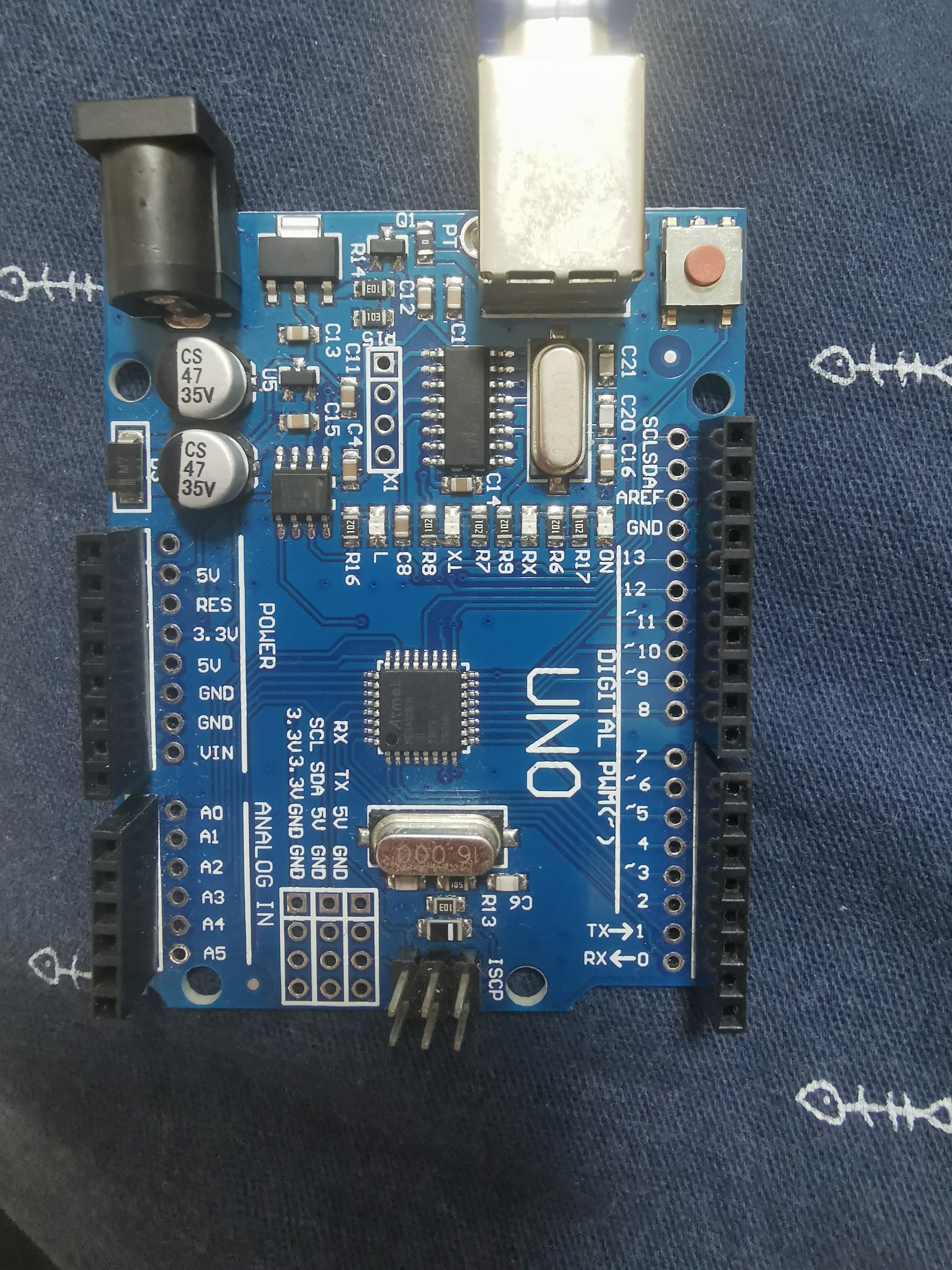
Arduino Uno Pins Adnormal Behaviour

Hello, this topic may seem generic but im having issue with my UNO R3 board.

I have a script that basically changes the color of my led strip depending on the distance measured by a ultrasonic sensor. It was working few weeks ago but now the led isn't lighting up at all and the ultrasonic sensor is returning 0.0cm always.

I believe it to be a hardware/circuit or maybe short circuit issue since I heard some sort of cracking sound while I was doing some wiring. No wire pins is broken or left inside the Arduino board though.

I tested further with a simple script to read the values of pin 2 (digital pin) and it reads value of 1 when nothing is connected to it.

The RX TX is responding normally to my interval set for ultrasonic reading.

I have plans to test with another uno board but is there other tests I can do to determine if the board is fried? Any guidance is appreciated.

This is the code i used for led color change to ultrasonic value

#include <Adafruit_NeoPixel.h>

//#define balls 8
//#define NUMPIXELSBALLZ 16
#define strip 8
#define NUMPIXELSSTRIP 8

//Adafruit_NeoPixel BALLZ = Adafruit_NeoPixel(NUMPIXELSBALLZ, balls, NEO_GRB + NEO_KHZ800);
Adafruit_NeoPixel STRIPPED = Adafruit_NeoPixel(NUMPIXELSSTRIP, strip, NEO_GRB + NEO_KHZ800);

// other pins
const int USpower = 11;
const int trigPin = 12;
const int echoPin = 13;

//rgb 0/255/139 cyan
int red, green;
int cccc = 0;
float truered, truegreen;
//uint32_t colors[NUMPIXELSBALLZ];
uint32_t colornya = STRIPPED.Color(0,0,0);

int v1,v2,v3,v4,v5;
int n1,n2,n3,n4,n5;

void setup() {
  pinMode(USpower,OUTPUT);
  pinMode(trigPin, OUTPUT);
  pinMode(echoPin,INPUT);
  Serial.begin(9600);
  //BALLZ.begin();
  STRIPPED.begin();
}

void loop() {
  digitalWrite(USpower,HIGH);
  digitalWrite(trigPin,LOW);
  delayMicroseconds(2);
  digitalWrite(trigPin,HIGH);
  delayMicroseconds(10);
  digitalWrite(trigPin,LOW);
  long duration = pulseIn(echoPin,HIGH);
  float distance = duration*0.034 / 2;
  int measure = (int)distance;
  cccc = cccc + 1;
  Serial.print("distance: ");
  Serial.print(distance, 1);
  Serial.print("cm nya: ");
  Serial.println(cccc);
  if (measure <= 5) {
    colornya = STRIPPED.Color(255,0,0);
  } else if (measure > 5 && measure <= 32) {
    red = 255 - (distance * 10);
    green = distance * 10;
    red = constrain(red, 0 ,255);
    green = constrain(green, 0 ,255);
    truered = (int)red;
    truegreen = (int)green;
    colornya = STRIPPED.Color(truered, truegreen, 0);
  } else if (measure > 32) {
    colornya = STRIPPED.Color(0,255,255);
  }
  for (int i = 0; i < NUMPIXELSSTRIP; i++) {
    STRIPPED.setPixelColor(i, colornya);
  }
  STRIPPED.setBrightness(39);
  STRIPPED.show();
  delay(100);
}

Physical connections:

Ultrasonic:
Vcc to 5V
Trig to pin 12
Echo to pin 13
Ground to GND

Check wiring.

You do not have a "pinMode()" for pin 2.

What is the function of this pin?

Welcome to grade school.

Never, ever wire up a circuit with the power on. This is a sure fire way of damaging components including processors. It can cause latch up where the pins can generate or sink a lot of current.

Special components like USB connectors and SD cards are what is called "hot plugable", this involves a physical design that sequences the connection in this order.

  1. Ground
  2. Power
  3. Data

Randomly wiring stuff while powered up can produce any combination of connections.

Also I note you have no mention of large supply decoupling capacitors on your Neopixel strip and no series resistor in the data input line.

i've checked the wiring it is correct and same as last time i tried while it was working
the reading of pin 2 was done on a different script
the USpower pin is used to test to lit up a separate red led that has only 2 pins (+ and -), but the led doesnt seem to light up either

But you are keeping this information from us. Code is only half the story with an embedded electronics project, we need to see a schematic, so we can check the circuit for other errors. Which by the sound of it also involves connecting LEDs up to a power supply without any current limiting resistor in series with it.

I didnt use any external power supply or capacitor other than the board itself. Here's the diagram json

{
  "version": 1,
  "author": "Anonymous maker",
  "editor": "wokwi",
  "parts": [
    { "type": "wokwi-arduino-uno", "id": "uno", "top": 0, "left": 0, "attrs": {} },
    { "type": "wokwi-neopixel", "id": "rgb1", "top": -109.1, "left": 37.4, "attrs": {} },
    { "type": "wokwi-neopixel", "id": "rgb2", "top": -109.1, "left": 66.2, "attrs": {} },
    { "type": "wokwi-neopixel", "id": "rgb3", "top": -109.1, "left": 95, "attrs": {} },
    { "type": "wokwi-neopixel", "id": "rgb4", "top": -109.1, "left": 123.8, "attrs": {} },
    { "type": "wokwi-neopixel", "id": "rgb5", "top": -109.1, "left": 152.6, "attrs": {} },
    { "type": "wokwi-neopixel", "id": "rgb6", "top": -109.1, "left": 181.4, "attrs": {} },
    { "type": "wokwi-neopixel", "id": "rgb7", "top": -109.1, "left": 210.2, "attrs": {} },
    { "type": "wokwi-neopixel", "id": "rgb8", "top": -109.1, "left": 239, "attrs": {} },
    { "type": "wokwi-hc-sr04", "id": "ultrasonic1", "top": -219.3, "left": -167.3, "attrs": {} }
  ],
  "connections": [
    [ "rgb1:DIN", "rgb2:DOUT", "green", [ "h0" ] ],
    [ "rgb2:DIN", "rgb3:DOUT", "green", [ "h0" ] ],
    [ "rgb3:DIN", "rgb4:DOUT", "green", [ "h0" ] ],
    [ "rgb4:DIN", "rgb5:DOUT", "green", [ "h0" ] ],
    [ "rgb5:DIN", "rgb6:DOUT", "green", [ "h8.8", "v9.6" ] ],
    [ "rgb6:DIN", "rgb7:DOUT", "green", [ "h0" ] ],
    [ "rgb7:DIN", "rgb8:DOUT", "green", [ "h0" ] ],
    [ "rgb1:VDD", "uno:5V", "green", [ "h-67.2", "v316.8", "h172.8" ] ],
    [ "rgb8:VSS", "uno:GND.3", "green", [ "v-0.9", "h28", "v307.2", "h-105.6" ] ],
    [ "rgb8:DIN", "uno:8", "green", [ "h66.4", "v67.2", "h-153.6" ] ],
    [ "ultrasonic1:GND", "uno:GND.1", "black", [ "v105.6", "h181.2", "v19.2" ] ],
    [ "ultrasonic1:ECHO", "uno:13", "green", [ "v115.2", "h200.8" ] ],
    [ "ultrasonic1:TRIG", "uno:12", "green", [ "v124.8", "h220.4" ] ],
    [ "ultrasonic1:VCC", "uno:IOREF", "red", [ "v345.6", "h220.8" ] ]
  ],
  "dependencies": {}
}

Why on earth not? Maybe you should read my tutorial on supply decoupling.

Also the wiring of the Neopixels is bazaar. The power, ground and data should all be fed from one end.

Who is jason? It is certainly not me. And what is this code you have posted?

The bottom line is that you have fried (destroyed) your Arduinio and need to replace it, And maybe the other components as well.

:v the code was for a simulation website called wokwi.
Guess my board really is fried then, thanks for the input

Your wokwi simulation has the Vcc input to the SR04 connected to the IOref of the Arduino. That is not correct.

Would you show how your real wiring?

You do not need to typecast these "int"s as type "int".

int red, green;

truered = (int)red;
truegreen = (int)green;

Why not typecast these "float"s as "int"s?

float truered, truegreen;

truered = (int)red;
truegreen = (int)green;

You never make changes to "setBrightness()" so you should call it one time, in "setup()"

  STRIPPED.setBrightness(39);
sketch.ino for wokwi
#include <Adafruit_NeoPixel.h>
#define strip 8
#define NUMPIXELSSTRIP 8

Adafruit_NeoPixel STRIPPED = Adafruit_NeoPixel(NUMPIXELSSTRIP, strip, NEO_GRB + NEO_KHZ800);

const int trigPin = 12;
const int echoPin = 13;

int red, green, truered, truegreen;
int cccc = 0;
uint32_t colornya = STRIPPED.Color(0, 0, 0);

void setup() {
  pinMode(trigPin, OUTPUT);
  pinMode(echoPin, INPUT);
  Serial.begin(115200);

  STRIPPED.begin();
  STRIPPED.setBrightness(255);
}

void loop() {
  digitalWrite(trigPin, LOW);
  delayMicroseconds(2);
  digitalWrite(trigPin, HIGH);
  delayMicroseconds(10);
  digitalWrite(trigPin, LOW);

  long duration = pulseIn(echoPin, HIGH);
  float distance = duration * 0.017;
  int measure = (int)distance;

  cccc = cccc + 1;
  Serial.print("distance: ");
  Serial.print(distance, 1);
  Serial.print("cm nya: ");
  Serial.println(cccc);

  if (measure <= 5) {
    colornya = STRIPPED.Color(255, 0, 0);
  } else if (measure > 5 && measure <= 32) {
    red = 255 - (distance * 10);
    green = distance * 10;
    red = constrain(red, 0, 255);
    green = constrain(green, 0, 255);
    truered = red;
    truegreen = green;
    colornya = STRIPPED.Color(truered, truegreen, 0);
  } else if (measure > 32) {
    colornya = STRIPPED.Color(0, 255, 255);
  }
  for (int i = 0; i < NUMPIXELSSTRIP; i++) {
    STRIPPED.setPixelColor(i, colornya);
  }
  STRIPPED.show();
  delay(100);
}
diagram.json for wokwi
{
  "version": 1,
  "author": "Anonymous maker",
  "editor": "wokwi",
  "parts": [
    { "type": "wokwi-arduino-uno", "id": "uno", "top": 0.6, "left": -0.6, "attrs": {} },
    {
      "type": "wokwi-hc-sr04",
      "id": "ultrasonic1",
      "top": -142.5,
      "left": -90.5,
      "attrs": { "distance": "2" }
    },
    {
      "type": "wokwi-led-ring",
      "id": "ring1",
      "top": -133.63,
      "left": 121.26,
      "attrs": { "pixels": "8" }
    },
    { "type": "wokwi-vcc", "id": "vcc1", "top": -172.04, "left": 76.8, "attrs": {} }
  ],
  "connections": [
    [ "uno:GND.1", "ring1:GND", "black", [ "v-19.2", "h38.7" ] ],
    [ "uno:GND.1", "ultrasonic1:GND", "black", [ "v-19.2", "h-105.3" ] ],
    [ "vcc1:VCC", "ultrasonic1:VCC", "red", [ "v124.8", "h-105.6" ] ],
    [ "vcc1:VCC", "ring1:VCC", "red", [ "v124.8", "h76.8" ] ],
    [ "uno:12", "ultrasonic1:TRIG", "green", [ "v-38.4", "h-133.9" ] ],
    [ "uno:13", "ultrasonic1:ECHO", "green", [ "v-48", "h-124.4" ] ],
    [ "uno:8", "ring1:DIN", "green", [ "v0" ] ]
  ],
  "dependencies": {}
}

On wokwi the uno board for that pin shows as that REF but my board shows 5V so I thought I could use it as a power supply. I don't think the board is official anyway, I got it for like 2.5USD on Shopee so it lasted quite long for its low price.

For future reference, do you guys have any hardware recommendations for powering LED strips? I'd like my product to be as small and compact as possible so I didn't thought of using additional shield or hardware

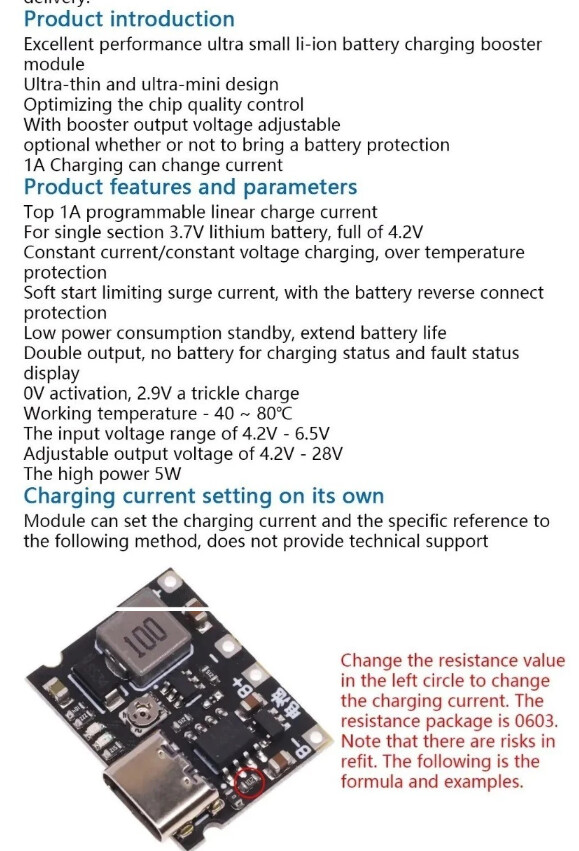
i did some searching and i found this li-ion modified with a step up boost module. Can i use this to power my led?


Arduino should be used only as a control device. Power for lights (anything with high power usage) should be supplied from external power supplies. When using Neopixels, also include a (current limiting) resistor and a (smoothing, electrolytic) capacitor.

Probably not. It uses the Arduino power output. You need a power supply.