ATtiny85 timing 240822

Hello Arduino form,

Doing some tests to understand the relation between the
Internal Clock speed used to compile s sketch and the output
of the ATtiny85. Tests results copied herewith below.

The first three tests indicate that there is a directly proportional
relation between the internal clock speed and delay output from
the microprocessor. That is, the 8 MHZ clock speed sets the
delay output at one second when the delay is set on the sketch
at 1000 ms.

And if the sketch is compiled at 16 MHZ the
delay output doubles to two seconds. And conversely,
if the click speed is set at 1 MHZ the LED blinks
at .25 hertz.

The thing which is doesn't seem to make sense is
when, in the fourth test the delay is set to
2000 ms. The expected outcome was the oscillation
would go to two seconds. But the result was
the LED stays on for eight seconds and stays
off for eight seconds. This is with the sketch
compiled at 8 MHZ.

What am I missing?

Thanks.

Allen Pitts
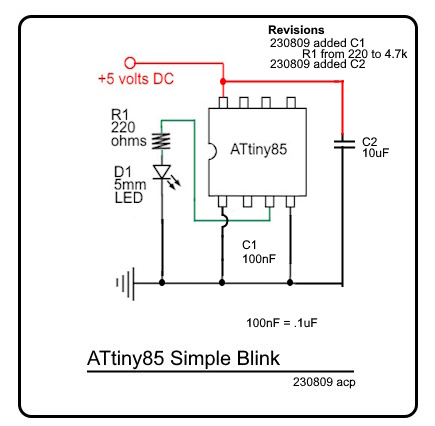
ATtiny_Simple_Blink_Schematic_230809_c
ATtiny_Blink_230809.ino (655 Bytes)

/*
  Blink  230809 
  Turns on an LED on for one second, then off for one second, repeatedly.

    modified 8 May 2014
  by Scott Fitzgerald
 */
//int LED = PB4;

// the setup function runs once when you press reset or power the board
void setup() {
  // initialize digital pin 13 as an output.
  pinMode(4, OUTPUT);
}

// the loop function runs over and over again forever
void loop() {


  digitalWrite(4, HIGH);  // turn the LED on (HIGH is the voltage level)
  delay(2000);            // wait for a second
  digitalWrite(4, LOW);   // turn the LED off by making the voltage LOW
  delay(2000);            // wait for a second
}

Test 240822.1 Internal clock 8 MHZ
Preconditions

  1. Schematic: ATtiny85 Simple Blink, attached
  2. Sketch: ATtiny_Blink_230809.ino (delay=1000)
  3. Internal clock: 8 MHZ
    Expected result : D1 oscillates on and off at 1 hertz
    Actual result : D1 oscillates on and off at 1 hertz

Test 240822.2 Internal clock 16 MHZ
Preconditions

  1. Schematic: ATtiny85 Simple Blink, attached
  2. Sketch: ATtiny_Blink_230809.ino (delay=1000)
  3. Internal clock: 16 MHZ
    Expected result : D1 oscillates on and off at 2 hertz
    Actual result : D1 oscillates on and off at 2 hertz

Test 240822.3 Internal clock 1 MHZ
Preconditions

  1. Schematic: ATtiny85 Simple Blink, attached
  2. Sketch: ATtiny_Blink_230809.ino (delay=1000)
  3. Internal clock: 1 MHZ
    Expected result : D1 oscillates on and off at .25 hertz
    Actual result : D1 oscillates on and off at .25 hertz

Test 240822.4 Internal clock 8 MHZ
Preconditions

  1. Schematic: ATtiny85 Simple Blink, attached
  2. Sketch: ATtiny_Blink_230809.ino (delay=2000)
  3. Internal clock: 8 MHZ
    Expected result : D1 oscillates on and off at 2 hertz
    Actual result : D1 oscillates on and off at 8 hertz

You say expected result is a 1 hertz oscillation. With a delay of 1000 on and 1000 off I would expect a blink rate of 0.5 hertz (1 sec. on, 1 sec. off is 1 cycle). Are you mis-stating the situation by calling the frequency the time between change from high to low as one cycle?

Are you actually changing the clock frequency of the ATtiny or are you just telling the compiler the clock frequency is 8 MHz. If you are “lying” to the compiler, what is the actual clock frequency in each case?

1 Like

Hello bitherder_57 and the Arduino forum,

In Test 240822.1 the sketch reads

  digitalWrite(4, HIGH);  // turn the LED on (HIGH is the voltage level)
  delay(1000);            // wait for a second
  digitalWrite(4, LOW);   // turn the LED off by making the voltage LOW
  delay(1000); 

and LED D1 comes on for one second and then goes off for one second.
This cycle repeats. So it is surmised that one would call this a two second
cycle with one second lit and one second dark.
Perhaps the verbage in Expected and Actual Results was misleading.

The method that was used to change the clock frequency (or perhaps this
method does not change the clock frequency, that is the knowledge
that is sought) was

  1. In the Arduino IDE ver 2.1.1 the sketch ATtiny_Blink_230809.ino is opened.
  2. At Tools
    Board: ATtiny25/45/85
    Clock: "Internal 8 MHZ"
    Processor: "ATtiny85"
    Programmer: "USByinyISP"
  3. The status bar lower left reads: Ln 1, Col 1 ATtiny25/45/85 (not connected)
  4. At Sketch
    Click Upload Using Programmer
    Result:
  5. Compiling
  6. Done compiling
  7. Uploading
  8. Done uploading

But the question being asked is: Why does this method
provide unpredictable results?

I think I may have found the answer and would humbly
request that the answer written herewith below be confirmed
or corrected.

At a post in this forum at

Post about ATtiny click speeds

To change the clock, select the 16MHz target and use the 'burn bootloader' option in the Arduino IDE. This will set the internal fuses in the microcontroller. Then use that clock speed as your target for uploading the program and everything will work as advertised.

This would seem to indicate that the answer is to change the clock speed at which the sketch is compiled the 'burn bootloader' option must be run.

That is the first question.

The second question is what are 'the internal fuses in the microcontroller'? Have researched that term and find several references to the internal fuses in an ATtiny85
but nothing that says what they are, what their function is, how they work, how they are set and what the result of setting them are.

Thanks.

Allen Pitts

To start with, see section 6.2 and 20.2 of the datasheet:

And then, return with any questions.

These are fully described in the ATtiny85 data sheet.

The compiler and processor have no way of knowing what the actual CPU clock speed is. For example, if you set the fuses for "crystal", the actual frequency of oscillation can be anything from kHz to 20 MHz, depending on which crystal you have connected to the oscillator pins.

Setting F_CPU merely tells the compiler what you think it is. If that frequency is correct, your code will run as expected.

[quote="AllenPitts, post:3, topic:1294445"].
This would seem to indicate that the answer is to change the clock speed at which the sketch is compiled the 'burn bootloader' option must be run.
[/quote]

As described in the link you provided, you do change the actual frequency the MCU operates at when you burn the bootloader. Typically you would only burn the bootloader one time. That is why I asked the question. The fuses you are asking about are set or “burned” when you burn the bootloader. They are set to make the processor run at speed you choose when you are selecting the bootloader options.

So now I ask if you ever burned a bootloader to the ATtiny or did you buy the chip with a bootloader already burned in.

One test I would like to see is to repeat this test:

Using the same chip that you got these unexpected results:

Report the results of the repeated test.

I don’t want to put too fine a point on it but:

You are describing a cycle that takes two second to complete. Since the units for hz are cycles per second the frequency of the cycle is 0.5 hz not 1 hz. A cycle is measured from the time a certain event occurs to the time that event occurs again.

You can think of the "fuses" as a small and separate section of flash memory that contains information about the low-level behavior of the microcontroller. eg, which clock is used, how fast it runs, whether debugging is enabled, etc. (All described in the datasheet.)
The fuses are ONLY changeable with a device programmer; typically they'd get set early in the "development" cycle and keep particular values as different application code is uploaded to the chip.
The Arduino IDE will typically only set the fuses as part of the "burn bootloader" command (whether or not a bootloader is used, and how big it is, is usually controlled by a Fuse.) And merely uploading a new sketch does not change the fuses.

Hello camsysca, jremington, bitherder_57, westfw and the Arduino forum,

The two hundred and thirty-four page ATtiny85 data sheet including the
thirty-three references to 'fuses' has been perused. The hour are so spent
with ATtiny85 data sheet did less to answer the question 'What are fuses?'
than did the ten seconds required to read westfw's reply:

'You can think of the "fuses" as a small and separate section of flash memory that
contains information about the low-level behavior of the microcontroller.'

So now I ask if you ever burned a bootloader to the ATtiny or did you buy the
chip with a bootloader already burned in.

In an effort to answer a question that has been asked (An endeavor that seems
to be less attended than the enterprise of either demeaning the dignity
of the inquisitor or flaunting the brilliance of the responder.) the
microcontroller is purchased at Mouser Electronics
Link to ATtiny85 at Mouser Electronics
The information provided by the vendor does not tell if the microcontroller
has a bootloader already burned in.

The method for programming the ATtiny 85 as detailed in
'Test 240822.1 Internal clock 8 MHZ' in this thread marked 'post #1'
above, uses the Sparkfun Tiny AVR Programmer

Today a dozen or so tests have been conducted using the preconditions
listed as the method for programming the ATtiny 85 as detailed in
'Test 240822.1 Internal clock 8 MHZ' in post #1.
The 'Method for Programming ATtiny85 ,copied herewith below,
used today differs from the
'Test 240822.1 Internal clock 8 MHZ' because in all the tests conducted
today included step '4. At Tools click 'Burn Bootloader' whereas previous
tests did not include step 4.

The conclusion of these tests is that compiling and uploading
with or without running Burn Bootloader at the 16 MHZ or the 1 MHZ
internal clock speed delivers unpredictable results.
Predictable results are returned by compiling and uploading to the
ATiny 85 with internal clock speed 8 MHZ.

The tests also seem to point to the idea that the ATtiny85, out
of the box from Mouser, initially needs the Burn Bootloader
to be run. Subsequent compiling and uploading can be accomplished
without Burn Bootloader.

Thanks.

Allen Pitts

Method for Programming ATtiny85

  1. In the Arduino IDE ver 2.1.1 the sketch ATtiny_Blink_230809.ino is opened.
  2. At Tools
    Board: ATtiny25/45/85
    Clock: "Internal 8 MHZ"
    Processor: "ATtiny85"
    Programmer: "USByinyISP"
  3. The status bar lower left reads: Ln 1, Col 1 ATtiny25/45/85 (not connected)
  4. At Tools click 'Burn Bootloader ' Result: Burning Bootloader; Done Burning Bootloader
  5. At Sketch
    Click Upload Using Programmer
    Result:
    Compiling
    Done compiling
    Uploading
    Done uploading

Chips purchased from Mouser should be in their "completely blank, as delivered by Microchip" state, with fuses values as "hinted" at by the "Default value" column in the datasheet. Chips from other vendors may or may not already be programmed with a bootloader - in particular, the popular "Digispark" clones will (should) have a USB bootloader.

At Tools: Board: ATtiny25/45/85

Are you using Spence Konde's "ATtinyCore"? (You should be.)
In that case, there are three different board types for the tiny85:

  1. ATtiny25/45/85 (no bootloader)
  2. ATtiny45/85 (Optiboot)
  3. ATtiny85 (Micronucleus/digispark)

In Arduino, the "Burn Bootloader" command will normally set the fuses AND load bootloader code into the chip, since all of the actual "Arduino" boards needed the bootloader to be used in the manner intended. Packages like ATtinyCore use the "burn bootloader" command, with a "no bootloader" board type, to JUST set the fuses.

The tinyx5 is a little weird in that the 16MHz (PLL) clock is NOT controlled by fuses.

BTW: The term "fuses" is "historical" - originally, fuses in the semiconductor arena were actual bits of metal on the chip, and to change their value (once!) you'd use a special programmer that would actually cause the metal connection to break (like an actual AC fuse.) This was swell for "one-time, permanent" configuration settings, and the term has expanded with improvements in memory technology to refer to any sort of "manufacturing time" configuration memory.

The conclusion of these tests is that compiling and uploading with or without running Burn Bootloader at the 16 MHZ or the 1 MHZ internal clock speed delivers unpredictable results.

Could we see the output from the "burn bootloader" command? (with "verbose upload" configured in preferences? This would show us the fuses that the command is actually trying to set, and we can check for consistency with what we think they should be...

Let me try it like this.
The data sheet will clearly be quite heavy going at this stage in your exploration of the Arduino world.
There are two important clock frequencies here. One is the real clock frequency at which the MCU runs and this is controlled by fuses and the crystal or resonator if present. The other is the clock frequency which you have told the compiler that the target MCU will run at. If these frequencies are different then any sketches which rely on timings will give incorrect results.
A factory fresh atmega85 will run a 1MHz . The internal oscillator runs a 8MHz and a fuse is set to divide the oscillator frequency by 8 giving the 1MHz clock frequency.
If you were then to compile the blink sketch and select the 8MHz frequency, then instead of seeing the led blinking at a rate of 1 second on and 1 second off you would see it blinking at 8 seconds on and 8 seconds off. By compiling the sketch for 8MHz the 1 second delay will be defined as 8 million clock cycles. Because the real MCU clock speed is 1MHz, after 1 second, only 1 million clock cycles will have been counted.

The *badly named "burn bootloader" function in the IDE is the standard way of ensuring that there is a match between the real MCU frequency and the frequency for which the sketch is compiled.

*Minor rant:
Try explaining to someone who does not want a bootloader that they have to select burn bootloader. Better but longer would be "configure MCU for Arduino compatibility". Maybe "Arduinoize MCU" as a short form.

Edit:


Fuse is very much analogous to electric fuse as you have described in your post #9.

Flash memory can be erased; but, fuse remains unchnaged during flash memory erase process. Fuse can only be changed by a Porgrammer (AVR/Parallel).

Electrically, the fuses in a modern AVR are almost certainly EEPROM or Flash technology; after all, they CAN be erased/changed by a programmer. The old-technology actual-fuse-like fuses could only be modified Once.
(Logically, the fuses are not part of the AVR Flash or EEPROM address space, and so programming them is different. However, you CAN read the fuses from a sketch, and that uses the LPM instruction, which I think is a significant clue to the actual implementation.)

1 Like

Hello westfw, 6v6gt, GolamMostafa, and the Arduino forum,

The idea that fuses in the Attiny85 are "manufacturing time configuration memory."
and not a timing device for setting off a bomb helps a great deal in figuring
what is happening in the ATtiny85 when compiling and uploading a sketch after
running the bootloader.

This explanation is helpful and appreciated.

But is seems for every question the answer seems to engender a half dozen
more questions.

The tinyx5 is a little weird in that the 16MHz (PLL) clock is NOT controlled by fuses.

To try and understand this it was necessary to research PLL to find out that
the TLA (three-letter acronym), PLL, stands for phase-locked loop.
Perusing the fascinating PLL literature still another TLA was encountered
VCO or voltage controlles oscilator and so one rabbit hole connected to another
is entered.

Also edifying was this prose:

There are two important clock frequencies here. One is the real clock frequency at which > the MCU runs and
this is controlled by fuses and the crystal or resonator if present.

So the concept that the fuses are not like the breaker fuse that is tripped
when too much amperage is drawn through the 110 volt house mains but the
rather is a device to divide the oscillator frequency.

Not sure from where the tables posted by GolamMostafa come.
The tables look like they may be from a data sheet. But the
data sheet downloaded marked "Atmel 8-bit AVR Microcontroller with 2/4/8K
Bytes In-System Programmable Flash" attached herewith" has section

19.2 Filling the Temporary Buffer (Page Loading)
To write an instruction word, set up the address in the Z-pointer......

whereas GolamMostafa's section 19.2 is

19.2 Fuse Bits of ATtiny85 Microcontroller

Seriously considering ditching the ATiny85, the fuses, the PLL and VCO and going with a different small microcontroller like
Ximimark 2Pcs Digispark Kickstarter Mini ATTINY85 USB Development Board

Ximimark Digispark Kickstarter

Thanks.

Allen Pitts
atmel-2586-avr-8-bit-microcontroller-attiny25-attiny45-attiny85_datasheet.pdf (3.7 MB)

19.2 Fuse Bits of ATtiny85 Microcontroller

Look at section 20.2 in the document you linked. There must have been a revision since @GolamMostafa’s version was published.

So I have done a little bit of checking. Arduino IDE 2.1.1 is not the current version available but I did download version 2.3.2 and there is no option to choose an ATtiny85 as a target. My previous research on the matter tells me that I have to download a “Board” specification and install it using the Boards Manager utility of the IDE.

So, what board have you installed in your IDE?

At some point you need to stop digging, and figure our how to simplify what you've learned to the level at which it is relevant to what you want to do.

In microcontroller context, a PLL is a magic box used to multiply one frequency by some constant, to achieve a higher frequency. Sometimes, there is a lot of configuration that goes with this. But the tiny85 chips just use this to generate 64MHz.

The ATtiny85 has these configuration bit, and one of the things they do is select the clock "source" that the chip runs at. There are, um, 7 choices:

  1. External clock, high speed crystal, or low speed crystal. These are mostly unlikely on a tiny85, since they use up pins that are already in short supply.
  2. internal 128kHz oscillator. Also not interesting.
  3. Calibrated internal oscillator (6.4 or 8MHz.) Now we're talking!
  4. PLL - somehow the 64MHz PLL clock is divided by 4 to give you 16MHz. (PS: I was wrong earlier - there IS a fuse for the PLL clock!)

There's another fuse that controls whether the clock source is further divided by 8. (I don't know why this is a fuse. Perhaps historically, 1MHz instruction cycles were common for microcontrollers.)

Predictable results are returned by compiling and uploading to the ATiny 85 with internal clock speed 8 MHZ.

You haven't explained what the actual results have been, recently. (Nor confirmed your board package, nor shown the output that confirms fuse settings.)

If 8MHz is the only setting that you're finding "predictable", is there some reason you don't want to just use that setting? Using a digispark-like board is still a tiny85, it's just removed a bunch of the choices. (and added USB support that might interfere with the use of several pins.)

In this specific case yes but, just in case it is not clear from what has been said so far, fuses can simply be regarded as configuration parameters for a number of selectable options/features.

Sorry for the confusion and inconvenience!

I have taken the fuse information from ATtiny85 data sheets (Rev. 2586Q–AVR–08/2013, Section-20.2) and then have compiled/edited/exapned them and then have included them in Section-19.2 of my 20-Chapter proposed Text/Lecture Book.

You need to install a "core" to use the ATTiny85. As per @westfw #9 post the best option is ATTinyCore. It can be installed from the IDE's board manager.

I suspected that and confirmed it with my tests last night. I hadn’t used version 2.x of the IDE and I did not know if something had been added.