The video below shows how multiplexing works by slowing it right down.
The display shown is a "scrolling LED" display I bought at (I think) Jaycar a while ago.
I opened it up, and disconnected its internal processor and connected up a Uno (Ruggeduino actually).
Controlled by a potentiometer off camera, I slowly increase the multiplexing speed.
The display has 72 columns of LEDs and 7 rows.
Internally it has 10 x 74HC595 shift registers. Nine of them are used for the columns (9 x 8 = 72) and the last one selects which row is displayed.
As you can see initially, you see one row at a time, as each row is selected. However once running at full speed the persistence of vision effect makes it look like all LEDs are active at once.
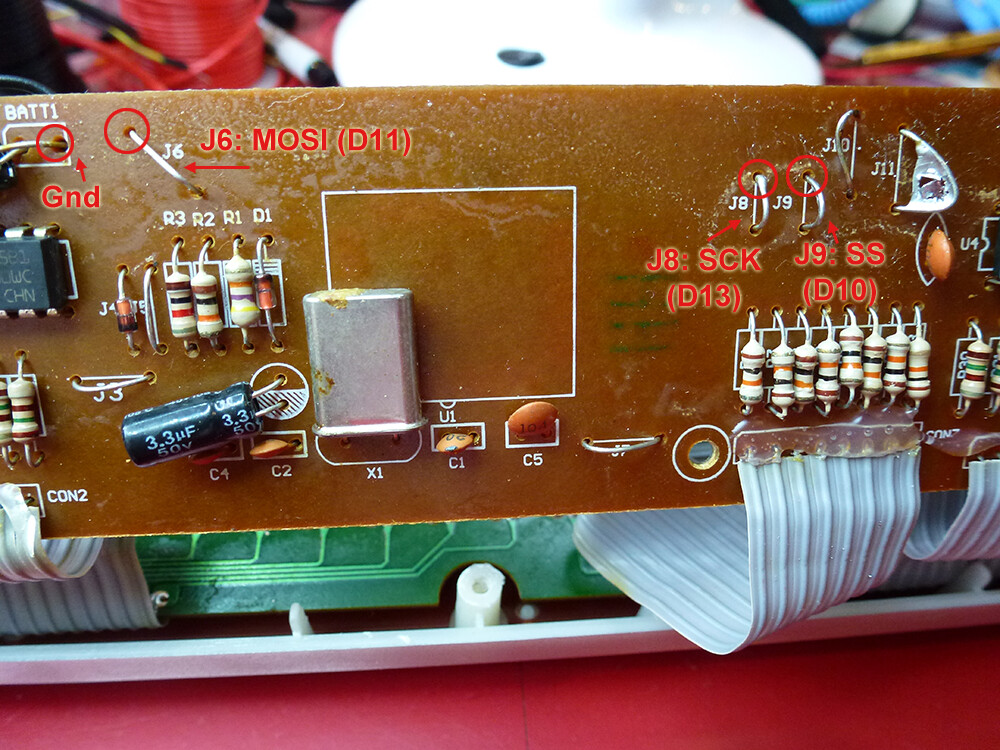
Some photos of the internals:
A nice bit of "hacking for educational purposes" there Nick. Thanks for sharing XD Would it be possible to see your code as I am interested in how you used the pot to adjust the multiplexing speed.
I'm working on describing the project in more detail. Basically the multiplexing was slowed down by a simple delay in the inner loop (between each row).
I look forward to seeing it when completed
Here is my write-up of the process involved in hacking into, and taking control of, the LED strip:
Ultimately I needed to only cut three jumpers and solder wires on leading to the SPI pins on my Uno, plus Ground.
Nice well written write up Nick, thank you.
The page linked to above now has a schematic to make it clearer what is happening. Also this video demonstrates the sign in action scrolling words across the display, updating as it goes.
The updating of the time is done in loop() and the display refreshing is done in a timer-driven interrupt service routine.