E (177) opi psram: PSRAM ID read error: 0x00000000, PSRAM chip not found or not supported, or wrong PSRAM line mode 12:41:04.957 -> E (177) spiram: SP

ESP-ROM:esp32s3-20210327

12:41:04.776 -> Build:Mar 27 2021

12:41:04.776 -> rst:0xc (RTC_SW_CPU_RST),boot:0x8 (SPI_FAST_FLASH_BOOT)

12:41:04.821 -> Saved PC:0x40381a51

12:41:04.821 -> SPIWP:0xee

12:41:04.821 -> mode:DIO, clock div:1

12:41:04.821 -> load:0x3fce3808,len:0x4bc

12:41:04.821 -> load:0x403c9700,len:0xbd8

12:41:04.821 -> load:0x403cc700,len:0x2a0c

12:41:04.821 -> entry 0x403c98d0

12:41:04.957 -> E (177) opi psram: PSRAM ID read error: 0x00000000, PSRAM chip not found or not supported, or wrong PSRAM line mode

12:41:04.957 -> E (177) spiram: SPI RAM enabled but initialization failed. Bailing out.

I am using Arduino IDE 2.3.2 and latest esp32 (2.0.16) the board i'm using is basic esp32 s3 dev kit module-1 by espressif.

You missed the ; in line 42.

Show a screen dump of the "Tools" page in the IDE where it is clear what board type etc. that you selected. Show also a link to the exact board type you have. It may be that your version of the ESP32 does does not have PSRAM.

this is the tools image
this is the board manager urls image and i'm using the latest arduino version 2.3.2 ,esp32 (2.0.16)
can you help me out.


i didn't miss i guess, any other suggestions please.

Show the screen shot when you click on the tools menu item (marked with the red hand drawn arrow):

image

Also show a link to the vendor page (ebay, aliexpress etc.) from where you purchased your ESP32 board.

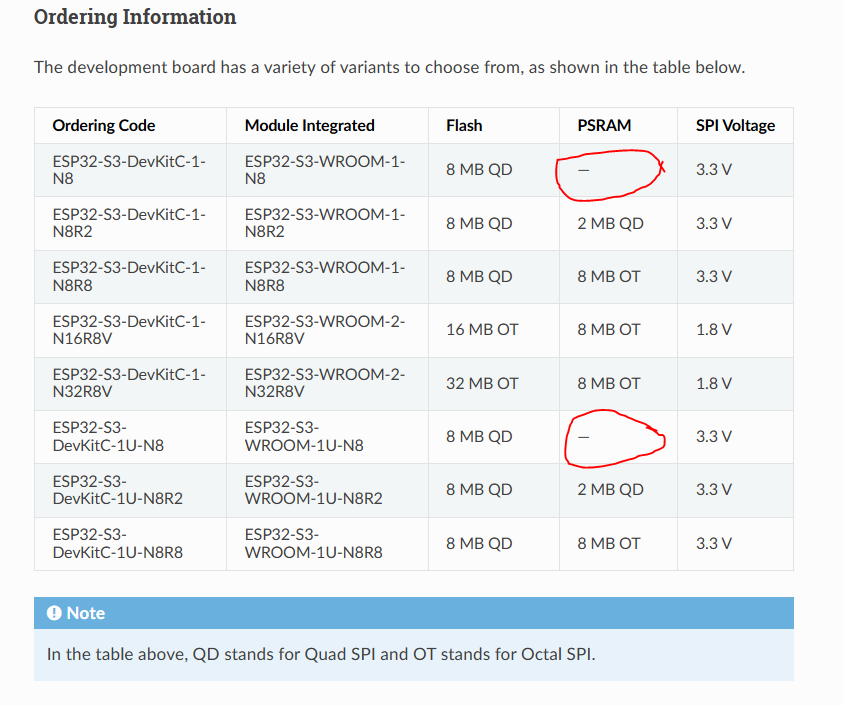
The text marked with the red "circle" below should be copied and pasted into your post as text. A screen shot image in this case is not so useful.

image


actually that ESP32 S3 board we purchased from a local vendor.
ESP-ROM:esp32s3-20210327

11:44:05.928 -> Build:Mar 27 2021

11:44:05.928 -> rst:0x1 (POWERON),boot:0x8 (SPI_FAST_FLASH_BOOT)

11:44:05.928 -> SPIWP:0xee

11:44:05.928 -> mode:DIO, clock div:1

11:44:05.928 -> load:0x3fce3808,len:0x4bc

11:44:05.928 -> load:0x403c9700,len:0xbd8

11:44:05.928 -> load:0x403cc700,len:0x2a0c

11:44:05.928 -> entry 0x403c98d0

11:44:06.084 -> E (171) opi psram: PSRAM ID read error: 0x00000000, PSRAM chip not found or not supported, or wrong PSRAM line mode

11:44:06.084 -> E (172) spiram: SPI RAM enabled but initialization failed. Bailing out.

The following table was taken from here: Page Not Found - ESP32-S3 - — ESP-IDF Programming Guide v5.5 documentation

Some ESP32-S3 devkits do not have any PSRAM. Can you identify your specific ESP32-S3 model from the document ?

Put this somewhere in your setup():

Serial.println(ESP.getPsramSize());
Serial.println(ESP.getFreePsram());

What does it tell you?

IMO your board does not have PSRAM, as ithe error mesage already says.

ESP-ROM:esp32s3-20210327

12:15:00.127 -> Build:Mar 27 2021

12:15:00.127 -> rst:0x1 (POWERON),boot:0x8 (SPI_FAST_FLASH_BOOT)

12:15:00.127 -> SPIWP:0xee

12:15:00.127 -> mode:DIO, clock div:1

12:15:00.127 -> load:0x3fce3808,len:0x4bc

12:15:00.127 -> load:0x403c9700,len:0xbd8

12:15:00.127 -> load:0x403cc700,len:0x2a0c

12:15:00.127 -> entry 0x403c98d0

12:15:00.286 -> E (171) opi psram: PSRAM ID read error: 0x00000000, PSRAM chip not found or not supported, or wrong PSRAM line mode

12:15:00.286 -> E (172) spiram: SPI RAM enabled but initialization failed. Bailing out.

this is what serial monitor is showing even after pasting these below lines

Serial.println(ESP.getPsramSize());
Serial.println(ESP.getFreePsram());

SO no PSRAM on your board.

then how should i upload code in it?

Is this question for real? You don't have PSRAM.

actually before the code got uploaded and the device worked for many days, recently i'm facing this issue so if there is any way to solve it ,it will be a great help to me.

Maybe the chip died or the soldering was bad or you had one device with PSRAM and the others without and swaped them accidentally ... anyway, no PSRAM here (any more).

Well if it worked then it is quite possible that your application does not use PSRAM and the option should be set to disabled here (marked in red)

even after disabling it same issue is occuring.

It is possible then that something is cached if you are getting exactly the same error message.
Close the IDE and reopen it. Check that the PSRAM option is still disabled. Attempt to load the simple "Blink" sketch example and then show the error message (if any).

Exactly the same thing i did i closed all other IDE and opened which is required ,also uploaded example blink sketch then there is no such error.

It seems that you are saying that the Blink sketch loads and works correctly with PSRAM disabled but the application you have been running previously does not work with PSRAM disabled and always gives exactly the same error messages.

I find this a bit strange because the error message refers specifically to the PSRAM type that you had previously selected namely opi PSRAM but those ESP32 development kits can have two types of PSRAM, that is OPI and QSPI (or none at all) and I can't imagine that any application would be sensitive to the exact type provided that the correct PSRAM type (matching the installed type) was declared in the Tools window.

Anyway, let's see the latest error messages.