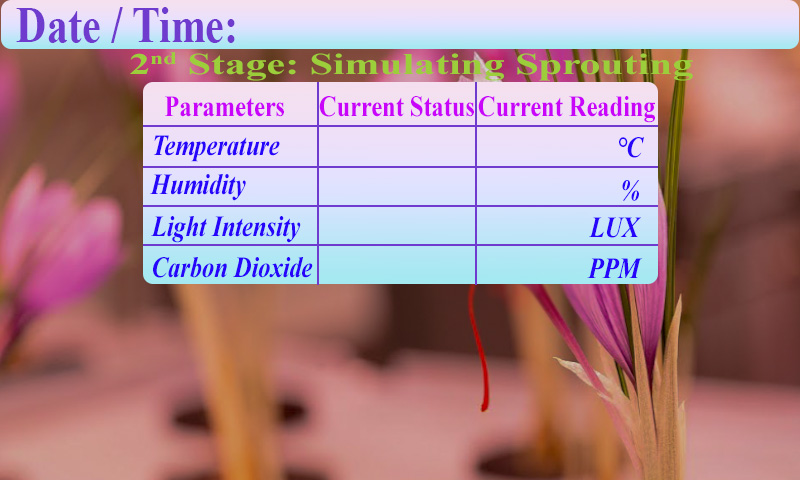
I'm trying to read the HEX data (UART2) coming from the Dwin display when a button is pressed. I'm using ESP32 as my MCU and sensors are communicating via the I2C bus.
Based on the HEX data I'm changing the status of some GPIO pins so that I can use hardware interrupts within my code. Now when I try to read the HEX data that is stored in unsigned char Buffer[9]; is not the one I'm looking for I assume it is corrupted. I'm still a beginner and might a done some silly mistakes and not been able to figure them out. Below is my sketch. Any help will be much appreciated.
#include <Arduino.h>
#include <SensirionI2cScd30.h>
#include <Wire.h>
#include <SPI.h>
#include <Adafruit_Sensor.h>
#include <Adafruit_BME280.h>
#include "RTClib.h"
#include <BH1750.h>
#include <HardwareSerial.h>
HardwareSerial SerialPort(2); // Connect DWIN via UART2

const byte rxPin = 16; //rx2
const byte txPin = 17; //tx2

RTC_DS3231 rtc;
char daysOfTheWeek[7][12] = {"Sunday", "Monday", "Tuesday", "Wednesday", "Thursday", "Friday", "Saturday"};


SensirionI2cScd30 sensor;
unsigned char Buffer[9];
static char errorMessage[128];
static int16_t error;

#define BME_SCK 13
#define BME_MISO 12
#define BME_MOSI 11
#define BME_CS 10

BH1750 lightMeter(0x23);

Adafruit_BME280 bme; // I2C
//Adafruit_BME280 bme(BME_CS); // hardware SPI
//Adafruit_BME280 bme(BME_CS, BME_MOSI, BME_MISO, BME_SCK); // software SPI

unsigned long delayTime;

void IRAM_ATTR ISR_H() {
//    Statements;
    Serial.println("Home Page in Progress");
    Buffer[0] == 0X5A;
    Buffer[4] == 0X20;
}

void IRAM_ATTR ISR_1() {
//    Statements;
  Serial.println("First Stage in Progress");
    Buffer[0] == 0X5A;
    Buffer[4] == 0X21;
}

void IRAM_ATTR ISR_2() {
//    Statements;
  Serial.println("Second Stage in Progress");
    Buffer[0] == 0X5A;
    Buffer[4] == 0X22;
}

void IRAM_ATTR ISR_3() {
//    Statements;
  Serial.println("Third Stage in Progress");
    Buffer[0] == 0X5A;
    Buffer[4] == 0X23;
}

void IRAM_ATTR ISR_4() {
//    Statements;
  Serial.println("Fourth Stage in Progress");
    Buffer[0] == 0X5A;
    Buffer[4] == 0X24;
}

void setup() {
  // put your setup code here, to run once:
  Serial.begin(115200);
  //Begin serial communication DWIN
  SerialPort.begin(115200, SERIAL_8N1, rxPin, txPin);

  pinMode(12, OUTPUT);    // sets the digital pin 13 as output for Home Page
  pinMode(13, OUTPUT);    // sets the digital pin 12 as output for First Page
  pinMode(14, OUTPUT);    // sets the digital pin 14 as output for Second Page
  pinMode(15, OUTPUT);    // sets the digital pin 32 as output for Third Page
  pinMode(32, OUTPUT);    // sets the digital pin 35 as output for Fourth Page

  pinMode(27, OUTPUT);// connected to Terminal-01 of Relay
  pinMode(26, OUTPUT);// connected to Terminal-02 of Relay
  pinMode(25, OUTPUT);// connected to Terminal-03 of Relay
  pinMode(33, OUTPUT);// connected to Terminal-03 of Relay

  attachInterrupt(digitalPinToInterrupt(12), ISR_H, HIGH);// Interrupt for Home Page
  attachInterrupt(digitalPinToInterrupt(13), ISR_1, HIGH);// Interrupt for First Page
  attachInterrupt(digitalPinToInterrupt(14), ISR_2, HIGH);// Interrupt for Second Page
  attachInterrupt(digitalPinToInterrupt(15), ISR_3, HIGH);// Interrupt for Third Page
  attachInterrupt(digitalPinToInterrupt(32), ISR_4, HIGH);// Interrupt for Fourth Page

  // Initialize the I2C bus (BH1750 library doesn't do this automatically)
  // On esp8266 you can select SCL and SDA pins using Wire.begin(D4, D3);
  // begin returns a boolean that can be used to detect setup problems.
    Wire.begin();

    sensor.begin(Wire, SCD30_I2C_ADDR_61);

    sensor.stopPeriodicMeasurement();
    sensor.softReset();
    delay(2000);//**********************************************
    uint8_t major = 0;
    uint8_t minor = 0;
    error = sensor.readFirmwareVersion(major, minor);
    if (error != NO_ERROR) {
        Serial.print("Error trying to execute readFirmwareVersion(): ");
        errorToString(error, errorMessage, sizeof errorMessage);
        Serial.println(errorMessage);
        return;
    }
    Serial.print("firmware version major: ");
    Serial.print(major);
    Serial.print("\t");
    Serial.print("minor: ");
    Serial.print(minor);
    Serial.println();
    error = sensor.startPeriodicMeasurement(0);
    if (error != NO_ERROR) {
        Serial.print("Error trying to execute startPeriodicMeasurement(): ");
        errorToString(error, errorMessage, sizeof errorMessage);
        Serial.println(errorMessage);
        return;
    }

  Serial.println(F("BME280 test"));

  bool status;

    // default settings
  // (you can also pass in a Wire library object like &Wire2)
  status = bme.begin();
  if (!status) {
    Serial.println("Could not find a valid BME280 sensor, check wiring!");
    while (1);
  }

  Serial.println("-- Default Test --");
//  delayTime = 1000;//************************************

  Serial.println();

  if (lightMeter.begin(BH1750::CONTINUOUS_HIGH_RES_MODE)) {
    Serial.println(F("BH1750 Advanced begin"));
  } else {
    Serial.println(F("Error initialising BH1750"));
  }
  #ifndef ESP8266
    while (!Serial); // wait for serial port to connect. Needed for native USB
  #endif

  if (! rtc.begin()) {
    Serial.println("Couldn't find RTC");
    Serial.flush();
    while (1) delay(10);
  }

  if (rtc.lostPower()) {
    Serial.println("RTC lost power, let's set the time!");
    // When time needs to be set on a new device, or after a power loss, the
    // following line sets the RTC to the date & time this sketch was compiled
    //rtc.adjust(DateTime(F(__DATE__), F(__TIME__)));
    // This line sets the RTC with an explicit date & time, for example to set
    // January 21, 2014 at 3am you would call:
    rtc.adjust(DateTime(2023, 6, 26, 7, 13, 0));
  }

  // When time needs to be re-set on a previously configured device, the
  // following line sets the RTC to the date & time this sketch was compiled
  // rtc.adjust(DateTime(F(__DATE__), F(__TIME__)));
  // This line sets the RTC with an explicit date & time, for example to set
  // January 21, 2014 at 3am you would call:
  //rtc.adjust(DateTime(2023, 6, 25, 12, 46, 59)); //Adjust Time Here
}

void loop() {
  display_control();
//  delay(50);

  // put your main code here, to run repeatedly:
  float co2Concentration = 0.0;
  float temperature = 0.0;
  float humidity = 0.0;
  int lux = 0;

    DateTime now = rtc.now();

    error = sensor.blockingReadMeasurementData(co2Concentration, temperature, humidity);
    if (error != NO_ERROR) {
        Serial.print("Error trying to execute blockingReadMeasurementData(): ");
        errorToString(error, errorMessage, sizeof errorMessage);
        Serial.println(errorMessage);
        return;
    }

    Serial.print(now.year(), DEC);
    Serial.print('/');
    Serial.print(now.month(), DEC);
    Serial.print('/');
    Serial.print(now.day(), DEC);
    Serial.print(" (");
    Serial.print(daysOfTheWeek[now.dayOfTheWeek()]);
    Serial.print(") ");
    Serial.print(now.hour(), DEC);
    Serial.print(':');
    Serial.print(now.minute(), DEC);
    Serial.print(':');
    Serial.print(now.second(), DEC);
    Serial.println();

  error = sensor.blockingReadMeasurementData(co2Concentration, temperature, humidity);
    if (error != NO_ERROR) {
        Serial.print("Error trying to execute blockingReadMeasurementData(): ");
        errorToString(error, errorMessage, sizeof errorMessage);
        Serial.println(errorMessage);
        return;
    }

    if (lightMeter.measurementReady()) {
    lux = lightMeter.readLightLevel();
    Serial.print("Light Intensity: ");
    Serial.print(lux);
    Serial.println(" Lux");
  }


    int c = (int)co2Concentration;
    temperature = bme.readTemperature();
    humidity = bme.readHumidity();
    float t = temperature;
    float h = humidity;
    int l = lux;

    Serial.print("Co2 Concentration: ");
    Serial.print(c);
    Serial.print(" PPM \t");
    Serial.println();

    Serial.print("Temperature: ");
    Serial.print(t);
    Serial.println(" *C");

    Serial.print("Humidity: ");
    Serial.print(h);
    Serial.println(" %");
    Serial.println("***********************************");

    sendFloatNumber(t,0x61);
    sendFloatNumber(h,0x62);
    sendIntNumber(l,0x63);
    sendIntNumber(c,0x64);

    if (now.hour() >= 7 && now.hour() < 19){
      digitalWrite(27, LOW);// turn relay-01 ON
      Serial.println();
      Serial.println("Light is ON");
    }
    else{
      digitalWrite(27, HIGH);// turn relay-01 OFF
      Serial.println();
      Serial.println("Light is OFF");
    }

  if(digitalRead(12) == HIGH){
    Serial.println("Home Page Loop");
  }

  if(digitalRead(13) == HIGH){
    Serial.println("First Page Loop");

    if (bme.readTemperature() > 24 && bme.readTemperature() < 26 || bme.readTemperature() < 24){
      digitalWrite(26, HIGH);// turn relay-02 OFF
      Serial.println("Chiller is OFF");
    }
    else{
      digitalWrite(26, LOW);// turn relay-02 ON
      Serial.println("Chiller is ON");
    }

    if (bme.readHumidity() > 65 && bme.readHumidity() < 75 || bme.readHumidity() > 75){
      digitalWrite(25, HIGH);// turn relay-03 OFF
      Serial.println("Humidifier is OFF");
    }
    else{
      digitalWrite(25, LOW);// turn relay-03 ON
      Serial.println("Humidifier is ON");
    }

    if (co2Concentration > 2000 && co2Concentration < 4000 || co2Concentration > 4000){
      digitalWrite(33, HIGH);// turn relay-04 OFF
      Serial.println("Co2 Valve is OFF");
      Serial.println();
    }
    else{
      digitalWrite(33, LOW);// turn relay-04 ON
      Serial.println("Co2 Valve is ON");
      Serial.println();
    }
  }
  if(digitalRead(14) == HIGH){
    Serial.println("Second Page Loop");
    if (bme.readTemperature() > 20 && bme.readTemperature() < 25 || bme.readTemperature() < 20){
      digitalWrite(26, HIGH);// turn relay-02 OFF
      Serial.println("Chiller is OFF");
    }
    else{
      digitalWrite(26, LOW);// turn relay-02 ON
      Serial.println("Chiller is ON");
    }

    if (bme.readHumidity() > 80 && bme.readHumidity() < 90 || bme.readHumidity() > 90){
      digitalWrite(25, HIGH);// turn relay-03 OFF
      Serial.println("Humidifier is OFF");
    }
    else{
      digitalWrite(25, LOW);// turn relay-03 ON
      Serial.println("Humidifier is ON");
    }

    if (co2Concentration > 700 && co2Concentration < 800 || co2Concentration > 800){
      digitalWrite(33, HIGH);// turn relay-04 OFF
      Serial.println("Co2 Valve is OFF");
      Serial.println();
    }
    else{
      digitalWrite(33, LOW);// turn relay-04 ON
      Serial.println("Co2 Valve is ON");
      Serial.println();
    }
  }
  if(digitalRead(15) == HIGH){
    Serial.println("Third Page Loop");

    if (bme.readTemperature() > 10 && bme.readTemperature() < 20 || bme.readTemperature() < 10){
      digitalWrite(26, HIGH);// turn relay-02 OFF
      Serial.println("Chiller is OFF");
    }
    else{
      digitalWrite(26, LOW);// turn relay-02 ON
      Serial.println("Chiller is ON");
    }

    if (bme.readHumidity() > 80 && bme.readHumidity() < 90 || bme.readHumidity() > 90){
      digitalWrite(25, HIGH);// turn relay-03 OFF
      Serial.println("Humidifier is OFF");
    }
    else{
      digitalWrite(25, LOW);// turn relay-03 ON
      Serial.println("Humidifier is ON");
    }

    if (co2Concentration > 750 && co2Concentration < 850 || co2Concentration > 850){
      digitalWrite(33, HIGH);// turn relay-04 OFF
      Serial.println("Co2 Valve is OFF");
      Serial.println();
    }
    else{
      digitalWrite(33, LOW);// turn relay-04 ON
      Serial.println("Co2 Valve is ON");
      Serial.println();
    }
  }
  if(digitalRead(32) == HIGH){
    Serial.println("Fourth Page Loop");
    if (bme.readTemperature() > 10 && bme.readTemperature() < 17 || bme.readTemperature() < 10){
      digitalWrite(26, HIGH);// turn relay-02 OFF
      Serial.println("Chiller is OFF");
    }
    else{
      digitalWrite(26, LOW);// turn relay-02 ON
      Serial.println("Chiller is ON");
    }

    if (bme.readHumidity() > 80 && bme.readHumidity() < 90 || bme.readHumidity() > 90){
      digitalWrite(25, HIGH);// turn relay-03 OFF
      Serial.println("Humidifier is OFF");
    }
    else{
      digitalWrite(25, LOW);// turn relay-03 ON
      Serial.println("Humidifier is ON");
    }

    if (co2Concentration > 750 && co2Concentration < 850 || co2Concentration > 850){
      digitalWrite(33, HIGH);// turn relay-04 OFF
      Serial.println("Co2 Valve is OFF");
      Serial.println();
    }
    else{
      digitalWrite(33, LOW);// turn relay-04 ON
      Serial.println("Co2 Valve is ON");
      Serial.println();
    }
  }
}

void display_control(){
  if (SerialPort.available())
  {
    Serial.println("Serial Port is available");
//    delay(1000);
    for (int i = 0; i <= 8; i++) //this loop will store whole frame in buffer array HEX Data coming from Touch Display Button.
    {
      Buffer[i] = SerialPort.read();
      Serial.println(Buffer[i]);
    }

    if (Buffer[0] == 0X5A)
    {
      if (Buffer[4] == 0X21){//First Stage Button
          digitalWrite(12, LOW); // sets Home page OFF
          digitalWrite(13, HIGH); // sets First Stage ON
          digitalWrite(14, LOW); // sets Second Stage OFF
          digitalWrite(15, LOW); // sets Third Stage OFF
          digitalWrite(32, LOW); // sets Fourth Stage OFF
          Serial.println("First Stage Button is Pressed");
      }

     if (Buffer[4] == 0X22){//Second Stage Button
          digitalWrite(12, LOW); // sets Home page OFF
          digitalWrite(13, LOW); // sets First Stage OFF
          digitalWrite(14, HIGH); // sets Second Stage ON
          digitalWrite(15, LOW); // sets Third Stage OFF
          digitalWrite(32, LOW); // sets Fourth Stage OFF
          Serial.println("Second Stage Button is Pressed");
     }

     if (Buffer[4] == 0X23){//Third Stage Button
          digitalWrite(12, LOW); // sets Home page OFF
          digitalWrite(13, LOW); // sets First Stage OFF
          digitalWrite(14, LOW); // sets Second Stage OFF
          digitalWrite(15, HIGH); // sets Third Stage ON
          digitalWrite(32, LOW); // sets Fourth Stage OFF
          Serial.println("Third Stage Button is Pressed");
     }

     if (Buffer[4] == 0X24){//Fourth Stage Button
          digitalWrite(12, LOW); // sets Home page OFF
          digitalWrite(13, LOW); // sets First Stage OFF
          digitalWrite(14, LOW); // sets Second Stage OFF
          digitalWrite(15, LOW); // sets Third Stage OFF
          digitalWrite(32, HIGH); // sets Fourth Stage ON
          Serial.println("Fourth Stage Button is Pressed");
     }

     if (Buffer[4] == 0X20){//Home Page Button
          digitalWrite(12, HIGH); // sets Home page ON
          digitalWrite(13, LOW); // sets First Stage OFF
          digitalWrite(14, LOW); // sets Second Stage OFF
          digitalWrite(15, LOW); // sets Third Stage OFF
          digitalWrite(32, LOW); // sets Fourth Stage OFF
          Serial.println("Home Page Button is Pressed");
     }
    }
   }
  }

void sendFloatNumber(float floatvalue,byte address)
{
  SerialPort.write(0x5A);
  SerialPort.write(0xA5);
  SerialPort.write(0x07);
  SerialPort.write(0x82);
  SerialPort.write(address);
  SerialPort.write((byte)0x00);

  byte hex[4]={0};

  FloatToHex(floatvalue,hex);

  SerialPort.write(hex[3]);
  SerialPort.write(hex[2]);
  SerialPort.write(hex[1]);
  SerialPort.write(hex[0]);
}

void sendIntNumber(int intvalue, byte address)
{
  SerialPort.write(0x5A);
  SerialPort.write(0xA5);
  SerialPort.write(0x05);
  SerialPort.write(0x82);
  SerialPort.write(address);
  SerialPort.write((byte)0x00);
  //SerialPort.write(highByte(intvalue));
  //SerialPort.write(lowByte(intvalue));

  byte hex[2]={0};

  IntToHex(intvalue,hex);

  SerialPort.write(hex[1]);
  SerialPort.write(hex[0]);
}

void FloatToHex(float f,byte* hex)
{
  byte* f_byte=reinterpret_cast<byte*>(&f);
  memcpy(hex,f_byte,4);
}

void IntToHex(int f,byte* hex)
{
  byte* f_byte=reinterpret_cast<byte*>(&f);
  memcpy(hex,f_byte,2);
}

//detachInterrupt(GPIOPin);