int perintah = 1;
. . .
digitalWrite(perintah, HIGH);
Avoid using D1 as it is used for serial communications.
Have you heard of making a TIMER using the millis( ) function ?
#define LEDon                     HIGH
#define LEDoff                    LOW

#define ENABLED                   true
#define DISABLED                  false

const byte trigger              = A0;
const byte perintah             = 13;

bool LED13timerFlag             = false;

//timing stuff
unsigned long LED13Millis;

const unsigned long LED13interval = 5000ul; //5 seconds

//********************************************^************************************************
void setup()
{
  pinMode(perintah, OUTPUT);

} //END of   setup()


//********************************************^************************************************
void loop()
{
  //****************************
  //if we are not currently timing, have we reached the trigger point ?
  if (LED13timerFlag == DISABLED && analogRead(trigger) > 600)
  {
    //enable the LED 13 TIMER
    LED13timerFlag = ENABLED;

    //reset the LED 13 TIMER
    LED13Millis = millis();

    digitalWrite(perintah, LEDon);
  }

  //****************************
  //if LED 13 TIMER is enabled, is it time to turn off LED 13 ?
  if (LED13timerFlag == ENABLED && millis() - LED13Millis >= LED13interval)
  {
    //we are now finished with this timing sequence
    LED13timerFlag = DISABLED;

    digitalWrite(perintah, LEDoff);
  }

} //END of   loop()
I don't use tinkercad.
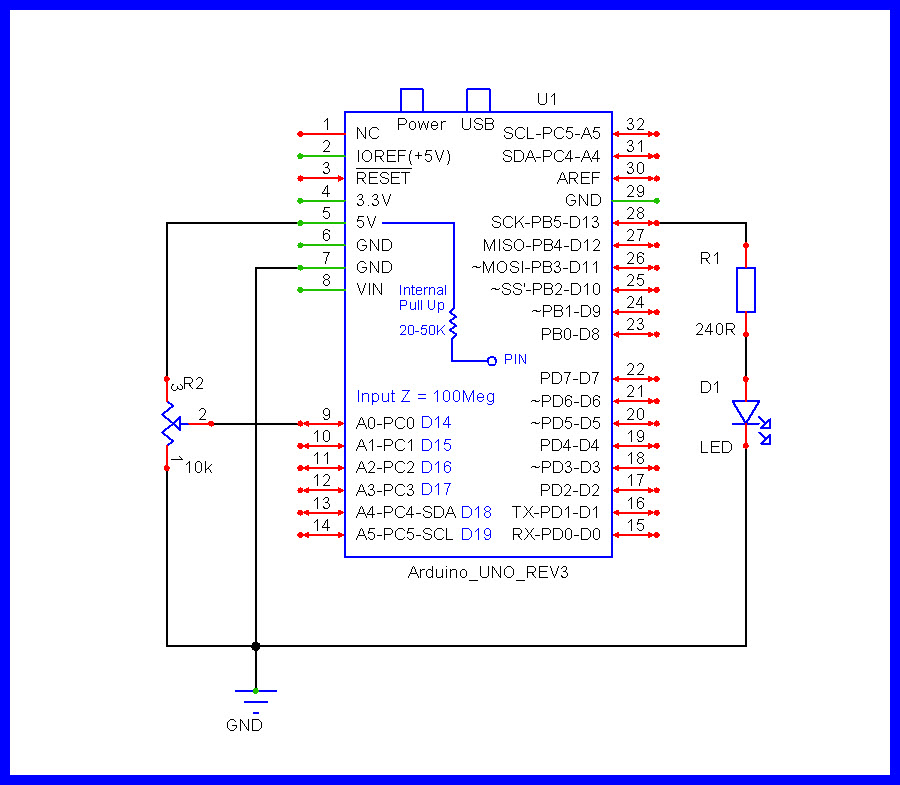
it is just a simulation but I assume at some point in time you build a real circuit. NEVER connect something bigger than a sensor or a resistor-with-LED directly to an IO-pin. It is very likely that the device like your lamp will draw too much current and destroy the microcontroller.
The IO-pin that shall switch on/off the lamp must be connected to the base of a transistor
the transistor then can be connected to the coil of the relay. You have only one end of the relay-coil connected. The second is missing.
As using a relay requires an additional transistor simply use a resistor and an LED for your simulation. lighting up the LED makes the switching of the IO-pin visible too.
Your code uses IO-pin 1. The wiring uses IO-pin 13.
For switching off the lamp you need some kind of timing.
Your code has no timing yet.
There is a timing-option that is easy to use but very limited in where it can be applied
This option uses delay(). if you want to stumple over a lot of hurdles with more complex programs use delay()
If you want to be able to use timing professionally skip delay() and learn non-blocking timing.
I advertise my own tutorial for learning it
what should happen if the analog input is still above the threshold after the 30s? go again for a 30s cycle? just ignore and turn off and wait for the analog input to go below the threshold before being able to activate the digital output again?
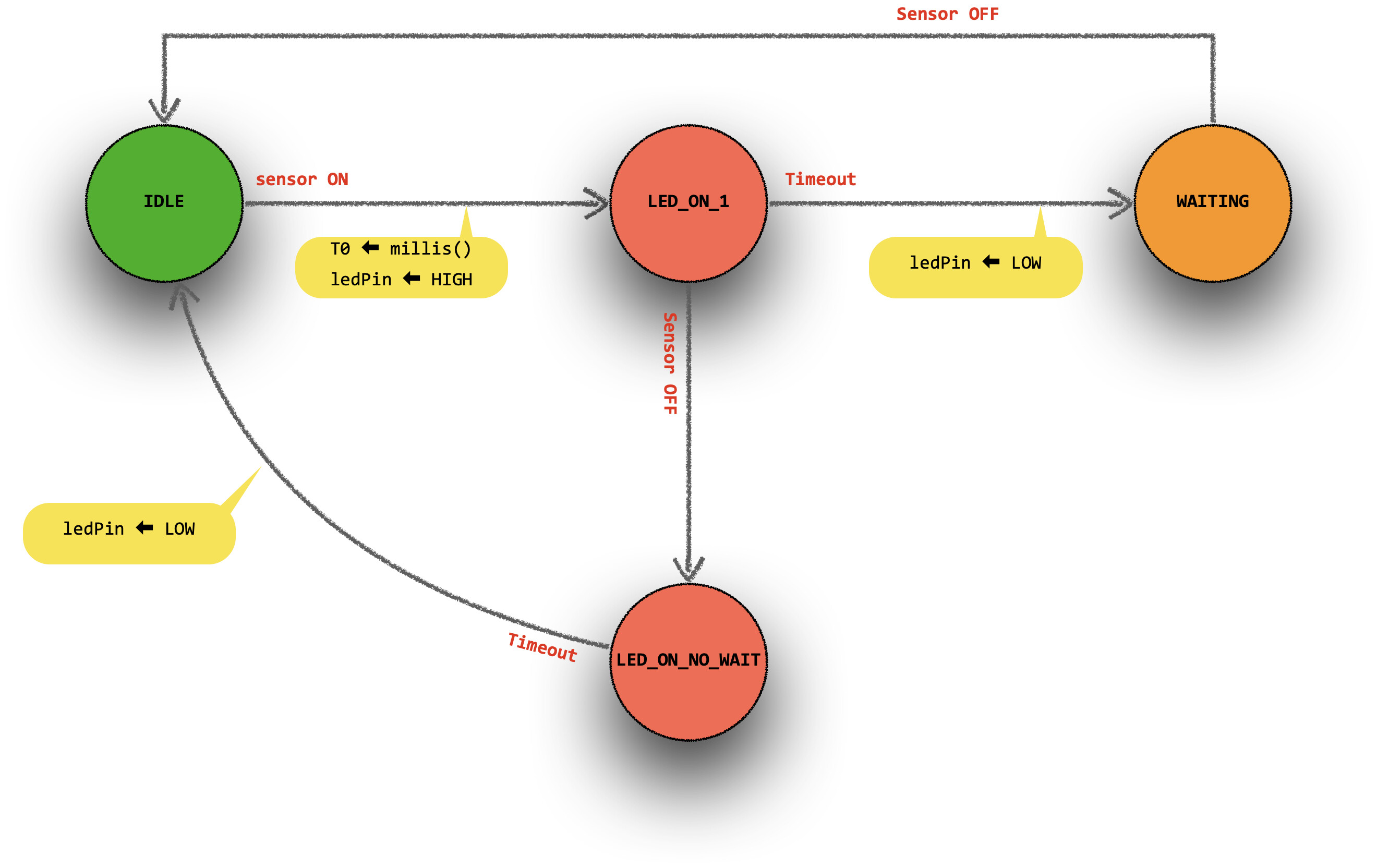
a state machine is a good way to design this kind of system, here is an example of what it could look like
I'm pretty familiar with programming state-machines but I don't understand your picture.
Too less explanation what is meaning what.
What do the textes inside the circles represent?
what do the textes along the arrowlines represent?
what do the yellow "messages" represent?
I'm sure if you try to think about it you'll figure it out - most people do
to help if you really could not get it:
circle = state (so the label could be the state name)
arrow = a possible transition
red text = event triggering that transition
yellow bubble = action to take during the transition
start in the green circle state (idle)
(and it's incomplete, needs to account for the sensor being activated again in the LED_ON_NO_WAIT state depending how you want this to work ➜ goes back to specifications)
How can you do an action during the transistion?
For me a transition is
myState = sm_waiting;
the pure assigning of a new state
This assigning of a new state is conditional and of course inside the conditional code you can have additional commands
I still say for somebody that is very new to state-machines your picture has way too less information to write the code or even if you put the code next to it to understand the relations between the code and the drawing.
If you insist on saying "most people will learn it" then this learning happens through reading additional tutorials but not through studying your picture.
don't get lost in translation, I'm French, you are German (if I trust my guts), none of us is a native English speaker
it means do the action, then change the state to acknowledge you have taken the transition
I said "most people will figure it out", implied of course that they have some programming background and understand FSM. note for mere mortals
(I do have a tutorial in French)
may be some code would help you, it would look like this:
const byte sensorPin = A0;
const int sensorThreshold = 600;
const byte ledPin = 2;

const unsigned long duration = 30000ul; // 30s in ms
unsigned long t0;

enum : byte {IDLE, LED_ON, LED_ON_NO_WAIT, WAITING} state = IDLE;

void fsm() {
  switch (state) {
    case IDLE:
      if (analogRead(sensorPin) >= sensorThreshold) {
        t0 = millis();
        digitalWrite(ledPin, HIGH);
        state = LED_ON;
      }
      break;

    case LED_ON:
      if (millis() - t0 >= duration) {
        digitalWrite(ledPin, LOW);
        state = WAITING;
      }
      else if (analogRead(sensorPin) < sensorThreshold) {
        state = LED_ON_NO_WAIT;
      }
      break;

    case LED_ON_NO_WAIT:
      if (millis() - t0 >= duration) {
        digitalWrite(ledPin, LOW);
        state = IDLE;
      }
      break;

    case WAITING:
      if (analogRead(sensorPin) < sensorThreshold) {
        state = IDLE;
      }
      break;
  }
}

void setup() {
  pinMode(ledPin, OUTPUT);
  digitalWrite(ledPin, LOW);
}

void loop() {
  fsm();
}
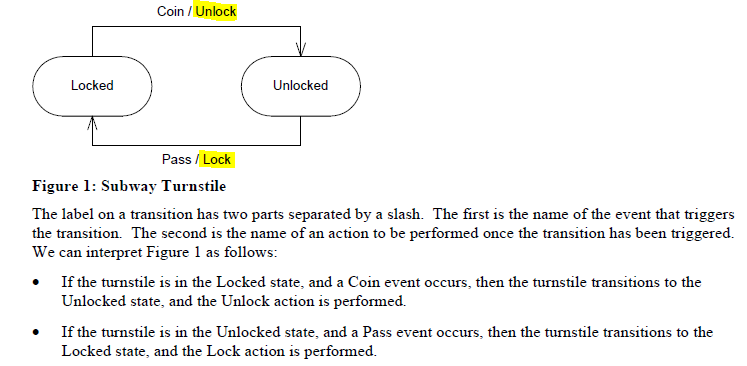
This paper has the diagram below and associated explanation. The action's completion is what differentiates one state from the other. The wording below (... transitions to the state ... and the action is performed...) would imply that the action associated with the state change occurs after the arrival in the new state. That makes more intuitive sense to me than
... since that would mean the previous state would need knowledge of what the next state should do. For example if state LED_ON needs a led turned on, it seems better to me to turn it on on arrival in state LED_ON rather than do that on exit from state WAITING. Why should state WAITING be expected to know what to do in state LED ON? And there may be a dozen routes to state LED ON: would be tedious to have to code that led turning on in 12 previous states rather than only in the new state LED ON.
No that's history - of course Alsace is French ...
to your point, the idea is to graphically describe what a switch/case would do upon getting the event required for a transition. It's not what you want to do in the next state, it's what you do because you've got the event that will move you to the other state.
see code sample above for a better idea of what I meant in my frenglish
BTW you are correct on this but it's extra code to do what's required only once, when you enter the new state - so it's easier to do it when leaving the previous state in my opinion.
otherwise you need a intermediary state where the action is taken and then you move to the real next state
No you don't. I see that in your code you turned the led on on exit from WAITING, and you would have to do that in other states that might occur before state LED ON.
Why not just turn the led on the first time you run through the switch..case of LED ON. That fits into the fact that states can have actions on arrival, during the state's currency, and on exit.
edit: your way, if the rules of what defines the state LED ON changed (maybe turn the led on and play a tune) then you have to make that change on the exit from every state which might lead to state LED ON., not just on the first time into LED ON.
for a digitalWrite() there is no harm in doing it every time you come back to that case, but if that were a reset of an external device that would be bad...
you need an extra variable (either maintain previous state variable and check if it has changed or some local static variable that you set and unset upon transition). ➜ I find this more cumbersome than performing the necessary actions when leaving the previous state. And if you have lots to do, just put that in a function and call the function
not saying you are wrong, what you say makes sense, just saying that's my preferred way as it usually makes the code simpler as you don't have to deal with this "first time / upon arriving at" thingy
Set a "newstate" flag when you leave the old state. In the new state, check the flag, do the action if it's set, clear the flag. It makes the destination state self-contained, and each possible previous state doesn't have to know about and do the stuff that the new state needs to do.
Sure, exactly my point. You need an extra variable and additional code at the start of a case to check that variable and perform the action.
Note that there are actions that might also depend on the previous state... which my approach deals with in a better way I feel (ie do things to do upon leaving and before arriving to a new state so it's all in one place.)
again, your approach work, I just don't like the extra variable