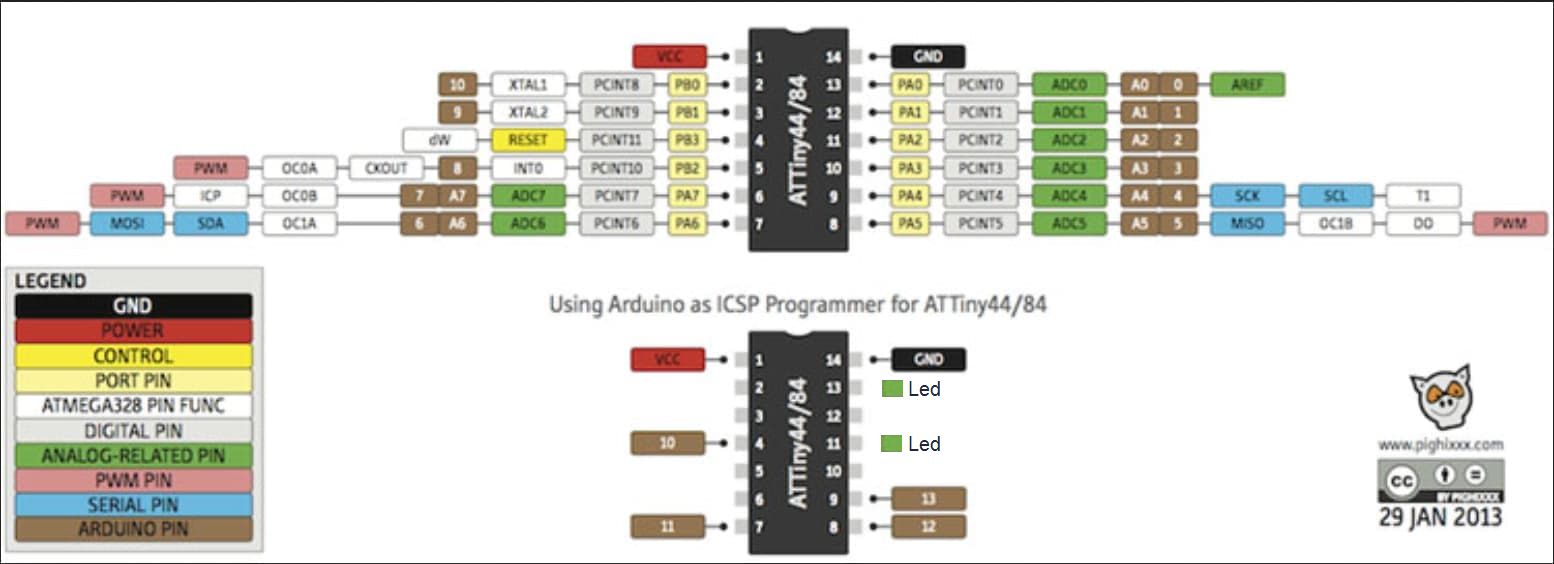
A high voltage programmer is a programmer that let's you set the fuses of the chip by actually providing 12v+ to the reset pin (instead of just 5v+)
They are not to hard to built, have a look here
I think i used the 2nd sketch sort of, this is what i use
// AVR High-voltage Serial Fuse Reprogrammer
// Adapted from code and design by Paul Willoughby 03/20/2010
// http://www.rickety.us/2010/03/arduino-avr-high-voltage-serial-programmer/
// Fuse Calc:
//   http://www.engbedded.com/fusecalc/

// https://eleccelerator.com/fusecalc/fusecalc.php?chip=attiny13

#define  RST     13    // Output to level shifter for !RESET from transistor
#define  SCI     12    // Target Clock Input
#define  SDO     11    // Target Data Output
#define  SII     10    // Target Instruction Input
#define  SDI      9    // Target Data Input
#define  VCC      8    // Target VCC

#define  HFUSE  0x747C
#define  LFUSE  0x646C
#define  EFUSE  0x666E

// Define ATTiny series signatures
#define  ATTINY13   0x9007  // L: 0x6A, H: 0xFF             8 pin
#define  ATTINY24   0x910B  // L: 0x62, H: 0xDF, E: 0xFF   14 pin
#define  ATTINY25   0x9108  // L: 0x62, H: 0xDF, E: 0xFF    8 pin
#define  ATTINY44   0x9207  // L: 0x62, H: 0xDF, E: 0xFFF  14 pin
#define  ATTINY45   0x9206  // L: 0x62, H: 0xDF, E: 0xFF    8 pin
#define  ATTINY84   0x930C  // L: 0x62, H: 0xDF, E: 0xFFF  14 pin
#define  ATTINY85   0x930B  // L: 0x62, H: 0xDF, E: 0xFF    8 pin

void setup() {
  pinMode(VCC, OUTPUT);
  pinMode(RST, OUTPUT);
  pinMode(SDI, OUTPUT);
  pinMode(SII, OUTPUT);
  pinMode(SCI, OUTPUT);
  pinMode(SDO, OUTPUT);     // Configured as input when in programming mode
  digitalWrite(RST, HIGH);  // Level shifter is inverting, this shuts off 12V
  Serial.begin(115200);
  Serial.println("ATtiny HV Programmer");
  Serial.println("Type 'I' for Fuse Settings");
  Serial.println("Type 'D' For Setting fuses to Default");
  Serial.println("Type 'R' For Setting Reset Disable");
}

void loop() {
  if (Serial.available()) {
    Serial.println();
    char c = Serial.read();
    pinMode(SDO, OUTPUT);     // Set SDO to output
    digitalWrite(SDI, LOW);
    digitalWrite(SII, LOW);
    digitalWrite(SDO, LOW);
    digitalWrite(RST, HIGH);  // 12v Off
    digitalWrite(VCC, HIGH);  // Vcc On
    delayMicroseconds(20);
    digitalWrite(RST, LOW);   // 12v On
    delayMicroseconds(10);
    pinMode(SDO, INPUT);      // Set SDO to input
    delayMicroseconds(300);
    unsigned int sig = readSignature();
    Serial.print("Signature is: ");
    Serial.println(sig, HEX);
    Serial.print("Chip : ");
    switch (sig) {
      case ATTINY13:
        Serial.println("ATtiny13");
        break;
      case ATTINY24:
        Serial.println("ATtiny24");
        break;
      case ATTINY25:
        Serial.println("ATtiny25");
        break;
      case ATTINY44:
        Serial.println("ATtiny44");
        break;
      case ATTINY45:
        Serial.println("ATtiny45");
        break;
      case ATTINY84:
        Serial.println("ATtiny84");
        break;
      case ATTINY85:
        Serial.println("ATtiny85");
        break;
    }
    if (c == 'D') {
      readFuses(sig);
      if (sig == ATTINY13) {
        writeFuse(LFUSE, 0x6A);
        writeFuse(HFUSE, 0xFF);
      }
      else if (sig == ATTINY24 || sig == ATTINY44 || sig == ATTINY84 ||
               sig == ATTINY25 || sig == ATTINY45 || sig == ATTINY85) {

        writeFuse(LFUSE, 0x62);
        writeFuse(HFUSE, 0xDF);
        writeFuse(EFUSE, 0xFF);
      }
      Serial.println("Fuses Set to Defaults");
      readFuses(sig);
    }
    else if (c == 'R') { // reset disable
      uint32_t fuses = readFuses(sig);
      if (sig == ATTINY13) {
        byte val = (fuses >> 16) & 0xFF; //keep current settings
        writeFuse(LFUSE, val);
        val = (fuses >> 8) & 0xFE; // disable bit 0 = reset disable
        writeFuse(HFUSE, val);  // other bits should be retained
      }
      else if (sig == ATTINY24 || sig == ATTINY44 || sig == ATTINY84 ||
               sig == ATTINY25 || sig == ATTINY45 || sig == ATTINY85) {

        byte val = (fuses >> 16) & 0xFF; //keep current settings
        writeFuse(LFUSE, val);
        val = (fuses >> 8) & 0x7F; // disable bit 7 = reset disable
        writeFuse(HFUSE, val);  // other bits should be retained
        val = (fuses) & 0xFF;
        writeFuse(EFUSE, val);
      }
      Serial.println("Reset Fuse disabled");
      readFuses(sig);
    }
    else if (c == 'I') {
      readFuses(sig);
    }
    digitalWrite(SCI, LOW);
    digitalWrite(VCC, LOW);    // Vcc Off
    digitalWrite(RST, HIGH);   // 12v Off
    Serial.println("Process Completed");
    delay(1000);
  }
}

byte shiftOut (byte val1, byte val2) {
  int inBits = 0;
  //Wait until SDO goes high
  while (!digitalRead(SDO))
    ;
  unsigned int dout = (unsigned int) val1 << 2;
  unsigned int iout = (unsigned int) val2 << 2;
  for (int ii = 10; ii >= 0; ii--)  {
    digitalWrite(SDI, !!(dout & (1 << ii)));
    digitalWrite(SII, !!(iout & (1 << ii)));
    inBits <<= 1;         inBits |= digitalRead(SDO);
    digitalWrite(SCI, HIGH);
    digitalWrite(SCI, LOW);
  }
  return inBits >> 2;
}

void writeFuse (unsigned int fuse, byte val) {
  shiftOut(0x40, 0x4C);
  shiftOut( val, 0x2C);
  shiftOut(0x00, (byte) (fuse >> 8));
  shiftOut(0x00, (byte) fuse);
}

uint32_t readFuses (uint16_t sig) {
  byte val;
  uint32_t fuses;
  shiftOut(0x04, 0x4C);  // LFuse
  shiftOut(0x00, 0x68);
  val = shiftOut(0x00, 0x6C);
  fuses = val;
  Serial.print("LFuse ");
  Serial.print(val, HEX);
  shiftOut(0x04, 0x4C);  // HFuse
  shiftOut(0x00, 0x7A);
  val = shiftOut(0x00, 0x7E);
  fuses = fuses << 8;
  fuses |= val;
  Serial.print(", HFuse: ");
  Serial.print(val, HEX);
  shiftOut(0x04, 0x4C);  // EFuse
  shiftOut(0x00, 0x6A);
  val = shiftOut(0x00, 0x6E);
  fuses = fuses << 8;
  fuses |= val;
  if (sig != ATTINY13) {
    Serial.print(", EFuse: ");
    Serial.print(val, HEX);
  }
  Serial.println();
  return fuses;
}

unsigned int readSignature () {
  unsigned int sig = 0;
  byte val;
  for (int ii = 1; ii < 3; ii++) {
    shiftOut(0x08, 0x4C);
    shiftOut(  ii, 0x0C);
    shiftOut(0x00, 0x68);
    val = shiftOut(0x00, 0x6C);
    sig = (sig << 8) + val;
  }
  return sig;
}
I ended up using a step-up converter to provide the 12v, so it became 1 neat package.
This is a Fuse-bit calculator


 Important Warning