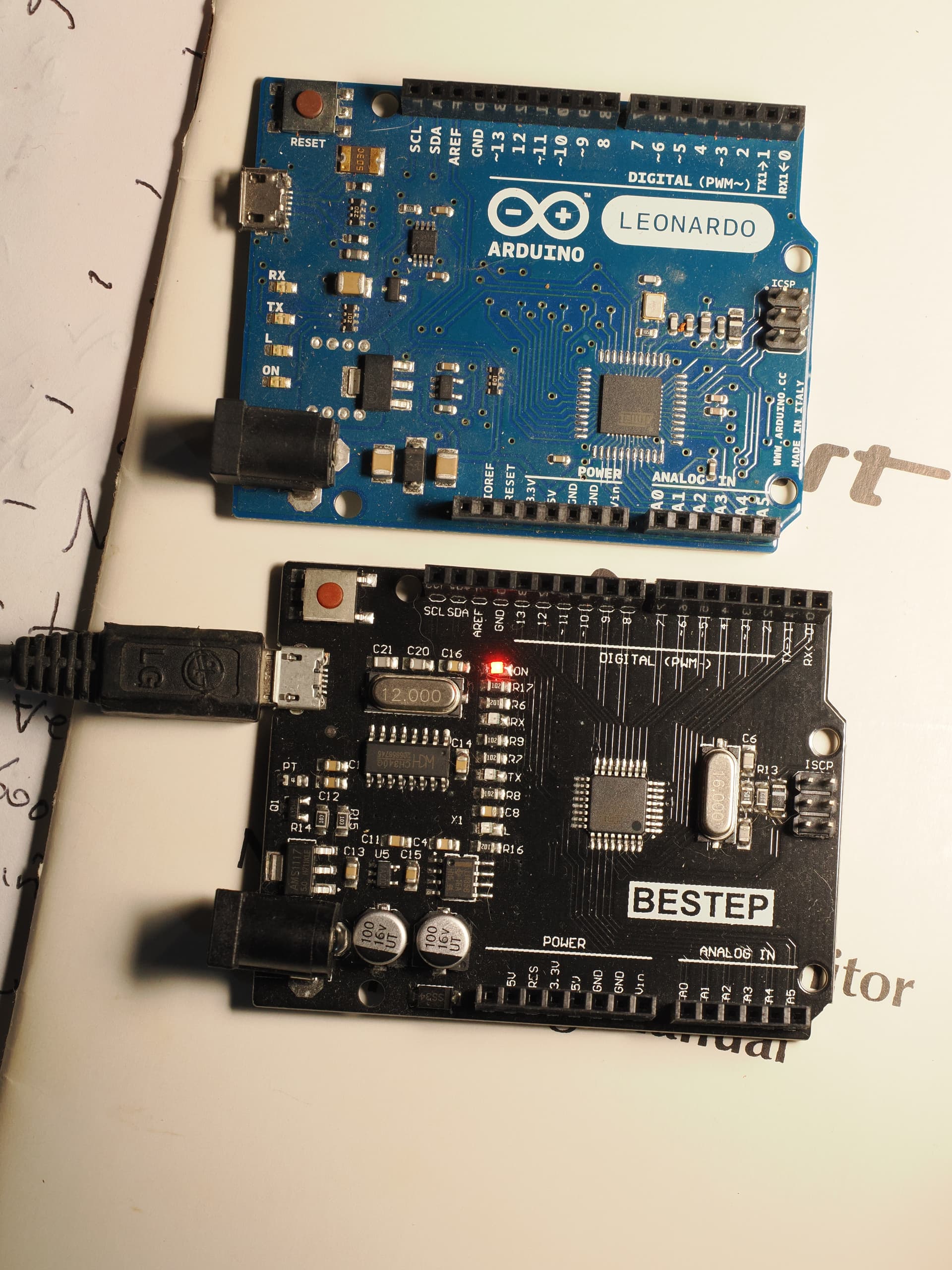
Digging through my junkbox, I have what appears to be a Leonardo clone. At least, it has the same pinout. It's only marking is "BESTEP", but I only get what appears to be a relay shield when I search for "leonardo bestep".
Attempting to connect to Arduino IDE results in a communication error, while the “real” Leonardo compiles, downloads, and runs as simple demo script.
Any ideas how to talk to this thing?
Thanks in advance for any advice offered!
Welcome to the forum
As do a number of other boards, notably the Uno
Does your PC create a COM port when you plug the board in ?
1 Like
It definitely looks like an UNO clone, not a Leonardo.
2 Likes
Good to know! I didn’t have a UNO to compare it to.
If I switch its board to UNO in the IDE, the extra serial port goes away, and I can’t connect to it at all.
But it shows the following when I select “Tools —> Get Board Info”:
The board type selected has no effect on whether or not the COM port created when it is plugged into USB is present or not
What do you mean when you refer to "the extra serial port" ?
The "Get Board Info" only works if there is a working Serial connection
From my research, it appears the 2ec2:0004 USB VID/PID pair of that port is associated with the "Loupedeck Live" streaming console device.
This result indicates that you have a "Loupedeck Live" device connected to your computer and you selected its serial port from Arduino IDE's Tools > Port menu, not the port of the UNO R3 derivative board.
Please perform this experiment to verify that the port you have selected is your Arduino board:
- Disconnect the USB cable of the Arduino board from your computer.
- Select Tools > Port from the Arduino IDE menus.
- Take note of the ports (if any) listed in the menu.
- Close the Tools menu.
 The ports list is only updated when the Tools menu is re-opened, so this step is essential.
- Connect the Arduino board to your computer with a USB cable.
- Select Tools > Port from the Arduino IDE menus. - If a new port is listed in the menu, that is the port of your Arduino board.
If you saw a new port appear at the last step, select that port from the Tools > Port menu and try uploading again.
If this doesn't solve the problem, please reply here on this forum topic with the answers to the following questions:
- While following those instructions, did you see a port in the Tools > Port menu at step (6) that was not present at step (3)?
- If you did see a new port, was the upload successful after you selected that port?
Have you installed the CH340 driver?
1 Like
Yes, that's essential. If there is no driver for the board, you will not see a com port, but an unknown device in device manager.
The Arduino IDE does NOT install this driver.