How to use Capacitive Sensors with Arduino, and communicating with a program on the computer

Hello Arduino Community,

I'm currently using my Arduino to detect capacitive inputs via the digital pins. I'm trying to code a Turbowarp project that can detect a USB signal when the Arduino detects an input. I figured out the capacitive code, but I've been struggling figuring out a way to get my ancient 1st gen UNO to communicate with the computer, since it doesn't have USB support.

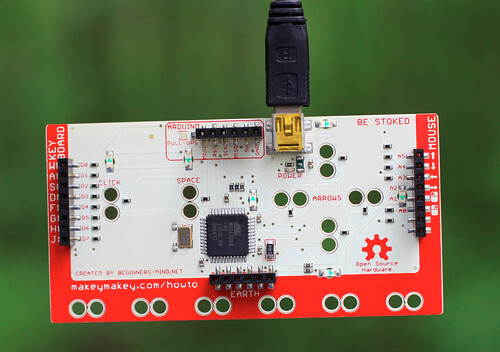
I ended up settling with using a MakeyMakey as an in-between for this. The MakeyMakey has keyboard support, and I checked, and the ground pin from the Arduino will activate the buttons from the MakeyMakey. The only problem with this is that the Arduino can't use its ground pin to communicate, since its a constant ground.

My question is, and this may be really easy, but how would I get a data pin to act as a ground connection, but only when I want the MakeyMakey to send a signal to my Turbowarp project?


Edit: Thanks to everybody that helped me find a solution to the problem. With my available resources I ended up making a system that works.

SOLUTIONS:

1: Use a separate capacitive chip:

Link for product provided by Grumpy_Mike:

Another simple alternative for short time periods:

The Makey Makey Go is another great way to have capacitive sensing and keyboard support in one, flashdrive sized board.

2: Using a MOSFET / Transistor, set up a switch that completes the circuit when a Digital Pin on the Arduino supplies voltage:

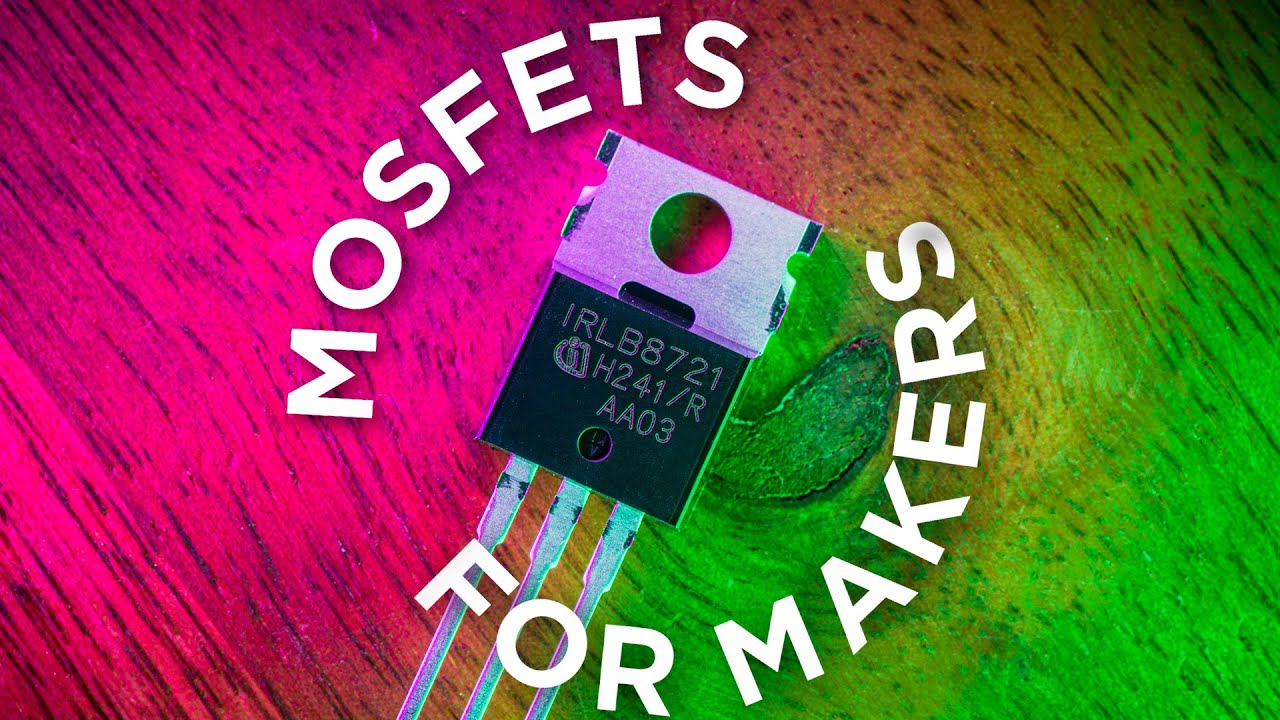
If anybody needs a tutorial for wiring up a MOSFET properly (like I did lol):

Both of these solutions will work for capacitive inputs. A Turbowarp (or Scratch) project can read the USB Keyboard signal and act according to the key it receives.

Bonus: If you use the capacitive chip with a USB HID capable Arduino, you can skip needing a Makey Makey at all! I'm not sure how to do this, but i'm sure there's some great documentation on it somewhere!


Thanks again so much to the helpful people of the Arduino Forum for making this possible!
The simple answer is don't do this.

The more complex answer is it depends on the current you are sinking.

Never come across one of these, what was it's name, and can you post a picture.

Can you post a link to that please.

In theory, but the lowest voltage you can get will be about 0.7V, which is the Vbe (voltage between base and emitter) of silicon transistors.

You might want to look at this How to get the best out of this forum before you proceed any further.
We only know what you tell us, and without knowing what you have, we don't stand a chance.

Hello, Grumpy_Mike!

Thanks for helping me out. I apologize for my lack of literacy with the subject of Arduinos. I think I could have been a bit better with defining my problem. For context of the reason, I'm building an interactive experience for my school project. In the experience, a touchscreen display and an Hertzsprung-Russell Diagram will be visible. There will be small capacitive aluminum foil spots in which, when touched, will open up a pop up describing the element related to the part of the diagram with the touch pad. I'll attach a link to a google sites with the Turbowarp project embedded, but bear in mind that it's not finished, and might be a bit buggy.

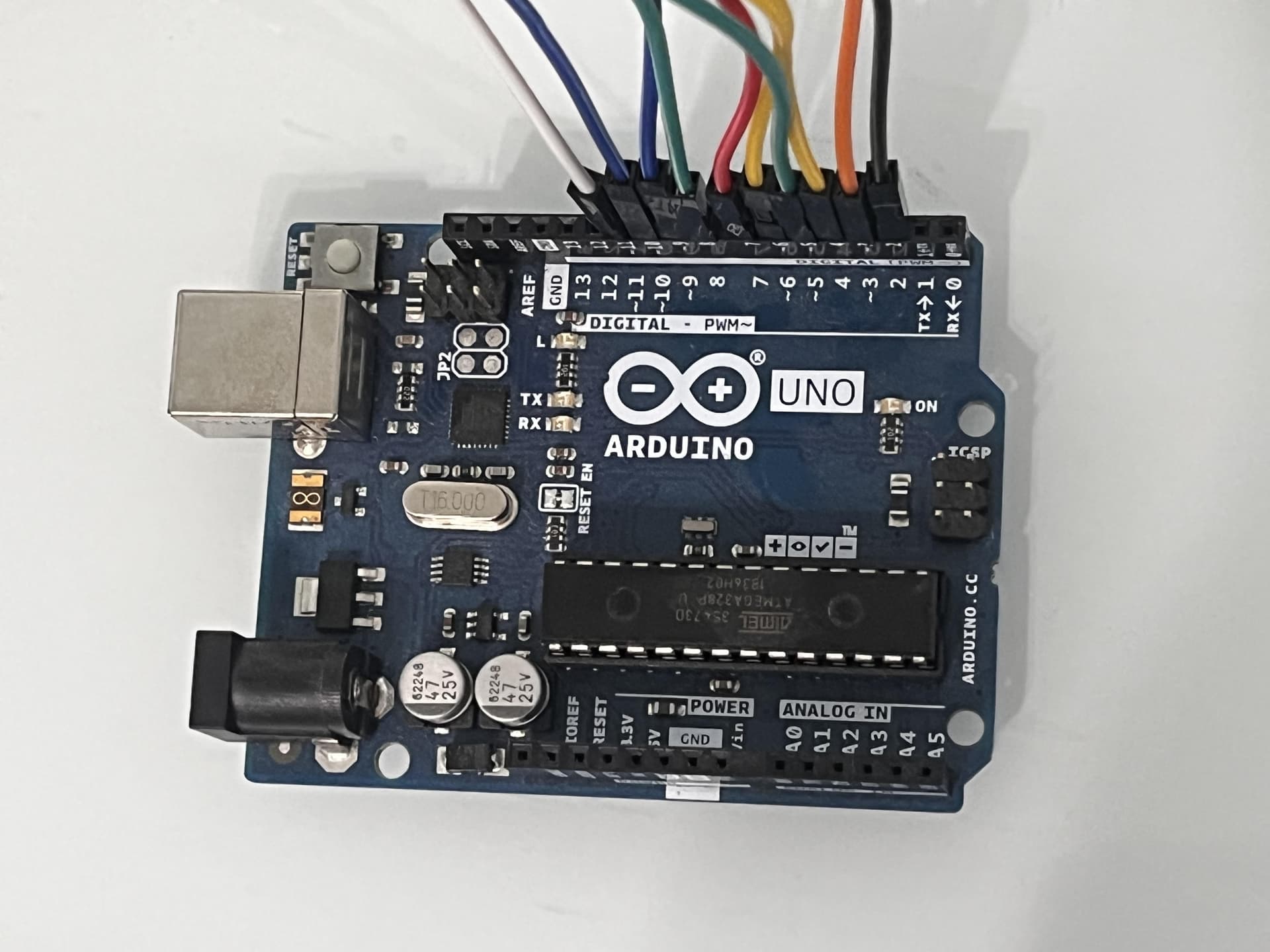
Alright so, to clarify about my UNO model, I looked into it a bit further, and I don't actually think this is a first-gen Uno. I threw out the box, but I remember I got it off amazon as a starter kit. I tried IDing the model, but none of them look quite like mine? I'm pretty sure it is legitimate, since it came with a full kit, and the parts matched the ones in YouTube videos at the time. It most resembles the UNO R3, but with some disparities, and I'm pretty sure I got it after the release date of the UNO R3, but R3 is not labeled anywhere on the product. If it helps, it came with a guidebook written in 2015. I'll upload an image of the board.

I also did my best to mockup my layout, excluding the capacitive wiring on the breadboard:

From my point of view, this should bypass the issue of the digital pins not being able to make a ground connection, but I'm not sure... I do see your point of the VBE, but would that cause an issue with the MakeyMakey? Since when Digital Pin 13 doesn't supply power, everything is grounded? Again, I'm less than experienced, so I'll happily take your advice for this matter.

And here's the Turbowarp project in case you would like to see it for yourself. Note: I have not coded the part of the project related to interacting with the capacitive buttons, and I will try to approach that task once I get the actual electronics working. Bonus note: The scrolling does not work with a mouse wheel, since it is designed to be swiped. You can just click and drag down to see the rest.

https://sites.google.com/view/hrdiagramexperience?usp=sharing

Thanks again so much! This is helping me a lot.

Thanks for the extra information, that helps a lot.

OK. Luckily I used to lecturer in a UK University and gave some Astronomy lectures, so I know what a Hertzsprung-Russell Diagram is. But for others, following this thread might not know, so this link will explain what one is.

Quite often these kits use knock off Arduinos to keep the costs down. The front is almost identical to my genuine Arduino Uno R3, but some of the lables on the board are slightly different. Have you looked at the back? Is it mainly white with a small map of Italy and saying MADE IN ITALY next to it and no chips mounted on the back?

But I would be surprised if it didn't work like an normal R3.

Thanks for the link to the Turbowarp project, sadly it wants me to accept cookies from Google, something I try and avoid.

Personally I would avoid the MakeyMakey thing altogether and get a proper touch sensor chip.

I use the MPR121 chip a lot for touch sensors. AdaFruit has a library for driving them, and they use a much more sophisticated way of measuring the sensors than you can get with just monitoring the charge/discharge time from a digital pin. That way is just really a toy.

How many touch sensors do you need?
The MPR121 gives you 12 touch sensors per chip, they sell a breakout board with them on

But I tend to buy them from eBay as they are usually a bit cheaper.

You can use more than one chip if 12 is not enough but i would start with one chip and get that working first.

What version of the IDE are you using?

Does it look like this on the back?

Nope, unfortunately, the MakeyMakey doesn't have any Arduino pins... This is really cool though. I might have to look into it for my future projects!

Man that sucks if it wasn't an official board. I payed the full price for it. Interestingly, I remember the listing on amazon being linked to the Arduino homepage. Well whatever, I'll just note that my Arduino is basically an R3.

That's alright. The project doesn't even really matter for this scenario. I can imagine that this would work the same if it was an interactive experience for Barbenheimer.

I actually really like this method, but I unfortunately don't have the time to purchase one of these. Are there any USB versions of this, so that I wouldn't have to worry about coding, for future projects? And 12 is more than enough. I initially intended on having just five, because of the UNO's limited Digital Pins.

Currently, I am using the Cloud editor, because of convenience.

Honestly, I might just rework this project to use the MakeyMakey only, and use capacitive touch pads in future projects, when I have the needed resources, and am prepared for such a task.

I showed that one because it has an ATmega32u4 on it and I found the schematic. You could trigger any of the inputs with a transistor or MOSFET.

I have an Uno clone and it works perfectly

Wow luck really isn't going my way. I checked the chip, and it's also different. I don't know if this will work with the transistor because I couldn't find any documentation on it. Then again, I may be looking for the wrong thing. It seems to write: Amega 1616 csp. I Googled it and couldn't find anything. I'll post an image, if it helps.

If it could work, I do have NPN Transistors, and some MOSFETs.

No, not that I know of. Perhaps @jim-p would enlighten us. I did try searching for "touch sensor with USB output" and got plenty of hits but nothing with a USB output, apart from very expensive touch sensors for TV / monitor screens.

But if you are worried about for coding for this chip, then any library worth its salt will come with example code you can use to get it to work.

To access these go to the File Menu and take the Examples sub menu. Then scroll down to the name of the library you want to use and there will be an other sub menu with examples on it.
I did this for the AdaFruit MPR121 library and got this example

/*********************************************************
This is a library for the MPR121 12-channel Capacitive touch sensor

Designed specifically to work with the MPR121 Breakout in the Adafruit shop 
  ----> https://www.adafruit.com/products/

These sensors use I2C communicate, at least 2 pins are required 
to interface

Adafruit invests time and resources providing this open source code, 
please support Adafruit and open-source hardware by purchasing 
products from Adafruit!

Written by Limor Fried/Ladyada for Adafruit Industries.  
BSD license, all text above must be included in any redistribution
**********************************************************/

#include <Wire.h>
#include "Adafruit_MPR121.h"

#ifndef _BV
#define _BV(bit) (1 << (bit)) 
#endif

// You can have up to 4 on one i2c bus but one is enough for testing!
Adafruit_MPR121 cap = Adafruit_MPR121();

// Keeps track of the last pins touched
// so we know when buttons are 'released'
uint16_t lasttouched = 0;
uint16_t currtouched = 0;

void setup() {
  Serial.begin(9600);

  while (!Serial) { // needed to keep leonardo/micro from starting too fast!
    delay(10);
  }
  
  Serial.println("Adafruit MPR121 Capacitive Touch sensor test"); 
  
  // Default address is 0x5A, if tied to 3.3V its 0x5B
  // If tied to SDA its 0x5C and if SCL then 0x5D
  if (!cap.begin(0x5A)) {
    Serial.println("MPR121 not found, check wiring?");
    while (1);
  }
  Serial.println("MPR121 found!");
}

void loop() {
  // Get the currently touched pads
  currtouched = cap.touched();
  
  for (uint8_t i=0; i<12; i++) {
    // it if *is* touched and *wasnt* touched before, alert!
    if ((currtouched & _BV(i)) && !(lasttouched & _BV(i)) ) {
      Serial.print(i); Serial.println(" touched");
    }
    // if it *was* touched and now *isnt*, alert!
    if (!(currtouched & _BV(i)) && (lasttouched & _BV(i)) ) {
      Serial.print(i); Serial.println(" released");
    }
  }

  // reset our state
  lasttouched = currtouched;

  // comment out this line for detailed data from the sensor!
  return;
  
  // debugging info, what
  Serial.print("\t\t\t\t\t\t\t\t\t\t\t\t\t 0x"); Serial.println(cap.touched(), HEX);
  Serial.print("Filt: ");
  for (uint8_t i=0; i<12; i++) {
    Serial.print(cap.filteredData(i)); Serial.print("\t");
  }
  Serial.println();
  Serial.print("Base: ");
  for (uint8_t i=0; i<12; i++) {
    Serial.print(cap.baselineData(i)); Serial.print("\t");
  }
  Serial.println();
  
  // put a delay so it isn't overwhelming
  delay(100);
}

Do you know that all the Arduino's analogue pins can be used as digital inputs / outputs. Just define them as such in the setup function, using them as pins 14, 15, 16, 17, 18, 19, or as A0, A1, A2, A3, A5, A6.

How long have you got? I can get them off eBay within a week.

What country are you in?
Check the AdaFruit web site for world wide distributors close to or in your country.

I don't recommend that anyone follow that MOSFET video, especially the solenoid and motor connections.

The proper and safe way to connect a MOSFET to an Uno is like this:

Anyway, glad you have it working.
Have a nice day!

Wot? No comment on the possible USB output touch sensor, and how this would be actually be any use to the OP?

You can't just plug in a USB output into an Arduino's USB input. There is the Host / Device issue to consider.

If, like usual, you don't believe me then check out this link:-

I actually did find one! It's the Bare Conductive Touch Pad. It fits all of the checkboxes:

  • It has 12 capacitive pins
  • It has USB (HID) and MIDI support
  • It runs on the ATmega32U4
  • It has a built in audio jack (Great for making some cool music projects)
  • It has 12 digital pins, which would make it awesome to interface with an Arduino
  • It's coded directly from the Arduino IDE, making it convenient!

The only disadvantages are:

  • It's very pricey, around $225, or ÂŁ179.39 (as of this comment)
  • It's not available on Amazon or by the manufacturer, only found on a European Shipping Site (RS)

But if that's alright, there's more info on here:


I also found a Makey Makey "Go" model, which has capacitive capabilities.

Pros:

  • It's really cheap, being only around $25 ($20 since it's on discount right now)
  • It's plug and play
  • It's very portable

Cons:

  • It only has one capacitive sensor
  • It only works with Aligator Clips
  • It doesn't have programmability (Apart from deciding which key it triggers)
  • It won't work with Arduino

Still this may be a great choice, depending on your needs!


And then, of course, there's the non USB versions that would be wired into the Arduino, or similar boards.

I won't list any here, because of the endless list of examples you can find on Ebay, Amazon, Adafruit or whatnot.

Pros:

  • Even more affordable
  • Arduino Compatible
  • Programmable
  • Bulk buying is feasible

Cons:

  • Not USB compatible

I hope this helps any person who stumbles into this topic and needed to find this!

Well, uh. I already turned in the assignment.

I actually did not know this! Thanks for the tip!

PS: I'm planning on eventually compiling all of the info on this topic into an answer to help out all of the people looking for this! If you have any more info you would recommend for me to add, let me know!

Yes I have one of these. I have had it since they first came out.

Wow, I didn't pay anything like that, something like ÂŁ40 or so.
It is a very useful board.

I mentioned this in my book Arduino Music and Audio Projects

I said this about it:-

What you have is an Arduino based on the 32u4 chip (like the Leonardo); it has a compatible pin out, but with no connectors attached. In addition, there is a 12 input touch sensor incorporated into the board along with a micro SD card reader and a VS10538 chip. This amazing chip can play MP3 files and can act as a complete general MIDI sound generator. Being a 32u4 processor chip, the board can also be made to look like a USB MIDI device. There is a lot to explore with this board and I suspect I could write a whole book about it some day.

I go on to describe a simple project using it:-

The unexpectedly great thing about it is the initial presentation with great packaging and a fully working system programmed to give you instructions as soon as you connect it to speakers and a power source. The touch contacts are the pads at the top of the board labeled E0 to E11. You touch each one in turn for your spoken introduction to the board.

This means that right out of the box it is a sample player triggered by the touch sensors and you can make a project with it straight away. This is what I did.

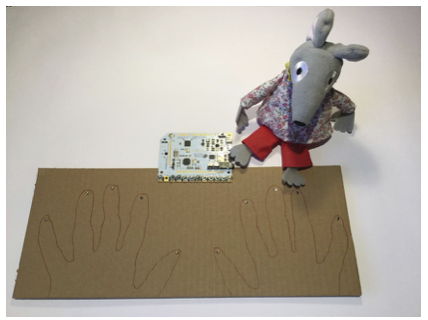
First of all, I got a piece of cardboard about 14 by 6 inches, placed my hands, on it and drew an outline of my fingers. Then at the tip of each finger I pushed a paper fastener and soldered a wire to each one on the underside. Then I mounted the touch board onto the edge of the cardboard with some M3 nuts bolts and washers and connected each paper fastener wire to a separate touch sensor by wrapping the wire under the head of the bolt. I used hot-glue to fix the wires on the underside and stop them from moving about. This is important for the calibration of the touch sensors.

Then

Finally, I got some MP3 samples on an SD card and named them “Track000” to “Track009” and I had
a touch sample player. The first time you power it up, you need to press the Reset button to allow the touch sensors to calibrate. You need to adjust for the new wires on the touch sensors, and then you are good to go.

This is a picture of the final project, mouse optional:-

I have also used it in other projects since.

Where did you buy it? What was the price? It may be that shipping overseas had a giant markup for me. (or maybe the price really quintupled)

Well I already knew the people at Bare because I met them at a UK maker fair when they were just selling their conductive paint. I was exhibiting at that show as well and I invited them to look at what I was exhibiting. We have a great conversation and swapped cards. Then some time later I got notification that they were running a Kick Starter project for a board.
Here it is:-
https://www.kickstarter.com/projects/863853574/touch-board-interactivity-everywhere/
I think I got the ÂŁ40 one.

I doubt it.

It probably did. I guess this would be that there is a big difference between a Kick Starter where in effect you have an order for a known number, and then the build for the ongoing market where the number for production are much more speculative.

Remember in this case the company would have to pay for this stock and this is a big investment for the three people initially involved in starting this business. So this means smaller production runs which are more expensive than a large know production run, where you already have the money up front. Hence the price difference.

Alright, I was able to find more info on the touch board. Apparently, the website linked to the buy page for the touchboard didn’t have the board by itself for sale, only kits. I ended up writing the price for a pro kit, which did actually cost that much.

I was able to find the product by itself for sale on SparkFun for $65:

It still isn’t the £40 you got for being an early backer, but it’s much more affordable than a kit.

I also found a few listing on eBay, but those are from resellers, so I doubt they provide the best value.

My mistake for misrepresenting the price!

1 Like

This topic was automatically closed 180 days after the last reply. New replies are no longer allowed.