Today .ino files are strangely opening in an external editor (Notepad++), not the IDE. I found this thread
I had some difficulty finding 'the Arduino IDE installation folder' but believe it's this:
C:\Users\terry\AppData\Roaming\arduino-ide
and followed instructions from @ptillisch to use the command
& ".\Arduino IDE"
in PowerShell. But at Step 6, executing that PS script, I got this error message:
PS C:\Users\terry\AppData\Roaming\arduino-ide> & ".\Arduino IDE"
& : The term '.\Arduino IDE' is not recognized as the name of a cmdlet, function, script file, or operable program.
Check the spelling of the name, or if a path was included, verify that the path is correct and try again.
At line:1 char:3
You're right, I'm using 1.8.19. Didn't spot the distinction.
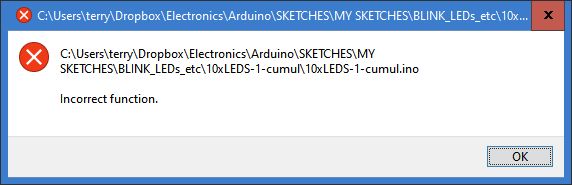
But I've now tried various other 'fixes' without success. For example, the most familiar way of associating file extensions: right-clicking on an .ino file and selecting Open with.. > Arduino IDE. gives this 'Incorrect Function' error :
Try doing an uninstall (It is Windows, right? Then use the uninstall Windows provides, do NOT do anything manually)
Now do an install and see what happens.
Yes, Win 10.
It's rare anyway, but I'm always reluctant to uninstall an app that's been running sweetly for several years. Irrational, but...
Anyway I did a clean uninstall (I use Revo Uninstaller) and then re-installed ... and all seems OK at first sight. Trust I won't get any hassle about drivers, cores, etc. We'll see.
The only thing that may pop up is drivers but it's also unlikely the uninstaller would touch them. At some point the install of another app took over the 'ownership' of the .ino files. Why it gave you that wierd message though is a new one on me.
If a driver is missing, you will find out on an upload. Don't panic, just use a magnifying glass to determine what chip is on the board closest to the USB connector and ask AI where to get the driver. The 3 most likely will have something like CH340G.
There are a few special cases, but just ask ChatGPT the following