Is creating an mouse powered by an arduino compatible microcontroller a bad idea?

I would like to create a own modular mouse with a custom firmware.
Why because I am sick of the current mouses which just get such often the click problem. I always have to take them apart to switch the mouse-switches which not just takes mutch time for a simple repair but it is really annoying. Other people which I know just throwing them away which is just really sad (and alot of unnessesary garbage).

Now I started researching which things I could use for this project.
Microcontroller:
Arduino (Diffrend versions)
ESP32(Diffrend versions)
Raspberry pi pico

Sensors:

(Old) examples/posts of using an mouse sensor with arduino:

The biggest issue I can currently think of is to get the sensor running so it can perform like current "gaming" mouses and find a working lib.
So I wonder is it possible to create a project like this or is the project doomed to fail at the beginning?

(P.S Modular mouse means you can add new buttons or remove them, change the case completely so you just can switch between something like this:

to something like this:
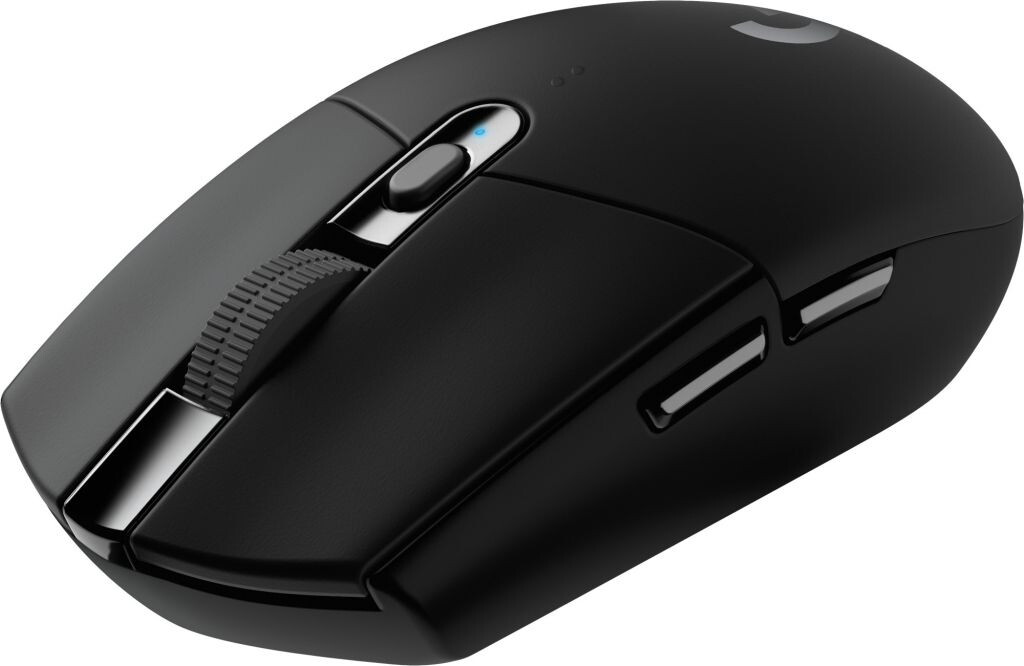
or this:
image

Something like this but mutch more customizable and easy to repair


(Switchable mouse switches, wheel, maybe even mouse sensors)

(More or less build the mouse you need ^^)

A 32u4 is one of the easiest boards to use for this project.

1 Like

Look at the Nano, almost the same footprint and less expensive. Going way back maybe to Win95 days the mice did not have acceleration etc in them. Later as systems advanced it became an option which to my knowledge was handled by the host computer. It would be a relative timing solution to accelerate the count. I have not messed with one since. You can possibly use the sensor and bypass there electronics if you want. I remember some companies looking at a CMOS microcontroller for this when they were still new and only 4 & 8 bit varieties.

I would consider an esp32 for the project--32bit chip vs 8bit (nano), much faster (240mhz vs 16mhz) with built in WIFI/bluetooth. about the same cost as a nano, I picked up a 3 pack the other day for like $22. Code for esp32 is done just the same as any other arduino (C).

as for your library search, I know there is a "controller & joystick" library that is quiet good & built for the sort of thing you're trying to do. The one I know of is for atmel arduinos, but I have to think there is a good one for an esp32 as well. if you go that route, I'm sure a quick search will find you something. Or the atmel library may work as is, not sure what all is involved there.

Do you mean this

I do not have mutch experience with more slower microcontrollers, can it handle that input fast enought so that it does not lose data or lag behind?

I mostly developed for the ESP8266 and ESP32/ESP32S2/ESP32C3 so far. I even designed an PCB for them xD. But I want to consider others solutions too. I guess the best ESP to use is maybe the ESP32S2 since it has an USB interface. (Bluetooth could be an option too but then I need an transmitter and receiver + I do not know if I need to certify them if I like to sell them later too)

Currently I had more trouble finding mouse sensors which are still manifactured. I think that I may can get sensores here:https://www.pixart.com/products-comparison/7/Optical_Mouse_Sensor
But I did not found out mutch about how to use them. I can use the SPI interface for communication but I do not know what I need to input or what the output is. (And if there is an supporting lib for that.) Are there other companies too or are there really such less options?

I guess it is possible to not only just use the SPI interface since PS2 and USB can be an option too: https://www.youtube.com/watch?v=j33jA7B2Bz4
As actual output I use the build in Linb (Over the USB interface) or something like this https://www.youtube.com/watch?v=lkvJsrufmjE

Did you mean something like this?

No, though that is an interesting application. What I was describing sets up the arduino so that it registers with windows as a plug & play input device. I'm talking about making the arduino the mouse & use it to control a PC. That is what you intend to do, or have I got that wrong? If so, the rest of this is pretty well useless to you. :roll_eyes:

My knowledge of the subject is limited to helping someone with something called a "button box". Basically a bunch of custom, programmable keys, it was for a flight simulator. So it needed to register with windows like a "normal" device to show up in the software. As I recall, he was using a class called "controller & joystick" to accomplish the plug & play capability. You might look into "button boxes" to learn on the subject, there were a bunch of youtube tutorials on the subject last I checked. They make the mouse -> pc comms pretty streamlined. You'll have to workout turning the raw sensor data into positioning data.

I can't comment on what you'd need to sell it with a transmitter. But if you want to sell this, you really think there is a market for a wired mouse in 2022?

and yes you need a receiver, but don't most devices you would be hooking to have BT capability? (phone, laptop, pc?) If not, you don't have to make that, an off the shelf dongle will do just fine for a Rx.

I'm all for exploring options, but all the arduinos are all less capable, though a couple of them are smaller(the zero is a fast (samd @120mhz) version of the nano(same pinout).

Plus, it sounds like esp's are in your wheelhouse. Again, all for developing new skills. but if you intend on making a mouse that is better than what the market offers, you probably should work with something you have some experience with, no?

final thought: perhaps approaching the project as a multi platform project (just by being arduino, it almost already is). Then get yourself some of the boards discussed (nano, zero, esp32, ect) and port the code for each one, and make direct comparisons yourself. What'd it cost you, a couple a boards? They're always handy to have around.

I mention this now, because the task of porting will be a lot simpler if you have that as an objective from the beginning.

Do you mean with buttonbox something like this?

Yes there is still a marked for them, e.g in the laboratory where I had to do some work they are banned. And my mother told me that they were not allowed to use bluetooth devices in their conference either. You need extra batterys and the responsiveness, lag and packetloss is worse in wireless mices as in wired mouses. Wireless devices may have advantages on the Convenience site and if you are like to be mobile.
But you need to include batteries and create a circlet for the energie consumption. This just makes everything more complex, so I will may add this as modification if i do not need an extra certification because they are really expensive but I still need an qualification for it.

I was more thinking about this arduino because it has a similar performance as an ESP32: Arduino Nano RP2040 Connect — Arduino Official Store but they are mutch more expensive compared to a ESP32.

Yes you are right, thats why I am using arduino-framework instead of the espressif Framework, so I can easily port the code to other compatible controllers, because you never know if China might start a war too after Russia started the war (or more continue the war). Which makes it possible for me to change the controller mutch easier. :smiley:

It seams it deleted the link, it was about the use of a joystick and controller lib maybe I find it and can insert it again.

ahh I see...I'm a farmer / machinist , so my time in high security environments is rather limited :wink:
Honestly, I had it in my head that this was more of a gaming application. I see I was mistaken.

yes thats the button box, i know its looks different & kinda clunky, but I think its got a lot of the framework for what your trying to do.

so if the BT is out, why the Nano connect? I get that its faster, but you dont need all that wireless, right?

the zero is similar in speed, nano footprint & a bit cheaper than the connect you listed ($15usd was the cheapest I found). all road still seem to lead back to esp32, its just hard to beat the bang for your buck.

have you checked any of your broken mice to see what kind of chips they run? I know you're not gonna find an arudino in there, but maybe an atmel or a samd, or something else...might give you some guidance.

How many GPIO's will you be needing? Special pin considerations? (ie interruptable).

and I'm just curious, how do you plan to fabricate the actual mouse? you got fabrication skills? maybe 3d printed? That'd make tweaking the shape rather simple. but the shape of a mouse is rather complex, you gotta be able to model that. food for thought.

I'm dealing with that (for the first time) on a project of my own. Its a hassle to say the least, so I get it.

if you like that nano connect, ebay has them for a few bucks cheaper:
nano connect ebay

It is an all purpose mouse. (tbh in gaming I always would a wired mouse but that depends on the preferences).

Yes that was a good hint indeed. With that I can add interfaces for adding and removing buttons or switches, wheels or other input stuff.

Bluetooth is not out, it is just not the biggest priority because I need to research in the costs for certifications and laws surrounding wireless transmissions which I need to dive mutch deeper. (I just makes launching a product mutch harder if you do it the first time)

I didn´t find mutch out by opening the mouse.
The sensor has written this on it: A3055 n1746A
And the microcontroller has something with: mf3hS50.1 on it.
The mouse is a Logitech G300s

Which zero do you mean?
This one Arduino MKR ZERO (I2S bus & SD for sound, music & digital audio data) — Arduino Official Store

The more the better I guess. I think i need some AD-Converter(Not many). Something for the mouse wheel. And then as many GPIOs which I can get to give interfaces for the input-components.

First it will definitly get 3D printed for the prototypes. What do you mean by fabrication skills? Getting it produced or designed?

Did you do it with and ESP32 and Arduion or something else? That could be interesting for me later.

I think maybe getting one for test purposes could be good so i just have them to my expanse but I think going with the ESP32 is maybe the best with a custom PCB.

It seems thats the reason
There are only two big players for mouse sensors left Logitech and PixArt.

Wasn't sure if you had experience with some thing like injection molding or something, but if you can print your prototypes, no fab skills required.

yah, thats the zero I had in mind (and have used a few times). It was my go to before I discovered esp32...it also used to be $10, now $15+ on ebay. There is something fancy about the adc on the zero, I don't know the technical details, but analog out looks much better on a scope than it does from say a nano. though I don't really see that as being useful in your application.

I think you're right to select the esp32 & if you have the ability to design & have made, custom PCB's, all the better!

Re battery power:
I don't have it solved yet, but yeah its with respect to an esp32. Mine situation is tricky, I need 5v to run sensors..which means I either need a buck converter or a 5v+ battery source..makes things a bit complicated and that before you involve a LION charging circuit. and I've never built a battery powered arduino project, nor have I designed one with low power in mind. I kinda stalled out on the project for the moment, if / when I solve it, I'll be sure to let you know.

I currently only have theoretic knowledge form my university but I did not do that myself.

Are you planning to use the sleep modes of the ESP?

It seems the biggest problem is to get hands on a reliable source of mouse sensors because the most are just selling to businesses. And there is just one manufacture as far as I have seen that.

initially I was not, but when my first test drained the battery in hours(unacceptable by a factor of 10), I thought it'd be a good idea to look into it. Seems pretty easy to implement, I need to do it in a manor that ensures it does not miss a single event when waking. Not sure if thats actually difficult or not, its all pretty new to me.

again, with 3d printing, you dont need much in the way of fab skills/tools. But you do need the digital equivalents. So you have some picture in your head or on paper, is the CAM work within your skill set? Whether you print it yourself or send it out for printing, the idea in your head needs to get translated into an STL file. Having modeled similar objects, the many curves of a mouse is a challenging model to produce. Are you up to the task? that has much to do with whether this project "is a bad idea" or not. Either way, i do find it interesting where I imagine many are thinking "just buy a new mouse, bruh" :wink:

Thats the reason why I started to study this, so I am able to construct and manufacture stuff ^^.

I think I will not do the complicated stuff at first, I am outsourcing the designing to a friend who just works with CAD programs all day long. He can design that pretty fast. :grin:
When I have more time and practice I try to design on myself too.

sounds like ya got a plan, good luck! I do hope you'll share the results with us.

Sorry if I've mised this -
If its to be a wired mouse why not use the USB power?

the Nano does not support USB I/O.

cant comment on the nano connect but the 32U4 is good value for the power it offers.

Handling buttons for functions isnt a problem - but if you are aiming for "perfect" operation I'd suggest its down to the sensor you use for position detection.

Sure I will keep you updated. The biggest problem is really getting the sensor because they only sell them to big companies as far as I saw that.

That was a comment on a different project not on the mouse project.

Do you mean the Arduino with a 16 MHz clockspeed?

I think Arduino Leonardo will make this work easier.

that is what they mean, but its because of (from arduino leonard specs) :

The ATmega32U4 has built-in USB communication that allows the Micro to appear as a mouse/keyboard on your machine.

see, I had assumed it was just a bit of programming (a class) that made the thing plug & play. It seems that its actually a hardware requirement, of which the leonard was meant to do natively. It seems, with some boards, you need a separate chip, even if it has a usb upload port. I would advise you look into how this may or may not work on the nano connect & esp32. I'll bet there's a documented method out there, just another wrinkle in your project....but, thats the way these things go.