JXCT Shutter box (RS485 modbus connection) with ESP32

I guess I needed to be a bit more specific over which line of code to comment out.

Remove the commenting from the digitalWrite above and change the code inside loop() to:

  // send the command
  digitalWrite(DE, HIGH);
//  digitalWrite(RE, HIGH);         <-- comment out this line
  delay( 10 );
  swSerial.write( msg, sizeof(msg) );
  swSerial.flush();
  digitalWrite(DE, LOW);
  digitalWrite(RE, LOW);

In theory your code should now display the message being transmitted and show the same message after RX:.

If it helps, here's a generic diagram I created that shows how I would connect to a sensor using RS485 if I were using the AltSoftSerial library:

Thankyou so much Mark for the diagram. It really clears a lot of things. Okay so I run this test that you suggested above and changed the required code, apologies for not getting it in the first time xD. Here is the code

// Attempt to access a JXCT type NPK sensor to read registers 0x00 to 0x2F
// to see if there is any response from the NPK sensor.
//
// This attempt uses the AltSoftSerial & raw Modbus packets.
// Get AltSoftSerial at https://www.pjrc.com/teensy/td_libs_AltSoftSerial.html
//
// Also requires the CRC library by Rob Tillaart - install it via Library Manager
//
// RS485 module wired up as:
// RS485 DI signal to pin 9
// RS485 RO signal to pin 8
// RS485 RE signal to pin 7
// RS485 DE signal to pin 6
// RS485 VCC to 5V
// RS485 GND to GND
//

#include <AltSoftSerial.h>
#include "CRC16.h"
#define RE 7
#define DE 6

const uint32_t TIMEOUT = 500UL;

uint8_t msg[] = {0x01, 0x03, 0x00, 0x00, 0x00, 0x01, 0xC4, 0x0B};
uint8_t values[11];
uint8_t regAddr = 0;

AltSoftSerial swSerial;

CRC16 crc(CRC16_MODBUS_POLYNOME,
          CRC16_MODBUS_INITIAL,
          CRC16_MODBUS_XOR_OUT,
          CRC16_MODBUS_REV_IN,
          CRC16_MODBUS_REV_OUT);
          
void setup() {
  Serial.begin(9600);
  swSerial.begin(9600);
  pinMode(RE, OUTPUT);
  pinMode(DE, OUTPUT);
  digitalWrite(DE, LOW);
  digitalWrite(RE, LOW);

  Serial.println("\n\nModbus NPK register scanner.\n\n");
  delay(1000);
}

void loop() {
  uint32_t startTime = 0;
  uint16_t crcValue = 0;
  
  // insert the register address
  msg[ 3 ] = regAddr++;

  // generate the CRC16 Modbus checksum
  crc.restart();
  for (uint8_t i=0; i<sizeof( msg )-2; i++ ) {
    crc.add( msg[i] );
  }
  crcValue = crc.calc();

  // and insert it into the test message
  msg[ sizeof(msg)-2 ] = (crcValue & 0xFF);
  msg[ sizeof(msg)-1 ] = ((crcValue >> 8) & 0xFF);
  
  Serial.print("TX: ");
  printHexMessage( msg, sizeof(msg) );

  // send the command
  digitalWrite(DE, HIGH);
  //digitalWrite(RE, HIGH);
  delay( 10 );
  swSerial.write( msg, sizeof(msg) );
  swSerial.flush();
  digitalWrite(DE, LOW);
  digitalWrite(RE, LOW);

  Serial.print("RX: ");
  
  // read any data received and print it out
  startTime = millis();
  while ( millis() - startTime <= TIMEOUT ) {
    if (swSerial.available()) {
      printHexByte(swSerial.read());
    }
  }
  Serial.println();
  delay(500);

  // reset register address back to 0x00 once we reach address 48
  if ( regAddr > 0x2F ) {
    regAddr = 0;
    Serial.println("\n\n\Rescan from register address 0x00 again in 5 seconds.\n\n");
    delay( 5000 );
  }
}

void printHexMessage( uint8_t values[], uint8_t sz ) {
  for (uint8_t i = 0; i < sz; i++) {
    printHexByte( values[i] );
  }
  Serial.print("  -   ");
}

void printHexByte(byte b)
{
  Serial.print((b >> 4) & 0xF, HEX);
  Serial.print(b & 0xF, HEX);
  Serial.print(' ');
}

and the output that I am receiving is
image

And not only this I have did the other 3 tests which you suggested me in 7 in 1 sensor post

All 2 failed. Arduino was sending TX but RX was empty. In fact when performing the first test my RS485 module was heating up a lot (highlighted in yellow). I am increasingly convinced that my module is damaged since all these tests worked before and since these tests check only the rs485 module so I can't blame the sensor xD. Also I would like to add that I have checked all the jumper wires by connecting to 8 and 9 pins of arduino and running the modbus scan it was sending and receiving the same data so this means wires and controller is working. Let me know what you think about this. Then I will buy a new module. Also please tell me the reason why the module was getting heated when preforming the first test

I would have expected the RX printout to show the values that have been transmitted.

By commenting out that line, you are telling the MAX485 chip to leave its receiver enabled when transmitting. It's essentially a loopback so that you effectively receive or listen to what you transmit.

It would concern me that the RS485 module is heating up a lot. I've just looked and the Maxim datasheet says:

Drivers are short-circuit current limited and are protected against excessive power dissipation by thermal shutdown circuitry that places the driver outputs into a high-impedance state.

It does sound like there's a problem with that RS485 module. I've got quite a few of them and not one of them has given me a problem.

It's difficult to say why the module may be heating up. I would usually suspect that maybe the VCC and GND wires got accidentally swapped at some point. The datasheet says that the maximum supply voltage is 12V. That's quite a large margin above the usual 5V. Did you accidentally connect the sensor +V to the VCC of the module?

Other than that, I have no idea why your module is heating up. It does suggest that it may be broken.

Hello, @markd833 sorry for the long pause. So I bought the new RS485 Modbus module. The previous one was indeed faulty. All the test passed and the test that you suggested above was also passing, means TX and RX were same. I even connected the 7 in 1 soil moisture sensor and it was working correctly this means the system is fine. By system I meant The Arduino Module, The RS485 module and the sensor ( 7 in 1). I then proceeded to change the sensor to the shutter box as my original goal is to run the shutter box. I used the code

// Attempt to access a JXCT type NPK sensor to read registers 0x00 to 0x2F
// to see if there is any response from the NPK sensor.
//
// This attempt uses the AltSoftSerial & raw Modbus packets.
// Get AltSoftSerial at https://www.pjrc.com/teensy/td_libs_AltSoftSerial.html
//
// Also requires the CRC library by Rob Tillaart - install it via Library Manager
//
// RS485 module wired up as:
// RS485 DI signal to pin 9
// RS485 RO signal to pin 8
// RS485 RE signal to pin 7
// RS485 DE signal to pin 6
// RS485 VCC to 5V
// RS485 GND to GND
//

#include <AltSoftSerial.h>
#include "CRC16.h"
#define RE 7
#define DE 6

const uint32_t TIMEOUT = 500UL;

uint8_t msg[] = {0x01, 0x03, 0x00, 0x00, 0x00, 0x01, 0xC4, 0x0B};
uint8_t values[11];
uint8_t regAddr = 0;

AltSoftSerial swSerial;

CRC16 crc(CRC16_MODBUS_POLYNOME,
          CRC16_MODBUS_INITIAL,
          CRC16_MODBUS_XOR_OUT,
          CRC16_MODBUS_REV_IN,
          CRC16_MODBUS_REV_OUT);
          
void setup() {
  Serial.begin(4800);
  swSerial.begin(4800);
  pinMode(RE, OUTPUT);
  pinMode(DE, OUTPUT);
  digitalWrite(DE, LOW);
  digitalWrite(RE, LOW);

  Serial.println("\n\nModbus NPK register scanner.\n\n");
  delay(1000);
}

void loop() {
  uint32_t startTime = 0;
  uint16_t crcValue = 0;
  
  // insert the register address
  msg[ 3 ] = regAddr++;

  // generate the CRC16 Modbus checksum
  crc.restart();
  for (uint8_t i=0; i<sizeof( msg )-2; i++ ) {
    crc.add( msg[i] );
  }
  crcValue = crc.calc();

  // and insert it into the test message
  msg[ sizeof(msg)-2 ] = (crcValue & 0xFF);
  msg[ sizeof(msg)-1 ] = ((crcValue >> 8) & 0xFF);
  
  Serial.print("TX: ");
  printHexMessage( msg, sizeof(msg) );

  // send the command
  digitalWrite(DE, HIGH);
  digitalWrite(RE, HIGH);
  delay( 10 );
  swSerial.write( msg, sizeof(msg) );
  swSerial.flush();
  digitalWrite(DE, LOW);
  digitalWrite(RE, LOW);

  Serial.print("RX: ");
  
  // read any data received and print it out
  startTime = millis();
  while ( millis() - startTime <= TIMEOUT ) {
    if (swSerial.available()) {
      printHexByte(swSerial.read());
    }
  }
  Serial.println();
  delay(500);

  // reset register address back to 0x00 once we reach address 48
  if ( regAddr > 0x2F ) {
    regAddr = 0;
    Serial.println("\n\n\Rescan from register address 0x00 again in 5 seconds.\n\n");
    delay( 5000 );
  }
}

void printHexMessage( uint8_t values[], uint8_t sz ) {
  for (uint8_t i = 0; i < sz; i++) {
    printHexByte( values[i] );
  }
  Serial.print("  -   ");
}

void printHexByte(byte b)
{
  Serial.print((b >> 4) & 0xF, HEX);
  Serial.print(b & 0xF, HEX);
  Serial.print(' ');
}

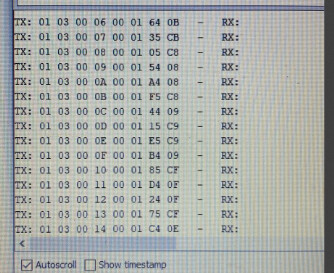
Now when I run the code I connected the Blue and Yellow pins to RS485 as intended and the brown (power) pin to my power supply ( in this case it's 7 volt battery since I am not in the lab) and black to GND, I got no response from the sensor so I disconnected the brown and black pins and connected the power supply adapter, the sensor did respond but I am not sure what to make of it I am sharing the response here

Output:


These two pics are the same response it was just that I was limited by the screen width.

Does this mean anything ? . Also I have this manual from the company which they gave me
485JXBS-8001-BYX-485-type-weather-shutter.pdf (481.2 KB)

Edit: this was the manual they gave and not the above one ( the above one I found on internet on their website )
JXCT-QXZ Weather Station Monitoring System.pdf (746.9 KB)

Can it be because I am not supplying enough power through brown and black wires like between 12v to 24v thats why it's happening ?

The baud rate should be 9600.

According to the datasheet it should run on both the baud rates. Although I changed it to 9600 and tested it but it was the same result

No, it doesn't work like that. When you tried earlier with a broken board, obviously it didn't work.

You need to use the same baud rate that worked with the PC software.

1 Like

Good news on the RS485 module. Hopefully your project can now continue.

It looks like the JXCT-QXZ manual is for a self contained weather system. It mentions displays and solar panels etc. That doesn't sound like what you have. Also page 9 of that manual mentions an AC 220V to DC 12V module - i.e. more than the 7V you are providing.

The 485JXBS document also says on page 2 that the system power supply is 12-24V.

Your 7V battery is below the specified minimum voltage for either system.

As for the response you are seeing - it looks like random garbage as there's no valid modbus data anywhere in that stream of bytes. That could of course be purely down to the low supply voltage you are using. Best to get the supply voltage right first before carrying on.

Re the baud rate, although the 485JXBS document says it supports 2400, 4800 and 9600 baud, you have use the baud rate that it is configured for. It won't auto detect the baud rate you are using.

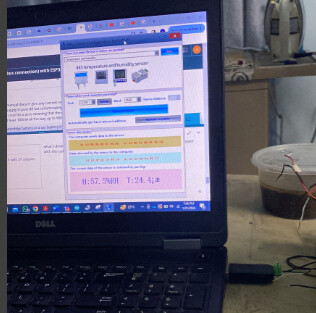
Regardless of what any manual is telling you, the screenshot in post #4 clearly shows that the PC program can communicate with your sensor. It shows the baud rate as 9600 baud and the sensor device address is 1. The sensor data window clearly shows modbus messages going to the sensor and the modbus replies from the sensor.

This is your golden system - it's the one that works with your sensor. You need to replicate the modbus messages using your Arduino to get the sensor to respond in the same way. The code you are using in post #24 is correctly generating the same 2 messages as the PC program - they are the first 2 in your output. You will know when you are getting a valid response from your sensor as the first 2 bytes will be 01 03 in each message.

I will be buying some batteries and test the system on 9600 baud rate with the same code. Let's see what happens

Avoid those little 9V rectangular batteries - they are no use for anything other than smoke alarms and tv remotes.

xD. I have a power supply but sadly there in my lab so just for short testing they come in handy. Can you suggest any other alternative ?

Difficult really as the user manual doesn't give any current requirements. I took a look at the picture of your lab power supply in post #8 but unfortunately there's a cable right in front of the 100's of mA digit. The digit could be a zero meaning that the unit is drawing very little current, or if it's non-zero, then that's at least 100mA all the way up to 900mA.

I was going to suggest a motorbike battery or a car battery if you already have one as they are usually around 13V, but I hesitate as they can provide huge amounts of current and things can easily go spectacularly wrong if you connect up you delicate electronics incorrectly.

Another option may be if you have an old laptop power supply. I think they are sometimes around 19V. Check out your stash to see if you have a 12V power pack that plugs into a wall socket as that may work for you as well. Make sure you read the label on the power pack to check the voltage and polarity of any connector.

1 Like

what's driving me crazy is that when I connect RS485 to USB and supply it with 5V adapter with the companies software it work so well like it starts to work almost immediately.
image
image

Ok. I think what's confusing is that the user manuals you have are for a slightly different spec sensor system as I wouldn't have thought that a system with a minimum supply voltage of 12V (according to the manuals) would work correctly at 5V.

Let's stick with your golden system that works with that 5V power pack.

You should be able to connect the A, B and GND wires of the RS485 module to the A, B and GND of your sensor and power your sensor from that 5V power pack. Then run the code in post #24.

As you are able to run a PC program, you have an RS485-USB adapter (or an RS485 card in your PC). You can use this RS485-USB adapter to listen in to the RS485 bus whilst the Arduino and the sensor are connected. Any PC terminal program that can display hexadecimal values will display the actual bytes that the RS485-USB adapter is seeing on the RS485 bus.

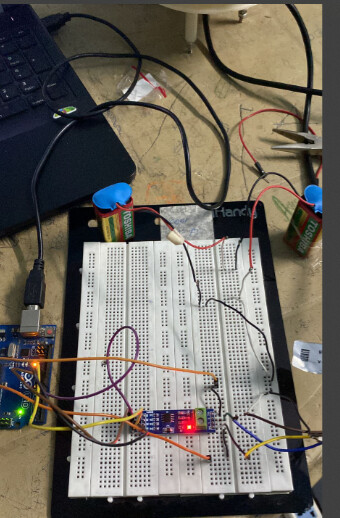
before commenting on post #34. I wanted to say I bought 9V (2) batteries as this was the easiest way to achieve 16 Volts. Connected them in series and powered the system but still I am seeing no response from the sensors
Here is the circuit pic:

output:
image

I am supplying the power from the RS485 pins and not from the adapter. It should be around 16 Volts

In order to check whether those 9V batteries are up to the job, can you power the sensor using them and re-run the PC program. Does the PC program still give the correct output?

okay so, I have tested this before previously in the lab also that when I connect usb to rs485 for their PC program I had to use the adapter (5v) if i disconnect it and supply it through the rs485 power ground wires I can't make the PC program work so my general understanding was that for their PC program we had adapter and for the arduino I had to power it just as I was powering 7 in 1 sensor .

From what you are describing, would this be your lab setup?

Drawing1

If that works correctly, then your Arduino setup should be like this:

I'm not sure I understand this. Are you referring to the VCC and GND pins on the RS485 module?

There is a slight mistake in the Lab setup.


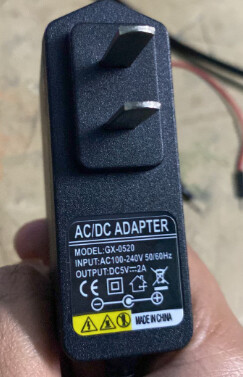
see the picture here. The green here is the adapter and it is attached with the green cord in the shutter box. It is like a cable which get's attached. Then there is a second cord (you can also see the second cord not highlighted in green) it goes to the 4 pins of RS485 (highlighted in RED). when I say supply it through the RS485 power and ground wires what I meant that I power this shutter box by first disconnecting the adapter and placing the wires (brown and black) into the power supply or battery pack in this case, so as to not power the system from both the sides. The rest of the diagram seems fine. The sensor has no positive or negative terminals it has a cord with an adapter.

Ok, so in order to change as few things as possible, can you power the shutter box from the adapter in green (just like you do when running from the PC), and only connect the A, B & GND wires from the shutter box to your Arduino setup?

It's possible that the sensor is configured to only be powered from that adapter and not from the + & - on the RS485 cable.