MD_MAX72xx Sketch Not Looping

I believe that the correct syntax would be (using your pin assignments)

MD_MAX72xx mx[2] = { MD_MAX72xx(HARDWARE_TYPE, DATA_PIN, CLK_PIN, CS_PIN, MAX_DEVICES), MD_MAX72xx(HARDWARE_TYPE, DATA_PIN1, CLK_PIN1, CS_PIN1, MAX_DEVICES) };

However, note that you should be able to use the hardware SPI just with different CS pins.

MD_MAX72xx mx[2] = { MD_MAX72xx(HARDWARE_TYPE, CS_PIN, MAX_DEVICES), MD_MAX72xx(HARDWARE_TYPE, CS_PIN1, MAX_DEVICES) };
MD_MAX72xx mx[2]

With only two elements in the array the index should be 0 or 1, not 1 or 2.

This compiles happily

MD_MAX72XX mx0 = MD_MAX72XX(HARDWARE_TYPE, DATA_PIN, CLK_PIN, CS_PIN, MAX_DEVICES);
MD_MAX72XX mx1 = MD_MAX72XX(HARDWARE_TYPE, DATA_PIN1, CLK_PIN1, CS_PIN1, MAX_DEVICES);
MD_MAX72XX mx[] = {mx0, mx1};

Grumpy_Mike,

Thank you very much for sticking with me, I modified my sketch as per your instruction and uploaded to my hardware and everything works as expected apart from an unexpected issue in that the speed of the Display update is a lot slower than I anticipated, but at least it works now.

When I adjust one or both of the Potentiometers it takes a full second or even more for the display (Bar Graph) to catch up to the new position of the Pot so makes the Pot adjustment look rather jumpy ( 4 to 6 Rows at a time, with a Ten Turn Pot depending on how fast it is turned).

I suspect this is down to the "for loop" technique I am using to update the "rows" of the Matrix which is currently 64 rows of LED's on each strip of eight 8 X 8 Matracies, although I would have thought the Arduino would be fast enough to keep up.

In my finished project I hope to have 3 Strips of sixteen 8 X 8 Matracies making 128 Rows of LED's in total in each of the Three strips.

I have removed anything from my sketch which might possibly be causing unnecessary delays, but little improvement.

I will persevere with my design and see if I can come up with a better way to update the displays based on the Pot position, but thanks to your help I now have a better understanding of driving more than one MD_MAX72xx instance with an array.

Thanks again for all your help, you obviously can't be that Grumpy :slight_smile:

Out of interest for everyone, I have included my complete (working) Sketch.

// INCLUDES
// Used to control a panel of MAX7219 LED displays based on the input from a Potentiometer.
#include <MD_MAX72xx.h>

// DEFINES
// Define the number of devices we have in the chain and the hardware interface
// NOTE: These pin numbers will probably not work with your hardware and may
// need to be adapted

// SPI hardware interface
//MD_MAX72XX mx = MD_MAX72XX(HARDWARE_TYPE, CS_PIN, MAX_DEVICES);
// Arbitrary pins

#define HARDWARE_TYPE MD_MAX72XX::FC16_HW
#define MAX_DEVICES  8
#define CLK_PIN   13  // or SCK
#define DATA_PIN  11  // or MOSI
#define CS_PIN    10  // or SS
#define CLK_PIN1   9  // or SCK1
#define DATA_PIN1  7  // or MOSI1
#define CS_PIN1    6  // or SS1
MD_MAX72XX mx0 = MD_MAX72XX(HARDWARE_TYPE, DATA_PIN, CLK_PIN, CS_PIN, MAX_DEVICES);
MD_MAX72XX mx1 = MD_MAX72XX(HARDWARE_TYPE, DATA_PIN1, CLK_PIN1, CS_PIN1, MAX_DEVICES);
MD_MAX72XX mx[] = {mx0, mx1};

// CONSTANTS
// The analogue input pins to which the potentiometers are connected.
const byte potPins[] = {A0, A2, A4};
// The total number of valves ****** Currently only two potentiometers in use ********
// Hopefully in the final sketch hope to use three Potentiometers a three lots of four 8X8 Matracies
const byte numPots = 2;

// GLOBALS
// This array will record the current reading of each input valve  **** Currently Only 2 In use *****
int currentReadings[numPots] = {};

//   Initialisation

void setup() {
  mx[0].begin();
  mx[1].begin();

  // Set the linear pot pins as input
  for (int i = 0; i < numPots; i++) {
    // Set the pin for the pot
    pinMode(potPins[i], INPUT);
  }

}

// Create a fixed map function:
long map2(long x, long in_min, long in_max, long out_min, long out_max) {
  return (x - in_min) * (out_max - out_min + 1) / (in_max - in_min + 1) + out_min;
}

/**
    Read the input from the potentiometer/s and store in the currentReadings array
*/
void getInput() {
  int totalColumns = 64;
  // Read the value from the pots
  for (int i = 0; i < numPots; i++) {
    // Get the "raw" input, which is a value from 0-1023
    int rawValue = analogRead(potPins[i]);
    // Scale the value to the number of LEDs in each strip
    int scaledValue = map2(rawValue, 0, 1023, 0, totalColumns);
    // To ensure we don't get any dodgy values, constrain the output range too
    scaledValue = constrain(scaledValue, 0, totalColumns);
    // Store the scaled value in the currentReadings array
    currentReadings[i] = scaledValue;
    // Print some debug information
  }
}

/**
   Set the LEDs dependant on the scaled value */
void setDisplay() {

  int totalColumns = 64;
  // Loop over each input
  for (int pot = 0; pot < numPots; pot++)
  {
    for (uint8_t col = (currentReadings[pot]); col < totalColumns; col++)
    {
      mx[pot].setColumn(col, 0x00);

    }
    for (uint8_t col = 0; col < currentReadings[pot]; col++)
    {
      mx[pot].setColumn(col, 0xff);

    }
  }
}
/**
  Main program loop runs indefinitely
*/
void loop()
{
  getInput();
  setDisplay();

}

Fimez.

marco_c

Thanks also for you input, I also tried your suggestion for my MD_MAX72xx array but got compile errors,unfortunately.

exit status 1
'MD_MAX72xx' does not name a type; did you mean 'MD_MAX72XX'?

I will persevere with your guidance on using common Pins (except CS) for the different Matracies as I am quickly running out of I/O Pins on my UNO Board but should just have enough to complete my overall project either way.

I may also look at using the MD_Parola library and Zones as an alternative to my original design.

Thanks again,

Fimez.

I would look at only updating the displays when there is a change in the reading of a pot, not every time through the loop. This will cut down on the number of times you have to send data out to refresh the displays.
Take the abs value of the result of subtracting the current reading from the last reading and only displaying if some threshold of movement has been exceeded.

A few tips to make your displays more responsive:

  1. Suspend the display update until you have finished setting all the columns. This will result in one update at the end (when you re-enable the updates) rather than an update for every column changed.

  2. Use clear() to clear the display before setting the columns that need to be on rather than setting columns on and off individually.

  3. Use the hardware SPI instead of the bitbash version. There is easily a 10x increase in speed for the comms update.

I would encourage you to read the MD_MAX72xx documentation that is in you docs folder if you have not found it yet.

Grumpy_Mike / marco_c

I don't want to keep taking up both of your time, so I will persevere and stop bothering you unless I am absolutely stuck, but .......

Thanks for the tip and you are correct, it makes no sense to loop through every single row of 64 Rows or even 128 Rows, when only a few have changed during the scan time.

I am working on your advice and will crack it in the end, but I would not have got this far without your assistance.

marco_c,

Thanks also for your tips, I am gradually getting through the MD_MAX72xx Library documentation which is very very comprehensive and quite often goes over my head, but the Library examples are very useful to show how things are done.

I do intend to use the Hardware SPI if at all possible as this will speed up everything so much that the delays I am currently seeing will pail into insignificance.

Fimez.

I don't want to keep taking up both of your time,

Don’t worry about that. That is what we like to do. It is especially rewarding seeing the way you respond, and seeing you are working things out for yourself and not relying on us to do every step. But most of all seeing you learn.

Grumpy_Mike / marco_c.... Progress :slight_smile: Sort of, two steps forward one step back :confused:

Up until now, I have not had much success with the SPI Hardware interface when using more than one MD_MAX7219 Instance and struggling with speed issues while using other Arbitrary pins.
I have now spent a far bit of time working on this and with your help have now cracked this with two Strips of two lots of four 8 X 8 matracies.

As marco_c advised the speed improvement over the bitbash method is very very noticeable and this has somewhat "got around" the issue I was having in display response time, but I am still perusing methods of only updating the displays when needed i.e. when Potentiometers have actually changed.

Having got so far, I then added two additional 4 off 8 X 8 Matracies to each instance making 16 8 X 8 modules per instance and then started getting issues with displays sets three and four giving strange results.

I reduced my hardware and sketch accordingly to 3 lots of 4 off 8 X 8 making 12 Matracies per instance and had exactly the same issues.

So everything works fine with 2 lots of 4 off 8 X 8 Matracies but not three.

I added some delays to the sketch to see if perhaps the SPI Hardware interface was running too fast but exact same issue, so don't think it is an issue with the SPI speed.

I have done some voltage checks between the variations and I am fairly sure there is no current limiting or voltage drop going on and I intend adding some additional larger DC Capacitors to the Matracies when they arrive (On order......Bring back Maplins, that's all I can say), perhaps I need to add some AC filter capacitors as well ?? .

I have done some digging around the Forum and internet and there are lots of conflicting stories about MAXIM MX7219 chips and the multitude of Chinese copies which I know mine are as I don't know if MAXIM even manufacture a 4 Off integrated MX7219 Chips with 8 X 8 Matracies module.

I can't believe that these Chinese modules are such an issue and I am sure there must be many people out there building projects with more than two of these Chinese 4 Off 8 X 8 units, but I am reluctant to purchase any more until I resolve the issue that I have with my current modules.

I wish I had access to an oscilloscope to do some more intensive investigation but for now will just have to concentrate on trial and error.

Once I have this sorted, I intend to add to my sketch, such that when each of the three strings of LED Matracies are set to three different pre-defined levels, another action is performed.
This part I am fairly comfortable with, but at this point I can't proceed until I resolve this current issue.

Fimez.

// INCLUDES
// Used to control a panel of MAX7219 LED displays based on the input from a Potentiometer.
#include <MD_MAX72xx.h>
#include <SPI.h>

// DEFINES
// Define the number of devices we have in the chain and the hardware interface
// NOTE: These pin numbers will probably not work with your hardware and may
// need to be adapted
#define PRINT(s, x) { Serial.print(F(s)); Serial.print(x); }
#define PRINTS(x) Serial.print(F(x))
#define PRINTD(x) Serial.println(x, DEC)
#define PRINT(s, x)
#define PRINTS(x)
#define PRINTD(x)
#define HARDWARE_TYPE MD_MAX72XX::FC16_HW
#define MAX_DEVICES  12


#define CLK_PIN   13  // or SCK
#define DATA_PIN  11  // or MOSI
#define CS_PIN    10  // or SS
//#define CS_PIN1    9  // or SS1

// SPI hardware interface
MD_MAX72XX mx0 = MD_MAX72XX(HARDWARE_TYPE, CS_PIN, MAX_DEVICES);
//MD_MAX72XX mx1 = MD_MAX72XX(HARDWARE_TYPE, CS_PIN1, MAX_DEVICES);
MD_MAX72XX mx[] = {mx0};
// Arbitrary pins
// MD_MAX72XX mx = MD_MAX72XX(HARDWARE_TYPE, DATA_PIN, CLK_PIN, CS_PIN, MAX_DEVICES);
#define DELAYTIME 100 // in milliseconds

// CONSTANTS
// The analogue input pins to which the potentiometers are connected.
const byte potPins[] = {A0, A2, A4};
// The total number of valves ****** Currently only two potentiometers in use ********
// Hopefully in the final sketch hope to use three Potentiometers a three lots of four 8X8 Matracies
const byte numPots = 1;

// GLOBALS
// This array will record the current reading of each input valve  **** Currently Only 2 In use *****
int currentReadings[numPots] = {};
//int previousReadings[numPots] = {};
//   Initialisation

void setup() {
  mx[0].begin();
  //mx[1].begin();

  // Set the linear pot pins as input
  for (int i = 0; i < numPots; i++) {
    // Set the pin for the pot
    pinMode(potPins[i], INPUT);
  }

}

// Create a fixed map function:
long map2(long x, long in_min, long in_max, long out_min, long out_max) {
  return (x - in_min) * (out_max - out_min + 1) / (in_max - in_min + 1) + out_min;
}

/**
    Read the input from the potentiometer/s and store in the currentReadings array
*/
void getInput() {
  int totalColumns = 96;
  // Read the value from the pots
  for (int i = 0; i < numPots; i++) {
    // Get the "raw" input, which is a value from 0-1023
    int rawValue = analogRead(potPins[i]);
    // Scale the value to the number of LEDs in each strip
    int scaledValue = map2(rawValue, 0, 1023, 0, totalColumns);
    // To ensure we don't get any dodgy values, constrain the output range too
    scaledValue = constrain(scaledValue, 0, totalColumns);
    // Store the scaled value in the currentReadings array
    currentReadings[i] = scaledValue;
    // Print some debug information
  }
}

/**
   Set the LEDs dependant on the scaled value */
void setDisplay() {

  int totalColumns = 96;

  // Loop over each input
  for (int pot = 0; pot < numPots; pot++)
  {

    for (uint8_t col = currentReadings[pot]; col < totalColumns; col++)
    {
      mx[pot].setColumn(col, 0x00); delay(DELAYTIME / MAX_DEVICES);
    }

    for (uint8_t col = 0; col < currentReadings[pot]; col++)
    {
      mx[pot].setColumn(col, 0xff); delay(DELAYTIME / MAX_DEVICES);
    }
  }
}

/**
  Main program loop runs indefinitely
*/
void loop()
{
  getInput();
  setDisplay();

}

So everything works fine with 2 lots of 4 off 8 X 8 Matracies but not three.

Are you sure you are not running out of memory. The memory report at the end of compilation does not take into account any memory allocated during run time, like allocating buffers for the memory.

Grumpy_Mike,

Another good point, I will look into checking the running memory tomorrow.

At least being Furloughed has some good points in these trying times i.e. more time to play with projects.

Fimez

On the speed - At the start of the for loop where you update the displays (setDisplay()?) use

mx[pot].control(MD_MAX72XX::UPDATE, OFF);

and when you have finished all the changes at the end of the loop

mx[pot].control(MD_MAX72XX::UPDATE, ON);

This will buffer all the LED changes into one message at the end and will also make a big difference. Cutting back the amount of comms to the LED modules will also generally make the system more reliable, especially as you add modules to the display, as this is the slowest part of the application.

I decided to go back to basics today after all the great programming and MD_MAX72xx Library advice I have received from Grumpy_Mike and marco_c, even checked back on some of marco's earlier posts (cc 2013, regarding MX7219 Matrix Current consumption) and read more about the Library itself, which by the way is an amazing and very very comprehensive library, with as many great Examples as you could ever wish to have.

I have not been using the Arduino boards for that long but I must admit from previous electronics build experience (in a previous life :slight_smile: ), I am not overly impressed with the "Header Pin" setup, of both the Arduino and Raspberry PI boards. I understand that this setup makes adding Top Hat boards very easy, which makes future expansion quite simple but the board connections are not the best in the world.

Issues are further compounded if during the "Learning" days, connections are made and broken on a regular basis which can cause the "fit" of connections into the header pins to be somewhat compromised.

Poor connections can cause all sorts of issues with invisible electrical noise and unwanted additional circuit resistance.

I decided to fit a Screw Shield 1.0 to a new Arduino Uno board and where ever possible, solder common connections together before fitting into the much more rugged screw terminals of the Screw Shield. (The Screw Shield will now stay in place for the foreseeable future)

Added some additional higher value electrolytic capacitors to my Matracies (thanks Mike) and reduced the MX7219 Matrix LED "INTENSITY" setting (thanks marco) to something more sensible (i.e 3) setting the intensity is ridiculously easy using marco's Library and has a range of 0 to 15.

I must admit that after about INTENSITY 6 or 7 I did struggle to notice a huge difference but that could just be down to my aging eyes :slight_smile: .

After all this my project is a lot healthier / stable with no "strange" issues and well on it's way to being completed, pending arrival of some additional components and hardware.

I had one question for marco, regarding buffering of Display changes, where is this buffer stored before transmission, I don't suspect it will be an issue in my relatively small sketch, but if stored in SRAM then it might become an issue for bigger sketches and yes I will read more of the Library docs as I am sure you will have covered it in there or previous posts :slight_smile: .

I looked into checking the free "Running" memory ( which turned out not to be as simple as one would like :frowning: ) but wasn't an issue after all for some of the problems I was having.
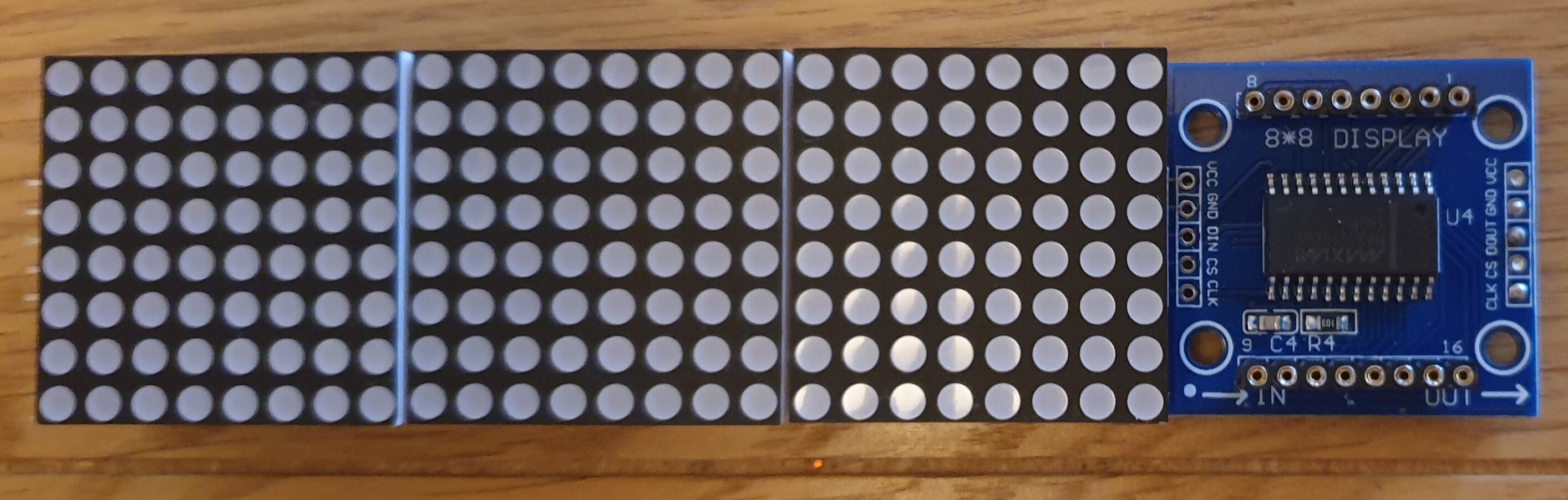
I have now concluded I will need a much more Beefier power supply for the finished project as there will be ultimately 48 Off individual MX7219 8 X 8 matracies, something I would never have been able to achieve with my original attempt using the good but somewhat limited LedControl Library, but it's all a big learning curve.

Especially when the very demanding customer (i.e. My Daughter) has now changed the project remit and also wants Multicoloured LED strips as an added feature to the project.

Under these ever changing Lock-down Conditions it may be a few weeks until the Project makes it's way from the test bench (Living Room Coffee Table, wife is not impressed :slight_smile: ) to it's final destination but I will update the post with a video when the time comes.

In the mean time, many thanks for all your assistance, I am sure I will have many more questions in the future, but I do at least try and resolve issues myself over and over again, until I am absolutely stuck.

Regards,

Fimez.

regarding buffering of Display changes, where is this buffer stored before transmission, ... but if stored in SRAM then it might become an issue for bigger sketches

The buffer is allocated at run time when it knows how many modules are in the chain. The higher the number of modules the more memory is allocated, so with many modules you need to care about this aspect. Once it is allocated it reserved for this use 'forever'.

With the commercial modules which typically have a 10k resistor to set the LED current, you will struggle to see much difference after about level 4 intensity. I use a 68k resistor and this allows much better discrimination and uses less power overall. You should look at how the Rset resistor works in the MAX7219 datasheet, which also gives a table for setting the right value.

Good luck with the project and I hope you don't get too much scope creep :slight_smile:

Thanks marco_c, I am using the 4 in 1 Commercial units (see attached) mainly for simplicity and they are a little cheaper for the quantity I require.

Looking under the LED Matracies, looks like I am stuck with the integrated surface mounted resistor at 10K as you have mentioned (9.98 KOhms according to my meter, yes I have measured it LOL :slight_smile: )

This is not a problem at all as with the INTENSITY setting I can reduce the overall current drain and get the correct brightness I need.

Thanks for the explanation on the Buffer :slight_smile:

Fimez