RFID Reader not working

Hello,
thank you for the great forum first of all. I am trying now for some hours to get the Reader (RFID RC522 from funduino) running, but apart from some starting information I can't get it going.

I identified two different problems:

  1. My reader pinout is a little bit different from the others (see picture), so I am not sure if I wired it up correctly.
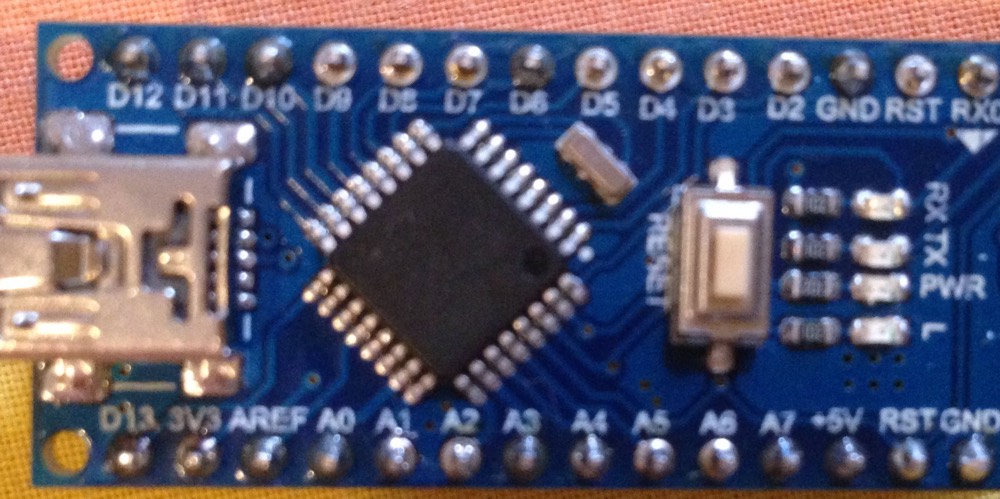
  2. I use a chinese version of the arduino nano and the pinout may be different although I can't see any differences at the pcb. Does anyone has some experience with this sort of arduinos?

I would be so happy if the reader would work. Thank you for your help,

crty

Of course I tried the conventional pins as well as the ICSP connection.

Here is my code:

/*
 * Name RC522DumpMifare.ino
 *
 * 2013-07-xx started
 * 2013-08-03 first commit
 * 2013-08-08 anticol/select 7byte UID, RATS
 *
 * Based on code by www.electrodragon.com
 * and modified/fixed by http://twitter.com/regnerischerTag
 *
 * TODO: 
 *  - ISO/IEC 14443-4
 *  - Auth 7byte
 *  
 */

// the sensor communicates using SPI, so include the library:
#include <SPI.h>

#define uchar unsigned char
#define uint unsigned int

//data array maxium length
#define MAX_LEN 16

/////////////////////////////////////////////////////////////////////
//set the pin
/////////////////////////////////////////////////////////////////////
const int chipSelectPin = 5;
const int NRSTPD = 5;

//MF522 command bits
#define PCD_IDLE              0x00               //NO action; cancel current commands
#define PCD_AUTHENT           0x0E               //verify password key
#define PCD_RECEIVE           0x08               //receive data
#define PCD_TRANSMIT          0x04               //send data
#define PCD_TRANSCEIVE        0x0C               //send and receive data
#define PCD_RESETPHASE        0x0F               //reset
#define PCD_CALCCRC           0x03               //CRC check and caculation

//Mifare_One card command bits
#define PICC_REQIDL           0x26               //Search the cards that not into sleep mode in the antenna area 
#define PICC_REQALL           0x52               //Search all the cards in the antenna area
#define PICC_ANTICOLL         0x93               //prevent conflict
#define PICC_SElECTTAG        0x93               //select card
#define PICC_ANTICOLL2        0x95 // anticollision level 2
#define PICC_ANTICOLL3        0x97               // anticollision level 3
#define PICC_AUTHENT1A        0x60               //verify A password key
#define PICC_AUTHENT1B        0x61               //verify B password key
#define PICC_READ             0x30               //read 
#define PICC_WRITE            0xA0               //write
#define PICC_DECREMENT        0xC0               //deduct value
#define PICC_INCREMENT        0xC1               //charge up value
#define PICC_RESTORE          0xC2               //Restore data into buffer
#define PICC_TRANSFER         0xB0               //Save data into buffer
#define PICC_HALT             0x50               //sleep mode


//THe mistake code that return when communicate with MF522
#define MI_OK                 0
#define MI_NOTAGERR           1
#define MI_ERR                2


//------------------MFRC522 register ---------------
//Page 0:Command and Status
#define     Reserved00            0x00    
#define     CommandReg            0x01    
#define     CommIEnReg            0x02    
#define     DivlEnReg             0x03    
#define     CommIrqReg            0x04    
#define     DivIrqReg             0x05
#define     ErrorReg              0x06    
#define     Status1Reg            0x07    
#define     Status2Reg            0x08    
#define     FIFODataReg           0x09
#define     FIFOLevelReg          0x0A
#define     WaterLevelReg         0x0B
#define     ControlReg            0x0C
#define     BitFramingReg         0x0D
#define     CollReg               0x0E
#define     Reserved01            0x0F
//Page 1:Command     
#define     Reserved10            0x10
#define     ModeReg               0x11
#define     TxModeReg             0x12
#define     RxModeReg             0x13
#define     TxControlReg          0x14
#define     TxAutoReg             0x15
#define     TxSelReg              0x16
#define     RxSelReg              0x17
#define     RxThresholdReg        0x18
#define     DemodReg              0x19
#define     Reserved11            0x1A
#define     Reserved12            0x1B
#define     MifareReg             0x1C
#define     Reserved13            0x1D
#define     Reserved14            0x1E
#define     SerialSpeedReg        0x1F
//Page 2:CFG    
#define     Reserved20            0x20  
#define     CRCResultRegM         0x21
#define     CRCResultRegL         0x22
#define     Reserved21            0x23
#define     ModWidthReg           0x24
#define     Reserved22            0x25
#define     RFCfgReg              0x26
#define     GsNReg                0x27
#define     CWGsPReg          0x28
#define     ModGsPReg             0x29
#define     TModeReg              0x2A
#define     TPrescalerReg         0x2B
#define     TReloadRegH           0x2C
#define     TReloadRegL           0x2D
#define     TCounterValueRegH     0x2E
#define     TCounterValueRegL     0x2F
//Page 3:TestRegister     
#define     Reserved30            0x30
#define     TestSel1Reg           0x31
#define     TestSel2Reg           0x32
#define     TestPinEnReg          0x33
#define     TestPinValueReg       0x34
#define     TestBusReg            0x35
#define     AutoTestReg           0x36
#define     VersionReg            0x37
#define     AnalogTestReg         0x38
#define     TestDAC1Reg           0x39  
#define     TestDAC2Reg           0x3A   
#define     TestADCReg            0x3B   
#define     Reserved31            0x3C   
#define     Reserved32            0x3D   
#define     Reserved33            0x3E   
#define     Reserved34  0x3F
//-----------------------------------------------

Ok,
sorry for posting the code details, you can see it at GitHub - rena2019/myarduino: my repository for arduino source code

Thank you for your help!! City

I am not sure what those pictures are attempting to show?

What we need to know is how have you wired then up to your arduino.

Hi Mike,

I tried different options, but were confused because my reader doesn't have a SDA Pin.

I used the ICSP connection in the following way but it didn't work out:
MISO-MISO
MOSI-MOSI
SCK-SCK
3V3-3V3
GND-GND
RST-RST

I tried this one but I didn't know where to put the SDA connection:
RC522 MODULE Uno/Nano MEGA
SDA D10 D9
SCK D13 D52
MOSI D11 D51
MISO D12 D50
IRQ N/A N/A
GND GND GND
RST D9 D8
3.3V 3.3V 3.3V

So as you can see at the picture the reader doesn't have a SDA Pin and I wonder how to connect it. Is it the same as the NSS pin so that I connect NSS and SS (i.e. Pin 5 at Arduino nano, which is low to start the reader)?

Thanks a lot for your patience!

crty

The web page says:-

Reset > Pin 5
SS or SDA > Pin 10
MOSI > Pin 11
MISO > Pin 12
SCK > Pin 13
Ground > Ground
3.3v > 3.3v

from RFID-RC522 RF IC Card Sensor Module 203517 - air

However where is the 3V3 coming from? The onle on the Arduino can only supply about 50mA and my guess is that the reader need much more than this.

Hi Mike,
thank you for your help again! I checked the 3V3 question with a second power source although I remember that the RFID Sensor is using about 25 mA max at reading (see here).
Anyway, doing this I built up the complete thing again and surprisingly the reader is working perfectly.
I used the code from Miguel Balboa from GitHub with the following pin connections:

  • Typical pin layout used:

  • MFRC522 Arduino Arduino Arduino Arduino Arduino
  • Reader/PCD Uno Mega Nano v3 Leonardo/Micro Pro Micro
  • Signal Pin Pin Pin Pin Pin Pin

  • RST/Reset RST 9 5 D9 RESET/ICSP-5 RST
  • SPI SS SDA(SS) 10 53 D10 10 10
  • SPI MOSI MOSI 11 / ICSP-4 51 D11 ICSP-4 16
  • SPI MISO MISO 12 / ICSP-1 50 D12 ICSP-1 14
  • SPI SCK SCK 13 / ICSP-3 52 D13 ICSP-3 15

Now I am looking for the right code, but I am happy to see it working!

Thanks for your help!

crty

Hi,
For the benefit of others can you please post a copy of your circuit, in CAD or a picture of a hand drawn circuit in jpg, png or pdf?
It would make this thread self contained for any other requests for RFID help.

Tom... :slight_smile:

Here are the fotos of my wiring which worked.

Thank you for your help.

PS: I also tried to remove the LED on pin 13 which was suggested at some posts, but currently I use different arduino nanos (with and without LED) and there is no difference.

here they come

Thanks but this is not quite what we meant. What would be good would be a schematic of your final wiring, not just pictures of plugs in sockets.