Hi friends,
I am new here ,I need a help
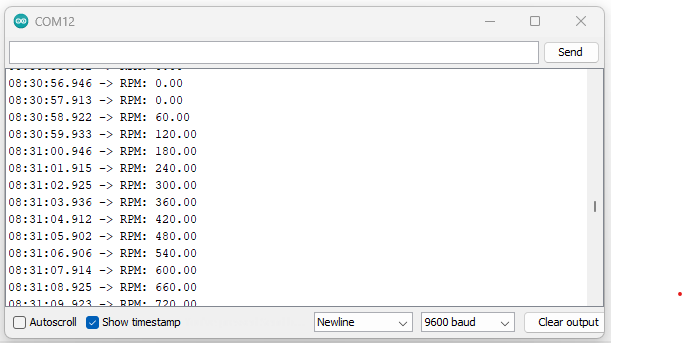
I am using arduino uno with proximity sensor that displays RPM value every thing i work fine and correct ... but it shows the value like
100
110
150
200
and so on ... , i want it to show number inside 110 -120 like 116-117-118 ........
here is my code
thank you.
#include <Arduino.h>
const int sensorPin = 2;
volatile int count = 0;
unsigned long previousMillis = 0;
unsigned long interval = 1000;
void setup() {
    Serial.begin(9600);
    pinMode(sensorPin, INPUT);
    attachInterrupt(digitalPinToInterrupt(sensorPin), countRevolutions, RISING);
}
void countRevolutions() {
count++; // Increment count on each interrupt
}
void loop() {
  unsigned long currentMillis = millis();
  if (currentMillis - previousMillis >= interval) {

    float rpm = (count / 1.0) * (60000.0 / interval); // Assuming 1 pulses per revolution


    Serial.print("RPM: ");
    Serial.println(rpm);

    // Reset count
    count = 0;

    // Update previous time
    previousMillis = currentMillis;
  }
}
What is "and so on"? Does the value you see increase every time? By a random amount? Why are the numbers you see not multiples of 60?
Why do you want that? Do you know what the correct RPM is in this range? Do you know that the RPM increases by exactly 1 every second?
If your true RPM is less than 120, then you will get only 1 or 2 interrupts over your 1000ms measurement period. Your code should only ever print RPM values of 0, 60 or 120.
If you want to measure the RPM with an accuracy of 1 RPM for 110-120 RPM, your measurement period should be 60000ms.
yes exactly like you said it shows multiples of 60 .
i need to display from 0 to 2500 ,but all the numbers like if my bench is working on 778 rpm i need to display 778 EX.
if my bench is working on 500 rpm the arduino shows me 500 rpm or 490-500 its normal
but if my bench is working on for example 447 rpm arduino displays like 440 or 460 ..
the last digit is always shows 0
brother it is not always multiples of 60 ... it's like getting 10 + 10 bigger so if i'm on 220 330 350 700 ....numbers like this work fine but numbers like 234 432 177 343 i'm not getting correct value, i'm getting ~prox value like if it's 177 i am getting 180
I will try your solution and post the result
I have not posted a solution. Only a more correct version of your original code. It won't fix your problem by itself, but the changes should be incorporated in your final code, even though they won't seem to give any different outputs at first.
I think that counting pulses over a long enough time period to give the accuracy you want will result in an update rate that you will consider too slow.
So I suggest you change your method to measure the pulse period (the time between the leading edge of a pulse and the leading edge of the next pulse) using millis() or micros() and calculate RPM from that.