Greetings
I am unable to get propper serial printing
Greetings
I am unable to get propper serial printing
More detail would be welcome.
Where is the serial data coming from?
Post the code that your are using. Read the forum guidelines to see how to properly post code and some information on how to get the most from this forum.
Use the IDE autoformat tool (ctrl-t or Tools, Auto format) before posting code in code tags.
Post the output from serial monitor if there is any. Copy and paste, not screenshot, please.
Device arduino uno
Serial output @^@^@^@^@^@^@^@^@^@^@^@^@^@^@^@^@^@^@^@^@^@^@^@^@^@^@^@^@^@^@^@^@^@^@^@^@^@^@^@^@^@^@^@^@^@^@^@^@^@^@^@^@^@^@^@^@^@^@^@^@^@^@^@^@^@^@^@^@^@^@^@^@^@^@^@^@^@^@^@^@^@^@^@^@^@^@^@^@^@^@^@^@^@^@^@^@^@^@^@^@^@^@^@^@^@^@^@^@^@^@^@^@^@^@^@^@^@^@^@^@^@^@^@^@^@^@^@^@^@^@^@^@^@^@^@^@^@^@^@^@^@^@^@^@^@^@^@^@^@^@^@^@^@^@^@^@^@^@^@^@^@^@^@^@^@^@^@^@^@^@^@^@^@^@^@^@^@^@^@^@^@^@^@^@^@^@^@^@^@^@^@^@^@^@^@^@^@^@^@^@^@^@^@^@^@^@^@^@^@^@^@^@^@^@^@^@^@^@^@^@^@^@^@^@^@^@^@^@^@^@^@^@
Post your codes/sketch using code tags (</>) that you uploaded into UNO.
Please post a schematic. I have no idea of the circuit and the ball of wires in the video give no clue.
<pre >/*
  Title:        HVRescue_Shield
  Description:  Arduino sketch for use with the HV Rescue Shield
  Author:       Jeff Keyzer
  Company:      MightyOhm Engineering
  Website:      http://mightyohm.com
  Contact:      http://mightyohm.com/blog/contact/

  This sketch assumes that the Arduino is equipped with an AVR HV Rescue Shield.
  Schematics and other details are available at http://mightyohm.com/hvrescue2

  The sketch uses High Voltage Programming Mode to set fuses on many Atmel AVR family 8-bit microcontrollers.
  Version 2.0 adds support for High Voltage Serial Programming (HVSP) mode and 8-pin ATtiny devices, but remains
  backwards compatible with the 1.x series hardware.

  The HVPP routines are based on those described in the ATmega48/88/168 datasheet rev.
  2545M-AVR-09/07, pg. 290-297 and the ATtiny2313 datasheet rev. 2543I-AVR-04/06 pg. 165-176.

  The HVSP routines are based on the ATtiny25/45/85 and 13A datasheets (ATtiny25/45/85 2586M–AVR–07/10 pg. 159-165,
  ATtiny13A 8126E-AVR-7/10 pg. 109-116).

  These routines are compatible with many other members of the AVR family that are not listed here.
  For a complete list of tested microcontrollers, see http://mightyohm.com/wiki/products:hvrescue:compatibility

  Changelog:
  3/15/11 2.12
    - New digital pin 0-7 (command&data) read/write routines for the Arduino Mega, since these lines are implemented
      differently on the Mega than on the original Arduino.

  3/8/11 2.11
    - Analog inputs (used here as digital outputs) are now called by their new Arduino A0-A5 names.

  2/2/11 2.1
    - adjusted RESET and VCC edge timing to work with new board design and avoid signal contention on SDO
    - fixed bug that prevented program from compiling in non-interactive mode
    - modified non-interactive mode so that read/verify serial comms still occur, but fuse values aren't prompted

  12/17/10 2.01
    - added missing braces to if(mode == HVSP) that sets SDO pinmode to INPUT
    - removed misleading comment about removing AVR when entering fuse values
    - default mode changed back to ATMEGA

  12/13/10 v2.0
    - Added support for 8-pin parts that use HV Serial Programming (HVSP)
    - New mode selection at startup determines which type of part is to be programmed
    - Got rid of endSerial function, since Arduino now includes Serial.end (finally!)
    - Added a wait for serial transmit to complete before burning fuses.  Without this HFUSE burn would fail occasionally.
    - Numerous other minor tweaks, removal of unnecessary delays, better commenting

  9/24/10 v1.2a
    - ATtiny2313 mode was being set by default.  Changed default mode back to ATmega (see #define ATtiny).

  8/16/10 v1.2
    - Existing fuse settings are now shown before asking the user for new values
    - Added OE strobe after entering programming mode to get ATtiny2313 to read first fuse correctly.
    - Cleaned up code a bit
    - Some minor tweaks to data direction register settings during setup, etc.

  11/02/09 v1.1
    - Removed endSerial call after reading back fuse bytes, was spewing garbage into
      serial monitor
    - Still occsionally get garbage when opening serial monitor, not sure what is causing this.

  03/01/09 v1.0
    - ATtiny2313 support, enable with ATtiny option
    - 12V Step up converter enable is non-inverting, unlike previous level shifter circuit
    - added interactive mode, asks for fuse values to burn, option to turn off
    - added EFUSE support and option to enable
    - button now has very simple debounce routine

  09/24/08
    - original release of sketch "HVFuse" to support first implementation on perfboard
    - Details: http://mightyohm.com/blog/2008/09/arduino-based-avr-high-voltage-programmer/

  Copyright 2008, 2009, 2010 Jeff Keyzer

  This program is free software: you can redistribute it and/or modify
  it under the terms of the GNU General Public License as published by
  the Free Software Foundation, either version 3 of the License, or
  (at your option) any later version.

  This program is distributed in the hope that it will be useful,
  but WITHOUT ANY WARRANTY; without even the implied warranty of
  MERCHANTABILITY or FITNESS FOR A PARTICULAR PURPOSE.  See the
  GNU General Public License for more details.

  You should have received a copy of the GNU General Public License
  along with this program.  If not, see <http://www.gnu.org/licenses/>.
*/

// User defined settings
#define  MEGA         0       // Set this to 1 if you are using an Arduino Mega (default = 0)
#define  DEFAULTMODE  ATMEGA  // If running in non-interactive mode, you need to set this to ATMEGA, TINY2313, or HVSP.
#define  ASKMODE      1       // Set this to 1 to enable mode question at startup
#define  INTERACTIVE  1       // Set this to 0 to disable interactive (serial) mode
#define  BURN_EFUSE   0       // Set this to 1 to enable burning extended fuse byte
#define  BAUD         9600    // Serial port rate at which to talk to PC

// If interactive mode is off, these fuse settings are used instead of user prompted values
#define  LFUSE        0x62  // default for ATmega168 = 0x62
#define  HFUSE        0xDF  // default for ATmega168 = 0xDF
#define  EFUSE        0xF9  // default for ATmega168 = 0xF9

/*
  Data line assignments
  Fuse and command data for HVPP mode are sent using Arduino digital lines 0-7

  Arduino Uno and other original-style form factor boards:
    Digital Line 0-7 outputs = PORTD
    Inputs = PIND
    Data direction register = DDRD

  Arduino Mega - much more complicated because digital lines 0-7 don't map directly to an AVR hardware port:
    Digital Line  AVR Signal Name
    0  PE0  (PORTE)
    1  PE1  (PORTE)
    2  PE4  (PORTE)
    3  PE5  (PORTE)
    4  PG5  (PORTG)
    5  PE3  (PORTE)
    6  PH3  (PORTH)
    7  PH4  (PORTH)
*/

// Pin Assignments (you shouldn't need to change these)
#define  VCC     12
#define  RDY     13     // RDY/!BSY signal from target
#define  OE      11
#define  WR      10
#define  BS1     A2
#define  XA0     8
#define  XA1     A4
#define  RST     A0    // 12V Step up converter enable (12V_EN)
#define  XTAL1   A3
#define  BUTTON  A1    // Run button

// Pin assignments for HVSP mode
#define  SCI    BS1
#define  SDO    RDY
#define  SII    XA0
#define  SDI    XA1

// Serial instructions for HVSP mode
// Based on the ATtiny85 datasheet Table 20-16 pg. 163-165.
// These instructions don't contain the necessary zero padding, which is added later.

// LFUSE
#define HVSP_READ_LFUSE_DATA     B00000100  // For the commands we are interested in
#define HVSP_READ_LFUSE_INSTR1   B01001100  // only the 1st instruction contains a fixed data packet.
#define HVSP_READ_LFUSE_INSTR2   B01101000  // Instructions 2-3 have data = all zeros.
#define HVSP_READ_LFUSE_INSTR3   B01101100

#define HVSP_WRITE_LFUSE_DATA    B01000000  // For the write instructions, the data contents
#define HVSP_WRITE_LFUSE_INSTR1  B01001100  // for instruction 2 are the desired fuse bits.
#define HVSP_WRITE_LFUSE_INSTR2  B00101100  // Instructions 3-4 have data = all zeros.
#define HVSP_WRITE_LFUSE_INSTR3  B01100100
#define HVSP_WRITE_LFUSE_INSTR4  B01101100

// HFUSE
#define HVSP_READ_HFUSE_DATA     B00000100
#define HVSP_READ_HFUSE_INSTR1   B01001100
#define HVSP_READ_HFUSE_INSTR2   B01111010
#define HVSP_READ_HFUSE_INSTR3   B01111110

#define HVSP_WRITE_HFUSE_DATA    B01000000
#define HVSP_WRITE_HFUSE_INSTR1  B01001100
#define HVSP_WRITE_HFUSE_INSTR2  B00101100
#define HVSP_WRITE_HFUSE_INSTR3  B01110100
#define HVSP_WRITE_HFUSE_INSTR4  B01111100

// EFUSE
// Note: not all ATtiny's have an EFUSE
#define HVSP_READ_EFUSE_DATA     B00000100
#define HVSP_READ_EFUSE_INSTR1   B01001100
#define HVSP_READ_EFUSE_INSTR2   B01101010
#define HVSP_READ_EFUSE_INSTR3   B01101110

#define HVSP_WRITE_EFUSE_DATA    B01000000
#define HVSP_WRITE_EFUSE_INSTR1  B01001100
#define HVSP_WRITE_EFUSE_INSTR2  B00101100
#define HVSP_WRITE_EFUSE_INSTR3  B01100110
#define HVSP_WRITE_EFUSE_INSTR4  B01101110

// Enable debug mode by uncommenting this line
//#define DEBUG

// Internal definitions
enum modelist { ATMEGA, TINY2313, HVSP };
enum fusesel { LFUSE_SEL, HFUSE_SEL, EFUSE_SEL };

// Global variables
byte mode = DEFAULTMODE;  // programming mode

// These pin assignments change depending on which chip is being programmed,
// so they can't be set using #define
// There is probably a more elegant way to do this.  Suggestions?
byte PAGEL = A5;  // ATtiny2313: PAGEL = BS1
byte BS2 = 9;     // ATtiny2313: BS2 = XA1

void setup() { // run once, when the sketch starts

  byte response = NULL;  // user response from mode query

  // Set up control lines for HV parallel programming

  #if (MEGA == 0)  // Set up data lines on original Arduino
    PORTD = 0x00;  // clear digital pins 0-7
    DDRD = 0x00;  // set digital pins 0-7 as inputs for now
  #else  // Mega uses different ports for same pins, much more complicated setup.  yuck!
     mega_data_input();
  #endif

  pinMode(VCC, OUTPUT);
  pinMode(RDY, INPUT);
  pinMode(OE, OUTPUT);
  pinMode(WR, OUTPUT);
  pinMode(BS1, OUTPUT);
  pinMode(XA0, OUTPUT);
  pinMode(XA1, OUTPUT);
  pinMode(PAGEL, OUTPUT);
  pinMode(RST, OUTPUT);  // enable signal for DC-DC converter that generates +12V !RESET
  pinMode(BS2, OUTPUT);
  pinMode(XTAL1, OUTPUT);

  pinMode(BUTTON, INPUT);
  digitalWrite(BUTTON, HIGH);  // turn on internal pullup resistor

  // Initialize output pins as needed
  digitalWrite(RST, LOW);  // Turn off 12V step-up converter (non-inverting, unlike original circuit)
  digitalWrite(VCC, LOW);

  Serial.begin(BAUD);  // Open serial port, this works on the Mega also because we are using serial port 0

    // Ask user which chip family we are programming
    #if ((ASKMODE == 1) && (INTERACTIVE == 1))
    Serial.println("Select mode:");
    Serial.println("1: ATmega (28-pin)");
    Serial.println("2: ATtiny2313");
    Serial.println("3: ATtiny (8-pin) / HVSP");

    while(response == NULL) {

      while (Serial.available() == 0);   // wait for character
      response = Serial.read();  // get response from user

      switch(response) {  // decide what to do
      case '1':
        mode = ATMEGA;
        break;
      case '2':
        mode = TINY2313;
        break;
      case '3':
        mode = HVSP;
        break;
      default:
        Serial.println("Invalid response.  Try again.");
        response = NULL;  // reset response so we go thru the while loop again
        break;
      }
    }
    #endif

    // Report which mode was selected
    Serial.print("Selected mode: ");
    switch(mode) {
    case ATMEGA:
      Serial.println("ATMEGA");
      break;
    case TINY2313:
      Serial.println("ATtiny2313");
      // reassign PAGEL and BS2 to their combined counterparts on the '2313
      PAGEL = BS1;
      BS2 = XA1;
      break;
    case HVSP:
      Serial.println("ATtiny/HVSP");
      break;
    }
}

void loop() {  // run over and over again

  byte hfuse, lfuse, efuse;  // desired fuse values from user
  byte read_hfuse, read_lfuse, read_efuse;  // fuses read from target for verify

  Serial.println("Insert target AVR and press button.");
  Serial.end();

  // Set lower 2 bits of DATA low.  This helps avoid serial garbage showing up when you insert a part.
  #if (MEGA == 0)
    DDRD = 0x03;
    PORTD = 0x00;
  #else  // Lower 2 bits are part of PORTE on the Mega
    PORTE &= ~(_BV(PE0) | _BV(PE1));
    DDRE |= (_BV(PE0) | _BV(PE1));
  #endif

  // wait for button press, debounce
  while(1) {
    while (digitalRead(BUTTON) == HIGH);  // wait here until button is pressed
    delay(100);                            // simple debounce routine
    if (digitalRead(BUTTON) == LOW)       // if the button is still pressed, continue
      break;  // valid press was detected, continue on with rest of program
  }
  // Initialize pins to enter programming mode
  #if (MEGA == 0)  // Set up data lines on original Arduino
    PORTD = 0x00;  // clear digital pins 0-7
    DDRD = 0x00;  // set digital pins 0-7 as inputs for now
  #else
    mega_data_input();
  #endif
  digitalWrite(PAGEL, LOW);
  digitalWrite(XA1, LOW);
  digitalWrite(XA0, LOW);
  digitalWrite(BS1, LOW);
  digitalWrite(BS2, LOW);
  digitalWrite(WR, LOW);  // ATtiny2313 needs this to be low to enter programming mode, ATmega doesn't care
  digitalWrite(OE, LOW);

  if(mode == HVSP) {
    digitalWrite(SDI, LOW);  // set necessary pin values to enter programming mode
    digitalWrite(SII, LOW);
    pinMode(SDO, OUTPUT);    // SDO is same as RDY pin
    digitalWrite(SDO, LOW);  // needs to be low to enter programming mode
  }

  // Enter programming mode
  digitalWrite(VCC, HIGH);  // Apply VCC to start programming process
  delayMicroseconds(80);
  digitalWrite(RST, HIGH);   // Apply 12V to !RESET thru level shifter

  if(mode == HVSP) {
    // reset SDO after short delay, longer leads to logic contention because target sets SDO high after entering programming mode
    delayMicroseconds(1);   // datasheet says 10us, 1us is needed to avoid drive contention on SDO
    pinMode(SDO, INPUT);    // set to input to avoid logic contention
  }

  delayMicroseconds(10);  // Give lots of time for part to enter programming mode
  digitalWrite(OE, HIGH);
  digitalWrite(WR, HIGH);   // Now that we're in programming mode we can disable !WR
  delay(1);

  /****
   **** Now we're in programming mode until RST is set LOW again
   ****/

  if (mode == HVSP) {
    HVSP_read(HVSP_READ_LFUSE_DATA, HVSP_READ_LFUSE_INSTR1);
    HVSP_read(0x00, HVSP_READ_LFUSE_INSTR2);
    read_lfuse=HVSP_read(0x00, HVSP_READ_LFUSE_INSTR3);

    HVSP_read(HVSP_READ_HFUSE_DATA, HVSP_READ_HFUSE_INSTR1);
    HVSP_read(0x00, HVSP_READ_HFUSE_INSTR2);
    read_hfuse=HVSP_read(0x00, HVSP_READ_HFUSE_INSTR3);

    #if (BURN_EFUSE == 1)
      HVSP_read(HVSP_READ_EFUSE_DATA, HVSP_READ_EFUSE_INSTR1);
      HVSP_read(0x00, HVSP_READ_EFUSE_INSTR2);
      read_efuse=HVSP_read(0x00, HVSP_READ_EFUSE_INSTR3);
    #endif

  }
    else {

    // Get current fuse settings stored on target device
    read_lfuse = fuse_read(LFUSE_SEL);
    read_hfuse = fuse_read(HFUSE_SEL);
    #if (BURN_EFUSE == 1)
      read_efuse = fuse_read(EFUSE_SEL);
    #endif
  }

  // Open serial port again to print fuse values
  Serial.begin(BAUD);
  Serial.print("\n");
  Serial.println("Existing fuse values:");
  Serial.print("LFUSE: ");
  Serial.println(read_lfuse, HEX);
  Serial.print("HFUSE: ");
  Serial.println(read_hfuse, HEX);
  #if (BURN_EFUSE == 1)
    Serial.print("EFUSE: ");
    Serial.println(read_efuse, HEX);
  #endif
  Serial.print("\n");

  #if (INTERACTIVE == 1)
    // Ask the user what fuses should be burned to the target
    // For a guide to AVR fuse values, go to http://www.engbedded.com/cgi-bin/fc.cgi
    Serial.print("Enter desired LFUSE hex value (ie. 0x62): ");
    lfuse = fuse_ask();
    Serial.print("Enter desired HFUSE hex value (ie. 0xDF): ");
    hfuse = fuse_ask();

    #if (BURN_EFUSE == 1)
      Serial.print("Enter desired EFUSE hex value (ie. 0xF9): ");
      efuse = fuse_ask();
    #endif

  #else  // not using interactive mode, just set fuses to values defined in header
    hfuse = HFUSE;
    lfuse = LFUSE;
    efuse = EFUSE;
  #endif

  // This business with TXC0 is required because Arduino doesn't give us a means to tell if a serial
  // transmission is complete before we move on and do other things.  If we don't wait for TXC0 to be reset,
  // I found that sometimes the 1st fuse burn would fail.  It turns out that DATA1 (which doubles as Arduino serial
  // TX) was still toggling by the time the 1st XTAL strobe latches the fuse program command.  Bad news.

  UCSR0A |= _BV(TXC0);  // Reset serial transmit complete flag (need to do this manually because TX interrupts aren't used by Arduino)
  Serial.println("Burning fuses...");
  while(!(UCSR0A & _BV(TXC0)));  // Wait for serial transmission to complete before burning fuses!

  Serial.end();    // We're done with serial comms (for now) so disable UART

  // Now burn desired fuses
  // How we do this depends on which mode we're in
  if (mode == HVSP) {
    HVSP_write(HVSP_WRITE_LFUSE_DATA, HVSP_WRITE_LFUSE_INSTR1);
    HVSP_write(lfuse, HVSP_WRITE_LFUSE_INSTR2);
    HVSP_write(0x00, HVSP_WRITE_LFUSE_INSTR3);
    HVSP_write(0x00, HVSP_WRITE_LFUSE_INSTR4);
    while(digitalRead(SDO) == LOW);  // wait until burn is done

    HVSP_write(HVSP_WRITE_HFUSE_DATA, HVSP_WRITE_HFUSE_INSTR1);
    HVSP_write(hfuse, HVSP_WRITE_HFUSE_INSTR2);
    HVSP_write(0x00, HVSP_WRITE_HFUSE_INSTR3);
    HVSP_write(0x00, HVSP_WRITE_HFUSE_INSTR4);
    while(digitalRead(SDO) == LOW);

    #if (BURN_EFUSE == 1)
      HVSP_write(HVSP_WRITE_EFUSE_DATA, HVSP_WRITE_EFUSE_INSTR1);
      HVSP_write(efuse, HVSP_WRITE_EFUSE_INSTR2);
      HVSP_write(0x00, HVSP_WRITE_EFUSE_INSTR3);
      HVSP_write(0x00, HVSP_WRITE_EFUSE_INSTR4);
      while(digitalRead(SDO) == LOW);
    #endif

    // Read back fuse contents to verify burn worked
    HVSP_read(HVSP_READ_LFUSE_DATA, HVSP_READ_LFUSE_INSTR1);
    HVSP_read(0x00, HVSP_READ_LFUSE_INSTR2);
    read_lfuse=HVSP_read(0x00, HVSP_READ_LFUSE_INSTR3);
    HVSP_read(HVSP_READ_HFUSE_DATA, HVSP_READ_HFUSE_INSTR1);
    HVSP_read(0x00, HVSP_READ_HFUSE_INSTR2);
    read_hfuse=HVSP_read(0x00, HVSP_READ_HFUSE_INSTR3);

    #if (BURN_EFUSE == 1)
      HVSP_read(HVSP_READ_EFUSE_DATA, HVSP_READ_EFUSE_INSTR1);
      HVSP_read(0x00, HVSP_READ_EFUSE_INSTR2);
      read_efuse=HVSP_read(0x00, HVSP_READ_EFUSE_INSTR3);
    #endif

    } else {
    //delay(10);

    // First, program HFUSE
    fuse_burn(hfuse, HFUSE_SEL);

    // Now, program LFUSE
    fuse_burn(lfuse, LFUSE_SEL);

    #if (BURN_EFUSE == 1)
      // Lastly, program EFUSE
      fuse_burn(efuse, EFUSE_SEL);
    #endif

    // Read back fuse contents to verify burn worked
    read_lfuse = fuse_read(LFUSE_SEL);
    read_hfuse = fuse_read(HFUSE_SEL);

    #if (BURN_EFUSE == 1)
      read_efuse = fuse_read(EFUSE_SEL);
    #endif

    // Done verifying
    digitalWrite(OE, HIGH);
  }

  Serial.begin(BAUD);  // open serial port
  Serial.print("\n");  // flush out any garbage data on the link left over from programming
  Serial.print("Read LFUSE: ");
  Serial.println(read_lfuse, HEX);
  Serial.print("Read HFUSE: ");
  Serial.println(read_hfuse, HEX);
  #if (BURN_EFUSE == 1)
    Serial.print("Read EFUSE: ");
    Serial.println(read_efuse, HEX);
  #endif
  Serial.println("Burn complete.");
  Serial.print("\n");
  Serial.println("It is now safe to remove the target AVR.");
  Serial.print("\n");

  // All done, disable outputs
  #if (MEGA == 0)  // Set up data lines on original Arduino
    PORTD = 0x00;  // clear digital pins 0-7
    DDRD = 0x00;  // set digital pins 0-7 as inputs for now
  #else
    mega_data_input();
  #endif
  digitalWrite(RST, LOW);  // exit programming mode
  delay(1);
  digitalWrite(OE, LOW);
  digitalWrite(WR, LOW);
  digitalWrite(PAGEL, LOW);
  digitalWrite(XA1, LOW);
  digitalWrite(XA0, LOW);
  digitalWrite(BS1, LOW);
  digitalWrite(BS2, LOW);
  digitalWrite(VCC, LOW);
}

void send_cmd(byte command)  // Send command to target AVR
{
  // Set controls for command mode
  digitalWrite(XA1, HIGH);
  digitalWrite(XA0, LOW);
  digitalWrite(BS1, LOW);

  if (mode != TINY2313)
    digitalWrite(BS2, LOW);  // Command load seems not to work if BS2 is high


  #if (MEGA == 0)
    PORTD = command;
    DDRD = 0xFF;  // Set all DATA lines to outputs
  #else
    mega_data_write(command);
  #endif

  strobe_xtal();  // latch DATA

  #if (MEGA == 0)
    PORTD = 0x00;
    DDRD = 0x00;  // reset DATA to input to avoid bus contentions
  #else
    mega_data_input();
  #endif
}

void fuse_burn(byte fuse, int select)  // write high or low fuse to AVR
{

  send_cmd(B01000000);  // Send command to enable fuse programming mode

  // Enable data loading
  digitalWrite(XA1, LOW);
  digitalWrite(XA0, HIGH);
  // Specify low byte
  digitalWrite(BS1, LOW);
  if (mode != TINY2313)
    digitalWrite(BS2, LOW);
  delay(1);

  // Load fuse value into target
  #if (MEGA == 0)
    PORTD = fuse;

    DDRD = 0xFF;  // Set all DATA lines to outputs
  #else
    mega_data_write(fuse);
  #endif

  strobe_xtal();  // latch DATA

  #if (MEGA == 0)
    PORTD = 0x00;
    DDRD = 0x00;  // reset DATA to input to avoid bus contentions
  #else
    mega_data_input();
  #endif

  // Decide which fuse location to burn
  switch (select) {
  case HFUSE_SEL:
    digitalWrite(BS1, HIGH); // program HFUSE
    digitalWrite(BS2, LOW);
    break;
  case LFUSE_SEL:
    digitalWrite(BS1, LOW);  // program LFUSE
    digitalWrite(BS2, LOW);
    break;
  case EFUSE_SEL:
    digitalWrite(BS1, LOW);  // program EFUSE
    digitalWrite(BS2, HIGH);
    break;
  }
  delay(1);
   // Burn the fuse
  digitalWrite(WR, LOW);
  delay(1);
  digitalWrite(WR, HIGH);
  //delay(100);

  while(digitalRead(RDY) == LOW);  // when RDY goes high, burn is done

  // Reset control lines to original state
  digitalWrite(BS1, LOW);
  digitalWrite(BS2, LOW);
}

byte fuse_read(int select) {
  byte fuse;

  send_cmd(B00000100);  // Send command to read fuse bits

  // Configure DATA as input so we can read back fuse values from target
  #if (MEGA == 0)
    PORTD = 0x00;
    DDRD = 0x00;  // reset DATA to input to avoid bus contentions
  #else
    mega_data_input();
  #endif

  // Set control lines
  switch (select) {
    case LFUSE_SEL:
      // Read LFUSE
      digitalWrite(BS2, LOW);
      digitalWrite(BS1, LOW);
      break;
    case HFUSE_SEL:
      // Read HFUSE
      digitalWrite(BS2, HIGH);
      digitalWrite(BS1, HIGH);
      break;
    case EFUSE_SEL:
      // Read EFUSE
      digitalWrite(BS2, HIGH);
      digitalWrite(BS1, LOW);
      break;
  }

  //  Read fuse
  digitalWrite(OE, LOW);
  delay(1);

  #if (MEGA == 0)
    fuse = PIND;
  #else
    fuse = mega_data_read();
  #endif

  digitalWrite(OE, HIGH);  // Done reading, disable output enable line
  return fuse;
}

byte fuse_ask(void) {  // get desired fuse value from the user (via the serial port)
  byte incomingByte = 0;
  byte fuse;
  char serbuffer[2];

  while (incomingByte != 'x') {  // crude way to wait for a hex string to come in
    while (Serial.available() == 0);   // wait for a character to come in
    incomingByte = Serial.read();
  }

  // Hopefully the next two characters form a hex byte.  If not, we're hosed.
  while (Serial.available() == 0);   // wait for character
  serbuffer[0] = Serial.read();      // get high byte of fuse value
  while (Serial.available() == 0);   // wait for character
  serbuffer[1] = Serial.read();      // get low byte

  fuse = hex2dec(serbuffer[1]) + hex2dec(serbuffer[0]) * 16;

  Serial.println(fuse, HEX);  // echo fuse value back to the user

  return fuse;

}

byte HVSP_read(byte data, byte instr) { // Read a byte using the HVSP protocol

  byte response = 0x00; // a place to hold the response from target

  digitalWrite(SCI, LOW);  // set clock low
  // 1st bit is always zero
  digitalWrite(SDI, LOW);
  digitalWrite(SII, LOW);
  sclk();

  // We capture a response on every readm even though only certain responses contain
  // valid data.  For fuses, the valid response is captured on the 3rd instruction write.
  // It is up to the program calling this function to figure out which response is valid.

  // The MSB of the response byte comes "early", that is,
  // before the 1st non-zero-padded byte of the 3rd instruction is sent to the target.
  // For more information, see the ATtiny25/45/85 datasheet, Table 20-16 (pg. 164).
  if (digitalRead(SDO) == HIGH) // target sent back a '1'?
    response |= 0x80;  // set MSB of response byte high

  // Send each bit of data and instruction byte serially, MSB first
  // I do this by shifting the byte left 1 bit at a time and checking the value of the new MSB
  for (int i=0; i<8; i++) {  // i is bit number
    if ((data << i) & 0x80)  // shift data byte left and check if new MSB is 1 or 0
      digitalWrite(SDI, HIGH);  // bit was 1, set pin high
    else
      digitalWrite(SDI, LOW);   // bit was 0, set pin low

    if ((instr << i) & 0x80)   // same process for instruction byte
      digitalWrite(SII, HIGH);
    else
      digitalWrite(SII, LOW);
   sclk();

    if (i < 7) {  // remaining 7 bits of response are read here (one at a time)
      // note that i is one less than the bit position of response we are reading, since we read
      // the MSB above.  That's why I shift 0x40 right and not 0x80.
      if(digitalRead(SDO) == HIGH)  // if we get a logic 1 from target,
        response |= (0x40 >> i);    // set corresponding bit of response to 1
    }
  }

  // Last 2 bits are always zero
  for (int i=0; i<2; i++) {
    digitalWrite(SDI, LOW);
    digitalWrite(SII, LOW);
    sclk();
  }

  return response;
}

void HVSP_write(byte data, byte instr) { // Write to target using the HVSP protocol

  digitalWrite(SCI, LOW);  // set clock low

  // 1st bit is always zero
  digitalWrite(SDI, LOW);
  digitalWrite(SII, LOW);
  sclk();  // latch bit

  // Send each bit of data and instruction byte serially, MSB first
  // I do this by shifting the byte left 1 bit at a time and checking the value of the new MSB
  for (int i=0; i<8; i++) {  // i is bit number
    if ((data << i) & 0x80)  // shift data byte left and check if new MSB is 1 or 0
      digitalWrite(SDI, HIGH);  // bit was 1, set pin high
    else
      digitalWrite(SDI, LOW);   // bit was 0, set pin low

    if ((instr << i) & 0x80)  // same process for instruction byte
      digitalWrite(SII, HIGH);
    else
      digitalWrite(SII, LOW);

   sclk();  // strobe SCI (serial clock) to latch data
  }

  // Last 2 bits are always zero
  for (int i=0; i<2; i++) {
    digitalWrite(SDI, LOW);
    digitalWrite(SII, LOW);
    sclk();
  }
}

#if (MEGA == 1)  // functions specifically for the Arduino Mega

void mega_data_write(byte data) { // Write a byte to digital lines 0-7
  // This is really ugly, thanks to the way that digital lines 0-7 are implemented on the Mega.
  PORTE &= ~(_BV(PE0) | _BV(PE1) | _BV(PE4) | _BV(PE5) | _BV(PE3));  // clear bits associated with digital pins 0-1, 2-3, 5
  PORTE |= (data & 0x03);  // set lower 2 bits corresponding to digital pins 0-1
  PORTE |= (data & 0x0C) << 2;  // set PORTE bits 4-5, corresponding to digital pins 2-3
  PORTE |= (data & 0x20) >> 2;  // set PORTE bit 5, corresponding to digital pin 5
  DDRE |= (_BV(PE0) | _BV(PE1) | _BV(PE4) | _BV(PE5) | _BV(PE3));  // set bits we are actually using to outputs

  PORTG &= ~(_BV(PG5));  // clear bits associated with digital pins 4-5
  PORTG |= (data & 0x10) << 1;  // set PORTG bit 5, corresponding to digital pin 4
  DDRG |= (_BV(PG5));  // set to output

  PORTH &= ~(_BV(PH3) | _BV(PH4));  // clear bites associated with digital pins 6-7
  PORTH |= (data & 0xC0) >> 3;  // set PORTH bits 3-4, corresponding with digital pins 6-7
  DDRH |= (_BV(PH3) | _BV(PH4));  // set bits to outputs
}

byte mega_data_read(void) { // Read a byte from digital lines 0-7
  byte data = 0x00;  // initialize to zero
  data |= (PINE & 0x03);  // set lower 2 bits
  data |= (PINE & 0x30) >> 2;  // set bits 3-4 from PINE bits 4-5
  data |= (PINE & 0x08) << 2;  // set bit 5 from PINE bit 3
  data |= (PING & 0x20) >> 1;  // set bit 4 from PING bit 5
  data |= (PINH & 0x18) << 3;  // set bits 6-7 from PINH bits 3-4

  return data;
}

void mega_data_input(void) { // Set digital lines 0-7 to inputs and turn off pullups
  PORTE &= ~(_BV(PE0) | _BV(PE1) | _BV(PE4) | _BV(PE5) | _BV(PE3));  // Mega digital pins 0-3, 5
  DDRE &= ~(_BV(PE0) | _BV(PE1) | _BV(PE4) | _BV(PE5) | _BV(PE3));  // Set to input
  PORTG &= ~(_BV(PG5));  // Mega digital pin 4
  DDRG &= ~(_BV(PG5));  // Set to input
  PORTH &= ~(_BV(PH3) | _BV(PH4));  // Mega digital pins 6-7
  DDRH &= ~(_BV(PH3) | _BV(PH4));  // Set to input
}
#endif

void sclk(void) {  // send serial clock pulse, used by HVSP commands

  // These delays are much  longer than the minimum requirements,
  // but we don't really care about speed.
  delay(1);
  digitalWrite(SCI, HIGH);
  delay(1);
  digitalWrite(SCI, LOW);
}

void strobe_xtal(void) {  // strobe xtal (usually to latch data on the bus)

  delay(1);
  digitalWrite(XTAL1, HIGH);  // pulse XTAL to send command to target
  delay(1);
  digitalWrite(XTAL1, LOW);
}

int hex2dec(byte c) { // converts one HEX character into a number
  if (c >= '0' && c <= '9') {
    return c - '0';
  }
  else if (c >= 'A' && c <= 'F') {
    return c - 'A' + 10;
  }
}
</pre>
This is my sketch
That's all? No more?
Are you playing with UNO or MEGA?
Do you what is a Serial Monitor?
Do you know the full name for the acronym IDE?
This is scamatic
Read the forum guidelines to see how to properly post code and some information on how to get the most from this forum.
Use the IDE autoformat tool (ctrl-t or Tools, Auto format) before posting code in code tags.
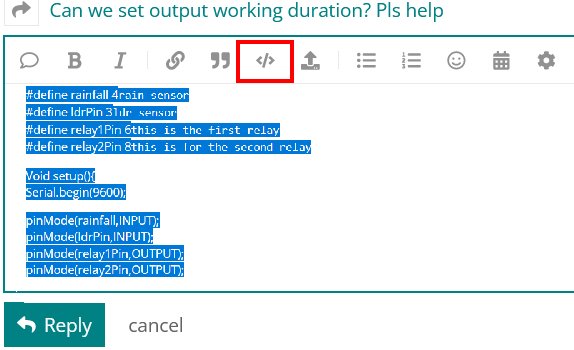
Please go back and fix your original post by highlighting the code and clicking the </> in the menu bar.
I suggest that you write a sketch that only establishes communications with your phone and is able to send data and print it to the serial monitor. There is no way that I am going to dig through all of that improperly posted code to try to find your problem. Then incorporate that code into your app.
Integreted devlopment envoirment
Thank you i was stuck on that
Integrated Development Environment
What are about the answers of the other four questions of post #9?
Q1
ans arduino uno
Q2
Ans serial monitor is monitor in which we are able to see data which is sent by arduino on specific baud rate
@vyom907 - have you tried a simple sketch just printing something like "Hello"?
I checked the baud rate before thats why i posted on fourm
Good! Very good!!
Now, try to create a sketch of your own where UNO will receive the message Forum from the InputBox of Serial Monitor (Fig-1) and then will send OK to the OutputBox of the Serial Monitor. This exercise will help you to observe that printing process is being dome correctly.

Figure-1:
I don't think that will work with the hardware as is. The schematic shows that RxD isn't connected.
Forget your schematic. To create a sketch, there is no need of schematic. What you need is the IDE.
1. Connect your UNO with your PC using a USB Port. Have you connected? What is the COM Port number?
2. Open IDE and observe that there are two functions like below. Correct?
void setup()
{

}

void loop()
{

}
